


















What's New with Cryotos

Discover the latest Cryotos updates designed to streamline your maintenance workflow. From enhanced asset tracking to smarter automation, see what’s new.

Role-Based Workflow Restriction

What changed? We have introduced a role-based workflow restriction mechanism, ensuring that users only see workflows relevant to their assigned roles when creating a Work Order or Corrective Action. The Workflow Name dropdown will now dynamically display workflows based on the logged-in user’s role.

Why it matters: This enhancement improves usability and process control by limiting workflow visibility to only what is applicable for each role. It reduces the chances of incorrect workflow selection, ensures better compliance with defined processes, and provides a cleaner, more focused user experience. Existing configurations for other roles remain unchanged, ensuring no disruption to current operations.

Display Purchase Information in Parts History Tab

What changed? The Parts History Tab now includes a feature to display purchase information. This enhancement ensures that users can easily view relevant purchase details for parts directly within the history tab.

Why it matters: This update improves the transparency and efficiency of managing part histories by centralizing purchase details. It allows users to quickly access important information such as purchase dates, suppliers, and cost data without having to navigate away from the Parts History Tab. This streamlined process helps improve decision-making and inventory management, enhancing overall user experience and workflow efficiency.

Expiration Reminder Dashboard

What changed? A dedicated dashboard has been introduced within the Expiration Reminder module, providing a centralized view of all reminder-related data through summary cards and visual insights.

Why it matters: This enhancement improves visibility and tracking of expiration-related data by presenting key insights in a single place. Users can easily monitor expired, upcoming, and active reminders, enabling proactive actions and better compliance management. It also enhances user experience by offering clear and interactive data visualization.

User Leave record

What changed? This feature captures leave types (such as sick leave, vacation, or personal leave). The system will now automatically ignore dates defined in the user leave records, preventing those dates from being considered when generating the work order schedule. Additionally, it ensures that a work order assignee is not assigned to users who are marked as unavailable due to leave.

Why it matters: This enhancement ensures that the scheduling process accounts for user availability, automatically adjusting daily orders to exclude users who are on leave. It prevents the system from assigning work orders to users who are unavailable, reducing errors and improving overall scheduling accuracy. This change enhances operational efficiency by preventing scheduling conflicts and ensuring that work orders are only assigned to available users, thus maintaining a smooth workflow.

Asset Reconciliation Enhancement

What changed? The Asset Reconciliation Report has been updated to include additional reconciliation details, providing a comprehensive view of asset audit and validation processes. This update enhances the report with new fields and data related to asset verification, location checks, and reconciliation timelines.

Why it matters: This enhancement improves accuracy and transparency in asset management by ensuring that all relevant asset reconciliation data is readily available. It provides a clearer picture of asset status and audit history, supporting better decision-making and compliance with audit requirements. Additionally, it helps in identifying discrepancies, facilitating prompt corrective actions, and improving overall asset tracking and management processes.

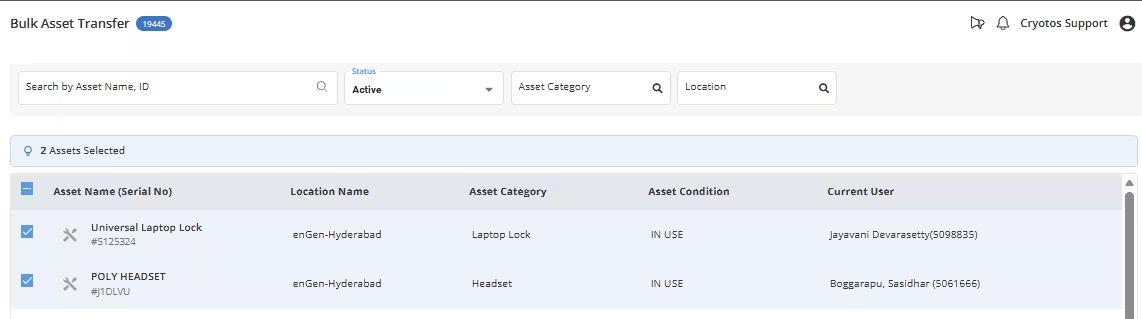
Implemented the Add associate’s in work Order Progress panel and listed of Associated users in Users

What changed? The "Add Associates" feature has been implemented in the Work Order Progress panel, allowing users to associate multiple users with a work order. A list of associated users can now be viewed in the "Users" section. This provides a streamlined way to manage and track the individuals assigned to a work order.

Why it matters: This enhancement allows for better visibility and management of work order assignments by enabling the addition of multiple associates to each work order. By providing a clear list of associated users, it ensures that all team members involved in a work order can be easily identified and tracked. This improves coordination, reduces communication gaps, and enhances team collaboration, leading to smoother work order execution and more efficient task management.

Work Order Enhancements

What changed? An "Edit" option has been introduced for the checklist in the Work Order detail page. Previously, once a work order was submitted or closed by the technician, the checklist could not be modified. Now, supervisors can review and edit the submitted checklist, including images, text inputs, number inputs, descriptions, and other details. Additionally, this functionality is configurable, and a Super Admin can control who has the permission to edit the Work Order checklist through the account settings.

Why it matters: This enhancement ensures that any incorrect or incomplete data entered by the technician can be corrected, improving the accuracy and quality of the work order records. By enabling supervisors to modify checklists even after submission, this feature minimizes errors and ensures that all relevant information is accurately captured. The configurability aspect gives Super Admins control over who can edit the checklist, offer flexibility and ensure the integrity of the process while preventing unauthorized changes. This change enhances the overall workflow, reducing the risk of miscommunication and errors.

Additional Resources

Increased visibility in maintenance operations
Blogs

Explore expert insights and latest trends to master modern maintenance strategies.

Organized maintenance scheduling to avoid unplanned downtime
Free Maintenance Checklist

Measure efficiency instantly. Calculate MTBF, MTTR, and ROI with our free tool.

Simplified record keeping for referencing maintenance histories done on particular assets
Maintenance Calculator

Demystify the jargon. Access clear definitions for all key maintenance terms.

Reduce repair costs by implementing preventive maintenance strategies
Maintenance Glossary

Standardize your workflow. Access ready-to-use inspection and safety checklists.