
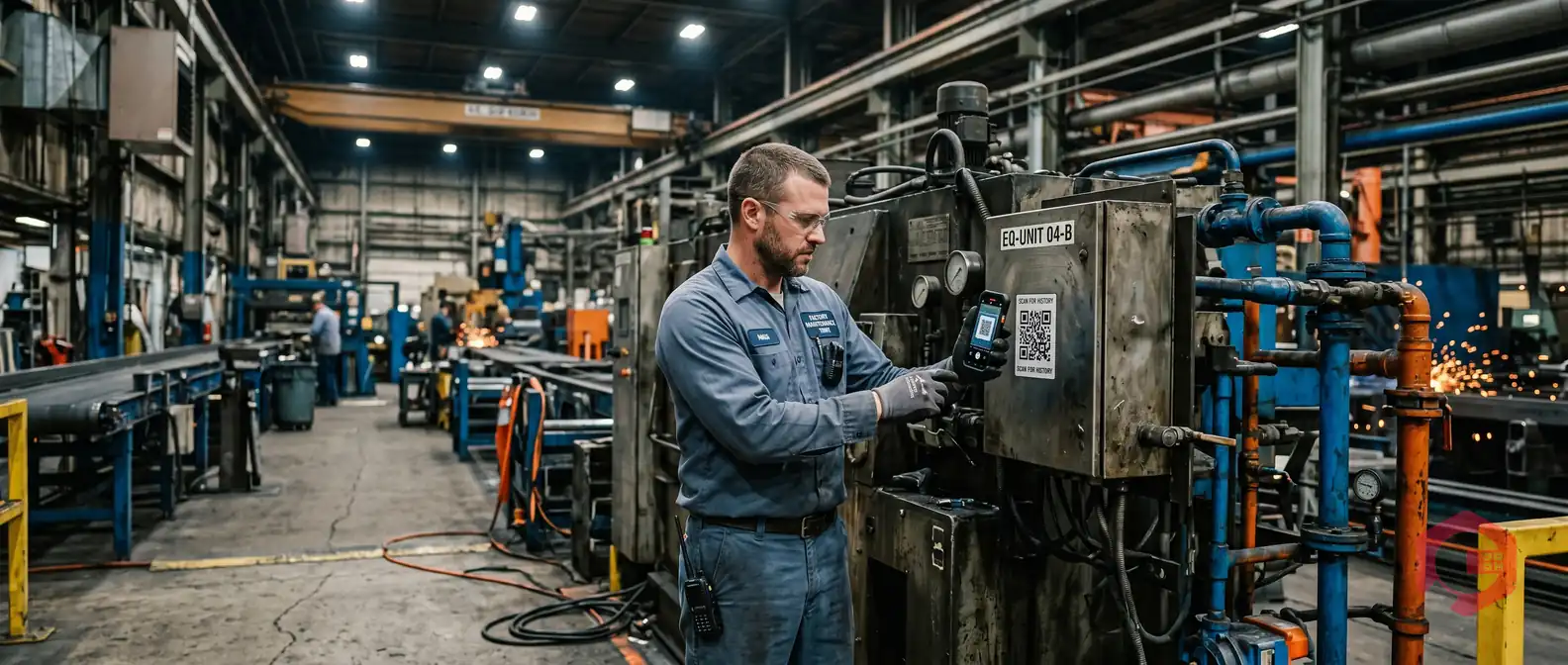
Work request creation with AI in a mobile app is the process by which a CMMS mobile application uses artificial intelligence - including image analysis, voice recognition, and generative text - to automatically generate a structured, detailed work request with minimal manual input. Instead of typing long fault descriptions on a small screen, a technician simply scans an asset QR code, snaps a photo of the problem, and speaks a short description. The AI does the rest.
Traditional work request forms were designed for desktops. On a factory floor, in a basement plant room, or at the top of a ladder, filling in six fields on a mobile screen is slow, error-prone, and often skipped. The result: maintenance managers receive incomplete tickets, response times suffer, and assets deteriorate while paperwork waits. According to a McKinsey report on industrial maintenance, AI-assisted data capture can reduce administrative time for field teams by up to 40%, directly accelerating mean time to respond (MTTR). This guide shows exactly how modern AI-powered CMMS mobile apps like Cryotos make that possible.
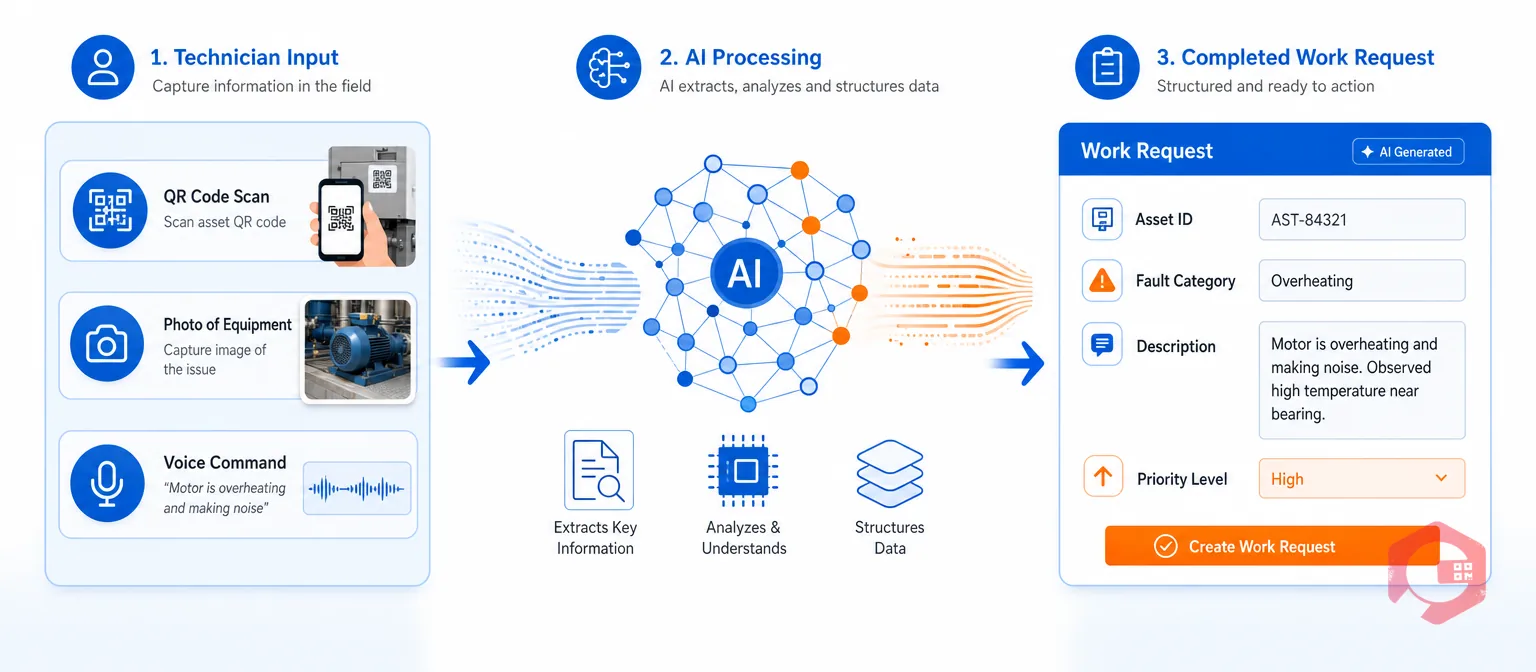
AI-powered work request creation uses machine learning, computer vision, and natural language processing embedded directly in a CMMS mobile app to convert unstructured inputs - a spoken sentence, an annotated photo, a QR scan - into a complete, categorized, and prioritized work request. The AI fills in the asset ID, fault category, urgency level, and recommended action automatically, leaving the technician only to confirm and submit.
This is fundamentally different from a mobile form with dropdown menus. In legacy CMMS mobile apps, the technician must still select the asset from a list, choose a fault type, describe the problem in a free-text box, assign a priority, and add attachments - each step requiring focused attention. With AI, those steps are automated based on context the system already understands.
A traditional work request on mobile asks for structured data - and relies entirely on the technician to provide it correctly. An AI-powered request flips this: the technician provides raw sensory input (voice, photo, scan), and the system structures it. The practical difference is speed - AI-assisted request creation takes under 30 seconds versus two to four minutes for manual entry - and data quality, since the AI consistently captures asset ID, location, and fault category that manual users frequently omit.
Ask any maintenance manager what slows down their response to equipment failures and the answer is almost always the same: incomplete work requests. A technician standing next to a leaking pump motor is not in the ideal position to type a detailed fault description. Mobile keyboards are small, gloves make typing difficult, and the pressure to get back to the job means shortcuts are taken.
Research by Plant Engineering found that 65% of work requests submitted via mobile CMMS apps are missing at least one critical data field. Missing asset IDs force coordinators to investigate before assigning. Vague fault descriptions send technicians without the right parts. No priority level means everything waits in the same queue.
Every incomplete request creates a back-and-forth loop between the requester and the maintenance planner - adding 15 to 30 minutes of delay per ticket before work can even be assigned. Multiply that by the dozens of requests a busy facility generates daily, and the operational drag is significant.

Modern AI-powered CMMS platforms like Cryotos have redesigned the work request creation flow around the realities of field work. Here is how the process works in practice:
The technician opens the Cryotos mobile app and scans the QR code affixed to the asset in question. In one tap, the app loads the complete asset profile - asset ID, location, model, maintenance history, and any open work orders. The system already knows what asset this is about, which eliminates the most common source of missing data in manual requests. No typing, no searching, no scrolling through long asset lists.
With the asset identified, the technician has two powerful AI input options. The first is photo capture with annotation: they take a photo of the fault - a cracked belt, a leaking seal, an overheating motor - and can draw directly on the image to highlight the specific problem area. The second option is a voice command: the technician simply says what they observe, and the app transcribes and processes the description in real time. Both inputs give the AI the raw material it needs.
This is where generative AI takes over. The Cryotos AI engine analyzes the annotated photo or transcribed voice input and does several things simultaneously. It classifies the fault type based on the visual or verbal description. It cross-references the asset's maintenance history to determine if this is a recurring issue. It generates a structured, professional fault description that would take a technician two to four minutes to write manually. And it recommends a priority level - Urgent, High, Medium, or Low - based on the asset criticality and fault severity.
The result is a fully populated work request form: asset ID confirmed via QR scan, fault category selected, description written by AI, priority suggested, location pre-filled, and relevant maintenance history attached as context for the responding technician.
The technician reviews the AI-generated request - a process that takes seconds, not minutes - and confirms or adjusts any field. They tap Submit, and the work request enters the system as a structured, complete ticket. The maintenance planner receives a notification with all the information needed to make an immediate assignment decision. No follow-up calls, no clarification emails, no waiting.
The quality of AI-assisted work request creation depends on the specific AI capabilities embedded in the CMMS mobile app. Here are the four capabilities that matter most:

The operational difference between manual and AI-assisted work request creation is significant across every dimension that matters to a maintenance operation:

The cumulative effect of faster, more complete, and better-structured work requests reaches far beyond the submission screen. The improvements flow through every stage of the maintenance workflow:

Cryotos CMMS has built AI-powered work request creation directly into its mobile app - not as a bolt-on feature, but as the default way the system works. The platform combines three AI capabilities: generative AI for voice-command work request creation, computer vision for photo analysis and annotation, and historical context intelligence that cross-references each new request against the asset's full maintenance record.
When a technician identifies a fault, they open the Cryotos mobile app, scan the asset's QR code, and choose their preferred input method - voice or photo. The AI takes over immediately: analyzing the input, generating a structured fault description, recommending priority, and pre-filling all required fields. The entire process takes less time than unlocking a phone and opening a text message.
The mobile app works fully offline, which means AI-assisted work request creation functions even in basements, remote plant areas, or facilities with poor connectivity. Requests sync automatically the moment connectivity is restored. Additionally, Cryotos supports public work requests via QR code scanning - operators, contractors, or even facility visitors can scan an asset tag and raise a request without needing a CMMS login, with the AI still structuring the submission before it enters the system.
Cryotos also integrates with IoT sensors, SCADA, and PLC systems. When a sensor detects a condition anomaly, the platform can automatically initiate a work request using the same AI-generated structure. Organizations using Cryotos have reported up to 25% faster repair times and a 30% reduction in unplanned downtime as a direct result of more complete and faster work request creation.
For maintenance managers looking to evaluate or upgrade their CMMS mobile app's AI capabilities, the key features to prioritize are computer vision accuracy, offline AI functionality, QR code integration, voice command quality, and historical context integration. Explore the full Cryotos CMMS platform or book a demo to see AI work request creation in action.
A work request is a submission identifying that maintenance attention is needed - it is the input stage. A work order is the approved, assigned, and scheduled task that a technician executes. In AI-powered CMMS platforms like Cryotos, the AI enhances the work request quality at submission so that conversion to a work order requires minimal review time.
Yes, in advanced CMMS platforms like Cryotos. The mobile app caches the AI models and asset data locally, allowing the full AI-assisted creation flow to work in offline environments. The completed request is stored on the device and syncs to the central system automatically once connectivity returns.
No. AI-assisted work request creation runs on any modern smartphone or tablet with a camera and microphone. There is no specialized scanning hardware or industrial-grade device requirement. The Cryotos mobile app is available on both Android and iOS and is optimized for field conditions maintenance technicians encounter daily.
Accuracy depends on image quality and the AI model's training data. In Cryotos, the image analysis AI is trained on maintenance-specific fault patterns and is supplemented by the asset's historical data. The generated description is presented to the technician for review before submission, ensuring any inaccuracy can be corrected in seconds.
Work request creation with AI in a mobile app is not a futuristic concept - it is the current standard for maintenance operations that take response speed and data quality seriously. By combining QR code scanning, computer vision, voice recognition, and generative AI, modern CMMS platforms eliminate the friction that has always made mobile work request submission slow, incomplete, and inconsistent.
The downstream benefits are measurable: faster MTTR, higher first-time fix rates, richer maintenance history, and lower administrative overhead. For any maintenance team that still relies on manual form entry on mobile, the question is no longer whether to adopt AI-assisted work request creation - it is how quickly they can make the switch.
Ready to see AI-powered work request creation in action? Cryotos CMMS delivers the complete AI-assisted workflow - QR scan, photo analysis, voice commands, and generative fault descriptions - in a mobile app that works fully offline. Book a free demo today and experience the difference a 30-second work request makes to your entire maintenance operation.

Cryotos AI predicts failures, automates work orders, and simplifies maintenance—before problems slow you down.



