How to Build an Effective Data Center Asset Management System?

Calendar
Duration:
12 min read
calendar today
Published on
May 7, 2026
Featured Image

A data center asset management system is a structured process and technology platform that tracks, maintains, and optimizes every physical and IT asset within a data center. According to the Uptime Institute, unplanned data center outages cost organizations an average of $9,000 per minute, and poor asset visibility is a leading root cause. Building an effective system gives operations teams real-time control over their infrastructure, reduces unplanned downtime, and supports compliance requirements from ISO 55000 to SOC 2.

What Is a Data Center Asset Management System?

A data center asset management system (DCAM system) is a centralized framework that gives facilities and IT operations teams complete visibility into every asset they own. Data center assets fall into three categories: IT assets (servers, storage arrays, networking hardware, edge devices), physical infrastructure assets (UPS systems, PDUs, CRAC/CRAH cooling units, generators, fire suppression equipment), and facility assets (building management systems, access control panels, environmental sensors).

DCAM focuses on the full lifecycle of individual assets — procurement, deployment, maintenance, and retirement. DCIM focuses on real-time monitoring of power, cooling, and capacity utilization. Best practice combines both: lifecycle recordkeeping from DCAM and real-time monitoring from DCIM, ideally through a CMMS platform that connects maintenance workflows to asset data.
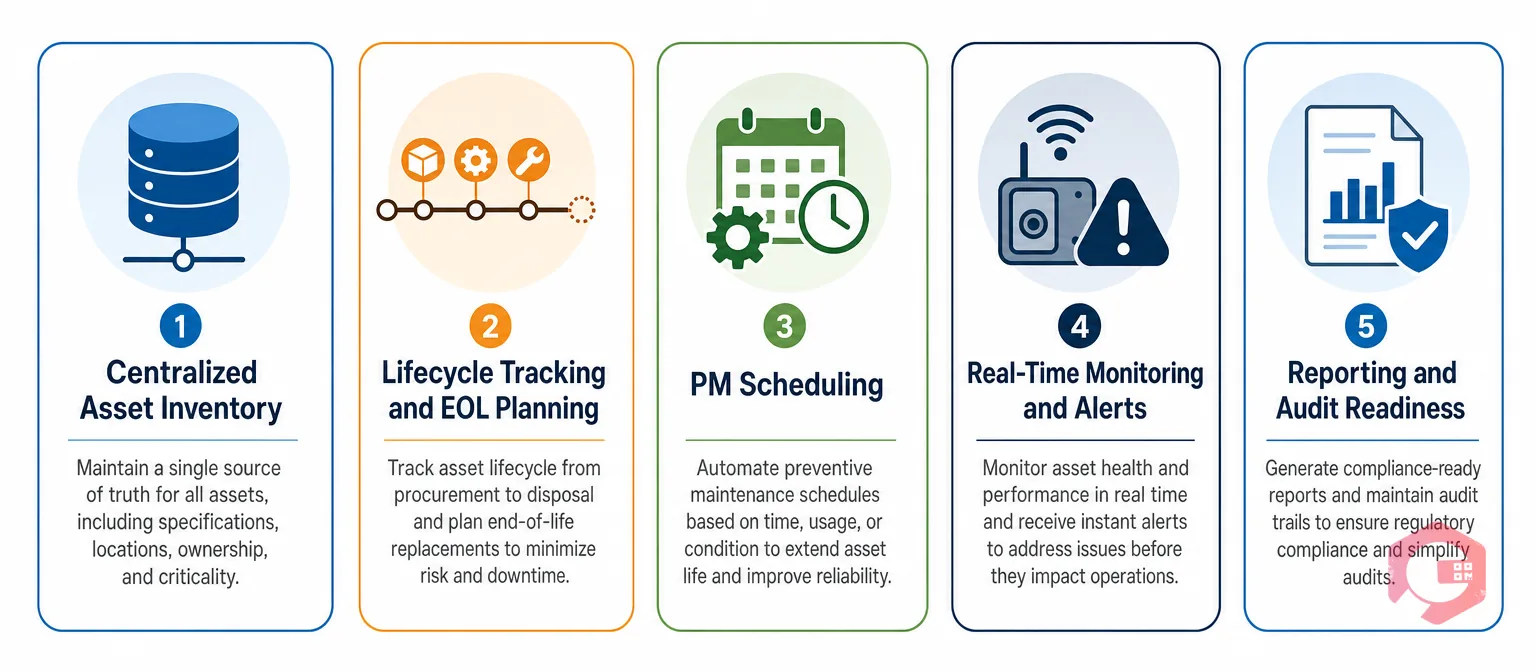
The 5 Core Components of an Effective DCAM System

5 core DCAM components: centralized asset inventory, lifecycle tracking EOL planning, preventive maintenance scheduling, real-time monitoring alerts, reporting audit readiness | Cryotos
  1. Centralized Asset Inventory: A single, authoritative database of every asset including location, asset tag, serial number, manufacturer, model, purchase date, warranty expiry, and assigned owner. Must be kept current through automated network discovery and physical walkdowns.
  2. Lifecycle Tracking and EOL Planning: Tracks each asset stage and surfaces alerts when assets approach EOL — typically 90, 60, and 30 days in advance. Gartner estimates emergency purchasing runs 15–25% higher than planned procurement.
  3. Preventive Maintenance Scheduling: Defines the correct PM interval for each asset class, assigns work orders to technicians, tracks completion, and records findings. Reliable Plant data shows organizations running structured PM programs on critical infrastructure see up to 30% fewer unplanned failures.
  4. Real-Time Monitoring and Alerts: Integrates with environmental sensors, DCIM platforms, and building management systems to receive live telemetry. When a sensor reading crosses a threshold, the system generates an alert and can automatically create a work order.
  5. Reporting and Audit Readiness: Generates — on demand — full asset registers, maintenance history logs, warranty coverage summaries, and compliance evidence packages. Audit preparation should take minutes, not days.

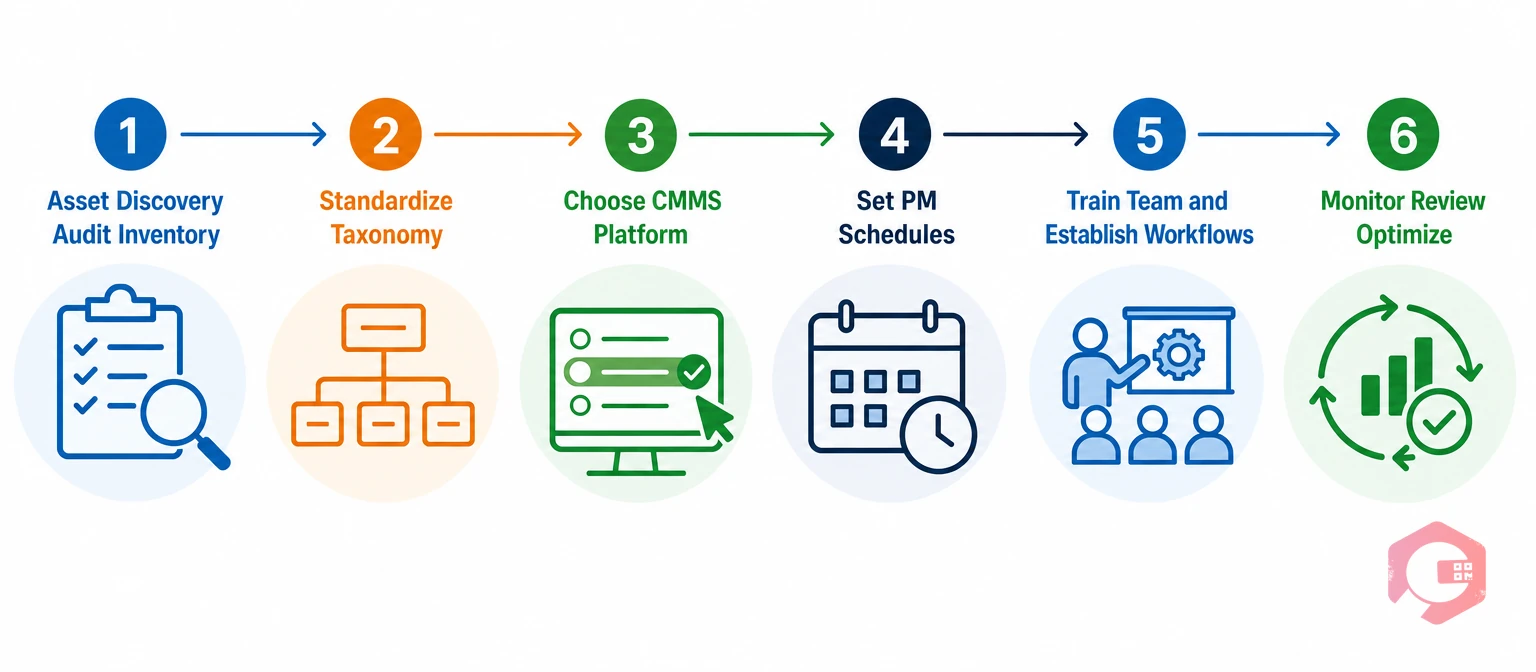
How to Build a Data Center Asset Management System

6-step data center asset management build process: asset discovery audit, standardize taxonomy, choose platform, set PM schedules, train team, monitor and optimize | Cryotos
  1. Conduct a full asset discovery audit — Send technicians through every cabinet, rack, and floor space with a structured audit form. This audit typically reveals 10–20% of assets are unlisted, mislocated, or already retired.
  2. Standardize your asset taxonomy — Define naming conventions, asset categories, and location hierarchies before importing anything. Site > Building > Room > Row > Rack > U-position for physical assets.
  3. Choose the right CMMS or DCIM platform — Evaluate on asset hierarchy depth, maintenance schedule flexibility, integration capability, mobile accessibility, and reporting customization.
  4. Set up preventive maintenance schedules — Start with highest-criticality assets: generators, UPS systems, and primary cooling units. Configure work orders to auto-generate at the correct interval.
  5. Train your team and establish workflows — Conduct structured training for operations technicians, facilities managers, and procurement. Define what gets recorded in the system versus what stays in email.
  6. Monitor, review, and optimize — Set a 90-day review cadence for the first year. Review PM completion rates (target: >95%), asset record accuracy, alert response times, and any unplanned failures.

CMMS vs. Standalone DCIM — Which Is Right for Your Data Center?

CMMS vs DCIM comparison for data centers: asset records, PM scheduling, real-time monitoring, cost, and best fit | Cryotos

A CMMS (Computerized Maintenance Management System) manages the full asset lifecycle — maintenance schedules, work orders, parts inventory, lifecycle records, and compliance documentation. A DCIM tool focuses on real-time monitoring of power, cooling, and capacity. CMMS is stronger for maintenance workflow management; DCIM is stronger for live environmental visibility. For most mid-market and enterprise data centers, a CMMS that integrates with monitoring feeds delivers better operational outcomes at lower cost than a standalone DCIM platform.

Frequently Asked Questions

What assets are tracked in a data center asset management system?

A complete DCAM system tracks IT assets (servers, storage, networking hardware, software licenses), physical infrastructure (UPS, PDUs, CRAC/CRAH units, generators, cable management), and facility systems (BMS, access control, environmental sensors). The scope should include anything with a maintenance requirement, a warranty, or a compliance obligation.

How often should data center assets be audited?

Critical infrastructure assets — generators, UPS systems, cooling units — should be physically verified quarterly. The full asset inventory should be reconciled against the system of record at least annually, with automated network discovery running continuously for IT assets.

Can a CMMS manage data center assets?

Yes — a CMMS built for physical asset management handles data center environments effectively. It manages asset records, preventive maintenance schedules, work orders, warranty tracking, and lifecycle planning for both IT and infrastructure assets. When integrated with environmental monitoring or DCIM feeds, a CMMS becomes the operational hub for all asset-related activities. Book a free demo today and see how quickly you can get your first PM schedules running.

Want to Try Cryotos CMMS Today?

Get Free Demo

Let AI Take Control of Your Maintenance

Cryotos AI predicts failures, automates work orders, and simplifies maintenance—before problems slow you down.

Try AI-Powered CMMS
🡢