

AI voice requests let technicians report equipment issues by speaking instead of typing. Gloved hands and noisy work areas no longer slow down maintenance reporting. A microphone captures the spoken description. AI converts it into a structured work order. The technician confirms it before submission, all without touching a screen. This matters because delayed or incomplete fault reports are one of the most common gaps in industrial maintenance data. Technicians work in plants, warehouses, utilities, and field service sites. AI voice requests close the reporting gap at the exact moment a problem is discovered.
Key Takeaways
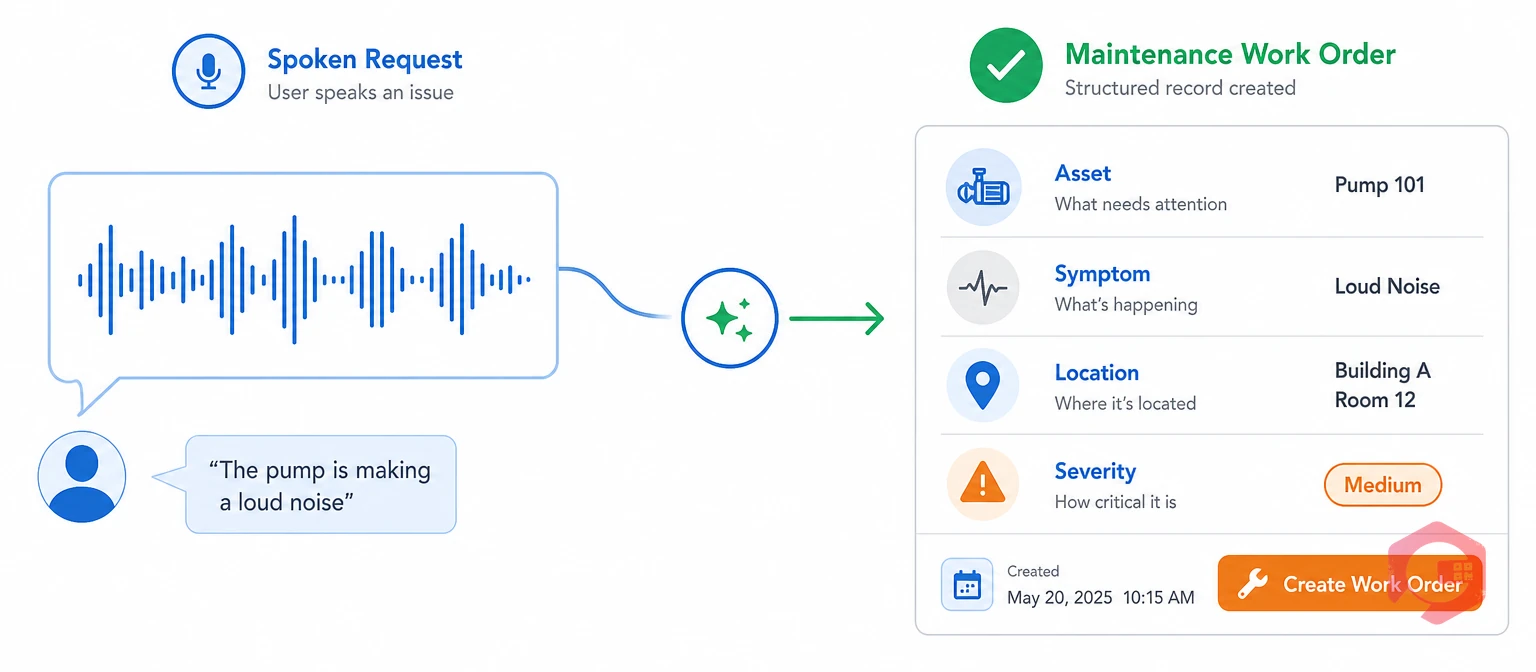
AI voice requests are spoken fault reports that speech recognition turns into structured work orders. A technician speaks into a phone, rugged tablet, headset, or dedicated microphone. Instead of navigating a mobile form, they simply describe what they see: the asset, the symptom, the location, and how urgent it is.
The AI extracts each detail as a separate field: asset ID, symptom, location, severity. It asks for anything missing before creating the record. This structured approach fits how asset management programs under ISO 55001 expect maintenance data to be captured. Records need to be consistent, with enough detail to support later analysis.
Voice-enabled Computerized Maintenance Management System platforms treat AI voice requests as a front door into the maintenance workflow, not a side feature. Once submitted, the request routes exactly like a report created by typing — the difference is entirely in how it got there.
Traditional reporting asks a technician to stop work, remove gloves, wake the device, find the right screen, and type. That is five steps before a single fault gets logged. In a noisy plant or a rushed shift, most of those steps get skipped or shortened.
The result shows up downstream as delayed entries, one-line descriptions, or reports based on memory hours after the technician left the asset. Calling a supervisor instead of typing does not solve much either. Background noise on either end of the call makes verbal handoffs unreliable, and nothing gets written down automatically.
Most maintenance teams recognize this pattern immediately. It is the reporting gap behind a large share of "why didn't anyone tell us" conversations after a breakdown.
See how Cryotos turns a spoken fault report into a tracked work request in seconds.
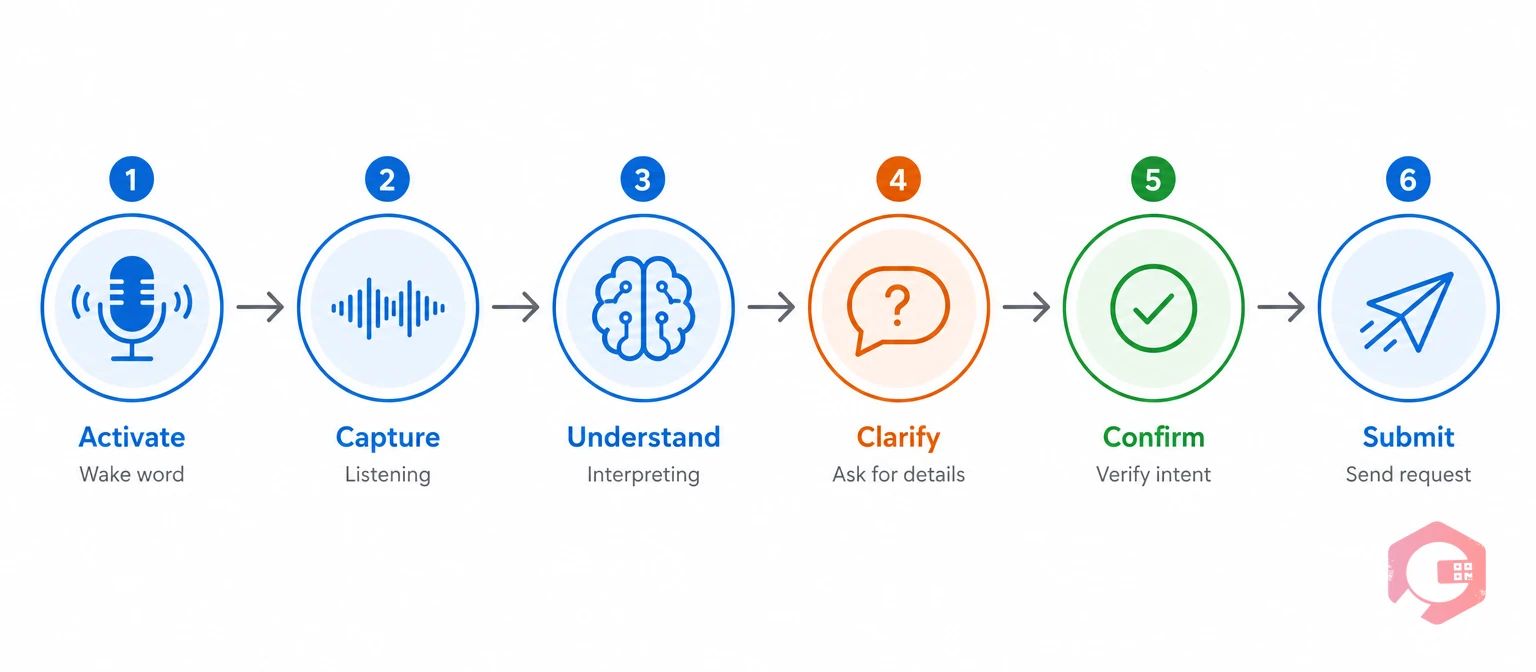
An AI voice request moves through the same six-step sequence regardless of industry or device, from the moment a technician starts talking to the moment a structured record lands in the CMMS.
The 6-Step Voice Capture Loop:
A technician says: "Create an issue for compressor C-17. I hear a metallic knocking sound, pressure is dropping, and the unit is still running." The assistant replies: "I found compressor C-17. Should I mark this high priority and notify the rotating equipment team?" The technician confirms and adds that the sound started about ten minutes ago. The system creates a time-stamped, high-priority request. Asset, symptom, condition, start time, and routing are already filled in. No typing happened at any point in the exchange.
Gloved hands are one of the clearest cases where typing simply does not work well, and AI voice requests remove the problem instead of working around it.
None of this needs new hardware. Most field technicians already carry a phone, a rugged tablet, or a headset used for other tasks too.
Voice reporting still works in loud settings when the system is engineered for the site, not just for a quiet office demo. Several things help: close-talk or boom microphones, hearing-protection-compatible headsets, directional mics, push-to-talk activation, automatic gain control, and a constrained maintenance vocabulary. Each one improves capture accuracy in machinery noise.
Noise-induced hearing loss is permanent, but it is also preventable. It builds up slowly, so many technicians do not notice it until the damage is done. NIOSH recommends keeping occupational noise exposure below an eight-hour average of 85 dBA. OSHA requires hearing conservation measures at specified exposure levels. AI voice requests must work around those limits. They cannot replace them.
Voice is a reporting tool, not hearing protection. A well-engineered system cuts down on shouting across a noisy area or squinting at a screen in a dim, loud room. The underlying noise hazard still needs engineering and administrative controls first.
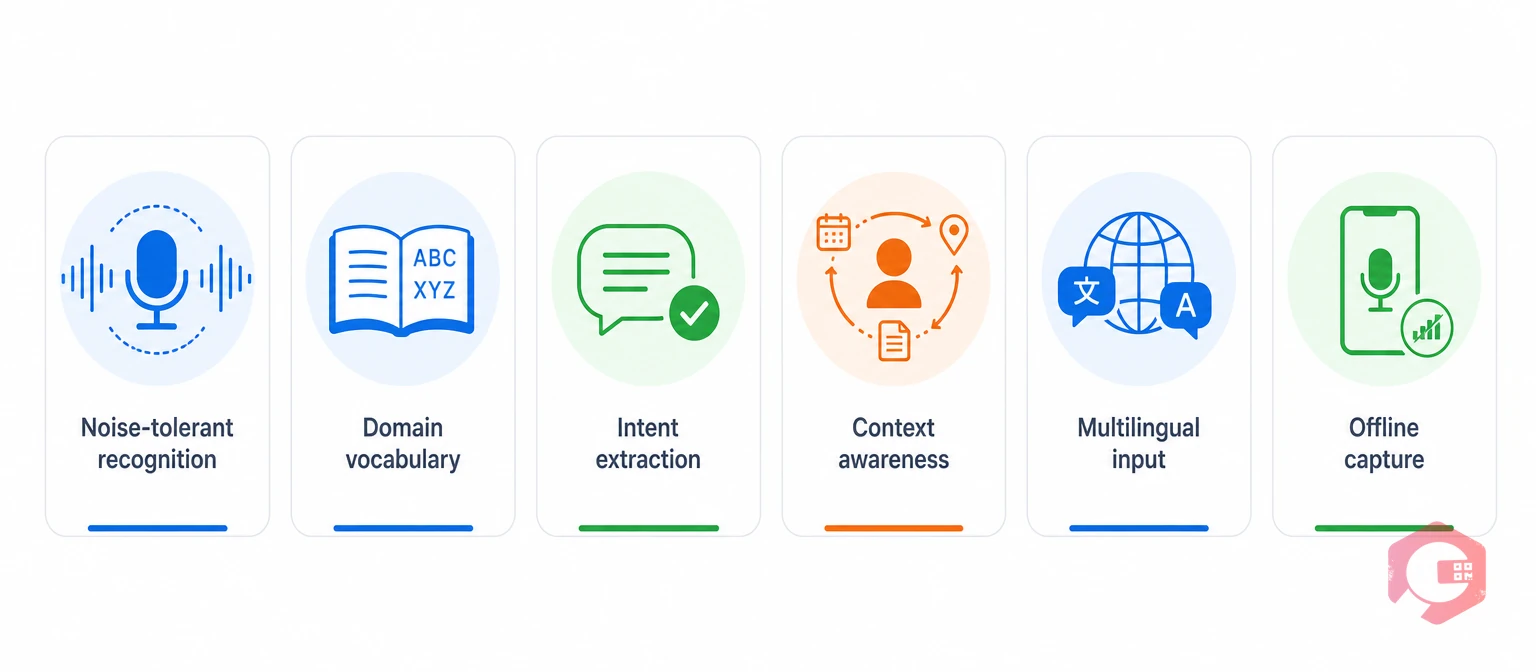
Not every voice tool performs the same way once background noise, accents, and site-specific terms enter the picture. A handful of capabilities separate a system that works in the field from one that only works in a demo.
Read-back confirmation is a short summary the technician approves before a record is saved. The assistant repeats what it heard. The technician can fix a misheard word on the spot, before it ever becomes a wrong work order.
Cryotos routes AI voice requests through workflow automation, so the fields extracted from speech immediately trigger the right notification and escalation path.
Faster, more consistent reporting changes more than how a fault gets logged — it changes how the whole maintenance operation responds to it.
Maintenance teams using Cryotos have reported up to 30% reduction in unplanned downtime and 25% faster repair turnaround. Those gains trace back to faster, more complete fault reporting at the point of discovery.
AI voice requests solve a real problem, but they introduce a few of their own that need a specific control, not just good intentions.
Most operations that roll out AI voice requests successfully treat this list as a pre-launch checklist. They do not treat it as a set of edge cases to handle later.
Rolling out AI voice requests works best as a narrow pilot, not a site-wide switch on day one.
Skipping straight to a full rollout has a cost. Vocabulary and workflow problems get fixed live, in front of the whole workforce, instead of during a small pilot where mistakes are cheap.
A pilot only proves its value when it gets compared against the existing reporting method, not judged in isolation.
Track safety observations separately from these numbers. Faster entry only matters if the interaction does not introduce a new risk on the floor.
Yes. AI voice requests do not require touching a screen at all, so glove thickness or contamination has no effect on capture. The technician speaks, the AI structures the request, and gloves never need to come off.
It can, but only with hardware built for the site. Close-talk or boom microphones, push-to-talk activation, and noise suppression tuned to the actual noise profile all help. A consumer phone microphone alone is usually not enough in heavy machinery noise.
A well-designed system flags low-confidence words. It reads back a short summary before creating any record, so the technician can correct it on the spot. Recognition errors get caught before submission, not discovered later in a wrong work order.
It should be, when the platform uses clear recording indicators, defined retention limits, encryption, and access controls the workforce has seen and understood. These policies need to be in place before rollout, not added after the first complaint.
Not usually. Most rollouts start with the phone or rugged tablet a technician already carries. Dedicated headsets or boom microphones become worth adding once a site's noise levels or hygiene requirements call for them.
AI voice requests turn a spoken observation into a structured, routed work record. A technician never has to remove gloves or fight through background noise to make that happen. Schedule a free demo to see how Cryotos captures voice-reported issues from the field and turns them into tracked, auditable maintenance work.



Cryotos AI predicts failures, automates work orders, and simplifies maintenance—before problems slow you down.



