

Automatic root cause analysis is a rule that opens an RCA when one asset repeats the same fault in a set window. It runs on the work order history you already keep, so it needs no new sensors. If a pump trips on the same seal leak twice in seven days, the system flags it, creates an RCA work order, and assigns an owner. Nobody has to remember to ask, "Didn't we just fix this?"
Most maintenance teams already have the data to spot repeat faults. What they lack is a trigger. This guide shows how to define a repeat fault, set the rules that fire an RCA, and build the workflow inside your maintenance system. That way, chronic failures get solved instead of patched.
Key Takeaways
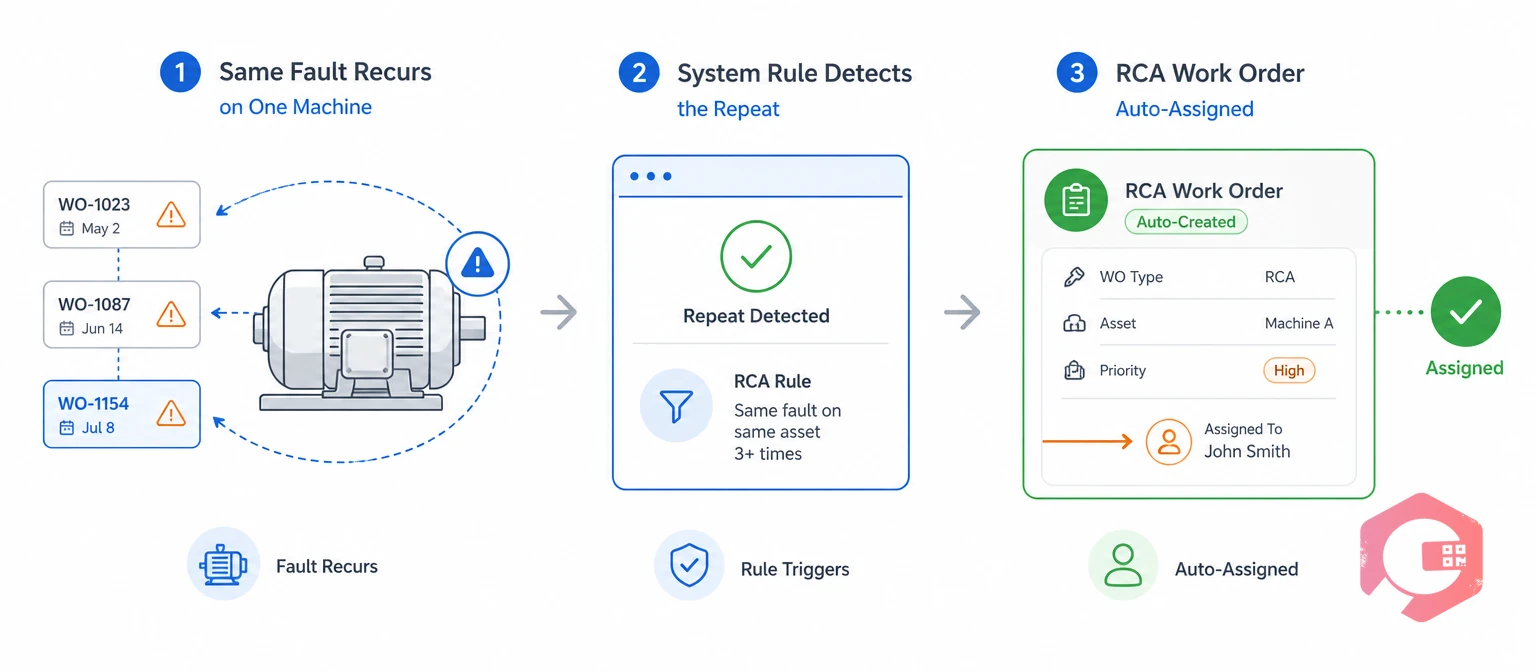
Automatic root cause analysis in maintenance means your system decides when an RCA is needed, based on rules you set ahead of time. People still do the thinking. The system makes sure the investigation starts on time, every time.
Root cause analysis is a structured method for finding the true reason a failure happened. Teams use root cause analysis to stop the same failure from coming back. The American Society for Quality's guide to root cause analysis describes it as a way to fix the cause of a problem rather than its symptoms.
Reliability programs built on RCM, FMEA, and ISO 55000 all assume failures get studied and fed back into the maintenance plan. An automated trigger is how that feedback loop actually happens on a busy plant floor.
In short, automatic root cause analysis does not replace engineering judgment; it makes sure that judgment gets applied to the right failures.
The same fault on the same asset twice in one week almost always means the first repair fixed the symptom and left the cause in place. A conveyor motor that trips on overload Monday and again Friday did not get unlucky twice.
A repeat fault is the same failure code on the same asset returning soon after a repair. The "soon" is a defined window. Many plants use 7 days for critical assets and 30 days for the rest.
Each repeat costs a second callout, more spare parts, and another round of mean time between failures drag. Two failures in a week also push MTBF for that asset sharply down, which hides in averages until someone looks at the single asset.
Treat every same-asset, same-fault repeat inside your window as proof that an investigation is overdue.
Manual RCA triggers fail because they depend on one person noticing a pattern across shifts, crews, and work orders. In most facilities, that person is busy fixing the next breakdown.
A common mistake is relying on a monthly "bad actor" report to catch chronic failures. By the time the report runs, the asset may have failed four more times.
Manual triggers work on paper, but only automatic root cause analysis rules that run every day catch a repeat fault before it becomes a habit.
Want a structured way to run each investigation once it fires? Use the free root cause analysis investigation checklist to guide your team from evidence to corrective action.
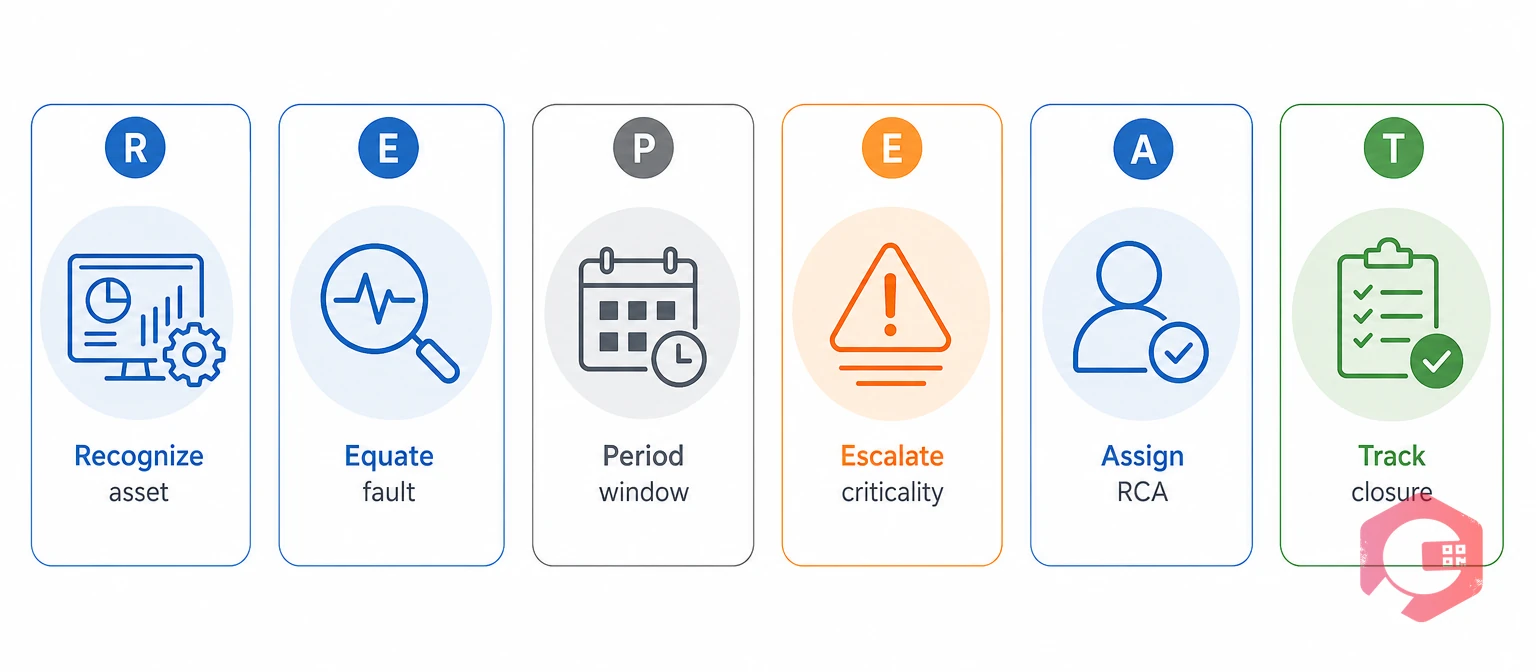
The REPEAT Trigger Framework gives you six rules that turn a repeat fault into an automatic root cause analysis. Each letter maps to one setting you configure once and then let the system enforce.
The REPEAT Trigger Framework:
Skip "Recognize" and repeats spread across different asset records. Skip "Equate" and the system cannot match faults. Skip "Track" and investigations close on paper while the asset keeps failing.
Operations that successfully run automatic root cause analysis get the first two rules right before anything else, because clean asset and failure data is what every trigger depends on.
An RCA trigger rules matrix sets out exactly which conditions fire an investigation and how deep it goes. Use the example below as a starting point and adjust the windows to your own failure history.
| Asset Criticality | Trigger Condition | Time Window | RCA Method | Owner and Due Date |
|---|---|---|---|---|
| High (safety or bottleneck) | Same fault code, 2nd occurrence | 7 days | Full RCA with fishbone and 5 Whys | Reliability engineer, 5 days |
| High | Any single failure over 4 hours downtime | Per event | Full RCA | Maintenance manager, 5 days |
| Medium | Same fault code, 2nd occurrence | 14 days | 5 Whys | Area supervisor, 7 days |
| Medium | Any fault code, 3rd occurrence | 30 days | 5 Whys plus failure data review | Area supervisor, 7 days |
| Low | Same fault code, 3rd occurrence | 30 days | Quick 5 Whys | Lead technician, 10 days |
Notice that the matrix tightens the rules as criticality rises. A low-priority exhaust fan can fail three times before it earns an investigation, but a bottleneck filler gets one the second time the same fault appears.
A clear trigger matrix removes debate, because everyone knows exactly when automatic root cause analysis is required.
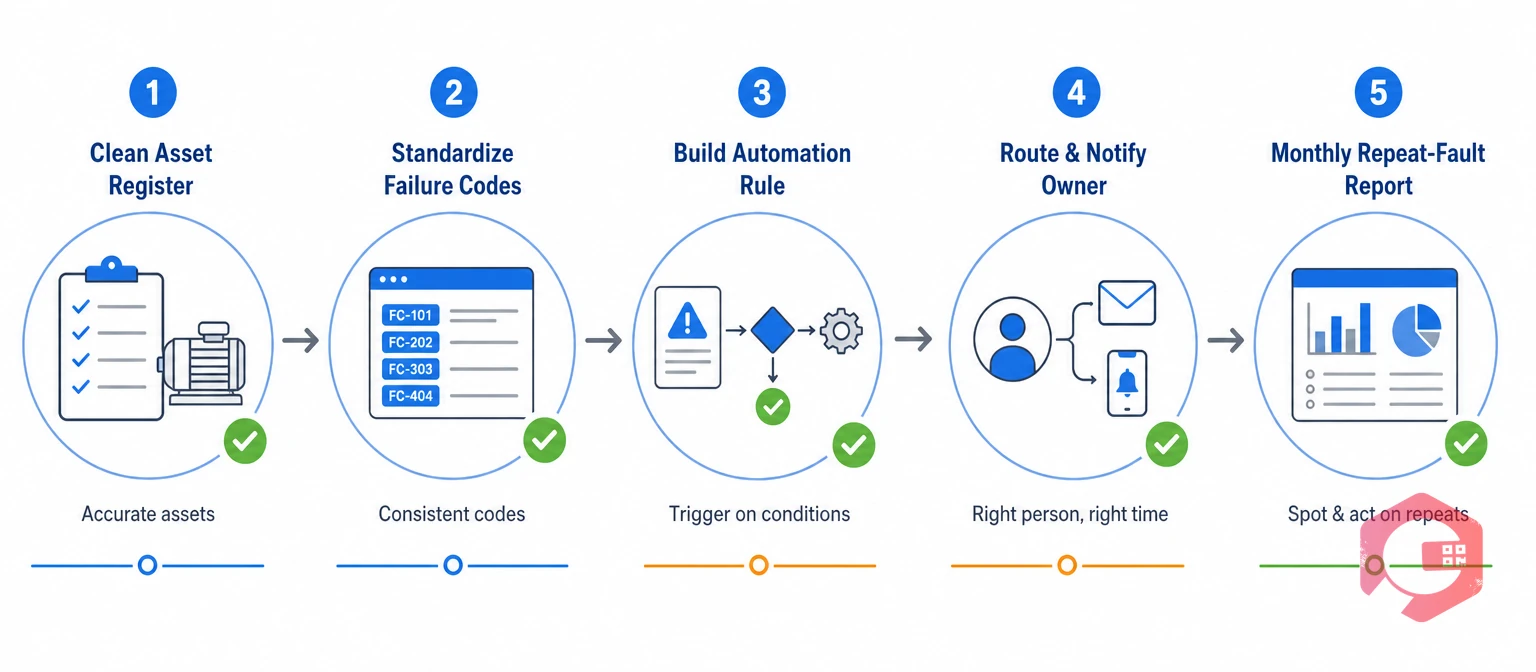
You can set up automatic RCA triggers in a Computerized Maintenance Management System in five steps. The work is mostly data cleanup and rule setup, not new hardware.
Give every machine one record and one ID, and attach every work order to it. A QR tag on each asset makes it hard for technicians to log faults against the wrong record.
Build a short list of problem, cause, and remedy codes. Remove "Other" as a default, and keep the list small enough that technicians pick the right code in seconds.
Use workflow automation to write the rule: if asset ID and failure code match a closed work order within the window, create an RCA task. Add criticality as a condition so that each asset class follows the matrix.
Send the new RCA to the named owner by mobile app, email, or WhatsApp. Copy the supervisor so that the repeat cannot sit unseen in a queue.
Track open investigations, overdue investigations, and repeat-fault counts by asset on a dashboard. Watch this trend monthly to see whether your fixes are holding.
Maintenance teams using Cryotos have reported up to 30% reduction in unplanned downtime and 25% faster repair turnaround. Much of that gain comes from catching repeat faults early instead of fixing the same problem again and again.
An automatic root cause analysis work order should arrive pre-filled with the evidence the investigator needs. When the trigger fires, the RCA should not start from a blank page.
The work order management record ties all of this to one asset, so the next technician sees what was found and what changed. Health care safety teams follow a similar approach; the AHRQ patient safety primer on root cause analysis stresses that an RCA only adds value when it leads to actions that are carried out and checked.
A complete RCA record turns one repeat fault into lasting knowledge for the whole team.
For critical assets, two occurrences of the same fault code within 7 days is a common trigger. For medium and low-criticality assets, many plants wait for a second or third repeat within 14 to 30 days. Set the count by asset criticality so that your team can keep up with the investigations it creates.
A repeat fault is the same failure on the same asset returning within a short window after a repair. A chronic failure is a pattern of repeats over months that has become "normal" for that asset. Catching repeat faults early with automatic triggers stops them from turning into chronic failures.
Yes, a CMMS can trigger an RCA using work order data alone. The rule only needs a clean asset ID, a standard failure code, and a closing date for each job. Sensors can add more triggers later, such as vibration alarms, but they are not required to start.
The owner should match the asset's criticality. A reliability engineer or maintenance manager usually owns investigations on critical assets, while area supervisors or lead technicians handle lower-criticality ones. Always name one person, because shared ownership tends to stall.
Start with tight rules only on your most critical assets, then expand. Widen time windows or raise the repeat count for low-criticality equipment, and review trigger volume each quarter. Clean failure codes also cut false triggers caused by vague or mixed-up codes.
The same fault twice in a week should never depend on someone's memory to get investigated. Schedule a free demo to see how Cryotos detects repeat faults and creates RCA work orders automatically, so every chronic failure gets a root cause and a lasting fix.


Cryotos AI predicts failures, automates work orders, and simplifies maintenance—before problems slow you down.



