

Emergency work order interruptions happen when a technician must stop a job mid-repair because a higher-priority breakdown arrives, and someone else picks up the original task. The problem is not the reassignment itself — it is the labor time data that disappears when the handoff is not recorded properly. Facilities that track time accurately during technician switches can keep their MTTR, labor cost, and wrench time reports reliable even when emergencies force mid-job changes.
According to SMRP best-practice metrics, labor hours per work order is a foundational KPI for maintenance cost management. When a technician switch goes unrecorded, that metric breaks — and every downstream report built on it becomes unreliable. This guide walks through a step-by-step method for switching technicians during emergency work order interruptions without losing a single minute of time data.
Key Takeaways

An emergency work order interruption is any event that pulls an assigned technician off an active job before it is complete, forcing a mid-task reassignment to a different person. The interruption is triggered by a higher-priority breakdown, a safety incident, a production-critical request, or a shift-end handover where the replacement technician continues what was started.
This is different from a planned reassignment where a supervisor moves resources during the weekly schedule. Emergency interruptions happen in real time, under pressure, and almost always without advance notice. The original technician may have already logged two hours of labor and partially disassembled a machine. The replacement technician may not know what has already been done or what parts have already been pulled from work requests queue.
Most maintenance teams experience this pattern multiple times per week. In facilities with high reactive workloads, emergency work order interruptions can account for 15–25% of all technician reassignments in a given month. The interruption itself is operationally necessary — the problem is entirely in how the switch gets recorded.
An emergency work order interruption is a forced mid-task reassignment triggered by a higher-priority event that pulls the assigned technician away before the job is complete. When that reassignment happens without a recorded pause, ownership transfer, and restart, the labor data on the original work order becomes unreliable.
Time data loss during a technician switch is the unrecorded interval between one technician stopping work and another technician starting on the same emergency work order. The consequences are measurable. MTTR calculations inflate because the idle time between technicians gets included in the total duration but not attributed to anyone. Labor cost per work order drops below reality because hours are missing. Wrench time studies become unreliable because the productive-to-total ratio is distorted by unrecorded handoff periods.
The break happens in three places during an emergency work order interruption, and all three are preventable.
Each of these breaks takes less than 30 seconds to prevent — but under the pressure of an emergency, all three get skipped. The fix is not discipline. It is a process that makes the recording step faster than skipping it.
Want to see how your current repair times compare? Use the MTTR calculator to benchmark your baseline before tightening your handoff process.
Emergency interruptions and planned reassignments both involve changing the assigned technician on a work order. The difference is timing, data risk, and the controls available to the supervisor. Understanding the distinction helps maintenance teams apply the right process to each situation.
| Factor | Emergency Interruption | Planned Reassignment |
|---|---|---|
| Trigger | Unplanned P1 breakdown or safety event | Schedule change, skill rebalancing, shift handover |
| Notice | Minutes or seconds | Hours or days |
| Time data risk | High — outgoing tech often skips pause entry | Low — planner closes and reopens time entries |
| Status note | Rarely written under pressure | Usually documented in the handover |
| Handoff quality | Verbal, incomplete, sometimes no contact at all | Written, with tool and parts status included |
The table makes it clear why emergency interruptions need their own process. The controls that work for a planned reassignment — advance scheduling, written handover notes, planner-managed time entries — are not available when a P1 breakdown pulls a technician off an active job in the middle of a shift.
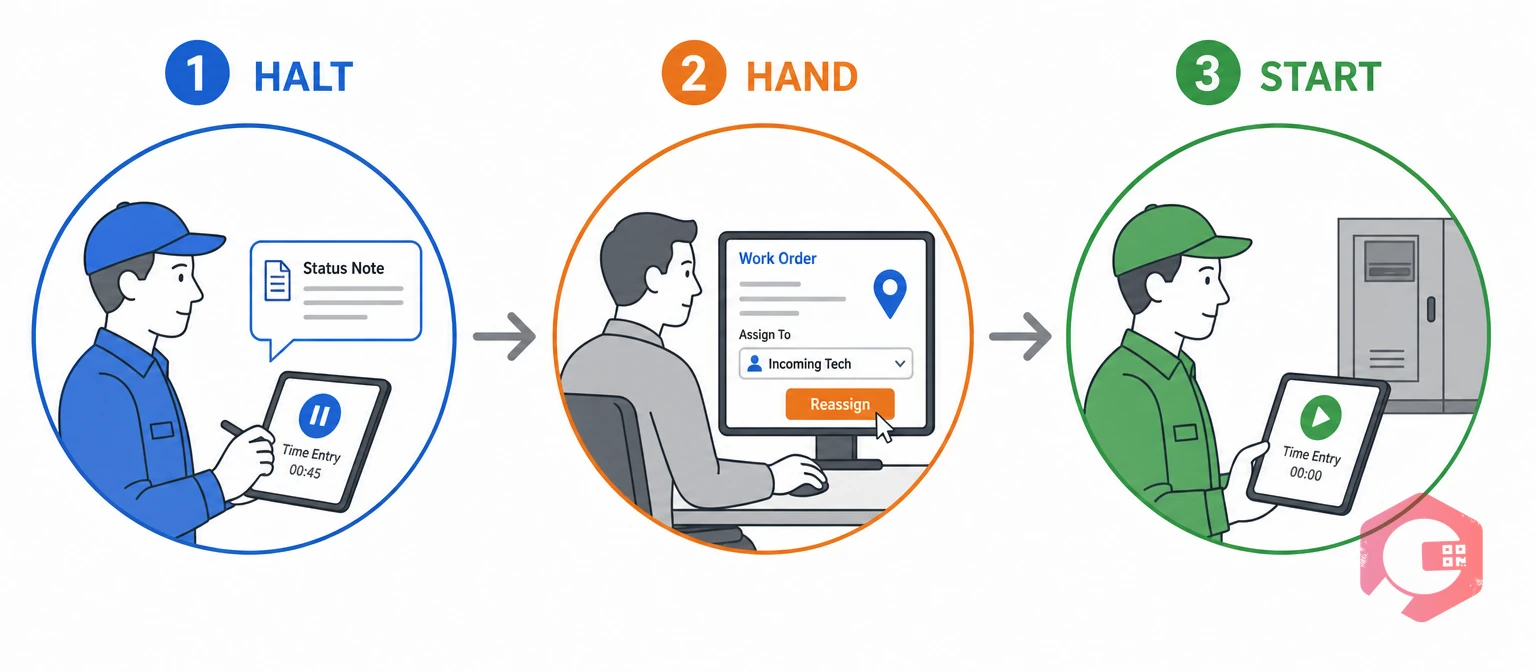
The HALT-HAND-START Method is a three-phase framework that gives every emergency technician switch a repeatable sequence. Each phase takes under 60 seconds and preserves all labor time entries on the work order.
The HALT-HAND-START Method:
Handoff gap time is the unrecorded minutes between one technician stopping and the next one starting. Reducing this gap to near zero is the primary goal of any emergency work order switch process.
The framework works because it breaks a chaotic moment into three distinct actions, each owned by a specific person. The outgoing technician owns HALT. The supervisor owns HAND. The incoming technician owns START. No single person has to do everything, and no step depends on memory.
The time stamp prevents labor data loss. The status note prevents rework. A replacement technician who opens a work order and sees "bearing housing removed, new bearing staged on cart, waiting for alignment tool" can resume in minutes. A replacement technician who opens the same work order with no note has to inspect the entire job site to figure out what was already done — and sometimes repeats work that was already completed.
A one-line note takes 15 seconds. Repeating an hour of diagnostic work takes an hour. The math is clear. According to Plant Engineering's maintenance cost benchmarking, the largest avoidable cost in reactive maintenance is not the repair itself — it is the time spent rediscovering what another technician already knew.
A CMMS turns each phase of the HALT-HAND-START method into a system-enforced action rather than a manual habit. The difference between a process that depends on discipline and a process that depends on software is that software does not forget under pressure.
Cryotos workflow automation handles the notification and reassignment routing automatically. When a supervisor changes the assigned technician on a live work order, the outgoing technician's time entry pauses, the incoming technician receives the assignment with full context, and the labor audit trail stays intact without anyone having to remember extra steps.

Fixing the handoff process is only half the job. Tracking the right metrics confirms the fix is working and surfaces new problems before they compound.
Maintenance teams using Cryotos have reported up to 30% reduction in unplanned downtime and 25% faster repair turnaround. Those gains come partly from closing exactly this kind of data gap — when every technician's labor hours are visible, planners can schedule more accurately and supervisors can spot overloaded shifts before they create the next round of emergency interruptions.
Track interruption frequency and handoff gap time through the downtime tracking module in Cryotos to see where your emergency switches cluster and which assets drive them.
Most facilities that struggle with time data accuracy during emergency switches make the same five mistakes. Each one is fixable with a process change, not a technology upgrade.
Every one of these mistakes traces back to the same root cause: the emergency work order creates time pressure, and the recording step feels optional. According to MTTR benchmarking research, unrecorded labor time is one of the most common reasons facilities overestimate their average repair duration — because idle handoff time inflates the clock without appearing in any technician's labor log.
The HALT-HAND-START method works because it distributes the recording across three people so no single person carries the full burden. Every emergency work order interruption follows the same three-phase sequence regardless of the priority level, asset type, or shift pattern.
If the outgoing technician does not pause their time entry and the replacement technician does not start a new one, the work order's labor record develops a gap. That gap means the total hours logged do not reflect the actual time spent on the job, which distorts MTTR, labor cost, and wrench time reports. The fix is a three-step pause-reassign-resume process that takes under 60 seconds.
Use a CMMS that supports multi-technician time logging on a single work order. The original technician's hours stay attached to the job under their name. The replacement technician starts a new time entry under their own name. Both entries live on the same work order, so the total labor history is complete and auditable.
HALT-HAND-START is a three-phase framework for switching technicians during an emergency work order interruption. HALT means the outgoing technician pauses their time and writes a status note. HAND means the supervisor reassigns the work order in the system. START means the incoming technician opens the order, reads the note, and begins a new time entry. Each phase is owned by a different person so the full burden does not fall on any one individual.
A CMMS prevents time data loss by enforcing a mandatory pause before a technician can leave an active job, requiring a status note on every pause, supporting multiple technician time entries on a single work order, and automatically notifying the replacement technician with full job context. These system-enforced steps replace the manual habits that fail under emergency pressure.
Track five metrics: interruption frequency per asset, handoff gap time between technicians, labor hours per work order accuracy, status note compliance rate, and rework rate on interrupted jobs. Together, these show whether the handoff process is preserving time data and whether the emergency switches are creating downstream quality problems.
Emergency work order interruptions are unavoidable, but losing time data during them is not. Schedule a free demo to see how Cryotos handles multi-technician time logging, automatic reassignment, and interruption tracking so every emergency switch stays on the record.



Cryotos AI predicts failures, automates work orders, and simplifies maintenance—before problems slow you down.



