An asset numbering system is a structured method for assigning a unique code to every piece of equipment, so maintenance teams can identify, search, and track each asset across its entire life. A good numbering system removes guesswork from work orders, breakdown calls, spare parts picks, and audits. It gives every technician, planner, and manager one short identifier that maps to one machine and one history.
Many plants still rely on names alone. The problem is that names change, abbreviations differ between shifts, and the same pump ends up under three records. An asset numbering system fixes that by giving each asset a permanent, unique code that works in every search bar, every filter, and every report. This guide covers what an asset number should look like, how operations teams use it every day, and how to set it up inside a Computerized Maintenance Management System (CMMS).
Key Takeaways

An asset numbering system is a set of rules that assigns a permanent, unique identifier to every maintainable asset in an organization. The identifier follows the asset from commissioning to retirement. It appears on labels, work orders, PM schedules, spare parts lists, and reports.
The idea is simple: one asset, one code, everywhere. The ISO 55000 asset management standard expects organizations to maintain accurate, controlled information about their assets. A numbering system is the foundation of that control, because every record, every work order, and every cost entry hangs on one identifier.
A useful asset number is short enough to read on a label, structured enough to carry meaning, and unique enough to never repeat. Most systems combine three to four segments:
For example, MUM-UTL-PMP-00012 reads as: Mumbai plant, utilities area, pump class, asset number 12. Anyone who sees the code knows where the pump is and what it is, before they open the record.
An asset number and an asset name serve different purposes. The number is a fixed, machine-friendly code. The name is a human-friendly description. Together, they let teams search, filter, and report without confusion.
| Attribute | Asset Number | Asset Name |
|---|---|---|
| Purpose | Unique identifier for systems and labels | Descriptive label for people |
| Format | Short, structured code (e.g. MUM-UTL-PMP-00012) | Free text (e.g. Cooling Tower Feed Pump #2) |
| Changes over time | Never changes once assigned | May change if the asset is renamed or relocated |
| Searchable by | Exact or partial match on the code | Keyword match on the description |
| Best for | QR labels, filters, exports, and cross-system links | Conversations, shift handovers, and quick recognition |
The best CMMS platforms show both side by side, so a technician can search by whichever one they remember. The number is for the system. The name is for the person.
Every piece of equipment needs a unique number because without one, maintenance history splits across duplicate records, work orders land on the wrong asset, and reports mix up machines. Asset management depends on accurate identification. A number that never changes and never repeats is the simplest way to get there.
Consider what happens without a numbering system. A technician logs a repair against "Chiller 1." Another technician calls the same machine "Main Chiller" and creates a second record. Six months later, the asset tracking report shows two assets with different failure counts, different PM schedules, and different spare parts lists, all for one machine.
Asset numbers show their value in the moments that cost the most time and money. Every scenario below runs faster and more accurately when each asset carries a unique identifier.
Without a numbering system, each of these scenarios depends on memory, nicknames, and guesswork. With one, they depend on a code that works every time.

The fastest way to build a numbering system is to stack four layers into one code. Each layer answers one question about the asset, and together they create a number that is unique, readable, and useful across sites.
The Four-Layer Asset Number Framework:
Put them together and you get MUM-UTL-PMP-00012. The format is consistent, the code is readable on a QR label, and any user can decode the location and type at a glance. Asset lifecycle management depends on an identifier that stays with the asset from installation to retirement, and the 4-Layer framework delivers that.
The ISO 14224 equipment taxonomy uses a similar layered approach, moving from industry down to individual parts. You do not need to follow the standard exactly, but the principle of building from broad to specific applies to every plant.
Good numbering habits save time. Bad ones create duplicates, confuse technicians, and break reports. The table below compares the two side by side.
| Practice | Good habit | Bad habit |
|---|---|---|
| Uniqueness | Every asset gets one number, never reused even after retirement | Reusing retired numbers or allowing duplicates across sites |
| Length | Short enough to fit on a label and say aloud (under 20 characters) | Long codes with embedded dates, serial numbers, and location strings |
| Structure | Fixed segments with a separator (e.g. site-area-class-sequence) | Free-text IDs chosen by different people on different days |
| Immutability | The number never changes, even when the asset moves | Renumbering assets every time they are relocated |
| Generation | Auto-generated by the system to prevent human error | Manually assigned from a spreadsheet, risking gaps and collisions |
| Vocabulary | Class and area codes from a controlled pick list | Free-text codes invented by each technician |
One rule matters more than all the others: never reuse a retired asset number. Old work orders, cost records, and reports still point to that number. Reusing it merges two different histories into one record, and that mistake is expensive to undo.
EAM software enforces these rules at the database level. When the system auto-assigns the next number and blocks duplicates, the discipline does not depend on one person's memory.
An asset numbering system is only as good as its daily use. Operations teams interact with asset numbers dozens of times a shift, often without thinking about it. Here is where the number does its work.
During a shift handover, the outgoing team lists the machines that need attention. Asset numbers remove ambiguity. "PMP-00012 has a seal drip, logged as WO-4521" is clear. "That pump near the boiler has a leak" is not. On a breakdown call, the operator reads the number from the QR label or the machine tag, and the dispatcher pulls up the asset record, its history, and the right spare parts list in one search.
Operations teams need to find an asset fast. Some remember the number, others remember the name. A well-built CMMS lets them search by either one. Typing "PMP-00012" or "Cooling Tower Feed Pump" should both return the same record, from the global search bar and from every asset picker on every form.
Partial search matters too. A technician who remembers only "00012" or "cooling" should still land on the right asset. Dual-key search, where the system checks both the number field and the name field in one query, is what makes numbering practical for floor teams.
When a storekeeper receives a parts request, the asset number links directly to the bill of materials. The right seal kit, the right bearing size, and the right belt length show up without guesswork. Without a number, the storekeeper asks the technician to describe the machine, checks a catalog, and sometimes picks the wrong part.
Auditors ask for the maintenance history of a specific machine. An asset number retrieves every work order, inspection record, calibration log, and cost entry tied to that machine in one search. Without a unique identifier, the team spends hours matching records by description, location, and date, and still misses entries logged under a different name.
Maintenance teams using Cryotos have reported up to 30% reduction in unplanned downtime and 25% faster repair turnaround. Much of that comes from clear identification: when the right asset is on every work order, history is complete, and the next decision is based on real data.
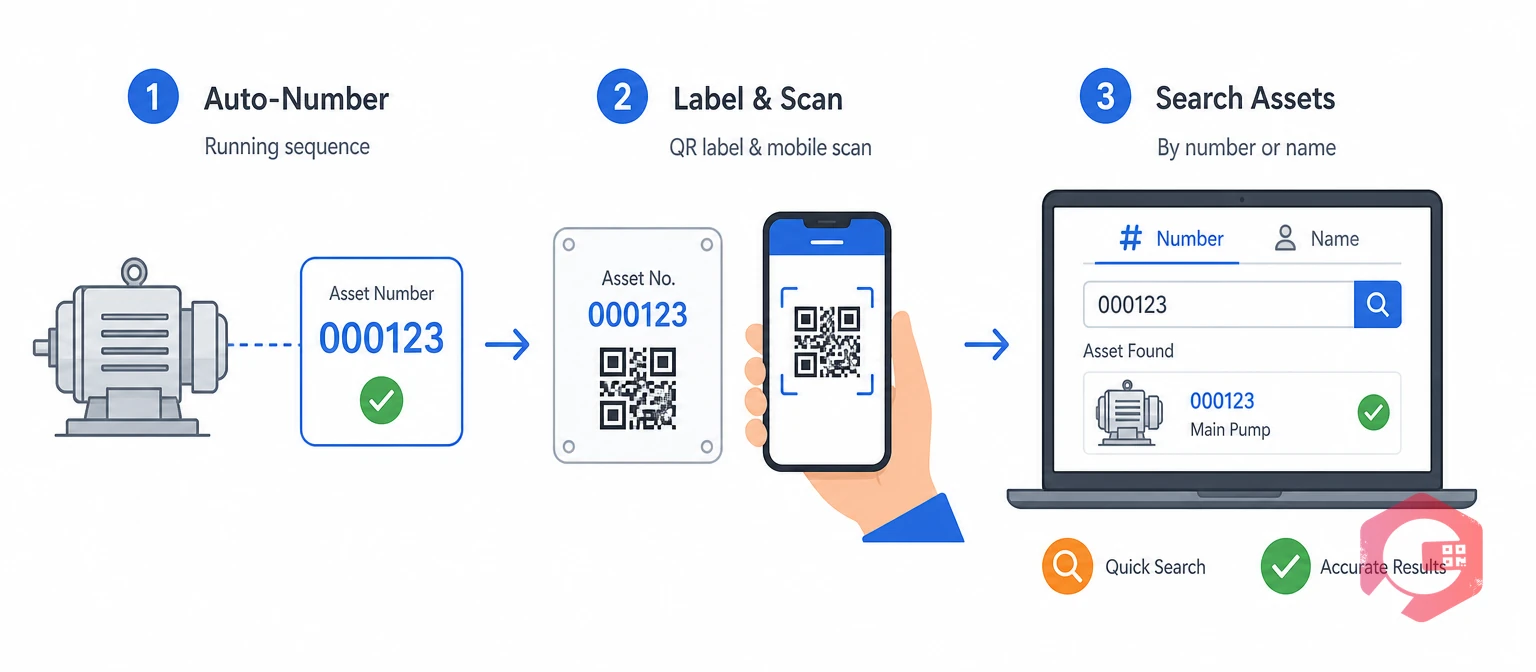
Implementing an asset numbering system inside a CMMS turns the rules into enforcement. The system assigns the number, blocks duplicates, prints labels, and makes both the number and the name searchable.
An auto-generated asset number is a system-assigned code that increments automatically each time a new asset is created. The admin sets a prefix, a padding width, and the system does the rest. No spreadsheet, no manual lookup, no collisions.
Auto-generation solves three problems at once. It prevents duplicates, because the counter never assigns the same number twice. It prevents gaps, because the counter never skips. And it prevents human error, because the technician never types the number at all. The number is read-only after creation, so nobody can change it later.
Print the asset number on a QR label and stick it on the machine. A technician scans the label with a phone, and the CMMS opens the asset record, its PM schedule, its history, and its attached documents. QR code scanning turns the asset number from a database field into a physical link between the machine and its digital record.
QR labels also speed up work requests. An operator scans the label, taps "report a problem," and the work request already carries the right asset number, location, and class. No typing, no guessing, no wrong asset.
Every search bar and every asset picker in the CMMS should check both the asset number and the asset name. A technician who types "PMP-00012" and a planner who types "Cooling Tower" both reach the same record. Partial matches should work too, so "00012" and "cool" both return results.
This dual-key search must extend beyond the asset list. Work order forms, PM schedule builders, meter reading screens, breakdown logs, and inventory links all include an asset picker. If any one of those pickers searches only by name, the numbering system loses half its value.
Most asset numbering failures come from shortcuts taken at setup. Fixing them later means renumbering assets and retraining teams, which costs far more than getting it right the first time.
Most facilities that struggle with asset data quality trace the problem back to identification. A clean numbering system is the cheapest fix for the largest share of data issues.
An asset numbering system is a set of rules that assigns a unique, permanent code to every piece of equipment. The code appears on labels, work orders, PM schedules, and reports, so every record ties back to one machine with one history. It replaces informal names and nicknames with a structured identifier that works in every search and every filter.
Use the 4-Layer Asset Number Framework: site code, area code, equipment class code, and a running sequence number. For example, MUM-PKG-CNV-00003 means Mumbai plant, packaging area, conveyor class, asset number 3. Keep the total length under 20 characters, use a separator between segments, and never embed information that changes, such as location or installation date.
Yes. Most CMMS platforms support auto-generation, where the system assigns the next number in a running sequence each time a new asset is created. The admin sets the prefix and padding, and the system handles uniqueness. Auto-generation prevents duplicates, gaps, and manual entry errors.
A machine number is a short, structured code that never changes once assigned. An asset name is a descriptive label that people use in conversation, such as "Cooling Tower Feed Pump #2." You need both: the number for system accuracy and the name for human recognition. A good CMMS lets you search by either one.
It speeds up breakdown calls, shift handovers, spare parts picks, PM scheduling, and audits. Every scenario runs faster when everyone uses one identifier that maps to one record. An operator who scans a QR label with the asset number opens the right record, history, and spare parts list in seconds, instead of describing the machine and hoping the dispatcher finds the right one.
Every work order, PM task, and breakdown report is only as good as the asset identifier behind it. Schedule a free demo to see how Cryotos auto-generates asset numbers, prints QR labels, and lets your team search by number or name from any screen.


Cryotos AI predicts failures, automates work orders, and simplifies maintenance—before problems slow you down.