An automobile dealership's service department runs on two numbers: how many jobs get completed per day, and how long each job takes. Every service manager knows this. What most service managers do not have is a reliable, real-time view of those numbers — broken down by technician, by job type, by bay, and by shift — without waiting for a monthly report that is already outdated by the time it lands in their inbox.
The gap between knowing those numbers matter and actually having them available is where most dealer service operations lose money. Technicians are busy, but not always productive in the revenue-generating sense. Bays are occupied, but not always producing completed jobs. Workshop equipment goes down, but nobody tracks the connection between equipment downtime and technician idle time. A CMMS with workshop asset management and technician work order tracking closes that gap. This guide explains exactly how.
Why Technician Productivity Tracking in Auto Dealerships Is Different from Other Industries
Automobile dealerships run a fundamentally different maintenance operation from a factory or a facility. The assets being serviced — customer vehicles — are not owned by the dealer. They arrive unpredictably, carry different service histories, and require different job scopes that change as the technician works through the job. The technician's productivity is therefore not just about working quickly. It is about working accurately, within the estimated time, on a job that was correctly diagnosed and correctly estimated at the service advisor stage.
Three factors make technician productivity tracking in dealerships specifically complex:
Labour time variance: Every service job has a manufacturer's standard time — the estimated hours the job should take, from which the customer is billed and against which technician efficiency is measured. A technician completing a 2.0-hour job in 1.4 hours is running at 142% efficiency. The same technician taking 3.1 hours on the same job is at 64%. Without a system that captures job start time, job close time, and compares both against the standard time, that variance is invisible until it shows up as a profitability problem at month end.
Job completion rate by category: Not all jobs are created equal. Oil changes and routine services close predictably. Electrical diagnostics, body-mechanical jobs, and intermittent fault investigations routinely require additional parts, second visits from the technician, or escalation to a senior hand. A service manager who knows that Technician A closes 94% of jobs on the first visit while Technician B closes 67% has information that changes how jobs are allocated, which technicians need support, and where training investment should go.
Workshop equipment downtime impact on technician productivity: When the four-post lift in Bay 3 is out of service, every job requiring that lift stacks up or bounces to other bays. When the wheel aligner goes down, alignment jobs cannot be completed. The connection between workshop equipment reliability and technician productivity is direct and measurable — but only if workshop equipment maintenance is tracked in the same system as technician work orders.
What a CMMS Tracks That a DMS Cannot
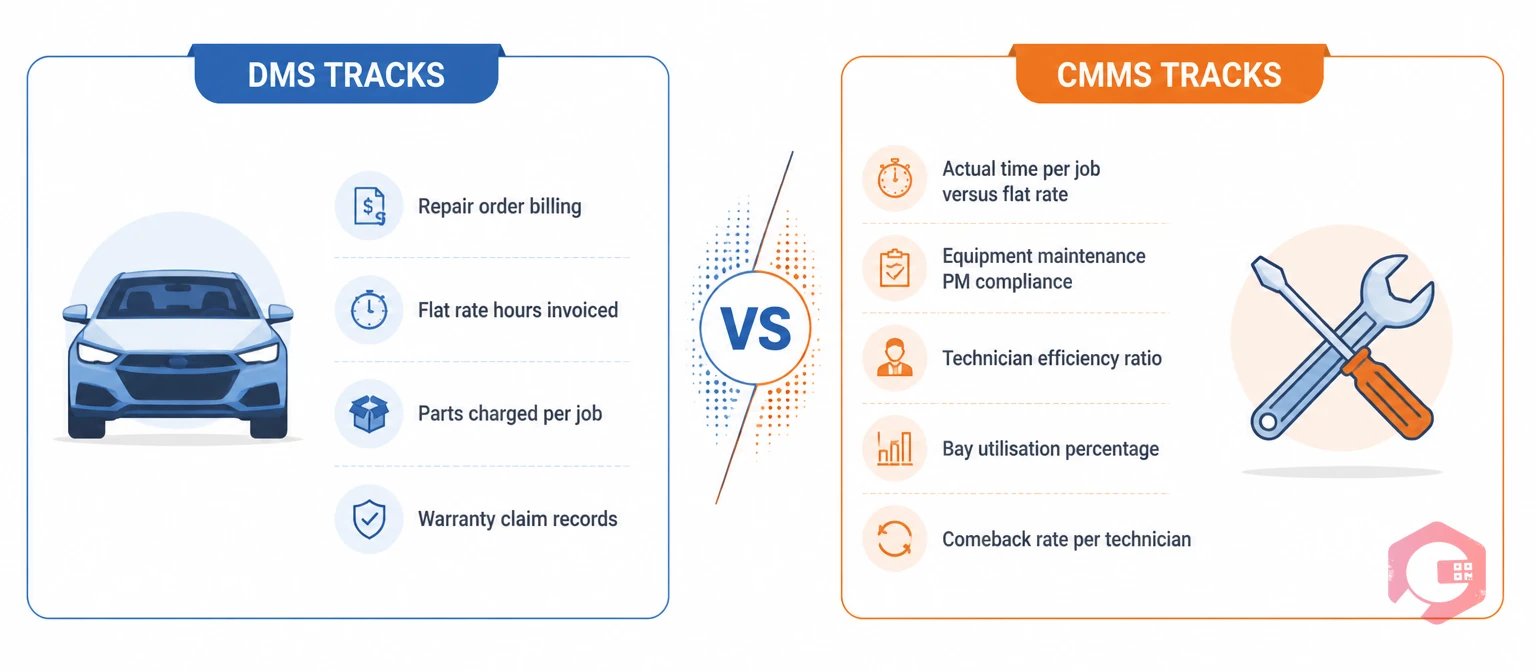
Most automobile dealerships already run a Dealer Management System — a platform that handles parts inventory, customer billing, vehicle history, and job card management. DMS platforms are built for the transaction layer: booking a job, issuing a job card, billing the customer, and receiving payment. They are not built for the operational layer: tracking whether maintenance work was completed on time, whether workshop equipment is serviceable, or why a specific technician's efficiency has dropped over the past six weeks.
A CMMS fills the operational gap that a DMS leaves:
Workshop equipment asset register and PM scheduling: Every piece of workshop equipment — hydraulic lifts, tyre changers, wheel balancers, wheel aligners, air compressors, battery chargers, diagnostic scan tools, emission testing equipment — is registered as an asset in the CMMS with its make, model, service history, and PM schedule. When a lift is due for its quarterly hydraulic fluid check and safety inspection, the CMMS generates the work order automatically. When it fails mid-shift, the corrective work order captures the downtime duration, root cause, and resolution.
Technician work order assignment and time tracking: Every job assigned to a technician is a work order in the CMMS — with the assigned technician, the estimated standard time, the actual start time recorded when the technician checks in, and the actual close time recorded when the job is signed off. The time variance between standard and actual is calculated automatically and accumulates into the technician's efficiency record over time.
Job completion rate by technician and job type: The CMMS records whether each work order was closed on the first attempt, required a rework, was escalated, or was returned to the customer with an open fault. Over time, these records build a job completion rate profile for each technician and each job category.
Bay utilisation and throughput tracking: Each service bay is an asset location in the CMMS. Work orders assigned to Bay 4 accumulate a history of how many jobs were completed from that bay, how many experienced equipment-related delays, and what the average cycle time looks like compared to other bays.
The Five Metrics Every Auto Dealer Service Manager Should Be Tracking
With a CMMS in place, the following five metrics are automatically calculated from work order data — no manual compilation required.
Technician efficiency rate: Standard hours billed divided by actual hours worked, expressed as a percentage. A technician billing 8.0 standard hours in a 7-hour wrench-turning shift is at 114% efficiency. Cryotos calculates this automatically from the standard time on each work order and the actual open-to-close time recorded by the technician.
First-time job completion rate: The percentage of work orders closed without a rework, a customer return for the same fault, or an escalation to a senior technician. A technician with 90% efficiency and 70% first-time completion is fast but not accurate — a combination that generates customer complaints and warranty rework costs.
Bay throughput by shift: Number of jobs completed per bay per shift, broken down by job type. This metric identifies whether throughput differences between bays are driven by technician performance or by bay-specific equipment issues.
Workshop equipment downtime impact: Hours of technician idle time attributable to workshop equipment unavailability, calculated by correlating corrective work orders on equipment assets with concurrent gaps in technician work order activity. Every hour a lift is out of service is a quantifiable revenue impact.
PM compliance rate for workshop equipment: The percentage of scheduled workshop equipment PMs completed within their due date window. Service managers who see their PM compliance rate drop below 80% know before the equipment fails that their workshop reliability is at risk.
How to Set Up Technician Productivity Tracking in Cryotos CMMS
The setup follows a four-step process that most dealership service teams complete in their first week of deployment.
Step 1 — Register all workshop assets: Every piece of workshop equipment is registered in Cryotos with its make, model, serial number, installation date, and service history. Each asset is tagged to its bay location. PM schedules are configured for each asset — hydraulic lifts on quarterly safety inspections, tyre changers on six-monthly calibration checks, wheel aligners on annual recertification — with automatic work order generation when due dates arrive.
Step 2 — Create technician profiles with standard time benchmarks: Each technician is a user in Cryotos, assigned to their primary bay. Standard time benchmarks are configured as reference values against which actual work order times are compared. When a work order is created for a specific job type, the standard time is pre-populated. The technician's actual time is captured from work order check-in to sign-off.
Step 3 — Configure the work order workflow for job allocation: The work order management module handles job allocation from the service advisor to the workshop floor. Work orders are assigned to specific technicians, tagged to specific bays, and carry the job type classification that drives the completion rate and efficiency calculations.
Step 4 — Activate the BI Dashboard for live productivity visibility: The BI Dashboard in Cryotos aggregates all five metrics into a single live view. The service manager sees the current shift's performance against the workshop's historical baseline, with the ability to drill down by technician, bay, or job type. No manual data extraction. No end-of-month compilation.
The Connection Between Workshop Equipment PM and Technician Performance
Most dealership service managers think about technician productivity and workshop equipment maintenance as separate concerns. The data consistently shows they are not.
A hydraulic lift that has not had its hydraulic seals and fluid checked in 18 months does not fail catastrophically — it degrades gradually. Lift speed slows. Locking mechanisms begin to stick. Technicians develop workarounds — leaving a vehicle partially raised rather than fully elevated, working in positions that take longer and increase error risk. None of these workarounds show up in a DMS. They show up as slightly reduced throughput across all jobs in that bay, distributed across every technician who uses it, over months.
When the lift's PM history is in the same CMMS as the technician's work order history, the correlation is findable. A bay whose throughput has declined 12% over six months while its lift has accumulated three overdue PM cycles is telling a clear story — one that a service manager with the right data can act on before the lift fails completely and takes the bay offline for a week.
The permit-to-work module ensures that any maintenance work on hydraulic systems, electrical supply equipment, or high-pressure systems follows a documented isolation and authorization procedure before a maintenance technician begins work. Every permit is logged, time-stamped, and linked to the corresponding work order.
If your service department is managing technician productivity from a DMS report that arrives three weeks after the month ends, and tracking workshop equipment maintenance on a whiteboard in the workshop manager's office, the gap between your current operational visibility and what a CMMS delivers is significant. Book a demo to see how Cryotos structures technician work order tracking and workshop asset management for automobile dealer service departments.
Frequently Asked Questions
Can Cryotos integrate with our existing DMS for job card data?
Cryotos integrates with external systems through its API, which allows job card data from a DMS to flow into Cryotos work orders rather than requiring manual re-entry. The integration maps the DMS job card reference to the Cryotos work order, so technician time tracking, completion status, and equipment usage recorded in Cryotos are always tied back to the original DMS transaction.
How do technicians log their time in Cryotos — do they need a separate device?
Technicians check in and out of work orders using the Cryotos mobile app on any Android or iOS smartphone or tablet. The check-in action takes less than five seconds — the technician scans the work order QR code or taps their name — and the timestamp is recorded automatically. There is no manual time sheet to complete at the end of the shift.
Can we track job completion rates separately for different technician skill levels?
Yes. Cryotos user profiles support skill level designation, and work orders can be filtered and reported by the assigned technician's skill tier. This makes it possible to compare first-time completion rates within skill level categories and to track how completion rates improve as a technician progresses through their skill tiers over time.
What happens when a job requires parts that are not in stock and the work order has to wait?
Cryotos work orders support a waiting-for-parts status that suspends the active time clock for the job while parts are on order. The technician's efficiency record is not penalized for parts delays outside their control. The waiting duration is captured in the work order record and contributes to a parts availability metric that procurement managers can use to reduce order-to-availability cycle times.