

Maintenance scheduling software reduces work order cycle time by automating the four phases where time is most commonly lost — request triage, technician assignment, parts availability, and work order closure — so that every job moves from creation to completion faster and with fewer manual interventions. According to Plant Engineering benchmarking data, facilities using structured scheduling software reduce average work order cycle time by 25–40% within the first six months compared to teams relying on manual planning and paper-based dispatch. Without scheduling software, maintenance managers are allocating work by memory, chasing parts by phone, and discovering backlogs after they have already grown into production risks.
This guide explains how CMMS scheduling software works mechanically to compress cycle time at each phase, which scheduling strategies deliver the fastest gains, and what to measure once the system is live.
Key Takeaways
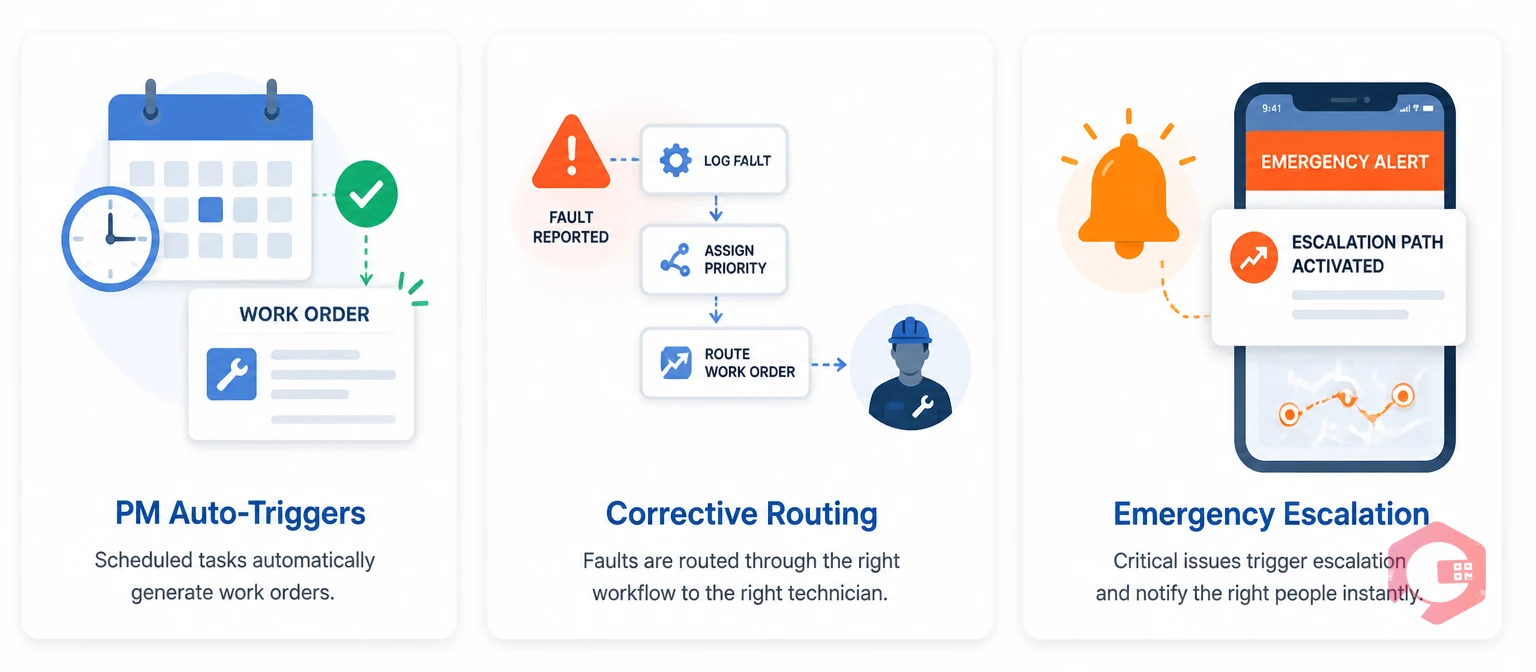
Maintenance scheduling software is the module within a computerised maintenance management system that controls when, how, and to whom maintenance work is assigned. It replaces manual planning — spreadsheets, whiteboards, verbal dispatch — with automated triggers, rule-based assignment, and real-time work queue management that operates continuously without requiring a planner to initiate every task.
The scheduling function manages three types of maintenance work simultaneously. Preventive maintenance tasks run on calendar intervals, operating hours, or condition thresholds — the software generates work orders automatically at the configured trigger point. Corrective work orders are created when faults are reported, then routed immediately to the right technician based on skills, location, and current workload. Emergency work orders follow escalation paths that bypass normal queues and notify on-call engineers within seconds of creation.
The output is a continuously updated work queue that every technician and manager can see in real time — with priorities, due dates, asset locations, parts requirements, and estimated durations attached to every job before it leaves the scheduling system.
Many CMMS platforms include a basic calendar view — a visual display of scheduled tasks by date. This is not the same as scheduling software. A calendar shows you what is planned; scheduling software actively manages execution. The distinction matters for cycle time because a calendar that shows a PM is overdue does nothing about it. Scheduling software with automated triggers, assignment rules, and escalation logic acts on that overdue status — generating reminders, reassigning to available technicians, or escalating to supervisors — without waiting for a human to notice the gap.
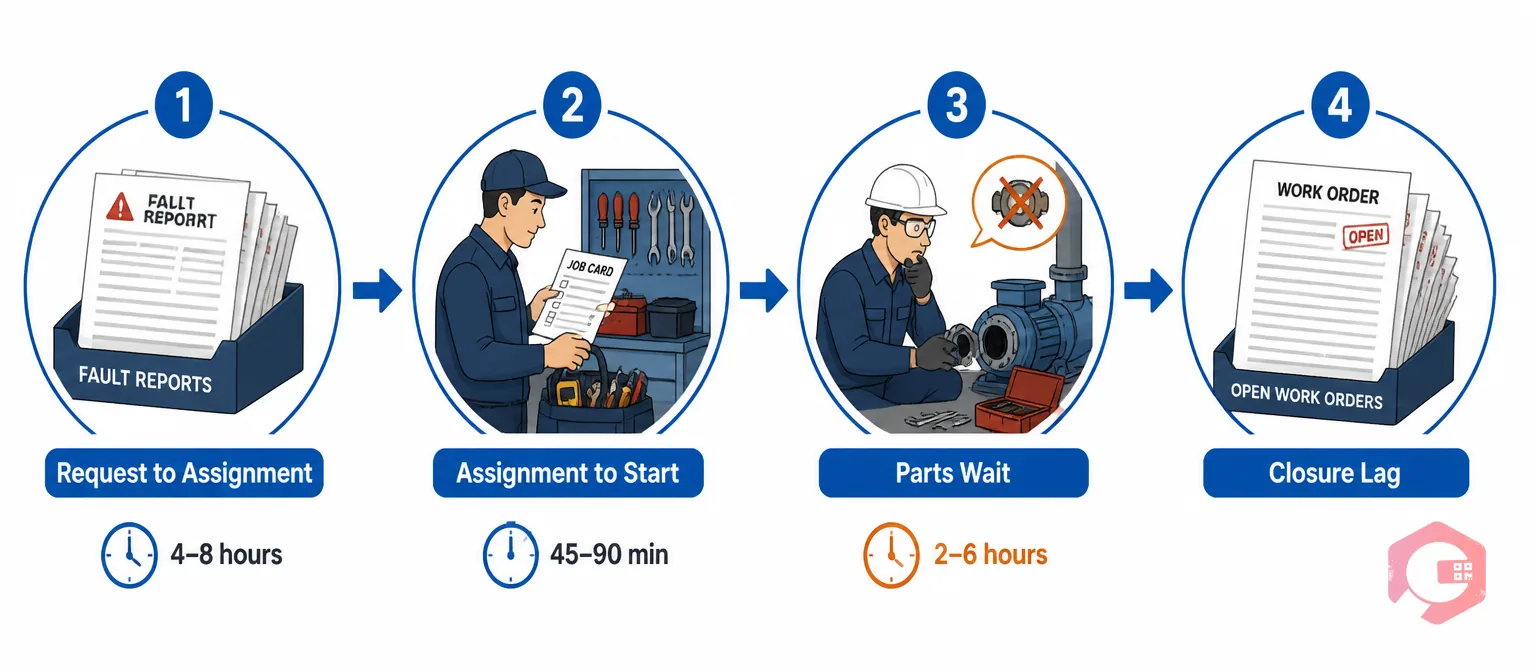
Work order cycle time is the total elapsed time from when a maintenance request is created to when the completed work order is formally closed. In most maintenance operations, this number is far longer than the actual repair time — because the repair represents only 25–35% of total cycle time. The rest is consumed by four waiting phases.
The first waiting phase is request to assignment — a fault is reported but sits unreviewed in a supervisor's queue while they are managing an active breakdown elsewhere. In manual systems, average time-to-assign for non-emergency work runs 4–8 hours during a standard shift. The second phase is assignment to start — a technician receives an assignment but must travel to the storeroom, collect tools, and often look up asset history before arriving at the job. This adds 45–90 minutes to jobs that should start within 20 minutes of assignment. The third phase is the parts wait — a technician arrives at the asset, discovers the repair requires a part not on the work order, and must pause to source it. This single event can add 2–6 hours to a corrective job. The fourth phase is closure lag — the repair is complete but the work order stays open in the system for hours or days because the technician has moved on to the next job and closure is done retrospectively from memory at shift end.
Each of these phases is directly addressable by scheduling software. None of them require the technician to work faster — they require the process around the technician to work smarter.
Use the MTTR calculator to establish your current baseline before deploying scheduling software — you need a before measurement to quantify the cycle time gains the software produces.

Scheduling software targets each of the four waiting phases with a different mechanism. Understanding how each mechanism works makes it possible to configure the software for maximum impact rather than accepting default settings.
Scheduling software replaces manual triage with automated routing rules. When a work request arrives — submitted by a technician, triggered by an IoT sensor, or generated by a PM schedule — the system evaluates asset type, fault category, priority level, and technician availability simultaneously, then assigns the job to the correct person without supervisor intervention for the majority of standard work orders. Assignment that previously took 4–8 hours in a manual system happens in under 60 seconds. Supervisors review exception cases — multi-technician jobs, unusual fault codes, or high-cost repairs requiring budget approval — rather than processing every assignment individually.
The scheduling module pushes a complete digital work order to the assigned technician's mobile device at the moment of assignment. That work order includes the asset location on a site map, the last five repair records for the asset, the procedure checklist, and the parts list with storeroom bin locations. A technician who previously spent 20–30 minutes gathering information before leaving for the asset now leaves immediately and arrives prepared. The assignment-to-start phase drops from 45–90 minutes to under 20 minutes.
Scheduling software reduces parts delays — the largest within-execution time loss — by linking parts requirements to work order templates. When a work order is generated for a specific asset or failure mode, the associated parts list is visible to the storeroom before the technician is dispatched. Storerooms running this workflow pre-stage kits so technicians collect them on the way to the job rather than discovering mid-repair that a component is missing. First-visit fix rate improves because the right parts are present from the first minute of the job.
Mobile work order management enables technicians to close jobs from the asset in real time — selecting the failure code, recording parts used, completing the digital checklist, and signing off in under two minutes. Closure lag shrinks from the hours-or-days of batch end-of-shift paperwork to near zero. This matters not only for cycle time measurement accuracy but for backlog visibility — open-in-system work orders that are actually complete in the field distort the maintenance picture and delay parts replenishment triggers.
The performance gap between manual and software-driven scheduling is measurable across every phase of the work order lifecycle. The comparison below covers the dimensions that most directly affect cycle time in day-to-day maintenance operations.
| Dimension | Manual Scheduling | Software Scheduling |
|---|---|---|
| Work order creation | Manual entry by planner; PM tasks created on memory or spreadsheet prompt | Auto-generated at trigger point (calendar, hours, sensor threshold, fault report) |
| Time to assign | 4–8 hours average; depends on supervisor availability | Under 60 seconds via automated routing rules |
| Technician information at job start | Verbal briefing or paper job card; no asset history at the asset | Full digital work order on mobile: history, checklist, parts list, site map |
| Parts availability | Discovered on arrival; storeroom visit often required mid-repair | Parts list pre-staged before dispatch; kit ready for collection |
| Prioritisation logic | Supervisor judgement; high-noise assets dominate regardless of criticality | Rules-based priority by asset criticality tier, safety flag, and SLA deadline |
| Backlog visibility | Weekly or monthly spreadsheet review; backlogs discovered late | Real-time queue with ageing alerts when work orders exceed threshold |
| Work order closure | Batch paperwork at shift end; closure lag of hours to days | Mobile same-session closure at the asset; lag under 5 minutes |
| PM compliance rate | Typically 55–70%; tasks slip when planners are pulled to reactive work | Typically 85–95%; auto-generation ensures tasks appear regardless of planner load |
The aggregate effect of these differences is a cycle time reduction of 25–40% within the first six months of software deployment — driven not by technicians working faster but by the process around them eliminating preventable waits at every phase.
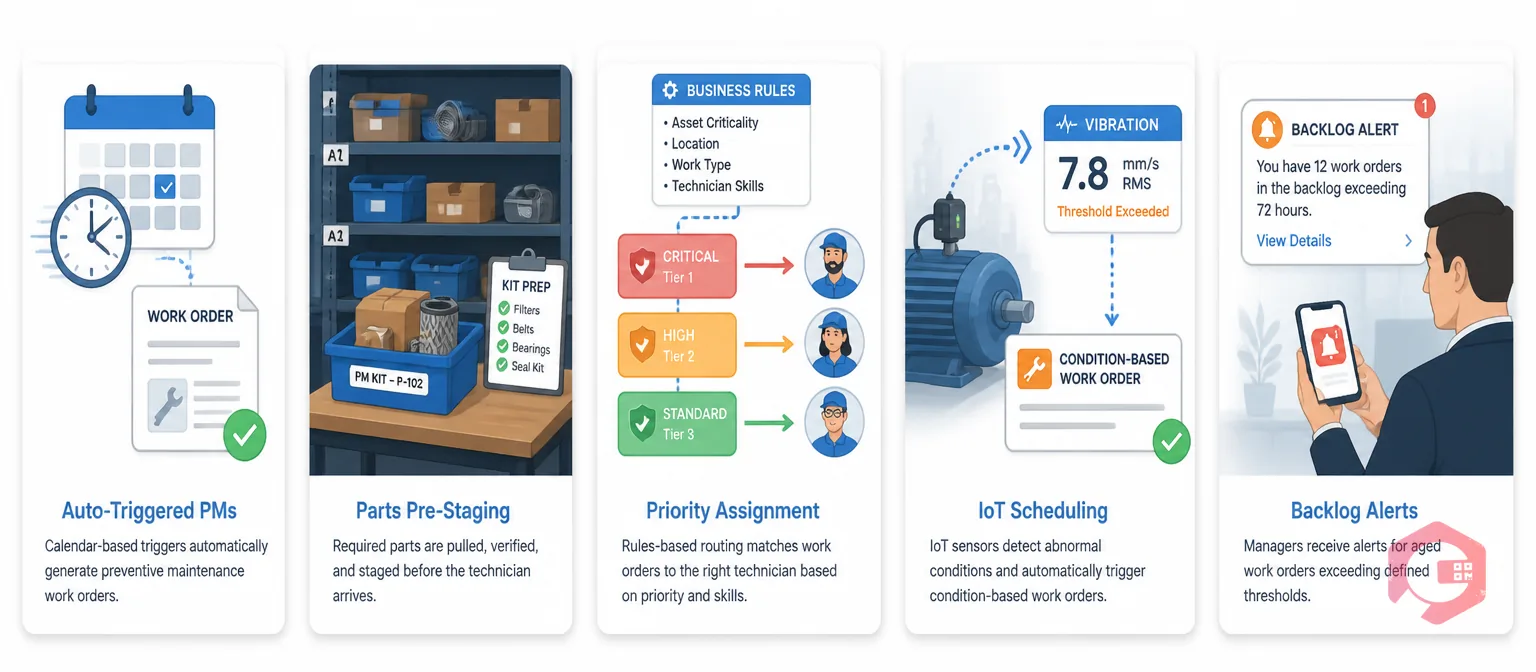
Not all scheduling software configurations produce the same cycle time results. These five strategies, applied in combination, consistently deliver the strongest gains across industrial and facility maintenance environments.
The most fundamental scheduling strategy is replacing manually created PM tasks with auto-triggered work orders. When a PM schedule is configured in the system — whether calendar-based, runtime-hour-based, or production-volume-based — work orders generate automatically at the trigger point without a planner having to initiate them. This eliminates the most common source of PM delay: the planner being absorbed by reactive work and failing to generate this week's PM tasks until Thursday.
Preventive maintenance software supports all three trigger types simultaneously on the same asset — so a compressor can have a monthly calendar PM, a 500-hour runtime PM, and a condition-based PM triggered by an IoT vibration threshold, all managed without manual intervention. PM completion rates in facilities using auto-triggered scheduling consistently run 15–25 percentage points higher than those relying on manual PM creation — which translates directly to fewer reactive breakdowns and shorter average cycle times across the maintenance program.
Every recurring failure mode has a known parts requirement. When that knowledge is embedded in a work order template linked to the asset and fault type, the scheduling system can alert the storeroom at the moment a corrective work order is generated — before the technician is dispatched. The storeroom picks and stages the kit; the technician collects it on the way to the job.
This strategy eliminates the mid-repair parts wait that accounts for the largest share of uncontrolled cycle time in corrective maintenance. Facilities that implement parts pre-staging alongside their scheduling software typically see average corrective cycle time drop by 30–45 minutes per job — without any change to the repair procedure itself.
In manual scheduling, work is often allocated by proximity and vocal pressure — whoever is closest to the supervisor, or whose manager complains loudest, gets the next technician. Scheduling software replaces this with rules-based assignment that routes work orders to technicians based on asset criticality tier, SLA deadline, skill match, and current workload in a consistent, auditable sequence.
The cycle time benefit is compound: high-criticality work reaches the right technician faster, and lower-priority work doesn't sit unassigned while available technicians wait for direction. The workflow automation module in a well-configured CMMS enforces these assignment rules automatically — including escalation to a supervisor if no qualifying technician is available within a defined window.
Calendar-based PM operates on the assumption that assets degrade at a uniform rate. IoT-connected scheduling replaces that assumption with actual condition data — vibration readings, temperature trends, operating hour counts, and energy consumption — and generates work orders when the data signals that maintenance is needed, not when the calendar says it is due.
The cycle time benefit operates in two directions. Condition-based work orders are generated with more lead time (because the fault is caught earlier in its development) and more complete information (because the triggering sensor data is attached to the work order). Technicians arrive at the asset knowing exactly which parameter is out of range and what the likely fault mode is — shortening the diagnosis phase within the execution window. According to ISO 55001 asset management guidelines, condition-based maintenance strategies consistently produce lower unplanned downtime rates than time-based schedules when applied to assets with sufficient sensor coverage.
Work order backlogs grow when scheduling systems generate more tasks than the maintenance team can complete — and then make that gap invisible until it becomes a crisis. Backlog ageing alerts are configured rules that notify maintenance managers when open work orders have exceeded a defined age threshold without being started or completed.
The practical effect is that backlogs are visible in real time rather than discovered in a monthly review. A manager who sees that 12 corrective work orders have been open for more than 72 hours can act — redistributing technician capacity, de-prioritising non-critical tasks, or requesting additional resource — before those aged work orders become emergency escalations. Planned downtime for high-priority backlog clearance is significantly cheaper than the unplanned downtime that results from deferred corrective work reaching a failure state.

Scheduling software produces measurable cycle time gains — but only if the right metrics are tracked consistently before and after deployment. Three KPIs together give a complete picture of whether the scheduling system is performing.
Mean Time to Assign (MTTA) measures the average elapsed time from work order creation to first technician assignment. In manual systems, MTTA for standard corrective work orders averages 4–8 hours during business hours. With automated assignment rules, best-practice MTTA is under 30 minutes for standard priority and under 5 minutes for emergency priority. Track this weekly by work order type to confirm that routing rules are performing as configured.
Mean Time to Repair (MTTR) measures the average time from when a technician begins active repair to when the asset is returned to service. MTTR improvement from scheduling software comes through parts pre-staging (fewer mid-repair delays) and better pre-job information (faster diagnosis). World-class MTTR targets vary by asset class, but a 15–25% reduction within six months of software deployment is a consistent benchmark for facilities that implement parts pre-staging alongside automated scheduling.
PM Completion Rate measures the percentage of scheduled preventive maintenance work orders completed on time. This is the leading indicator that most directly predicts future cycle time performance — because a facility with high PM compliance generates fewer reactive work orders, and reactive work orders have structurally longer cycle times than planned work. The maintenance checklists attached to each PM work order provide the audit evidence that PM completion rate figures are accurate, not self-reported. Target 90% or above. Below 80% consistently predicts a rising reactive work order volume within the next 60–90 days.
According to SMRP best practice guidelines, facilities that track all three of these KPIs monthly and act on deviations within one reporting cycle consistently outperform those tracking only MTTR — because MTTA and PM completion rate identify the upstream causes of cycle time problems before they manifest in MTTR data.
Cryotos delivers maintenance scheduling as an integrated capability within its CMMS — not as a separate tool that requires data synchronisation. Every PM schedule, assignment rule, parts template, and escalation path sits within the same system that manages work order execution, inventory consumption, and performance reporting.
The scheduling module supports time-based, runtime-hour-based, and condition-triggered PM generation simultaneously on the same asset. Drag-and-drop calendar scheduling lets planners visualise and adjust the maintenance workload across days, weeks, and months without leaving the scheduling view. Dynamic PM scheduling adjusts intervals automatically when IoT meter readings indicate that an asset has operated more or less intensively than its calendar-based schedule assumed — so the PM fires when the asset actually needs it, not when the spreadsheet says it should.
Work order assignment in Cryotos follows configurable rules that route jobs to technicians based on skill tags, current workload, geographic zone, and shift schedule. When no available technician matches all criteria within the defined SLA window, the system escalates automatically via mobile notification to the supervisor — with the work order details and current queue status attached. Technicians receive complete digital work orders on the Cryotos mobile app, with offline capability ensuring that connectivity gaps on the plant floor or in remote facilities never create an information access delay.
Parts pre-staging is handled through the inventory integration: when a work order is generated, the associated parts list from the work order template is automatically visible to the storeroom module, which can reserve stock against the job before dispatch. The BI Dashboard tracks MTTA, MTTR, PM completion rate, and backlog age by asset class, technician, and shift — giving maintenance managers the data to identify which scheduling configuration changes are producing cycle time gains and which need adjustment.
Maintenance teams using Cryotos report a 30% reduction in unplanned downtime and 25% faster repair times — outcomes that follow directly from the cycle time compression that structured scheduling software delivers across all four phases of the work order lifecycle.
Maintenance scheduling software automates the creation, assignment, and tracking of maintenance work orders. For preventive maintenance, it generates tasks automatically at calendar, runtime, or condition-based trigger points. For corrective and emergency maintenance, it routes work orders to the right technician based on skill, location, and priority rules within seconds of the fault being reported. The result is a continuously managed work queue that every technician and manager can see in real time — replacing manual planning processes that depend on a single planner's availability and memory.
Plant Engineering benchmarking data consistently shows facilities using structured scheduling software reducing average work order cycle time by 25–40% within the first six months. The gains are largest in the triage and assignment phase — where automation cuts time-to-assign from hours to minutes — and in the parts availability phase, where pre-staging linked to work order templates eliminates the mid-repair parts wait that accounts for the largest share of uncontrolled corrective cycle time. The actual reduction depends on how much of the current cycle time is consumed by manual process delays versus genuine repair complexity.
A CMMS (Computerised Maintenance Management System) is the broader platform that manages assets, work orders, inventory, and reporting. Maintenance scheduling software is the module within a CMMS that specifically controls when work is created, how it is assigned, and how queue priorities are managed. A CMMS without a strong scheduling module can store maintenance records but cannot proactively manage the work pipeline. The cycle time benefits of scheduling software come from this proactive work queue management — not from record storage alone.
Most maintenance teams see measurable cycle time improvement within 30–60 days of going live with automated scheduling — specifically in the time-to-assign and PM completion rate metrics, which respond immediately to automated work order generation and assignment routing. Parts pre-staging improvements take 60–90 days to fully materialise as work order templates are refined with accurate parts lists based on early work order data. The full 25–40% cycle time reduction benchmark typically applies at the 6-month mark, when all five scheduling strategies are operating in a configured and refined state.
Maintenance scheduling software does not just organise the work that already exists — it changes the structural conditions that determine how long that work takes to complete. By automating work order generation, eliminating manual assignment queues, and pre-staging parts before dispatch, scheduling software systematically removes the waiting time that accounts for the majority of your current cycle time. Schedule a free demo to see how Cryotos maintenance scheduling software compresses cycle time across your specific asset base and team structure.




Cryotos AI predicts failures, automates work orders, and simplifies maintenance—before problems slow you down.



