
Justifying a CMMS purchase to your CFO means translating maintenance problems into financial language — downtime costs, labour waste, emergency procurement premiums, and compliance exposure — and showing how the software eliminates them at a return that far exceeds the investment. A CMMS (Computerized Maintenance Management System) is not a technology purchase; it is a cost-reduction programme with a measurable payback period. The average industrial facility spends 15–40% of its maintenance budget on reactive repairs that a structured PM programme would have prevented. That gap is your business case. According to the Society for Maintenance and Reliability Professionals (SMRP), world-class maintenance operations achieve a planned-to-reactive ratio above 80:20 — most facilities without a CMMS sit below 50:50, meaning more than half of every maintenance dollar spent is unplanned, unbudgeted, and avoidable.
Key Takeaways

Most CMMS requests fail at the CFO stage not because the software is wrong for the business, but because the request was framed in maintenance language rather than financial language. Maintenance managers present uptime percentages, PM compliance rates, and work order backlogs. CFOs see unproven claims and a line item with no payback timeline.
The three most common objections are predictable: "We already have spreadsheets," "Can't maintenance just do a better job without buying software?" and "What's the payback period?" Each one has a data-backed answer — but you need to prepare it before the meeting, not improvise in the room.
The most important shift to make before building your case is this: CFOs approve investments that reduce risk or generate returns that outpace the cost of capital. They don't approve technology because it makes operations feel better organised. Frame every element of your CMMS business case in terms of money saved, risk avoided, or revenue protected — and you'll be speaking the right language from the first slide.
Before you can show what a CMMS saves, you need to establish what your current situation actually costs. This step produces the baseline that makes every subsequent number credible.
Start with your emergency maintenance spend. Pull the last 12 months of purchase orders flagged as emergency or unplanned. Add the premium freight costs, after-hours supplier charges, and any vendor callout fees. For most facilities running without a CMMS, this figure represents 20–35% of total maintenance parts spend — and almost all of it is avoidable with adequate preventive scheduling.
Next, calculate your unplanned downtime cost. Take your average hourly production output value (revenue ÷ production hours) and multiply by your total unplanned downtime hours for the year. Use the unplanned downtime calculator to get a consistent, defensible number you can present to your CFO without being challenged on methodology. For a facility producing $5M of revenue across 4,000 annual production hours, each hour of unplanned downtime costs approximately $1,250 in lost output — before you add labour costs, scrap, and customer penalty exposure.
Then capture your technician productivity gap. Calculate total technician hours available, subtract the hours actually spent on hands-on repair work (your wrench time), and cost the difference at your average technician hourly rate including benefits. Industry data from Reliabilityweb shows wrench time averages 25–35% in facilities without structured work order systems, versus 45–55% in CMMS-enabled operations. If you have 10 technicians at $45/hour fully loaded, recovering just 10 percentage points of wrench time is worth over $90,000 per year.
Finally, tally your inventory carrying costs and emergency stockout losses. Facilities managing spare parts manually consistently over-stock slow-moving items and under-stock high-failure-rate consumables. The result is capital tied up in the wrong parts and production losses when the right part isn't on the shelf at failure time.
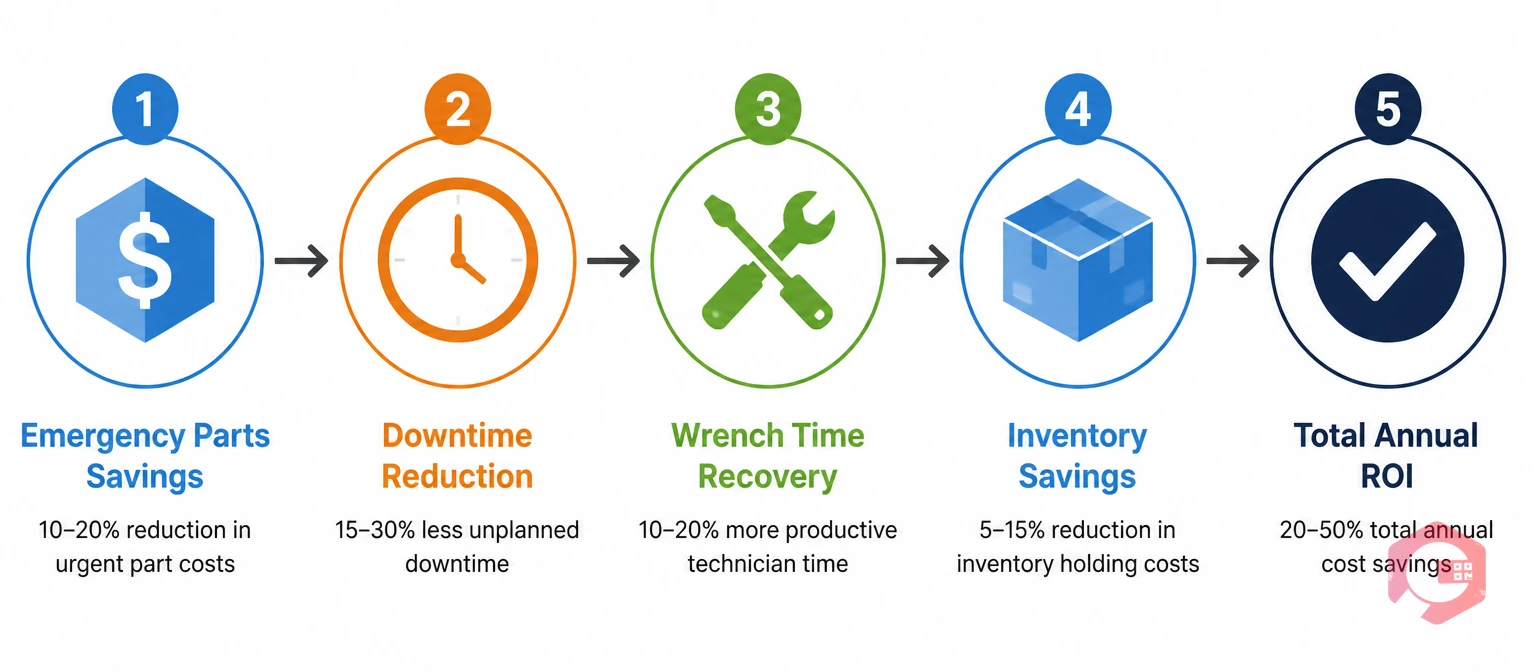
Once your baseline costs are established, the ROI calculation is straightforward. You're comparing the annual cost savings delivered by a CMMS against the annual software cost (subscription or amortised licence plus implementation).
A conservative benefits model for a mid-sized industrial facility typically looks like this. A 20% reduction in emergency parts spend on a $300K annual parts budget saves $60K. A 15% reduction in unplanned downtime on a $400K annual downtime loss saves $60K. A 10-point wrench time improvement worth $90K as calculated above. A 15% reduction in inventory carrying cost on a $200K parts inventory saves $30K per year in working capital. Combined: $240K in annual documented savings against a CMMS investment that typically runs $30K–$80K per year for a facility of this scale.
That is a 3×–8× return — and this model uses conservative assumptions. The mean maintenance cost calculator lets you plug in your specific numbers to generate a facility-level savings projection rather than relying on industry averages. Take that output into your CFO meeting — it converts your business case from a general claim into a facility-specific financial model.
One critical framing point: present your ROI as a range rather than a single number. A conservative case ($240K savings) and an expected case ($350K savings) bracket the projection credibly. CFOs distrust single-point estimates. A range signals that you've stress-tested your assumptions rather than cherry-picked favourable ones.
The payback period is the metric that most directly influences CFO approval decisions, because it answers the question that matters most: "When do we get our money back?"
Payback period = Total investment cost ÷ Annual savings delivered.
Using the example above: a $60K first-year investment (implementation plus first year of subscription) against $240K in conservative annual savings produces a payback period of approximately three months. Even if you apply a 50% haircut to the savings estimate to account for ramp-up time and imperfect adoption, you're still looking at a six-month payback — well within the 12–18 months that most CFOs consider acceptable for operational software.
Present this as a simple timeline chart, not a spreadsheet. Month 1–2: implementation and training. Month 3: first PM compliance improvements visible, emergency purchases start declining. Month 4–6: payback achieved at conservative savings rate. Month 7 onward: net positive ROI compounding. CFOs deal with complex financial models all day — a clear visual that shows the breakeven point immediately is more persuasive than a detailed NPV analysis buried in a workbook.
| Cost Category | Spreadsheet Approach | CMMS Approach | Annual Saving (example facility) |
|---|---|---|---|
| PM scheduling labour | 4–6 hrs/week of planner time building and distributing schedules manually | Auto-generated work orders; planner reviews exceptions only | $12,000–$18,000 |
| Emergency parts premium | 20–35% of parts spend on unplanned emergency orders at premium prices | Parts linked to PM schedules; reorder alerts prevent stockouts | $40,000–$90,000 |
| Technician travel/search time | Technicians locate asset history, manuals, and parts manually (avg 45 min/job) | Full asset history and documents on mobile at point of work | $25,000–$60,000 |
| Unplanned downtime losses | No PM tracking means failures surface as production stoppages | PM compliance tracking catches degrading assets before failure | $60,000–$200,000 |
| Compliance documentation | Manual assembly of audit records; 2–4 days per audit event | Automated audit trail; records generated at work order close | $8,000–$20,000 |
| Inventory over-stocking | Conservative buffer stocking drives 20–30% excess inventory value | Usage-based reorder thresholds eliminate unnecessary buffer | $15,000–$40,000 |
Spreadsheets have no licence cost, but they carry a substantial hidden operating cost — every hour a skilled maintenance professional spends maintaining a spreadsheet instead of maintaining equipment is a measurable productivity loss. Across a 10-person maintenance team, the combined overhead of manual scheduling, reporting, inventory tracking, and compliance documentation typically exceeds the full annual cost of a mid-tier CMMS before any downtime savings are counted.
Every CFO considering a CMMS budget request will raise at least one of four standard objections. Preparing written responses in advance — included as an appendix in your business case document — signals that you've thought this through and removes the need for off-the-cuff defensiveness in the meeting.
"Spreadsheets are free." Use the cost comparison table above. The spreadsheet approach isn't free — it's just that the cost shows up as overtime, emergency purchases, compliance failures, and downtime rather than a line item on the software budget. The CMMS cost is visible; the spreadsheet cost is hidden but real and significantly larger.
"Our team is too small to need this." A CMMS delivers proportionally larger savings to smaller teams, because smaller teams have less administrative capacity to manage a complex PM programme manually. A 3-person maintenance team spending 30% of its time on administrative tasks recovers a full person-equivalent of productive capacity by adopting a CMMS — a 33% productivity gain that no additional headcount could deliver at the same cost.
"We tried software before and it didn't stick." This objection is about implementation failure, not software failure. Address it by presenting your adoption plan: a phased rollout starting with the highest-impact use case (typically work order management or PM scheduling), a defined training programme by role, and a 90-day review checkpoint with measurable success criteria. Adoption failure happens when software is deployed without a change management plan — show you have one.
"What happens if the vendor goes under?" Address data portability: ensure your contract includes data export rights in standard formats (CSV, JSON) so that all maintenance history, asset records, and PM schedules can be migrated to any alternative platform. Cloud-based CMMS platforms from established vendors carry far lower continuity risk than the often-forgotten fact that a departing maintenance manager takes all the institutional knowledge stored only in their head or personal spreadsheet.

CFOs think about risk as well as cost. The risk framing often tips a borderline approval — because it shifts the question from "should we spend this money?" to "can we afford not to?"
Compliance risk is quantifiable. If your facility operates under ISO 55001, OSHA equipment maintenance requirements, or industry-specific regulations (FDA for pharma, HACCP for food and beverage), the cost of a compliance failure — fines, production shutdowns, remediation costs — frequently exceeds the entire annual CMMS investment by an order of magnitude. The downtime tracking and automated audit trail generated by a CMMS provide documented evidence of maintenance compliance that a spreadsheet cannot reliably produce.
Safety risk is even more compelling. According to the U.S. Occupational Safety and Health Administration (OSHA), inadequately maintained equipment is a leading cause of workplace injuries and fatalities in industrial settings. A maintenance-related safety incident carries costs that include workers' compensation, OSHA fines, legal exposure, production disruption, and reputational damage. The cost of a CMMS is trivially small compared to the liability exposure of a single serious incident rooted in missed preventive maintenance.
Key person dependency is a business continuity risk that resonates with CFOs. When your maintenance knowledge lives in one person's head or in spreadsheets that only they can navigate, that person leaving, retiring, or going on extended leave creates an operational crisis. A CMMS is your organisation's institutional memory for maintenance — every asset history, every PM procedure, every failure pattern is documented and accessible regardless of who is on shift.
A business case that gets approved typically runs 4–6 pages plus a one-page executive summary. The structure that works is: current state costs (your baseline from Step 1), projected savings with conservative and expected scenarios (Steps 2–3), payback timeline visual, risk reduction value (Step 5), vendor selection rationale with 3 options compared, implementation plan with milestones, and a one-page appendix handling common objections.
The executive summary is the most important page. Assume your CFO will read only this. It should contain: the problem statement in one sentence, the annual cost of the problem in a bold number, the proposed investment amount, the conservative payback period in months, and a single recommended action. Everything else is supporting evidence for the decision made on page one.
The vendor section matters more than most maintenance managers expect. CFOs don't want to select the cheapest option — they want to select the option with the best risk-adjusted return. Present three vendors with their pricing, implementation timelines, and the specific features relevant to your facility's top cost drivers. Show that you've done due diligence rather than arriving with a single vendor recommendation that feels like a predetermined conclusion.
For facilities evaluating a structured, enterprise-ready asset maintenance management system, the business case framework above applies directly — quantify your current costs, build the savings model against your facility's actual numbers, and present the payback period on a timeline your CFO can evaluate in under two minutes.
Most mid-sized industrial facilities achieve full payback within 6–12 months of go-live when the business case is built on documented baseline costs. Facilities with high emergency parts spend or significant unplanned downtime often see payback within 3–6 months. The payback period is directly driven by how large your current reactive maintenance cost base is — the more reactive your current programme, the faster a CMMS delivers return.
The standard method is: (Annual revenue ÷ Annual production hours) × Unplanned downtime hours = Revenue loss from downtime. Add the direct repair costs (emergency labour + parts) and any customer penalty or contractual exposure to get the full cost. For a more structured calculation, the unplanned downtime calculator at Cryotos walks through each input with guidance on which numbers to pull from your financial and maintenance records.
Cloud-based CMMS platforms (SaaS subscriptions) are typically classified as operating expenditure (OpEx), which means they don't require a capital budget approval and can often be funded from the maintenance department's existing operating budget. This is a significant advantage when presenting to a CFO — you're not asking for capital allocation, you're proposing to redirect a portion of current operating spend toward a higher-return channel. Clarify this framing early; it changes the approval process in most organisations.
Start with a 30-day measurement exercise before building the formal business case. Have your team log every reactive repair event — time spent, parts used, production stoppage duration — for one month. Extrapolate to an annual figure. Even a rough baseline is more persuasive than "we believe our downtime is significant." The measurement exercise itself often surfaces cost numbers that are larger than the maintenance team expected, which strengthens the urgency of the case.
Propose a phased implementation rather than a reduced-scope system. Start with the highest-ROI module — typically work order management or preventive maintenance scheduling — and build the financial case for expanding to additional modules once the first phase demonstrates measurable savings. A phased approach reduces the initial investment risk, produces early proof points for the CFO, and typically results in faster full deployment than trying to negotiate a budget compromise on features.
Building a CMMS business case that gets CFO approval is not about selling software — it is about presenting a documented, facility-specific financial argument that the cost of inaction exceeds the cost of investment. The framework above gives you the structure to do that, from baseline cost quantification through payback period calculation to objection handling. Cryotos CMMS is designed to make that investment case as strong as possible, with a 30% average reduction in unplanned downtime and 25% faster repair times reported by customers across manufacturing, facilities, and field service operations. Schedule a free demo to get facility-specific data that supports your business case presentation.




Cryotos AI predicts failures, automates work orders, and simplifies maintenance—before problems slow you down.



