Best Field Service Management Software in 2025 (+ Key Features to Look For)

Article Written by:

Created On:

April 1, 2026

Best Field Service Management Software in 2025 (+ Key Features to Look For)

Field service management software helps businesses schedule jobs, dispatch technicians, track assets, and close work orders — all from a single platform. According to a MarketsandMarkets report, the global FSM market is projected to grow from $3.2 billion in 2023 to $8.1 billion by 2028, driven by the surge in mobile workforces and connected equipment. Yet many field teams still rely on spreadsheets, phone calls, and paper forms — costing them an average of 25% more in travel time and rework than teams using dedicated FSM tools.

This guide covers the best field service management software available in 2025. You’ll find the features that actually matter, a clear explanation of how FSM differs from a CMMS, and a step-by-step framework for picking the right tool — whether you run a team of 5 technicians or 500.
What Is Field Service Management Software?

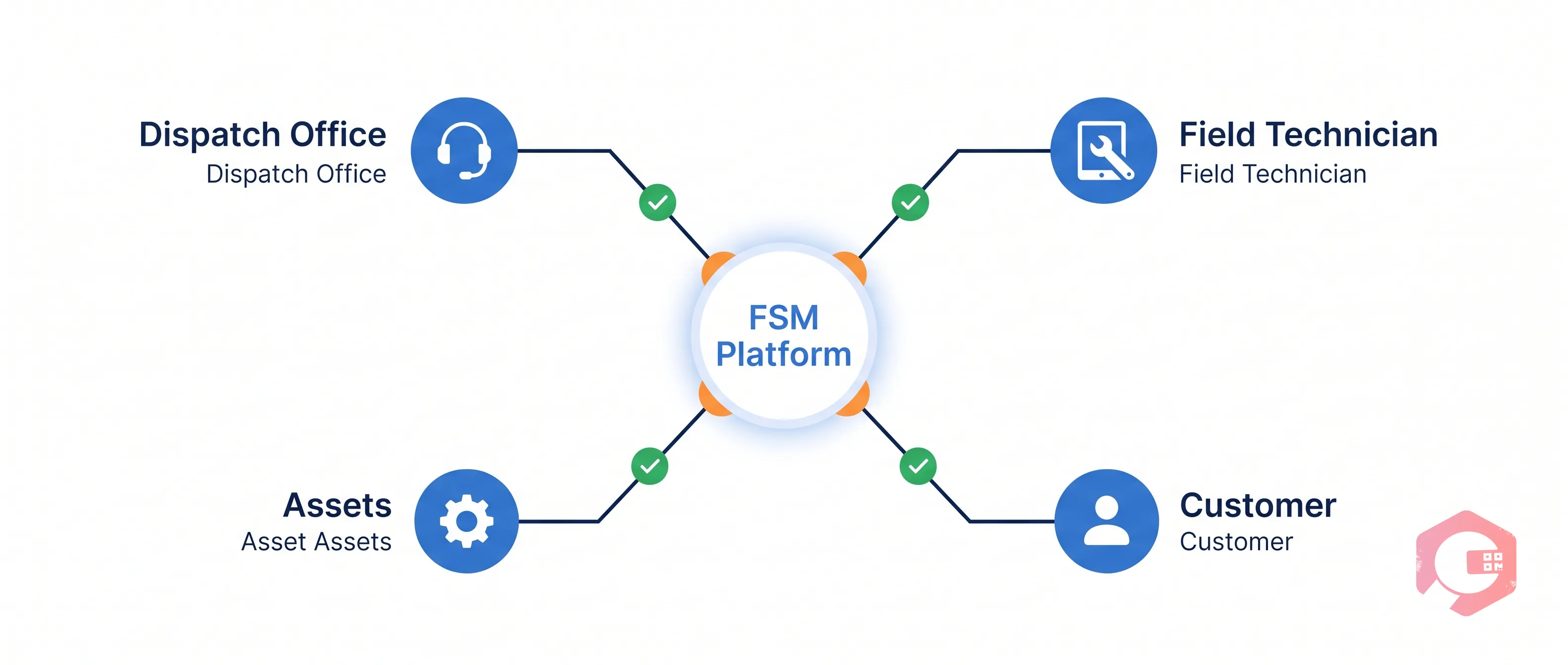
Field service management software is a digital platform that helps organisations plan, dispatch, track, and close field service jobs. It connects office-based teams with technicians in the field, giving everyone real-time visibility into job status, asset condition, and technician location. The core goal: get the right person to the right place at the right time, with everything they need to complete the job on the first visit.

Modern FSM platforms go well beyond scheduling. They handle work order creation, parts inventory, customer communication, compliance documentation, and post-job reporting — all in one system.

FSM Software vs. CMMS — What’s the Difference?

FSM and CMMS (Computerised Maintenance Management System) software often get confused, and for good reason — they overlap significantly. Here’s how to think about the distinction:

CapabilityFSM SoftwareCMMSWork order management✅ Core feature✅ Core featureField technician dispatch✅ Optimised for this⚠️ Basic in most toolsAsset lifecycle tracking⚠️ Limited in most tools✅ Optimised for thisPreventive maintenance scheduling⚠️ Varies by tool✅ Core featureCustomer-facing job portals✅ Common feature❌ Rarely includedIoT & sensor integration⚠️ Emerging✅ Common in enterprise toolsBest forService businesses (HVAC, plumbing, electrical, telecoms)Asset-heavy industries (manufacturing, facilities, utilities)

The short answer: if your team primarily dispatches technicians to customer sites, FSM software is the right fit. If your team maintains physical equipment and infrastructure at fixed locations, a CMMS is more appropriate. Many modern platforms — including Cryotos — now bridge both worlds.

Key Features of the Best Field Service Management Software

Best Field Service Management Software in 2025 (+ Key Features to Look For) — scenario

Not all FSM platforms are built the same. These are the six capabilities that separate tools that genuinely improve field operations from ones that just replace paper forms.

Work Order and Job Scheduling

The foundation of any FSM tool. Look for drag-and-drop scheduling, automated job assignment based on technician skill and location, and the ability to handle recurring jobs without manual re-entry. A maintenance team at a UK facilities company reduced scheduling time by 40% after switching from manual calendar management to automated work order assignment in their FSM platform. Work order management should feel effortless — not like filling out a form.

Mobile App for Field Technicians

Your field team won’t use a tool that’s painful on mobile. The best FSM apps work offline (syncing when connectivity returns), support photo and video attachments, allow digital signatures on-site, and surface all job history for the asset being serviced. An app that requires three taps to log a job completion is three taps too many.

Real-Time Dispatching and GPS Tracking

Real-time visibility into technician location lets dispatchers reassign urgent jobs without phone calls and gives customers accurate arrival windows. According to a Aberdeen Group study, top-performing service organisations are 1.6x more likely to use real-time location data for dispatch decisions. Look for map-based dispatch views with live technician status.

Preventive Maintenance and Asset Management

The best FSM tools let you build preventive maintenance schedules tied directly to specific assets — not just time-based intervals, but usage-based triggers (hours run, kilometres travelled, cycles completed). This moves your team from reactive repair to proactive upkeep, reducing unplanned downtime. Cryotos, for example, supports both static PMs (fixed intervals) and dynamic PMs (usage-based), which is rare in FSM-first tools.

Reporting, Analytics, and KPIs

You can’t improve what you can’t measure. FSM software should track first-time fix rate, mean time to repair (MTTR), technician utilisation, and job completion rate — and surface these as visual dashboards rather than raw exports. Scheduled reports sent to operations managers weekly are a sign of a mature platform.

IoT Integration and AI-Powered Scheduling

This is where FSM software is heading in 2025. The best platforms now integrate with IoT sensors (SCADA, PLC, edge devices) to trigger work orders automatically when equipment crosses a threshold — no human needs to spot the problem first. AI-powered scheduling algorithms then assign the job to the nearest available technician with the right skill set, cutting average response time significantly. This combination of IoT alerting and AI dispatch is the clearest differentiator between legacy FSM tools and modern platforms.

FSM Feature Evaluation Checklist
  • ☐ Drag-and-drop job scheduling with technician availability view
  • ☐ Mobile app with offline mode and photo/video attachments
  • ☐ GPS tracking and map-based dispatch console
  • ☐ Asset history accessible from the field on mobile
  • ☐ Preventive maintenance scheduling (time-based and usage-based)
  • ☐ KPI dashboards (MTTR, first-time fix rate, utilisation)
  • ☐ API or native integration with your ERP or CMMS
  • ☐ IoT/sensor integration for automated job triggering
  • ☐ Customer notification system (SMS, email, WhatsApp)
  • ☐ Compliance and safety documentation support

Top Field Service Management Software in 2025

Best Field Service Management Software in 2025 (+ Key Features to Look For) — problems grid

Here are the platforms worth evaluating this year, each with a clear “best for” use case so you can quickly identify the right fit.

1. Cryotos — Best for Asset-Heavy Industries

Cryotos is built for organisations that manage both field service jobs and physical assets — manufacturing plants, utilities, facilities management, and industrial maintenance teams. Unlike pure FSM tools, Cryotos combines field dispatch with a full CMMS, meaning your team gets work order management, asset lifecycle tracking, preventive maintenance scheduling, and real-time downtime tracking under one roof. Standout features include AI-powered work order creation via voice commands or photo analysis, IoT integration with SCADA and PLC systems, and WhatsApp notifications for technicians and managers. Cryotos customers report up to 30% reduction in downtime and 25% faster repair times. Ideal for teams of 10–500+ technicians in asset-intensive sectors.

2. Salesforce Field Service — Best for Enterprise

Salesforce Field Service (formerly Field Service Lightning) is the go-to for large enterprises already running Salesforce CRM. It offers powerful scheduling optimisation, an AI-assisted dispatcher console, and deep Salesforce ecosystem integration. The trade-off: it’s expensive, complex to implement, and overkill for any team not already invested in the Salesforce stack. Pricing starts in the hundreds of dollars per user per month.

3. ServiceTitan — Best for Residential and HVAC

ServiceTitan dominates the residential service space — HVAC, plumbing, electrical, and roofing. It’s packed with customer-facing features like automated appointment reminders, technician bios sent to customers before arrival, and built-in financing options. Less suited for industrial or facilities environments where asset management depth matters more than customer experience tools.

4. Jobber — Best for Small Service Teams

Jobber is one of the cleanest FSM tools available for teams of 1–25 technicians. It handles quoting, scheduling, invoicing, and payment collection in a single interface, with a genuinely good mobile app. It lacks the asset management and IoT depth needed for industrial environments, but for home services and light commercial work it’s hard to beat for simplicity and price.

5. Housecall Pro — Best for Home Services

Housecall Pro targets home service businesses — cleaning, landscaping, pest control, HVAC. Its strengths are customer communication (automated review requests, job reminders) and ease of setup. It’s not designed for teams managing complex assets or multi-site industrial maintenance, but for a 5–15 person home services company it covers all the essentials.

6. FieldPulse — Best Budget Option

FieldPulse offers solid core FSM capabilities — scheduling, dispatching, invoicing, GPS tracking — at a price point well below Salesforce or ServiceTitan. It’s a strong starting point for growing service businesses that need more structure than spreadsheets but aren’t ready to commit to an enterprise platform. Customisation options are limited compared to mid-market tools.

Quick Comparison Table

ToolBest ForMobile AppAsset ManagementIoT IntegrationStarting PriceCryotosAsset-heavy / industrial✅ Offline mode✅ Full CMMS✅ SCADA/PLCContact for pricingSalesforce Field ServiceEnterprise (Salesforce users)✅⚠️ Limited⚠️ Via connectors~$150/user/moServiceTitanResidential / HVAC✅⚠️ Basic❌~$125/user/moJobberSmall teams (1–25)✅❌❌~$49/mo flatHousecall ProHome services✅❌❌~$65/mo flatFieldPulseBudget / growing teams✅❌❌~$99/mo flat

How to Choose the Best FSM Software for Your Team

Best Field Service Management Software in 2025 (+ Key Features to Look For) — workflow

The right FSM tool depends heavily on your industry, team size, and existing tech stack. Work through these five steps before committing to a platform.

Step 1 — Define Your Field Service Workflow

Map out how a typical job moves through your organisation: from initial request or scheduled PM, through dispatch, on-site execution, parts usage, and final sign-off. Note every manual step or handoff — those are the points where FSM software will save you the most time. Teams that skip this step often end up buying a tool that solves the wrong problem.

Step 2 — Identify Must-Have vs. Nice-to-Have Features

Use the FSM Feature Evaluation Checklist above. Mark each feature as must-have, nice-to-have, or not needed. Any tool you evaluate must tick all your must-haves before you even look at pricing. This simple exercise eliminates 60–70% of the market immediately and keeps demos focused.

Step 3 — Evaluate Mobile Capabilities

Get your actual technicians to test the mobile app during the trial period — not just managers. Field staff will quickly identify friction points that don’t show up in sales demos. Key tests: can they log job completion in under 60 seconds? Does it work when offline? Can they access full asset history while on-site?

Step 4 — Check Integration with Your ERP or CMMS

FSM software lives alongside other systems — CMMS, ERP (SAP, Microsoft Dynamics), inventory management, and accounting software. Check whether the tool offers native integrations or requires custom API work. According to Gartner, integration complexity is the #1 reason FSM implementations run over budget and timeline.

Step 5 — Calculate Total Cost of Ownership

Per-user pricing is just the starting point. Add implementation fees, training costs, API integration work, and ongoing support costs. A tool priced at $50/user/month with a $15,000 implementation fee may cost more in year one than a $150/user/month platform with free onboarding. Ask vendors for an all-in year-one cost estimate before signing anything.

Benefits of Using Field Service Management Software

Best Field Service Management Software in 2025 (+ Key Features to Look For) — lifecycle

Teams that move from manual processes to a dedicated FSM platform consistently report improvements across four areas.

Faster First-Time Fix Rates

When technicians arrive with full asset history, the right parts already loaded, and clear job instructions, they fix the problem the first time more often. Industry data from ServiceMax shows that best-in-class service organisations achieve first-time fix rates above 88%, compared to an industry average of around 75%. Closing that gap directly cuts repeat visits, customer complaints, and labour cost.

Reduced Dispatch Time and Travel Costs

Intelligent scheduling that factors in technician location, skill, and current job load reduces average drive time per job. A logistics and facilities firm in Southeast Asia reduced fuel costs by 18% in the first six months after deploying an FSM platform with GPS-optimised routing — without reducing their service volume.

Better Technician Utilisation

Manual scheduling leaves gaps — jobs that run short with no next assignment queued, or technicians waiting for parts that weren’t pre-ordered. FSM software tracks actual vs. available hours per technician and flags utilisation gaps in real time. Teams typically see 15–20% improvement in billable hours per technician in the first quarter after deployment.

Real-Time Visibility Across All Job Sites

Operations managers stop chasing status updates via phone. Live dashboards show every open job, its current status, technician location, and any blockers — giving managers time to act on problems rather than discover them after the fact. This visibility is especially valuable for multi-site operations managing dozens of concurrent field jobs.

How AI Is Changing Field Service Management in 2025

The biggest shift in FSM software over the past two years isn’t in the features themselves — it’s in how those features get triggered and optimised. AI is removing the manual decision-making that slows field operations at every step.

Predictive dispatch: AI scheduling engines now analyse historical job data — how long similar jobs took, which technicians completed them fastest, what parts were used — and pre-build optimal technician routes for the day before the dispatcher even logs in.

IoT-triggered work orders: When a vibration sensor on a compressor crosses a threshold, the FSM platform automatically creates a work order, assigns it to the nearest qualified technician, and notifies the asset owner — all without human input. This is already live in platforms like Cryotos, which integrates directly with SCADA and PLC systems to turn sensor alerts into dispatched jobs. See how Cryotos handles IoT-driven maintenance.

AI-assisted work order creation: Instead of typing job details, technicians can speak a description or take a photo of the fault — and the platform generates a structured work order with the correct asset, fault code, and priority level automatically. This cuts job logging time by up to 70% for teams with high job volumes.

According to McKinsey, companies using AI in their field service operations reduce scheduling time by up to 30% and increase technician productivity by 15–20%. These gains compound over time as the AI model learns from your specific job data.

Frequently Asked Questions

What is field service management software used for?

Field service management software is used to schedule and dispatch field technicians, manage work orders, track job progress in real time, maintain asset records, and capture job completion data including parts used, time spent, and customer sign-off. It replaces phone calls, spreadsheets, and paper forms with a single connected system for both office and field staff.

What is the difference between FSM software and CMMS?

FSM software focuses on dispatching technicians to customer sites and managing the customer-facing aspects of service jobs. CMMS focuses on maintaining physical assets — tracking their condition, scheduling preventive maintenance, and managing repair history. The lines blur in modern platforms: tools like Cryotos combine both in a single system, making them suitable for asset-heavy industries that need both field dispatch and deep asset management.

How much does field service management software cost?

FSM software typically ranges from $49/month flat for small-team tools like Jobber to $150+/user/month for enterprise platforms like Salesforce Field Service. Most mid-market tools land between $65–$100/user/month. Budget for implementation, training, and integration costs on top of licensing fees — these can add 30–50% to year-one spend on larger deployments.

What are the top features to look for in FSM software?

The most important features are work order scheduling, a strong mobile app with offline mode, GPS-based dispatch, preventive maintenance scheduling tied to specific assets, and KPI dashboards tracking first-time fix rate and technician utilisation. For industrial teams, IoT integration and CMMS capabilities are also critical. Use the FSM Feature Evaluation Checklist in this guide to score tools against your specific needs.

Is field service management software worth it for small businesses?

Yes — the ROI case is strong even for teams of 5–10 technicians. Eliminating double-booking, reducing drive time with smarter routing, and cutting admin time on paperwork typically saves 5–10 hours per technician per week. Tools like Jobber and Housecall Pro are specifically designed for small teams and can be up and running in a day with minimal setup.

How does AI improve field service management?

AI improves FSM in three main ways: predictive scheduling (building optimal technician routes before the day starts), IoT-triggered work order creation (auto-generating jobs from sensor alerts), and smart job logging (creating structured work orders from voice input or photos). Together, these reduce dispatch time, cut manual admin, and improve first-time fix rates by ensuring technicians arrive with the right information and parts every time.

If your field teams manage physical assets alongside jobs, Cryotos combines best-in-class FSM with a full CMMS — so your team gets real-time job dispatch, preventive maintenance scheduling, asset lifecycle tracking, and IoT integration in one platform. Book a free demo and see how teams in manufacturing, facilities, and utilities use Cryotos to cut downtime and run tighter field operations.


Want to Try Cryotos CMMS Today? Lets Connect!
Thank you! Your submission has been received!
Oops! Something went wrong while submitting the form.
Related Post

Best Field Service Management Software in 2025 (+ Key Features to Look For)

Calendar
Duration:
14 min read
person
calendar today
Published on
April 1, 2026
Featured Image

Field service management software helps businesses schedule jobs, dispatch technicians, track assets, and close work orders — all from a single platform. According to a MarketsandMarkets report, the global FSM market is projected to grow from $3.2 billion in 2023 to $8.1 billion by 2028, driven by the surge in mobile workforces and connected equipment. Yet many field teams still rely on spreadsheets, phone calls, and paper forms — costing them an average of 25% more in travel time and rework than teams using dedicated FSM tools.

This guide covers the best field service management software available in 2025. You’ll find the features that actually matter, a clear explanation of how FSM differs from a CMMS, and a step-by-step framework for picking the right tool — whether you run a team of 5 technicians or 500.

What Is Field Service Management Software?

Field service management software is a digital platform that helps organisations plan, dispatch, track, and close field service jobs. It connects office-based teams with technicians in the field, giving everyone real-time visibility into job status, asset condition, and technician location. The core goal: get the right person to the right place at the right time, with everything they need to complete the job on the first visit.

Modern FSM platforms go well beyond scheduling. They handle work order creation, parts inventory, customer communication, compliance documentation, and post-job reporting — all in one system.

FSM Software vs. CMMS — What’s the Difference?

FSM and CMMS (Computerised Maintenance Management System) software often get confused, and for good reason — they overlap significantly. Here’s how to think about the distinction:

CapabilityFSM SoftwareCMMSWork order management✅ Core feature✅ Core featureField technician dispatch✅ Optimised for this⚠️ Basic in most toolsAsset lifecycle tracking⚠️ Limited in most tools✅ Optimised for thisPreventive maintenance scheduling⚠️ Varies by tool✅ Core featureCustomer-facing job portals✅ Common feature❌ Rarely includedIoT & sensor integration⚠️ Emerging✅ Common in enterprise toolsBest forService businesses (HVAC, plumbing, electrical, telecoms)Asset-heavy industries (manufacturing, facilities, utilities)

The short answer: if your team primarily dispatches technicians to customer sites, FSM software is the right fit. If your team maintains physical equipment and infrastructure at fixed locations, a CMMS is more appropriate. Many modern platforms — including Cryotos — now bridge both worlds.

Key Features of the Best Field Service Management Software

Best Field Service Management Software in 2025 (+ Key Features to Look For) — scenario

Not all FSM platforms are built the same. These are the six capabilities that separate tools that genuinely improve field operations from ones that just replace paper forms.

Work Order and Job Scheduling

The foundation of any FSM tool. Look for drag-and-drop scheduling, automated job assignment based on technician skill and location, and the ability to handle recurring jobs without manual re-entry. A maintenance team at a UK facilities company reduced scheduling time by 40% after switching from manual calendar management to automated work order assignment in their FSM platform. Work order management should feel effortless — not like filling out a form.

Mobile App for Field Technicians

Your field team won’t use a tool that’s painful on mobile. The best FSM apps work offline (syncing when connectivity returns), support photo and video attachments, allow digital signatures on-site, and surface all job history for the asset being serviced. An app that requires three taps to log a job completion is three taps too many.

Real-Time Dispatching and GPS Tracking

Real-time visibility into technician location lets dispatchers reassign urgent jobs without phone calls and gives customers accurate arrival windows. According to a Aberdeen Group study, top-performing service organisations are 1.6x more likely to use real-time location data for dispatch decisions. Look for map-based dispatch views with live technician status.

Preventive Maintenance and Asset Management

The best FSM tools let you build preventive maintenance schedules tied directly to specific assets — not just time-based intervals, but usage-based triggers (hours run, kilometres travelled, cycles completed). This moves your team from reactive repair to proactive upkeep, reducing unplanned downtime. Cryotos, for example, supports both static PMs (fixed intervals) and dynamic PMs (usage-based), which is rare in FSM-first tools.

Reporting, Analytics, and KPIs

You can’t improve what you can’t measure. FSM software should track first-time fix rate, mean time to repair (MTTR), technician utilisation, and job completion rate — and surface these as visual dashboards rather than raw exports. Scheduled reports sent to operations managers weekly are a sign of a mature platform.

IoT Integration and AI-Powered Scheduling

This is where FSM software is heading in 2025. The best platforms now integrate with IoT sensors (SCADA, PLC, edge devices) to trigger work orders automatically when equipment crosses a threshold — no human needs to spot the problem first. AI-powered scheduling algorithms then assign the job to the nearest available technician with the right skill set, cutting average response time significantly. This combination of IoT alerting and AI dispatch is the clearest differentiator between legacy FSM tools and modern platforms.

FSM Feature Evaluation Checklist
  • ☐ Drag-and-drop job scheduling with technician availability view
  • ☐ Mobile app with offline mode and photo/video attachments
  • ☐ GPS tracking and map-based dispatch console
  • ☐ Asset history accessible from the field on mobile
  • ☐ Preventive maintenance scheduling (time-based and usage-based)
  • ☐ KPI dashboards (MTTR, first-time fix rate, utilisation)
  • ☐ API or native integration with your ERP or CMMS
  • ☐ IoT/sensor integration for automated job triggering
  • ☐ Customer notification system (SMS, email, WhatsApp)
  • ☐ Compliance and safety documentation support

Top Field Service Management Software in 2025

Best Field Service Management Software in 2025 (+ Key Features to Look For) — problems grid

Here are the platforms worth evaluating this year, each with a clear “best for” use case so you can quickly identify the right fit.

1. Cryotos — Best for Asset-Heavy Industries

Cryotos is built for organisations that manage both field service jobs and physical assets — manufacturing plants, utilities, facilities management, and industrial maintenance teams. Unlike pure FSM tools, Cryotos combines field dispatch with a full CMMS, meaning your team gets work order management, asset lifecycle tracking, preventive maintenance scheduling, and real-time downtime tracking under one roof. Standout features include AI-powered work order creation via voice commands or photo analysis, IoT integration with SCADA and PLC systems, and WhatsApp notifications for technicians and managers. Cryotos customers report up to 30% reduction in downtime and 25% faster repair times. Ideal for teams of 10–500+ technicians in asset-intensive sectors.

2. Salesforce Field Service — Best for Enterprise

Salesforce Field Service (formerly Field Service Lightning) is the go-to for large enterprises already running Salesforce CRM. It offers powerful scheduling optimisation, an AI-assisted dispatcher console, and deep Salesforce ecosystem integration. The trade-off: it’s expensive, complex to implement, and overkill for any team not already invested in the Salesforce stack. Pricing starts in the hundreds of dollars per user per month.

3. ServiceTitan — Best for Residential and HVAC

ServiceTitan dominates the residential service space — HVAC, plumbing, electrical, and roofing. It’s packed with customer-facing features like automated appointment reminders, technician bios sent to customers before arrival, and built-in financing options. Less suited for industrial or facilities environments where asset management depth matters more than customer experience tools.

4. Jobber — Best for Small Service Teams

Jobber is one of the cleanest FSM tools available for teams of 1–25 technicians. It handles quoting, scheduling, invoicing, and payment collection in a single interface, with a genuinely good mobile app. It lacks the asset management and IoT depth needed for industrial environments, but for home services and light commercial work it’s hard to beat for simplicity and price.

5. Housecall Pro — Best for Home Services

Housecall Pro targets home service businesses — cleaning, landscaping, pest control, HVAC. Its strengths are customer communication (automated review requests, job reminders) and ease of setup. It’s not designed for teams managing complex assets or multi-site industrial maintenance, but for a 5–15 person home services company it covers all the essentials.

6. FieldPulse — Best Budget Option

FieldPulse offers solid core FSM capabilities — scheduling, dispatching, invoicing, GPS tracking — at a price point well below Salesforce or ServiceTitan. It’s a strong starting point for growing service businesses that need more structure than spreadsheets but aren’t ready to commit to an enterprise platform. Customisation options are limited compared to mid-market tools.

Quick Comparison Table

ToolBest ForMobile AppAsset ManagementIoT IntegrationStarting PriceCryotosAsset-heavy / industrial✅ Offline mode✅ Full CMMS✅ SCADA/PLCContact for pricingSalesforce Field ServiceEnterprise (Salesforce users)✅⚠️ Limited⚠️ Via connectors~$150/user/moServiceTitanResidential / HVAC✅⚠️ Basic❌~$125/user/moJobberSmall teams (1–25)✅❌❌~$49/mo flatHousecall ProHome services✅❌❌~$65/mo flatFieldPulseBudget / growing teams✅❌❌~$99/mo flat

How to Choose the Best FSM Software for Your Team

Best Field Service Management Software in 2025 (+ Key Features to Look For) — workflow

The right FSM tool depends heavily on your industry, team size, and existing tech stack. Work through these five steps before committing to a platform.

Step 1 — Define Your Field Service Workflow

Map out how a typical job moves through your organisation: from initial request or scheduled PM, through dispatch, on-site execution, parts usage, and final sign-off. Note every manual step or handoff — those are the points where FSM software will save you the most time. Teams that skip this step often end up buying a tool that solves the wrong problem.

Step 2 — Identify Must-Have vs. Nice-to-Have Features

Use the FSM Feature Evaluation Checklist above. Mark each feature as must-have, nice-to-have, or not needed. Any tool you evaluate must tick all your must-haves before you even look at pricing. This simple exercise eliminates 60–70% of the market immediately and keeps demos focused.

Step 3 — Evaluate Mobile Capabilities

Get your actual technicians to test the mobile app during the trial period — not just managers. Field staff will quickly identify friction points that don’t show up in sales demos. Key tests: can they log job completion in under 60 seconds? Does it work when offline? Can they access full asset history while on-site?

Step 4 — Check Integration with Your ERP or CMMS

FSM software lives alongside other systems — CMMS, ERP (SAP, Microsoft Dynamics), inventory management, and accounting software. Check whether the tool offers native integrations or requires custom API work. According to Gartner, integration complexity is the #1 reason FSM implementations run over budget and timeline.

Step 5 — Calculate Total Cost of Ownership

Per-user pricing is just the starting point. Add implementation fees, training costs, API integration work, and ongoing support costs. A tool priced at $50/user/month with a $15,000 implementation fee may cost more in year one than a $150/user/month platform with free onboarding. Ask vendors for an all-in year-one cost estimate before signing anything.

Benefits of Using Field Service Management Software

Best Field Service Management Software in 2025 (+ Key Features to Look For) — lifecycle

Teams that move from manual processes to a dedicated FSM platform consistently report improvements across four areas.

Faster First-Time Fix Rates

When technicians arrive with full asset history, the right parts already loaded, and clear job instructions, they fix the problem the first time more often. Industry data from ServiceMax shows that best-in-class service organisations achieve first-time fix rates above 88%, compared to an industry average of around 75%. Closing that gap directly cuts repeat visits, customer complaints, and labour cost.

Reduced Dispatch Time and Travel Costs

Intelligent scheduling that factors in technician location, skill, and current job load reduces average drive time per job. A logistics and facilities firm in Southeast Asia reduced fuel costs by 18% in the first six months after deploying an FSM platform with GPS-optimised routing — without reducing their service volume.

Better Technician Utilisation

Manual scheduling leaves gaps — jobs that run short with no next assignment queued, or technicians waiting for parts that weren’t pre-ordered. FSM software tracks actual vs. available hours per technician and flags utilisation gaps in real time. Teams typically see 15–20% improvement in billable hours per technician in the first quarter after deployment.

Real-Time Visibility Across All Job Sites

Operations managers stop chasing status updates via phone. Live dashboards show every open job, its current status, technician location, and any blockers — giving managers time to act on problems rather than discover them after the fact. This visibility is especially valuable for multi-site operations managing dozens of concurrent field jobs.

How AI Is Changing Field Service Management in 2025

The biggest shift in FSM software over the past two years isn’t in the features themselves — it’s in how those features get triggered and optimised. AI is removing the manual decision-making that slows field operations at every step.

Predictive dispatch: AI scheduling engines now analyse historical job data — how long similar jobs took, which technicians completed them fastest, what parts were used — and pre-build optimal technician routes for the day before the dispatcher even logs in.

IoT-triggered work orders: When a vibration sensor on a compressor crosses a threshold, the FSM platform automatically creates a work order, assigns it to the nearest qualified technician, and notifies the asset owner — all without human input. This is already live in platforms like Cryotos, which integrates directly with SCADA and PLC systems to turn sensor alerts into dispatched jobs. See how Cryotos handles IoT-driven maintenance.

AI-assisted work order creation: Instead of typing job details, technicians can speak a description or take a photo of the fault — and the platform generates a structured work order with the correct asset, fault code, and priority level automatically. This cuts job logging time by up to 70% for teams with high job volumes.

According to McKinsey, companies using AI in their field service operations reduce scheduling time by up to 30% and increase technician productivity by 15–20%. These gains compound over time as the AI model learns from your specific job data.

Frequently Asked Questions

What is field service management software used for?

Field service management software is used to schedule and dispatch field technicians, manage work orders, track job progress in real time, maintain asset records, and capture job completion data including parts used, time spent, and customer sign-off. It replaces phone calls, spreadsheets, and paper forms with a single connected system for both office and field staff.

What is the difference between FSM software and CMMS?

FSM software focuses on dispatching technicians to customer sites and managing the customer-facing aspects of service jobs. CMMS focuses on maintaining physical assets — tracking their condition, scheduling preventive maintenance, and managing repair history. The lines blur in modern platforms: tools like Cryotos combine both in a single system, making them suitable for asset-heavy industries that need both field dispatch and deep asset management.

How much does field service management software cost?

FSM software typically ranges from $49/month flat for small-team tools like Jobber to $150+/user/month for enterprise platforms like Salesforce Field Service. Most mid-market tools land between $65–$100/user/month. Budget for implementation, training, and integration costs on top of licensing fees — these can add 30–50% to year-one spend on larger deployments.

What are the top features to look for in FSM software?

The most important features are work order scheduling, a strong mobile app with offline mode, GPS-based dispatch, preventive maintenance scheduling tied to specific assets, and KPI dashboards tracking first-time fix rate and technician utilisation. For industrial teams, IoT integration and CMMS capabilities are also critical. Use the FSM Feature Evaluation Checklist in this guide to score tools against your specific needs.

Is field service management software worth it for small businesses?

Yes — the ROI case is strong even for teams of 5–10 technicians. Eliminating double-booking, reducing drive time with smarter routing, and cutting admin time on paperwork typically saves 5–10 hours per technician per week. Tools like Jobber and Housecall Pro are specifically designed for small teams and can be up and running in a day with minimal setup.

How does AI improve field service management?

AI improves FSM in three main ways: predictive scheduling (building optimal technician routes before the day starts), IoT-triggered work order creation (auto-generating jobs from sensor alerts), and smart job logging (creating structured work orders from voice input or photos). Together, these reduce dispatch time, cut manual admin, and improve first-time fix rates by ensuring technicians arrive with the right information and parts every time.

If your field teams manage physical assets alongside jobs, Cryotos combines best-in-class FSM with a full CMMS — so your team gets real-time job dispatch, preventive maintenance scheduling, asset lifecycle tracking, and IoT integration in one platform. Book a free demo and see how teams in manufacturing, facilities, and utilities use Cryotos to cut downtime and run tighter field operations.

Want to Try Cryotos CMMS Today?

Get Free Demo

Let AI Take Control of Your Maintenance

Cryotos AI predicts failures, automates work orders, and simplifies maintenance—before problems slow you down.

Try AI-Powered CMMS
🡢