

A CMMS go-live is not a finish line — it is the starting gate. The first 30 days after your Computerized Maintenance Management System launches are when adoption is won or lost, when data quality gaps get embedded or corrected, and when the habits that determine long-term ROI are either established or missed. According to a Plant Engineering maintenance study, organisations that follow a structured post-launch process achieve user adoption rates 2.3 times higher than those that treat go-live as the end of the project — and they recover their implementation investment in roughly half the time.
Key Takeaways

Most CMMS implementations are carefully planned up to go-live and then left to find their own way afterward. The team focuses on data migration, configuration, and training — all of which are critical — but the post-launch phase rarely gets the same structured attention. The result is a predictable pattern: adoption peaks in the first week when excitement is high, then drifts down as technicians revert to familiar habits, supervisors start working around the system rather than through it, and the gap between what the CMMS should be doing and what it actually is doing quietly widens.
The first 30 days are when habits form. According to McKinsey research on change management, technology rollouts that include structured post-go-live reinforcement are 30% more likely to deliver their projected ROI than those that focus solely on pre-launch training. A technician who closes their first ten work orders through the CMMS will find the eleventh natural. A technician who closes their first ten by telling their supervisor verbally while the system sits open on a desk will find the CMMS an obstacle rather than a tool. The window to shape that first set of habits is short — and once the drift toward workarounds sets in, reversing it requires significantly more management effort than preventing it in the first place.
The first 30 days also determine the quality of your baseline data. Every PM completion, work order closure, and downtime event logged in month one becomes part of the failure history that will drive smarter maintenance decisions in months six, twelve, and beyond. Data captured inconsistently or not at all in the early weeks creates permanent gaps in that history. The technicians who were on shift when the bearing failed in week three will eventually move to other roles — and if the failure mode, parts used, and repair time were not captured in the system, that information is gone permanently.
This checklist organises the first 30 days into four weekly phases. Each phase has a defined focus, a set of actions to complete, and a clear signal that tells you whether you are on track or need to intervene.
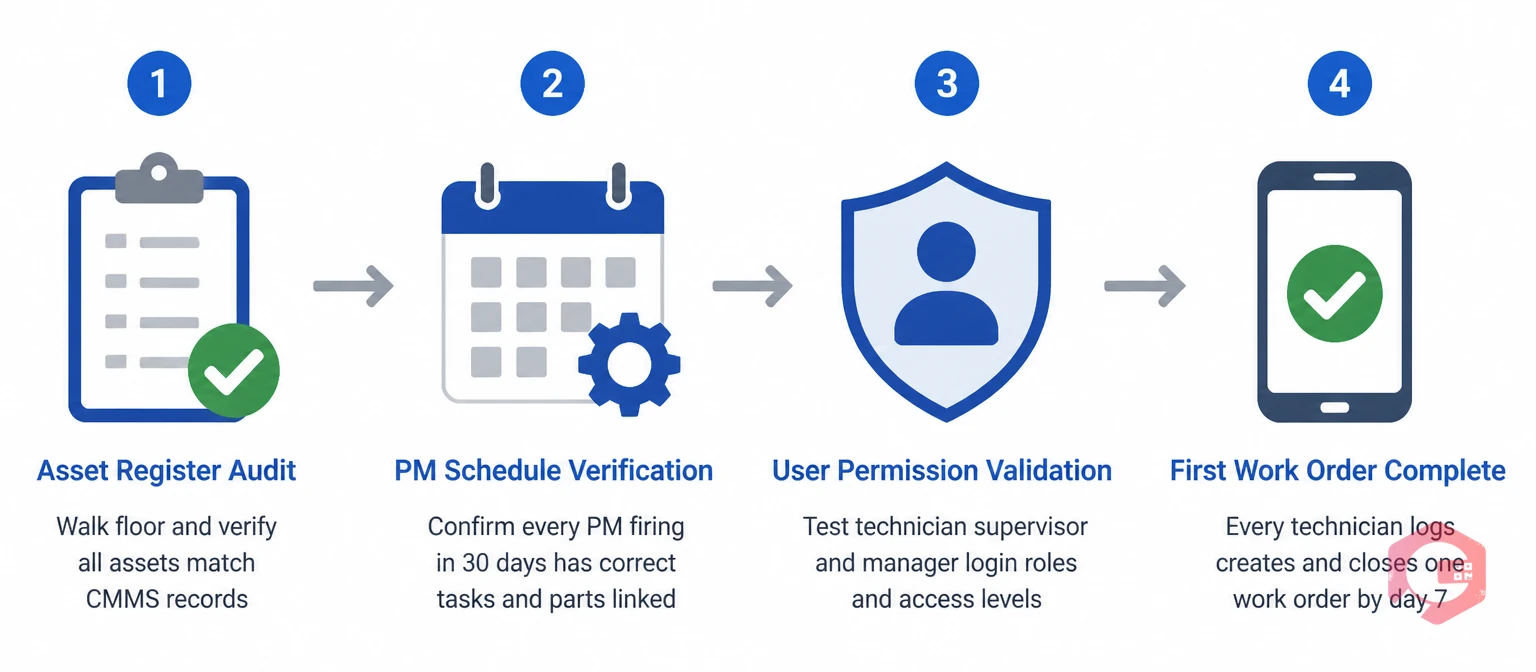
The first week is not about productivity — it is about correctness. Every asset record, PM schedule, work order template, and user permission that is wrong in week one will generate problems for months. Catching errors now takes minutes; fixing their downstream consequences takes hours.
Start with a structured asset register audit. Walk the floor with your CMMS asset list and verify that every asset that exists in the system actually exists in the plant, is located where the system says it is, and has the correct asset ID attached to it physically — whether through a QR code label, barcode, or nameplate tag. Any asset that is missing, mislocated, or incorrectly tagged will generate misdirected work orders and wrong-asset maintenance history. Fix these immediately, before any work orders are created against them. Use Cryotos's asset maintenance management module to pull the full asset list, then walk through it systematically. Flag discrepancies in real time rather than noting them for later.
Next, verify PM schedule configuration. Open every PM schedule that is set to fire in the first 30 days and confirm that the task description is complete, the assigned technician or role is correct, the required parts are linked to inventory, and the interval is what you intended. A PM schedule that fires without a linked parts list sends a technician to do a job they cannot complete. A PM assigned to a technician who left the company never gets done at all. These are not edge cases — they are among the most common first-week problems.
User permission validation is the third validation task. Log in as a sample technician, a sample supervisor, and a sample manager and confirm that each role can see exactly what they should see and nothing they should not. Pay particular attention to work order creation and closure — these are the highest-frequency interactions in the system, and a permission error that prevents a technician from closing a work order will immediately generate workarounds.
By the end of day 7, every technician should have logged into the system at least once, created or received a work order, and closed it with a completion note. This is not optional. If any technician reaches the end of week one without having completed this minimum interaction, address it directly — not in the next group training session, but today. The longer that first interaction is deferred, the more uncomfortable the system will feel when they eventually engage with it.
Week two is where the real operational test begins. The first PM tasks are firing, the first reactive work orders are being created, and you are finding out whether the workflows designed during implementation actually match the way your team works in practice.
The single most important metric to track in week two is same-session work order closure — the percentage of completed jobs where the technician closes the work order in the CMMS during or immediately after the job, not at the end of the shift or the next day. Target above 80% from day 8 onward. Below 70% is a signal that the mobile experience is creating friction, that technicians don't have their devices with them on the floor, or that the work order closure process has too many required fields. Each of these has a specific fix — but you need to identify which one is causing the problem before you can address it.
Check your work order management dashboard daily in week two. Look specifically for work orders that were created but not closed within 24 hours of the scheduled completion time. Each one represents either a job that ran longer than expected (and needs its estimated duration updated in the template), a job that was completed but not logged (a training and accountability issue), or a job that was legitimately deferred (which should be marked as such with a reason code, not left open silently).
PM schedule activation deserves specific attention this week. The first PM work orders are being generated and assigned. Confirm that each one reaches the intended technician via the notification channel you configured — mobile push, WhatsApp, or email. A PM that is generated in the system but never reaches the technician's attention is as useless as a PM that was never scheduled. Walk through the first three PM completions personally with the assigned technician, watching the full workflow from notification receipt to work order closure. You will almost always find at least one step that is slower or more confusing than it looked in training.
The preventive maintenance software configuration should also be reviewed against actual task durations this week. If a PM was estimated at 45 minutes and consistently takes 75 minutes, your schedule will pile up backlogs from the very first week. Adjust task duration estimates in the template now, before the schedule is full enough to create a real capacity problem.
By the end of week three, you have two weeks of work order data in the system. This is the first real opportunity to assess data quality — and to identify and fix the gaps before they become permanent patterns in your maintenance history.
Run a data quality audit on all work orders closed in the first two weeks. Check for three specific failure types. The first is incomplete closure notes — work orders closed with no description of what was found, what was done, or what parts were used. A closed work order with the note "fixed" is not a maintenance record; it is a timestamp. The second failure type is missing failure codes — corrective work orders closed without a failure mode classification. These are the records that should eventually tell you why failures are occurring and how often; without failure codes, they are just downtime events with no diagnostic value. The third type is parts transactions not linked to work orders — spare parts consumed during a repair but not recorded against the specific work order in the system. This breaks your inventory tracking and your per-asset maintenance cost calculation simultaneously.
For each work order that fails these checks, contact the technician who closed it within 24 hours and correct the record together. Do not wait for a group retraining session. Correcting records one-by-one in the first weeks is tedious but critical — you are building the habit of complete closure, which is worth far more than any individual corrected record.
Your maintenance checklists should also be reviewed this week. Checklists that are too long, too vague, or not matched to the actual asset configuration will be skipped or rushed. If you see consistent gaps in checklist completion on specific PM tasks, the checklist is likely the problem, not the technician. Shorten it, make the steps more specific, or split a complex checklist into separate tasks for different subsystems.
The adoption check at the end of week three involves two questions. First, is every work order that happened in the plant actually in the system? If you discover jobs that were completed and verbally reported but never logged — because a technician forgot, didn't have their device, or didn't think it needed logging — address this gap now. The signal to use with the team is not that compliance is required (though it is) but that the incomplete record will hurt them: the next technician on that asset will have no history of what was done, which slows every future diagnosis and repair. Second, are there patterns in who is logging and who is not? If a specific shift or a specific team has consistently low work order closure rates, the root cause is almost always a combination of insufficient training on the mobile workflow and insufficient reinforcement from the supervisor. Both are fixable — but only if you identify the pattern in week three rather than month three.

The final week of month one has a single primary purpose: establishing the performance baseline that will be used to measure all future improvement. Everything you measure from day 31 onward will be compared to this baseline. Setting it accurately — and ensuring it reflects reality rather than optimistic estimates — is the most important analytical task of the entire post-go-live period.
Pull these five metrics from the system for the first 30 days and document them alongside your pre-implementation baseline (which you should have captured before go-live): daily active users as a percentage of the total user base (target: 70%+ by day 30), PM compliance rate for all PMs that fired in the first month (target: 80%+ for initial month, building to 90% by month three), work order closure rate within 24 hours (target: 80%+), reactive-to-planned work order ratio (document current state as the baseline — improvement target is to reduce reactive below 30% over the next six months), and total downtime hours logged (your baseline for measuring future downtime reduction).
Your BI Dashboard in Cryotos surfaces all five of these in real time. Export a month-one performance report and share it with both the maintenance team and operations leadership. The team needs to see that the system is capturing real data and producing visible results — even in month one, a rising work order closure rate and a visible PM schedule are tangible evidence that the system is working. Leadership needs to see the baseline against which they should expect to see improvement in months three, six, and twelve.
The first-month review meeting should cover three questions. What is working well enough that we should leave it alone and let it build momentum? What is not working well enough that it needs a specific intervention in month two? And what configuration changes are needed now that we have real usage data that we did not have during implementation? The answers to these three questions should produce a specific action list with owners and due dates — not a vague commitment to "continue improving."
If PM compliance is below 70% after 30 days, the most likely causes are PM schedules that were not properly activated, notification delivery that is not reaching technicians, or PM tasks with duration estimates so inaccurate that technicians cannot complete them in the allotted time. Each has a specific fix. If daily active users are below 50%, the most likely cause is insufficient supervisor reinforcement rather than a training problem — the fix is daily supervisor check-ins on work order status for two weeks, not another training session. Use the mobile CMMS to audit which devices have active sessions and which have not connected in the past week, then contact inactive users directly.
The same mistakes recur across CMMS implementations regardless of industry, team size, or software. Understanding them before they happen is the only reliable way to avoid them.
The first mistake is treating the go-live date as the project end date rather than the project start date. Implementation teams frequently demobilise immediately after go-live — which is exactly when the system needs the most hands-on attention. Assign at least one person to a dedicated post-go-live support role for the first 30 days. Their job is to monitor adoption metrics daily, correct data quality issues in real time, and resolve workflow problems before they become embedded habits.
The second mistake is allowing parallel systems to run beyond the first week. If technicians can continue logging work on paper, in a spreadsheet, or verbally to a supervisor after go-live, a significant fraction of them will. Every day a parallel system runs is a day the CMMS data becomes less reliable and the adoption recovery becomes harder. Set a firm cutover date — preferably day 7 — and enforce it. The discomfort of the transition is shorter and cheaper than six months of operating two systems simultaneously.
The third mistake is failing to follow up on incomplete work orders in real time. A missed work order closure in week one is a training issue. A pattern of missed closures in week three is a supervision issue. By week five, it is a cultural issue. The speed of escalation from training issue to cultural issue is faster than most implementation teams expect — which is why the daily monitoring rhythm in weeks one through four is not optional.
The fourth mistake is setting unrealistic month-one targets. A PM compliance rate of 95% and a reactive maintenance percentage below 20% in the first 30 days is not achievable for most teams — and setting targets that are missed immediately undermines confidence in the system. Set targets that acknowledge the ramp-up period: 80% PM compliance and 80% work order closure rate in month one are ambitious enough to require real effort and achievable enough to produce genuine confidence when met. According to SMRP maintenance best practice guidance, world-class performance metrics are typically achieved 12–18 months into a disciplined implementation, not in the first month.
The fifth mistake is not using the month-one data to celebrate early wins. If the team closed 340 work orders through the system in the first 30 days when the manual process was capturing fewer than 50 per month, that is visible, concrete evidence of progress. Share it. Post the PM compliance chart on the maintenance team notice board. A team that can see the system working is a team that will continue using it. A team that receives no feedback from leadership about whether their adoption effort made a difference will find other priorities by month two.
Day 1 should focus on three actions: confirming that all users can log into the system successfully, verifying that the first week's PM tasks are correctly scheduled and assigned, and completing an asset register spot-check on a representative sample of assets. It should not involve any system configuration changes — those belong in the pre-go-live phase. Day 1 is about confirming that what was built works as intended before the team is fully dependent on it.
Role-specific refresher training should be scheduled at days 7, 30, and 90. Day 7 training addresses the specific friction points that emerged in the first week — it is not a repeat of the initial training but a targeted fix for real problems encountered in real use. Day 30 training covers intermediate features that are now relevant because the team has basic workflows mastered. Day 90 training introduces reporting and analytics capabilities that generate value once there is enough data in the system to make them meaningful.
For most teams, 75–85% PM compliance in month one is a strong result. It reflects the reality that some initial PM schedules will have configuration errors, some notification deliveries will be missed, and some technicians are still finding their workflow. The target is not perfection in month one — it is a compliance rate that is clearly trending upward each week. A team at 65% in week one, 75% in week two, 82% in week three, and 88% in week four is performing well regardless of the month-one average.
The parallel system should be shut down no later than day 7 after go-live. Running both systems simultaneously beyond the first week consistently produces lower CMMS adoption rates — because technicians will naturally gravitate toward the system they already know, especially under pressure. The first week of parallel operation provides a safety net for critical issues; after day 7, it is a barrier to adoption rather than a backup. If specific concerns justify a longer parallel period — regulatory documentation requirements, for example — these should be addressed as narrow exceptions with defined end dates, not as a reason to delay the full cutover.
Five KPIs cover the essential post-go-live health check: daily active users as a percentage of the total user base, PM compliance rate for all scheduled PMs, work order closure rate within 24 hours, percentage of corrective work orders with complete failure codes and closure notes, and reactive-to-planned work order ratio. These five metrics together tell you whether adoption is on track, whether the PM schedule is functioning, whether data quality is sufficient, and what the baseline maintenance programme profile looks like — all of which are essential inputs for the three-month and six-month performance reviews that follow.
The first 30 days of a CMMS go-live are the most important 30 days of the entire implementation. Cryotos supports this critical period with guided onboarding, real-time adoption dashboards, mobile-first work order management, and a dedicated support team — so that the structure described in this checklist is backed by the tools to execute it. Schedule a free demo and find out how Cryotos sets your first 30 days up for a go-live that sticks.




Cryotos AI predicts failures, automates work orders, and simplifies maintenance—before problems slow you down.



