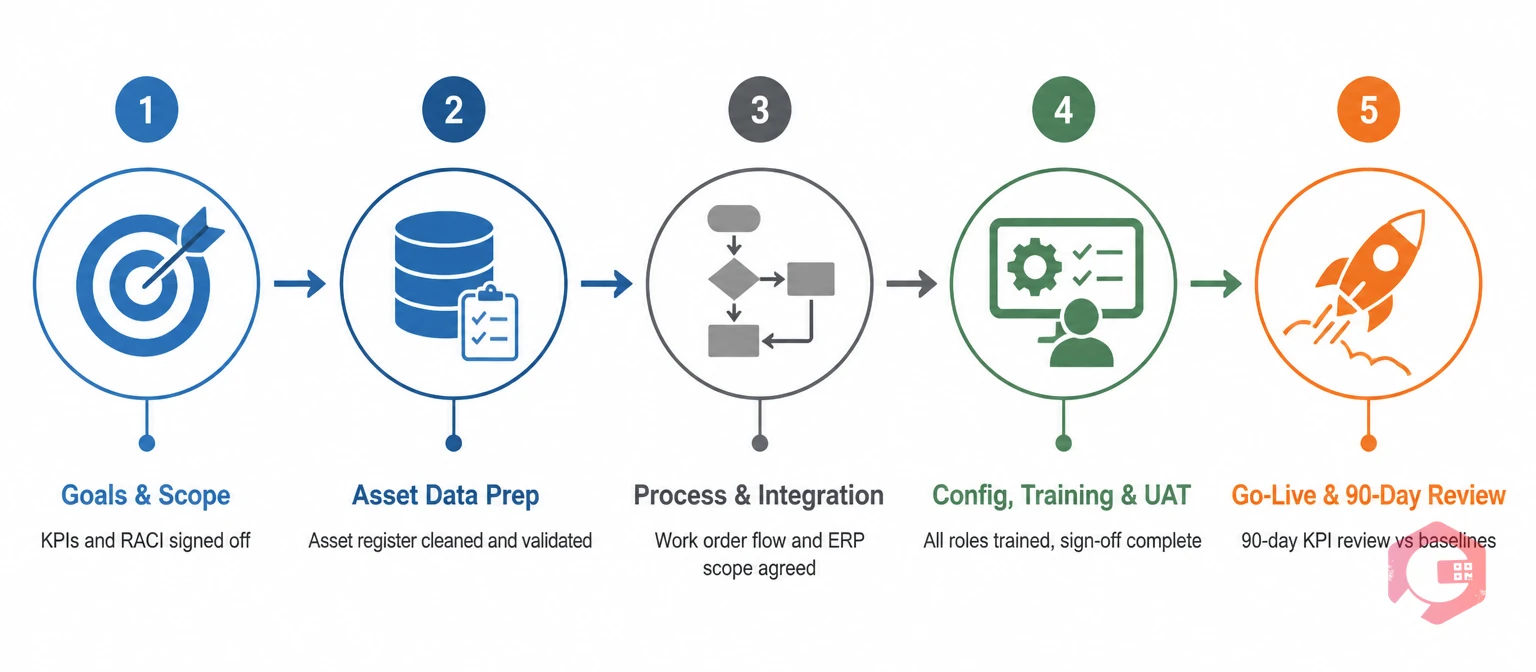
A CMMS implementation checklist is a structured, phase-by-phase audit that verifies your goals, data, processes, integrations, and team are all ready before the software goes live. Studies show that 60% of CMMS rollouts miss at least one major goal — and the root cause is almost always a skipped pre-launch audit, not a bad product choice.
This guide gives you a 5-phase checklist you can copy and use today. Each phase lists the items to verify, who owns them, and what "done" looks like — so your maintenance management software gets adopted instead of becoming shelfware.
What Is a CMMS Implementation Checklist?
A CMMS implementation checklist is a written set of readiness criteria covering every stage of a software rollout — from goal-setting and data preparation through configuration, training, go-live, and the 90-day adoption review. It exists to catch missing pieces before they turn into expensive problems mid-project.
Teams typically use it three ways:
Pre-purchase audit: Confirm your organization is ready to buy and deploy a CMMS at all.
Active project tracker: Use it as a working document during the 8-to-16-week rollout.
Post-launch scorecard: Track adoption, data quality, and KPI movement after go-live.
The checklist is owned by one project lead — usually the maintenance manager — with a named owner on every line item. Gartner research shows projects with a single accountable owner are roughly twice as likely to hit their original goals.
Why CMMS Implementations Fail (and How a Checklist Fixes It)
Research from McKinsey and Aberdeen Group consistently shows 50% to 70% of CMMS projects miss at least one major objective. The causes are predictable across industries:
No measurable goals: Teams buy a CMMS without defining the KPIs it should move — so there's no way to know if it succeeded.
Dirty master data: Asset lists are incomplete, duplicated, or inconsistently named, so the new system inherits old chaos from day one.
Weak executive sponsorship: Momentum collapses the moment the maintenance manager stops pushing — because no VP-level owner is protecting the project.
Skipped role-based training: Technicians get a 30-minute demo and never touch the system on real work before go-live.
Wrong-fit software: Features look great in a demo but don't match how work actually flows on the floor.
A pre-launch audit catches all five. The five phases below are that audit.
Phase 1 Checklist: Goals, Scope & Team
Before you talk to a vendor, lock down what success looks like and who's accountable. This is the phase most teams skip — and the most common cause of failed projects.
Defining Your CMMS KPIs
Pick 3 to 5 measurable targets tied to real operational pain. Common KPIs include cutting unplanned downtime by 25%, pushing preventive maintenance compliance above 90%, and reducing MTTR by 30%. Without these targets, you can't prove ROI — and you can't defend the project when it hits mid-implementation friction.
Building Your RACI Matrix
Every phase needs a Responsible, Accountable, Consulted, and Informed owner on every line item. Projects without a RACI matrix consistently lose track of who makes the final call when two departments disagree on a process — which happens in every multi-department rollout.
KPIs defined: 3 to 5 measurable targets documented and signed off by leadership.
Baselines captured: Current MTTR, MTBF, PM compliance, and downtime documented. No baseline = no ROI proof.
Scope locked: Sites, departments, and asset classes in scope for Year 1 are agreed in writing.
Budget approved: Software, implementation services, internal labor, integrations, and a 15% contingency.
Executive sponsor named: One VP-level owner who can approve budget changes and unblock cross-department blockers.
Project lead committed: Maintenance manager or operations director with at least 30% of their time dedicated to the rollout.
RACI matrix built: Owner on every phase and every line item.
Site champion identified: A trusted technician or planner who handles day-to-day questions on the floor.
Phase 2 Checklist: Asset Data Preparation
This is where most projects bleed time. The principle is simple: garbage in, garbage out. Three weeks cleaning data now saves three months of rework after go-live.
How to Audit Your Asset Register Before Import
Start with a full export of your existing asset list — spreadsheet, EAM system, or paper forms. Flag duplicates, missing serial numbers, and assets with no location assigned. Many plants find 10% to 20% duplication when they audit names and serial numbers side by side. Resolve all duplicates before import — never after. If you're importing from spreadsheets, Cryotos supports bulk Excel imports and OCR-scanned forms via its asset tracking module, which cuts manual data entry significantly.
Asset register complete: Every in-scope asset has a unique ID, location, and criticality score (1-3 or A/B/C).
Duplicates removed: Full deduplication run on asset names, serial numbers, and tag IDs.
Historical data scoped: Decision made on what's worth migrating — usually the last 12 to 24 months of work order history only.
QR/barcode strategy set: Labels printed and tagged before go-live so technicians can scan assets from day one using QR code scanning.
Phase 3 Checklist: Process Mapping & Integrations
Document how work actually flows today before you try to digitize it. Systems built around how people think they work — not how they actually work — get abandoned within 90 days.
ERP and IoT Integration Scope Questions
For ERP (SAP, Microsoft Dynamics, Oracle): which fields sync — purchase orders, asset master, cost codes? In which direction — one-way from ERP, one-way to ERP, or bidirectional? Who owns the field mapping spec? Cryotos supports native ERP integration with SAP and Microsoft Dynamics 365, and IoT connections via SCADA/PLC/edge devices. Defining scope in writing before configuration begins prevents the most common mid-project scope creep.
Work order lifecycle mapped: Request → triage → assign → execute → close → review. Every handoff has an owner.
PM library audited: Existing PM checklists reviewed for accuracy, correct frequency, and named owner. Use maintenance checklists templates to standardize.
Approval thresholds defined: Dollar value, risk level, and duration limits for each approval tier.
Failure codes standardized: Internal taxonomy agreed, or ISO 14224 adopted as baseline.
ERP integration scoped: Fields, sync direction, and field mapping spec signed off.
IoT sources listed: SCADA, PLC, and edge devices documented with threshold alert definitions for IoT meter reading.
Mobile strategy set: Company-issued vs BYOD, offline-mode requirements, ruggedized hardware count — all handled by mobile CMMS.
SSO configured: Azure AD, Okta, or Google Workspace integration scoped before user setup begins.
Phase 4 Checklist: Configuration, Training & UAT
This phase makes or breaks adoption. The goal: every user touches the system on real work before go-live. If a technician's first interaction with the CMMS is a live work order on a critical asset, the system loses their trust permanently.
User roles configured: Permissions match real job responsibilities — not the vendor's default template. Use user role access controls to separate technicians, planners, managers, and requesters.
PM schedules loaded: Both fixed-interval and meter-based PMs set up via preventive maintenance software and tested with real assets.
Notifications tuned: Email, mobile push, and WhatsApp alerts routed correctly to avoid alert fatigue.
Work request portal live: Requesters can log work via QR code, web, or WhatsApp before go-live through work requests.
Role-based training delivered: Separate sessions for technicians, planners, managers, and requesters — not a single all-hands demo.
Super users certified: 2 to 3 power users per site who can train new hires and answer floor questions after launch.
UAT scenarios run: Test 15 to 20 real scenarios — emergency repair, PM rescheduling, multi-asset job, parts issuance, permit-to-work trigger, and integration sync.
Sign-off matrix completed: Each department lead formally approves before go-live is scheduled.
Phase 5 Checklist: Go-Live & 90-Day Review
Go-live isn't the finish line — it's the start of the 90-day adoption window where most projects quietly fail. Set a structured review cadence before launch, not after.
Cutover plan documented: Exact date, time, and sequence of events for switching from legacy system to live CMMS.
Rollback plan ready: If something breaks in week 1, the team knows how to revert without losing work order data.
Day-1 support coverage scheduled: Vendor and internal team on standby for the first 5 working days — not just day one.
Parallel run limit set: Running both old and new systems for more than 2 weeks creates confusion and double data entry. Set a firm cutover date.
30-day adoption review: Track active user count, work orders created vs. baseline, and PM compliance vs. target.
60-day data quality review: Spot-check 50 random work orders for completeness — missing failure codes, blank labor times, and unlinked assets.
Timeline is the question every project lead asks first. Here are realistic ranges based on implementation scope — single site vs. multi-site, and data readiness:
Phase
Typical Duration
Key Milestone
Owner
Phase 1: Goals & Team
1–2 weeks
KPIs and RACI signed off
Maintenance Manager
Phase 2: Asset Data
2–4 weeks
Asset register validated
Data Lead / Planner
Phase 3: Process & Integration
2–3 weeks
Work order flow and ERP scope agreed
IT + Operations
Phase 4: Config, Training & UAT
3–5 weeks
All roles trained; UAT sign-off complete
Project Lead + Vendor
Phase 5: Go-Live & 90-Day Review
Ongoing (10–14 weeks post-launch)
90-day KPI review vs. Phase 1 baselines
Maintenance Manager + Leadership
Total (single site, clean data)
8–10 weeks
Live operations running
Executive Sponsor
Total (multi-site or complex ERP)
4–9 months
All sites live and reviewed
Executive Sponsor
Common CMMS Implementation Mistakes to Avoid
Most implementation failures follow a predictable pattern. Here are the six mistakes that appear most often — and how to avoid each one:
Importing dirty data: Migrating an uncleaned asset register is the single fastest way to poison user trust. Spend the time in Phase 2 — it pays back in every phase after.
One-size-fits-all training: A technician and a maintenance manager need completely different training. Running a single all-hands demo guarantees low adoption from both.
Skipping UAT on edge cases: Testing only the happy path (a standard work order) leaves offline mode, permit-to-work, and integration failures undiscovered until they happen live.
Running parallel systems too long: More than two weeks of running both old and new systems creates double data entry, confusion, and resistance to the new system.
No 90-day KPI review: Without a formal review against Phase 1 baselines, most teams never prove (or disprove) ROI — making the next budget request for CMMS improvements much harder.
Hardcoding integrations without field mapping spec: ERP integrations built without a written field mapping spec need to be rebuilt. Document every field, direction, and frequency before your vendor touches configuration.
Frequently Asked Questions
How long does a CMMS implementation take?
Most single-site CMMS implementations take 8 to 16 weeks, depending on data readiness and integration scope. Multi-site rollouts typically run 4 to 9 months, usually phased one site at a time. Teams with clean asset data and a committed project lead consistently finish at the faster end of that range — Cryotos customers with clean data typically go live in 6 to 10 weeks instead of the industry-standard 12 to 16.
How much does CMMS implementation cost?
Total implementation cost includes software licensing, implementation services, internal labor (your team's time), integrations, and hardware. Small single-site deployments can run $15,000 to $40,000 all-in. Enterprise multi-site rollouts with complex ERP integration can reach $150,000 to $500,000+. Always budget a 15% contingency — integration scope creep is the most common cause of overruns.
Who should lead a CMMS implementation?
The maintenance manager or operations director is the right project lead, with at least 30% of their time committed to the rollout. They need an executive sponsor (VP of operations or plant manager) for escalations and budget approvals, plus a site champion on the floor to handle day-to-day adoption questions from technicians.
Should I implement CMMS in phases or all at once?
For multi-site organizations, phased rollouts almost always win — start with one pilot site, capture lessons, then replicate. For a single-site deployment, go fully live once UAT passes. Running parallel systems for more than 2 weeks creates confusion and double data entry that actively hurts adoption.
What data do I need before implementing a CMMS?
At minimum: a clean asset register with unique IDs, locations, and criticality scores; 12 to 24 months of work order history (if migrating); your existing PM schedules and frequencies; and a spare parts list linked to assets. The cleaner this data is before import, the faster your team reaches productive use of the system.
Get Your CMMS Implementation Right the First Time
A CMMS only delivers ROI if it gets adopted — and adoption starts with a disciplined pre-launch audit. Walk through the five phases above with your team, assign owners to every line item, and you'll already be ahead of the 60% of projects that miss their goals. Cryotos CMMS includes pre-built PM templates, OCR-based asset import, role-based access controls, and a dedicated onboarding lead — so most checklist items are pre-handled out of the box. Customers with clean data typically go live in 6 to 10 weeks instead of the industry-standard 12 to 16. Book a demo to walk through your specific checklist with our implementation team.