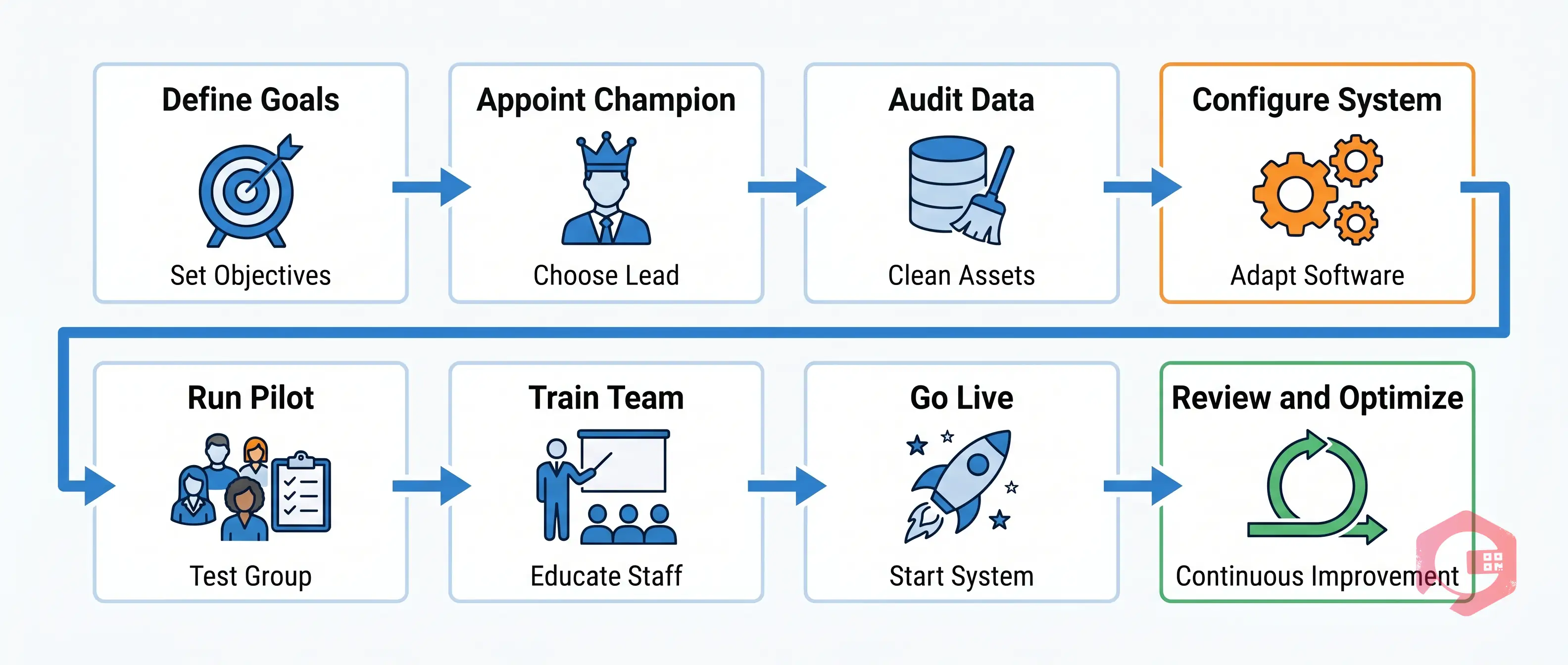
A CMMS implementation is one of the most impactful decisions a maintenance team can make — but studies show that over 60% of CMMS projects fail to deliver their expected ROI within the first year. The reason is rarely the software itself. It is almost always the implementation process that breaks down.
What Is CMMS Implementation and Why Does It Matter?
A Computerized Maintenance Management System (CMMS) is software that centralizes your maintenance operations — work orders, asset records, preventive maintenance schedules, inventory tracking, and reporting — into one platform. Implementation is the process of deploying that system in your facility and getting your team to actually use it.
It matters because reactive maintenance is expensive. Equipment failures cost manufacturers an average of $260,000 per hour of downtime (Aberdeen Group). A well-implemented CMMS reduces unplanned downtime by up to 28%, cuts maintenance costs by 20–25%, and extends asset lifespan significantly. But those gains only arrive when the system is set up correctly and adopted by the people who use it every day.
Why Most CMMS Implementations Fail
Most CMMS projects do not fail because the software is bad. They fail because of people, process, and planning gaps:
No clear ownership — Without a dedicated project lead who is accountable for the rollout, decisions stall and momentum dies.
Poor data migration — Importing messy, outdated, or incomplete asset data means the system starts broken and never recovers.
Skipping user training — Technicians who don't understand the system revert to paper, spreadsheets, or verbal handoffs.
No buy-in from leadership — If managers don't use reports or enforce the workflow, technicians won't bother logging work accurately.
Going live without a pilot — Rolling out to the entire facility at once amplifies every mistake and overwhelms the support team.
Treating it as a one-time project — A CMMS needs continuous updating as assets change, processes evolve, and new failure patterns emerge.
Step-by-Step CMMS Implementation Process
Follow this eight-step framework to move from purchase to a fully adopted, ROI-generating CMMS in 60 to 90 days:
Step 1: Define Your Goals and KPIs — Set specific metrics like MTBF, work order completion rate, PM compliance percentage.
Step 2: Appoint a Project Champion — Assign one person as the internal project lead who owns decisions, communications, and adoption.
Step 3: Audit and Clean Your Asset Data — Remove duplicates, update specifications, standardize naming conventions before migrating a single record.
Step 4: Configure the System to Match Your Workflow — Configure work order types, priority levels, approval flows, and notification rules to mirror how your maintenance department operates.
Step 5: Run a Pilot with a Small Team — Select one department or asset class for the first 4–6 weeks to identify friction points before scaling.
Step 6: Train Your Team in Context — Train technicians on the exact screens and workflows they will use every day. Role-specific training outperforms one-size-fits-all sessions.
Step 7: Go Live and Monitor Daily — Launch with a 30-day hypercare window. Have your project champion review dashboards daily and field questions immediately.
Step 8: Review, Optimize, and Expand — At 30, 60, and 90 days, pull your KPI data and compare it to your baseline. This review cycle turns a go-live into a sustained improvement program.
How Cryotos Ensures Implementation Success
Cryotos is built specifically for maintenance teams that need fast time-to-value without sacrificing depth:
Guided onboarding with a dedicated success team — Cryotos assigns an implementation specialist to every account. You get structured onboarding sessions, asset import templates, and a configuration checklist tailored to your industry.
Mobile-first design for field technicians — Technicians can create work orders, scan QR codes on assets, log parts, and capture photo evidence from any smartphone — no desktop required.
Pre-built PM templates by asset type — Instead of building preventive maintenance schedules from scratch, Cryotos provides industry-standard templates for HVAC, electrical panels, production machinery, vehicles, and more.
Real-time dashboards from day one — Within hours of going live, managers can see open work orders, overdue PMs, technician workload, and mean time to repair — without any custom reporting setup.
Scalable from one site to enterprise — Cryotos grows with you. Start with one facility, add locations, departments, and asset categories as you scale — without re-implementing.
Ready to get your CMMS implementation right the first time? Book a free demo with Cryotos and see how our guided onboarding turns a complex rollout into a structured, 30-day success story.
Frequently Asked Questions
How long does a CMMS implementation take?
A typical CMMS implementation takes 4 to 12 weeks depending on the size of the facility, the volume of asset data, and the number of users. Cryotos customers commonly complete their core go-live within 3 to 4 weeks using structured onboarding.
What is the biggest reason CMMS implementations fail?
The most common cause is poor user adoption — technicians and managers not logging work consistently in the new system. This usually happens when training is too generic, mobile access is limited, or leadership does not enforce the new workflow in the first 30 days.