

CMMS software automates photo capture in facility inspections by triggering mandatory photo requirements on work orders, embedding GPS and timestamp metadata at the moment of capture, and linking every image directly to the asset record and audit trail — without any manual filing. According to a 2024 Plant Engineering survey, facilities using digital photo documentation resolve regulatory disputes 63% faster than those relying on text-only reports.
For maintenance teams operating under OSHA, ISO 55001, or EPA requirements, this automation closes the gap between "photo taken on a phone" and "photo retrievable in seconds during an audit." This guide covers how the full workflow operates, how to integrate it into your checklists, and what auditors actually look for in inspection photo records.
Key Takeaways
Photo evidence in facility inspections is a timestamped, geotagged image captured at the point of inspection and linked directly to a specific asset, work order, or compliance task in a CMMS. Unlike handwritten notes or typed observations, a photo creates an objective visual record tied to a specific time and location that is difficult to dispute in a regulatory context.
Before digital maintenance systems became standard, inspectors carried clipboards, took photos on personal phones, and then manually transferred images to shared folders — or didn't transfer them at all. The result was inspection records that looked complete on paper but had no verifiable link between the photo and the asset it depicted.
Text descriptions of asset conditions introduce ambiguity that auditors are trained to identify. Four common failure modes in text-only reports are subjectivity (words like "minor corrosion" mean different things to different inspectors), no proof of presence (there's no way to confirm the inspector actually reached the asset), dispute vulnerability (a written observation can be challenged; a timestamped photo cannot), and retrieval difficulty (finding a specific text note from 18 months ago takes minutes; finding the photo from the same inspection should take seconds).
When a regulator questions whether a hazard was identified and addressed, a 12-word typed observation is a liability. A timestamped photo attached to a closed work order is not.
OSHA's General Duty Clause requires employers to document and address known hazards in the workplace. ISO 55001 — the international standard for asset management systems — requires evidence-based records of asset condition assessments. EPA facility inspection protocols for regulated sites demand detailed condition records with supporting documentation. Across all three frameworks, a timestamped photo attached to an inspection record is the clearest form of evidence available. For a detailed reference on OSHA inspection record requirements, see the OSHA Recordkeeping Guidelines.
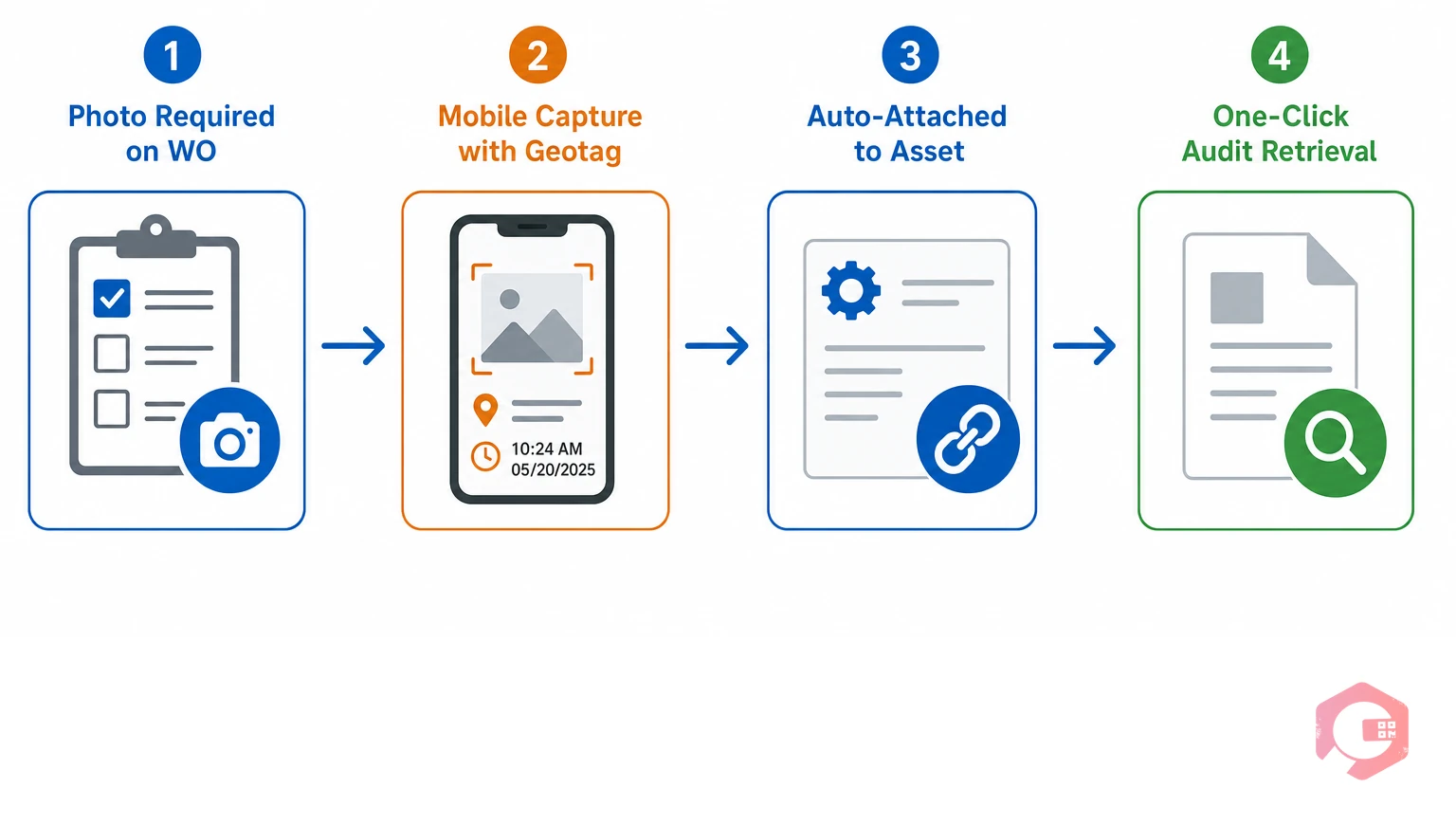
A CMMS eliminates the gap between "inspector takes a photo" and "photo is stored, labeled, and retrievable for audit." The four steps below describe how this automated workflow replaces the manual process — each step representing a point where manual documentation historically broke down.
A CMMS makes photo capture a required step within a specific work order management task or inspection checklist. When an inspector opens a work order for a quarterly safety inspection of an electrical panel, the system requires at least one photo before the task can be marked complete. The inspector cannot close the work order without it.
This is not a reminder or a suggestion — it's a system-enforced gate. The photo requirement is configured once by the maintenance manager and applies to every recurrence of that work order from that point forward.
Using a mobile inspection app, the inspector photographs the asset directly from their smartphone or tablet. The CMMS automatically embeds the GPS coordinates and exact timestamp into the image metadata at the moment of capture — not when it uploads, not when the inspector submits the form, but at the precise moment the shutter fires.
This distinction matters for auditors. A photo uploaded manually to a shared drive hours after inspection can have its metadata questioned. A photo captured through a CMMS mobile app cannot — the metadata is system-generated and logged server-side simultaneously.
Once submitted, the photo links automatically to three things: the specific work order, the asset record in the CMMS database, and the inspector's digital signature. This three-way linkage creates a complete chain of custody.
Without CMMS integration, photos typically live in one place (a phone gallery or shared folder) while the work order lives somewhere else (a paper form or separate spreadsheet). The link between the two exists only in someone's memory. CMMS automation closes that gap permanently.
A CMMS stores all photos indexed by asset ID, date, inspector, and work order number. Retrieval takes seconds. For multi-site facilities, all inspection photo records across every location are centralized in one searchable database. An auditor requesting photos of all inspections performed on a specific asset over the past two years gets a filtered, downloadable report — not an hours-long manual search.
The 4-Stage CMMS Photo Evidence Chain is a framework for evaluating whether a CMMS photo workflow produces inspection records that are audit-proof, legally defensible, and operationally useful. Most facilities that struggle with inspection compliance are failing at one or more of these four stages. Audit-proof documentation means every record contains system-generated, tamper-evident metadata that confirms who captured the image, where, and when — without relying on manual entry or human memory.
The 4-Stage CMMS Photo Evidence Chain:
Photo capture becomes operationally powerful when it's embedded directly into inspection checklists — not as an optional attachment, but as a mandatory field that controls workflow completion. Facilities that treat photos as "nice to have" in checklists consistently produce incomplete audit trails; facilities that make them mandatory produce the kind of records that end regulatory disputes before they escalate.
Every CMMS checklist item that involves a physical asset condition — lubrication levels, corrosion, crack propagation, panel integrity, valve positions — should have a mandatory photo field. The configuration is straightforward: within the checklist builder, set the photo attachment field as required for the checklist item to register as complete.
Best practice is to require two photos for certain categories: one "before" photo when the inspector arrives at the asset, and one "after" photo when work is completed or the condition is confirmed acceptable. This before/after pair is what auditors look for when evaluating whether a reported condition was actually addressed. For a structured starting point, Cryotos offers a downloadable facility inspection checklist that includes built-in photo requirements for common asset categories.
Once you've built photo requirements into your maintenance checklists, the system enforces them automatically on every recurrence. There's no reliance on individual inspectors remembering to attach photos.
Before/after photo documentation is the practice of capturing a "before" photo when a defect is first identified and an "after" photo when corrective work is confirmed complete — creating an unbroken visual record of the issue from discovery to resolution. For regulatory purposes, a before photo without a corresponding after photo is an open corrective action, and auditors treat it as one.
A CMMS can flag this automatically — any inspection checklist item with a "defect" classification that lacks a corresponding after-work photo triggers a reminder to the inspector and alerts the maintenance supervisor. This automation replaces what used to be a manual supervisory check during report review. The CMMS does it in real time, at scale, across every inspector on every shift.
This matters especially during re-inspection cycles. When a regulatory body returns to verify that a previously cited condition has been corrected, the facility needs a before photo (proving the original defect was documented), a corrective work order (proving action was taken), and an after photo (proving the condition was resolved). A CMMS that automates this three-part record creates that evidence package automatically. Facilities that rely on manual photo filing typically cannot reconstruct this chain of evidence after the fact.
This level of control pays dividends far beyond compliance. When supervisors can see at a glance which inspection tasks produced photos and which didn't — and when the system automatically flags incomplete photo submissions in real time — quality assurance becomes a by-product of the workflow rather than a separate review process. Facilities that implement mandatory photo fields consistently report fewer rework cycles, shorter dispute resolution timelines, and faster corrective action closure rates than those relying on optional photo attachments.

Every facility with a physical inspection requirement benefits from automated photo capture, but three sectors see the highest return: manufacturing and industrial plants, commercial facilities and property management, and healthcare and life sciences. The return on implementation in these sectors is driven by the severity of regulatory exposure when documentation fails.
Manufacturing operations face OSHA PSM (Process Safety Management) requirements, EPA Risk Management Programs, and internal ISO audit cycles that all require documented condition records for critical equipment. When a pressure vessel inspection turns up a hairline crack, the photo taken at that moment — timestamped, geotagged, attached to the work order, and linked to the corrective action — is what stands between a managed safety event and a regulatory citation.
One automotive parts manufacturer using mobile CMMS photo documentation reduced its OSHA citation rate by 41% in the first year of implementation. The photographic record removed ambiguity from every inspection dispute that arose during that period.
For commercial facility managers, photo documentation protects against tenant disputes, insurance claims, and contractor liability. The International Facility Management Association (IFMA) notes that digital documentation is increasingly a baseline expectation in facilities management contracts. A facility management software platform that automates photo capture across all properties — including routine inspections, move-in/move-out conditions, and emergency response events — creates an institutional memory that survives staff turnover and protects the organization in litigation.
Healthcare facility inspection documentation is a patient safety requirement, not only a regulatory one — every undocumented corrective action represents a potential gap in the physical environment of care that affects accreditation standing. Healthcare facilities operate under Joint Commission accreditation standards, CMS Conditions of Participation, and state health department inspection frameworks — all of which require documented evidence of facility condition assessments.
In a healthcare setting, a missed inspection or an undocumented corrective action isn't just a compliance issue; it can directly affect patient safety accreditation. CMMS-automated photo workflows give biomedical engineering and facilities management teams a defensible record for every inspection cycle, with no additional administrative burden on clinical staff. When The Joint Commission performs an unannounced survey, the ability to produce a complete photographic history of any piece of clinical equipment within minutes — organized by asset, date, and corrective action — is the difference between a minor finding and a major citation.
Across OSHA, ISO 55001, and EPA compliance frameworks, auditors evaluate inspection photo records on five dimensions. Understanding what they look for allows facilities to configure their CMMS photo workflows to satisfy every requirement from day one.
| Auditor Requirement | What Auditors Look For | How CMMS Satisfies It | Relevant Framework |
|---|---|---|---|
| Timestamp Integrity | Photo metadata shows exact date/time of capture | System-generated timestamp embedded at capture; cannot be manually altered | OSHA, ISO 55001, EPA |
| Location Confirmation | Evidence inspector was physically at the asset location | GPS coordinates embedded in image metadata at moment of capture | OSHA, EPA |
| Coverage Completeness | All required inspection points have photographic coverage | Mandatory photo fields in checklists prevent task completion without photos | ISO 55001, EPA |
| Linkage to Corrective Actions | Defects documented in photos are linked to corrective work orders | CMMS auto-creates corrective work orders from defect-flagged checklist items | OSHA, ISO 55001 |
| Retention Period Compliance | Records accessible for minimum 5-10 years depending on framework | Configurable retention settings in CMMS database; photos never auto-deleted | OSHA (5 yr), EPA (10 yr) |
For a detailed reference on ISO asset management documentation requirements, see the ISO 55001 standard overview. Facilities that configure their CMMS to satisfy all five dimensions above can produce a complete compliance package in minutes, not hours, when an auditor arrives. That speed of response — and the certainty that every record is complete — is what separates a well-prepared facility from one that scrambles to reconstruct documentation under audit pressure.
The retention period depends on the applicable regulatory framework. OSHA's injury and illness records must be kept for a minimum of five years. Environmental inspection records under EPA frameworks may require retention of up to ten years, and some state-level regulations exceed federal minimums. A CMMS with configurable retention settings allows each facility to align photo storage periods with their specific regulatory obligations automatically — so photos are never purged before their required retention date.
Yes — provided they meet chain-of-custody requirements. CMMS-generated photos satisfy these requirements because the metadata (timestamp, GPS, user authentication) is system-generated and cannot be altered without leaving an audit trail in the CMMS log. Photos taken on a personal phone and transferred manually to a shared drive do not carry the same evidentiary weight because there's no unbroken chain of custody between capture and storage.
Manual photo documentation means an inspector takes a photo on their device and later attaches it to a report — creating a gap between capture and filing where the chain of custody can be questioned. CMMS-automated photo capture means the photo is taken inside the CMMS mobile app, with metadata embedded at the moment of capture, and attached directly to the work order and asset record simultaneously. The second approach produces legally defensible records; the first produces records that can be challenged on chain-of-custody grounds.
Yes. Cryotos allows technicians to capture, annotate, and attach photos directly within work orders and inspection checklists using the mobile app. Photos are automatically timestamped, geotagged, and linked to the relevant asset record. Maintenance managers can configure mandatory photo fields at the checklist item level, and all photos are stored in the CMMS database with configurable retention settings for audit-ready retrieval.
If your team is ready to build an inspection program that stands up to any regulatory audit, Schedule a free demo to see how Cryotos automates photo capture, timestamping, and audit-ready record retrieval across every work order and inspection checklist.


Cryotos AI predicts failures, automates work orders, and simplifies maintenance—before problems slow you down.



