

A support ticket workflow in Cryotos CMMS is a structured, end-to-end process that lets users — from maintenance technicians to plant managers — submit Bug reports, Change/Correction Requests (CCRs), and general support queries directly from inside the application and route them to the Cryotos support team for tracked, documented resolution. Unlike sending an email that disappears into an inbox, a formalized ticket workflow ensures every issue gets a reference number, a priority, an assigned owner, and a clear resolution path — so nothing gets lost and no team has to chase updates.
According to a Gartner study on enterprise support operations, organizations with structured ticket submission processes resolve issues 40% faster and experience 35% fewer repeat incidents compared to those managing support through ad-hoc communication channels. For CMMS users managing critical maintenance operations, that speed difference directly affects asset uptime and team productivity.
This guide explains the three types of tickets you can raise in Cryotos, walks through the complete submission-to-resolution workflow step by step, and shows how a properly structured ticket process protects your maintenance operations from disruption.

Before raising a ticket, it helps to understand which type of issue you are dealing with. Cryotos support handles three distinct categories — and selecting the right type speeds up routing and resolution time significantly.
A Bug is any unintended behavior in the Cryotos application that prevents the platform from working as designed. Bugs range from minor UI glitches — a button that does not respond on first tap — to critical functional failures, such as a work order not being created when a PM trigger fires, or sensor data not flowing into the IoT dashboard as expected.
Bugs should be reported with a clear description of what was expected to happen, what actually happened, the steps to reproduce the issue, and the device/browser/app version in use. The more precise the report, the faster the development team can isolate and resolve the defect.
A CCR (Change/Correction Request) is a request for a deliberate modification to how Cryotos functions for your organization. Unlike a Bug — which reports something broken — a CCR proposes an improvement, a configuration adjustment, or a workflow correction that would better serve your specific operational requirements.
CCRs are the mechanism through which Cryotos evolves in response to real-world customer needs. They may be accepted as product enhancements, handled as configuration changes by the Cryotos team, or documented for a future release roadmap.
A general support ticket covers everything that falls outside a specific Bug or CCR — including how-to questions, access issues, integration clarifications, user account management, and any other operational query where you need guidance from the Cryotos support team.
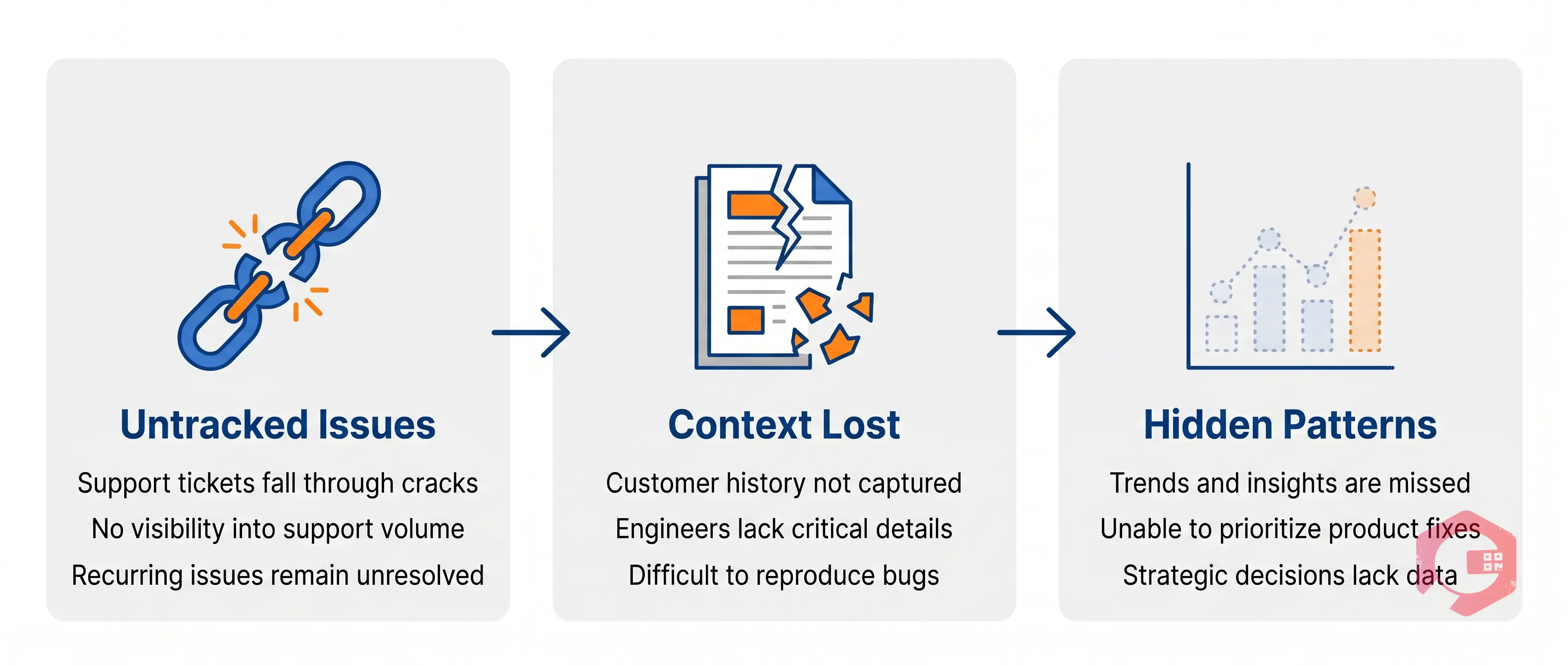
Maintenance teams depend on their CMMS to run every critical operation — from generating work orders to tracking asset health to ensuring compliance documentation is audit-ready. When something goes wrong with the platform, an unstructured support process — a WhatsApp message, an email to a personal contact, or a phone call — creates three serious risks.
First, the issue goes untracked. Without a ticket reference number, there is no accountable owner, no SLA timer running, and no guarantee the issue will be resolved before it causes an operational disruption. Second, critical context gets lost in translation. Support teams cannot diagnose a Bug without knowing the exact steps that triggered it, the device involved, and the error message shown. Informal channels capture none of this systematically. Third, recurring issues stay hidden. A structured ticketing system reveals patterns — if ten users across three sites report the same work order behavior in the same week, that surfaces as a trend in the ticket data. In informal channels, it stays invisible.
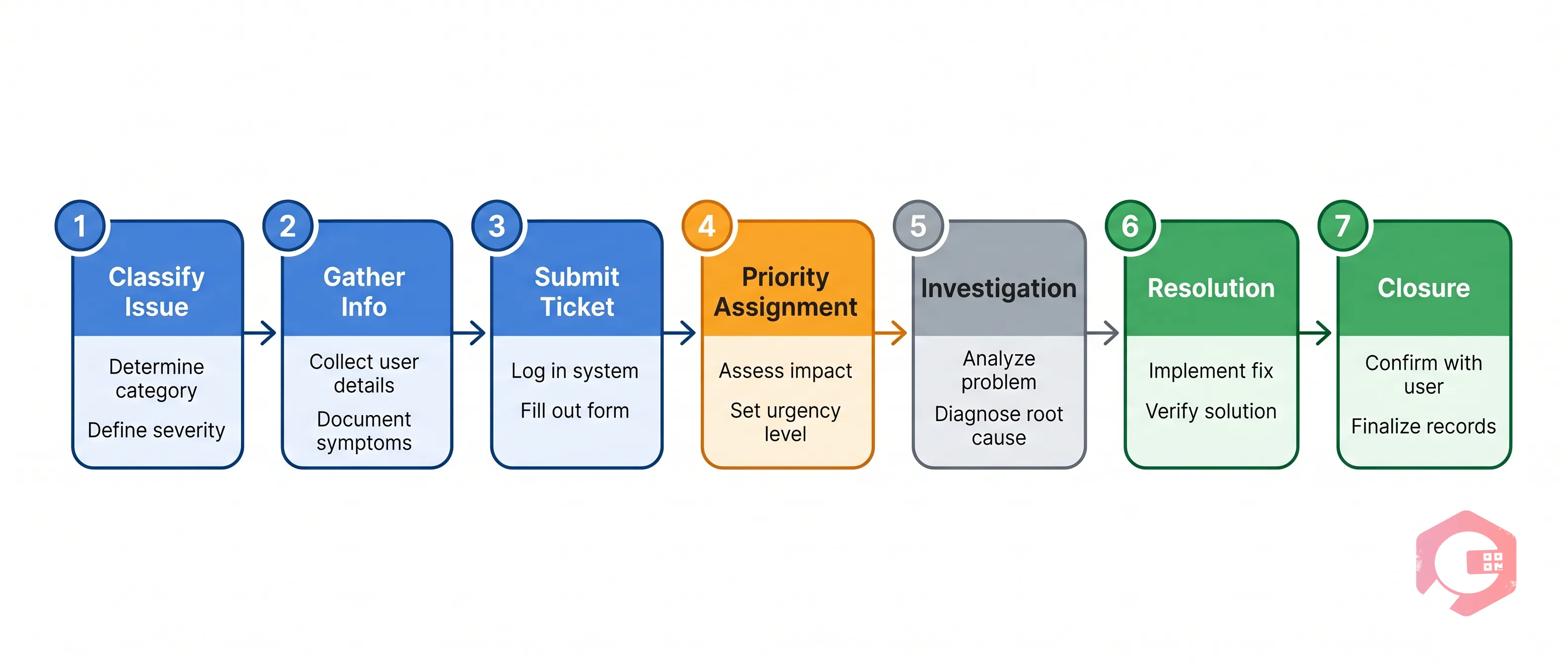
Here is the complete support ticket workflow in Cryotos — from the moment you identify an issue to the moment it is resolved and closed.
Before raising a ticket, take 60 seconds to classify what you are dealing with. Ask: is this something broken (Bug), something you want changed (CCR), or a question or access issue (General Support)? The right classification ensures your ticket reaches the correct team within Cryotos — development for Bugs, product for CCRs, and frontline support for general queries — without being rerouted after submission.
A well-prepared ticket gets resolved faster. Before opening the ticket form, collect the following: For a Bug, gather exact steps to reproduce the issue, expected behavior vs actual behavior, screenshots or screen recording, device type and OS, and the app/browser version. For a CCR, note the current behavior, desired behavior, business reason, and module name. For General Support, describe what you need help with and your user role and site name.
Log in to the Cryotos support portal and select the appropriate ticket type. Fill in the subject line with a clear, specific description — not "issue with Cryotos" but "PM work order not generating for Asset ID WO-4412 after 250-hour trigger." Tickets with attachments on the first submission are resolved an average of 28% faster than those submitted without evidence.
Once submitted, the system automatically generates a ticket reference number. A support agent assigns a priority level: Critical (response within 1 hour), High (response within 4 hours), Medium (response within 1 business day), or Low (response within 2 business days).
The assigned support agent or technical team investigates the issue. For Bugs, this involves replicating the behavior in a test environment. For CCRs, it involves assessing feasibility. For general support, it involves walking through the feature with the customer. If additional information is needed, you will receive an email notification with the follow-up question.
For Bugs, the development team deploys a fix. For CCRs accepted as configuration changes, the Cryotos team applies the modification to your account. Once the resolution is ready, the support team updates your ticket with resolution details and marks it as Resolved.
You review the resolution in your environment and confirm whether the issue has been fully addressed. The ticket closes automatically after 72 hours without a response, or you can close it manually. Every closed ticket is stored permanently in your support portal history, giving your team an auditable record of every issue raised and resolved.
To escalate a ticket in Cryotos, add a comment to the open ticket explaining the business impact of the delay and request escalation to a senior support engineer or account manager. When escalating, include the ticket reference number, a one-sentence description of the current operational impact, the number of users or sites affected, and any actions your team has already taken to mitigate the issue.

The quality of your ticket directly determines the speed of resolution. Submit one issue per ticket — combining multiple unrelated issues complicates routing and resolution tracking. Use specific asset and module names: "Corrective work order not auto-routing to the HVAC team in Building B, Site Chennai-2" gives the support team everything they need to begin investigation immediately. Attach evidence on the first submission. Include your environment details — device type, Cryotos app version, browser version, and date/time of the issue. Respond to follow-up requests within 24 hours to avoid adding delays to your resolution timeline.
Every ticket you submit is visible in your Cryotos support portal dashboard, showing ticket status, priority level, assigned support agent, all correspondence and notes, attachments and resolution documentation, and SLA compliance indicators. For organizations with multiple sites, Cryotos allows administrators to configure ticket visibility by role.
The Cryotos support ticket workflow is a direct extension of your maintenance operations. When a Bug is affecting your IoT sensor integration, it is potentially masking equipment failures that your team cannot see. When a CCR is blocking an inspection workflow, it is a compliance risk. Treating your Cryotos support tickets with the same discipline you apply to your work order management — clear descriptions, the right priority, prompt follow-up — means your CMMS runs at the level your operations require.
A Bug is an unintended defect in the Cryotos application that is not working as designed. A CCR (Change/Correction Request) is a deliberate request to modify how Cryotos works, either through a configuration change or a product enhancement. Bugs are investigated and fixed by the development team. CCRs are reviewed by the product team and implemented if accepted.
Critical Bugs have a 1-hour first-response SLA. Configuration-level fixes may be deployed within hours. Code-level defects requiring a release may take longer, but Cryotos will provide a workaround or interim resolution to restore operational capability while the permanent fix is developed.
Yes. The Cryotos support portal is accessible from both the web application and mobile app. Tickets submitted from mobile include your app version and device information automatically, which helps the support team diagnose mobile-specific issues without needing to request these details separately.
For a Bug report, include the exact steps to reproduce the issue, what you expected to happen vs what actually happened, the asset or module where the issue occurred, your device type and OS, the Cryotos app or browser version, and at least one screenshot or screen recording.
Open the ticket in the Cryotos support portal and add a comment requesting an update. Include the ticket reference number and a brief statement of the operational impact. For urgent operational issues, use the escalation option on the ticket form to flag the issue for senior attention. The support team will acknowledge escalation requests within 1 hour during business hours.




Cryotos AI predicts failures, automates work orders, and simplifies maintenance—before problems slow you down.



