A foolproof maintenance scheduling mechanism in CMMS software automatically validates dates as you build preventive maintenance schedules — and alerts you in real time when the system generates an impossible date like February 30. Instead of silently skipping or crashing, it presents you with the closest valid alternatives so your schedule never breaks and no maintenance task ever gets lost in a calendar gap.
Most CMMS platforms treat date validation as an afterthought. A technician sets up a quarterly PM on November 30, the system calculates the next occurrence as February 30, and that task quietly disappears. No alert. No warning. No missed-maintenance notification. Just a gap in your compliance record that shows up during an audit — or after an equipment failure.
Cryotos CMMS solves this with built-in smart date guards that intercept impossible dates the moment they're generated and give you three resolution paths: accept the closest valid date before, accept the closest valid date after, or switch to a schedule frequency that always lands on real calendar dates. This guide explains how the mechanism works, why it matters for regulated industries, and how to configure it correctly.
A foolproof scheduling mechanism — derived from the Japanese manufacturing concept of poka-yoke, or error-proofing — is a system-level guard that prevents invalid inputs from producing broken outputs. In maintenance scheduling, this means the software intercepts calendar conflicts before they become missed work orders.
The principle is simple: some months are shorter than others. February has 28 days in most years (29 in a leap year). April, June, September, and November end on the 30th. When you schedule a recurring PM on the 31st or 30th and apply a monthly or quarterly frequency, the system will eventually try to generate a date that does not exist — like June 31 or February 30.
Without a foolproof mechanism, the outcomes range from bad to worse. Some systems skip the non-existent date silently, creating an undetected gap. Others generate an error that halts the entire scheduling module. A few move the task to the first of the following month automatically, shifting your quarterly intervals by days or weeks over time until your compliance reporting is misaligned.
Cryotos handles this at the point of schedule generation — not after the fact — by alerting the scheduler the moment a date conflict is detected and presenting resolution options on the spot.
The classic scenario looks like this. A plant manager sets up a quarterly boiler inspection scheduled to start on November 30. The system correctly schedules the first occurrence: November 30. It then calculates the next date by adding three months: February 30. That date does not exist.
This is not a rare edge case. Any recurring schedule anchored to the 29th, 30th, or 31st of a month — and set to repeat monthly, bi-monthly, quarterly, semi-annually, or annually — will eventually land on a non-existent date. The breakdown by anchor day is:
For a facility running hundreds of preventive maintenance schedules, even a single missed occurrence can trigger a regulatory non-compliance finding. According to a Plant Engineering analysis, unplanned downtime costs industrial manufacturers an average of $260,000 per hour. A missed quarterly inspection that allows a condition to go undetected is a direct contributor to unplanned failures.
The problem compounds in multi-site facilities where different technicians set up schedules independently. One site anchors a monthly PM to the 31st. Another anchors a quarterly PM to the 30th. Over a 12-month period, these schedules generate multiple invalid dates — and without an alert mechanism, each one becomes an invisible gap in your maintenance record.
When a CMMS silently skips a date it cannot generate, the work order simply does not appear in any technician's queue. There is no missed-task notification, no overdue flag, no escalation. The asset goes uninspected. The compliance log shows no failure — just a gap. During an ISO 55001 or FDA 21 CFR Part 11 audit, that gap is a finding, and the auditor does not accept "the software skipped it" as a valid explanation.
A foolproof mechanism makes the invisible visible. When the system cannot generate the scheduled date, it immediately surfaces the conflict and demands resolution before the schedule is saved.
Cryotos CMMS validates every scheduled date at the moment of generation — not at the moment of execution. The validation runs as part of the preventive maintenance scheduling engine, which means conflicts are caught when you're building the schedule, not days or weeks later when the task was supposed to appear.
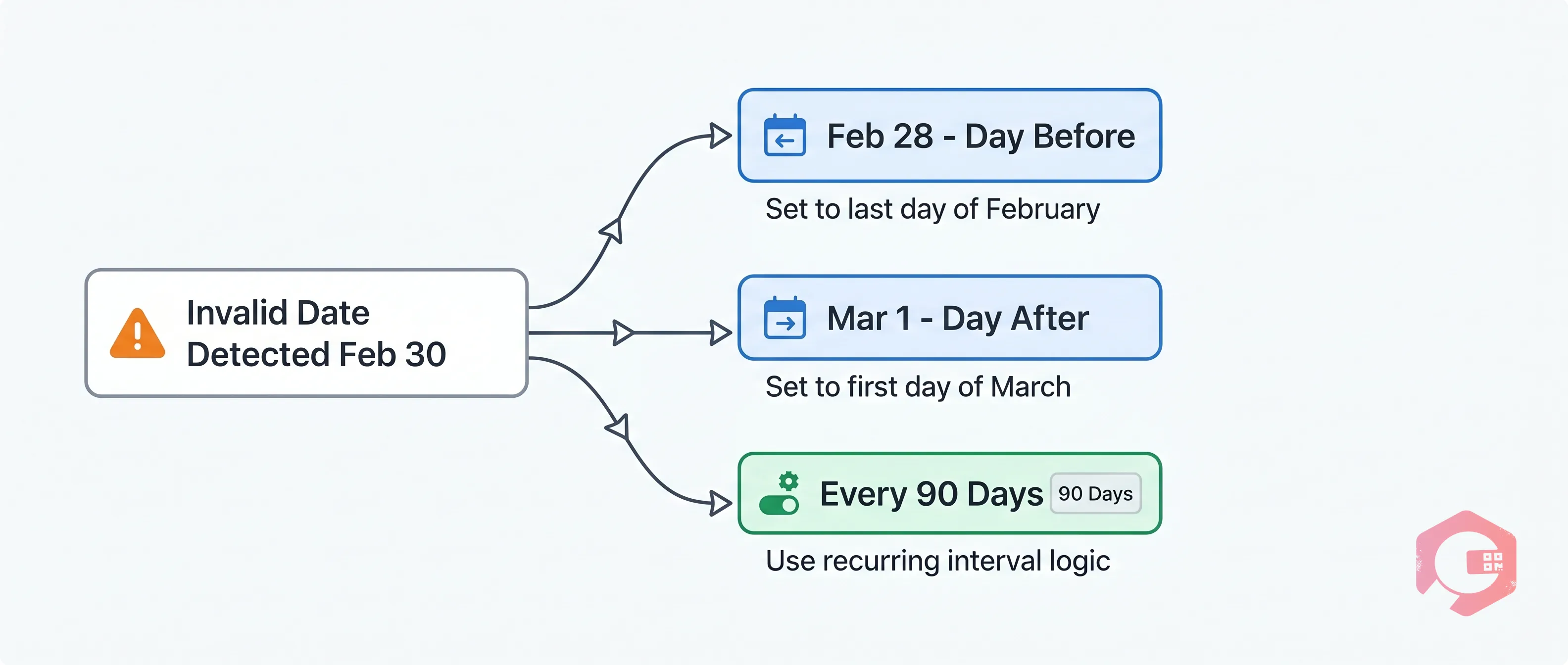
Here is the exact flow for the November 30 quarterly scenario:
The scheduler chooses one option, the choice is logged, and the rest of the schedule is recalculated from the resolved date. If Option A (February 28) is selected, subsequent occurrences are: May 28, August 28, November 28. The anchor has shifted, but every date in the sequence is valid and every occurrence is generated and assigned.
Option A — Use the day before the gap. The system selects the last valid calendar day of the month in question. For February 30, that is February 28 (or 29 in a leap year). This option keeps maintenance as close to the original intent as possible and works well for inspections and lubrication tasks where timing is approximate.
Option B — Use the day after the gap. The system selects the first valid calendar day of the following month. For February 30, that is March 1. This option is preferred when the maintenance task must not occur earlier than the scheduled date — for example, a statutory inspection that must happen no sooner than 90 days after the previous one.
Option C — Change the frequency. Instead of a calendar-anchored schedule (quarterly = 3 months from anchor date), the scheduler switches to a day-count interval (every 90 days). Day-count intervals always produce valid dates regardless of which month they fall in. Cryotos supports this as a dynamic PM trigger in its static and dynamic scheduling module.
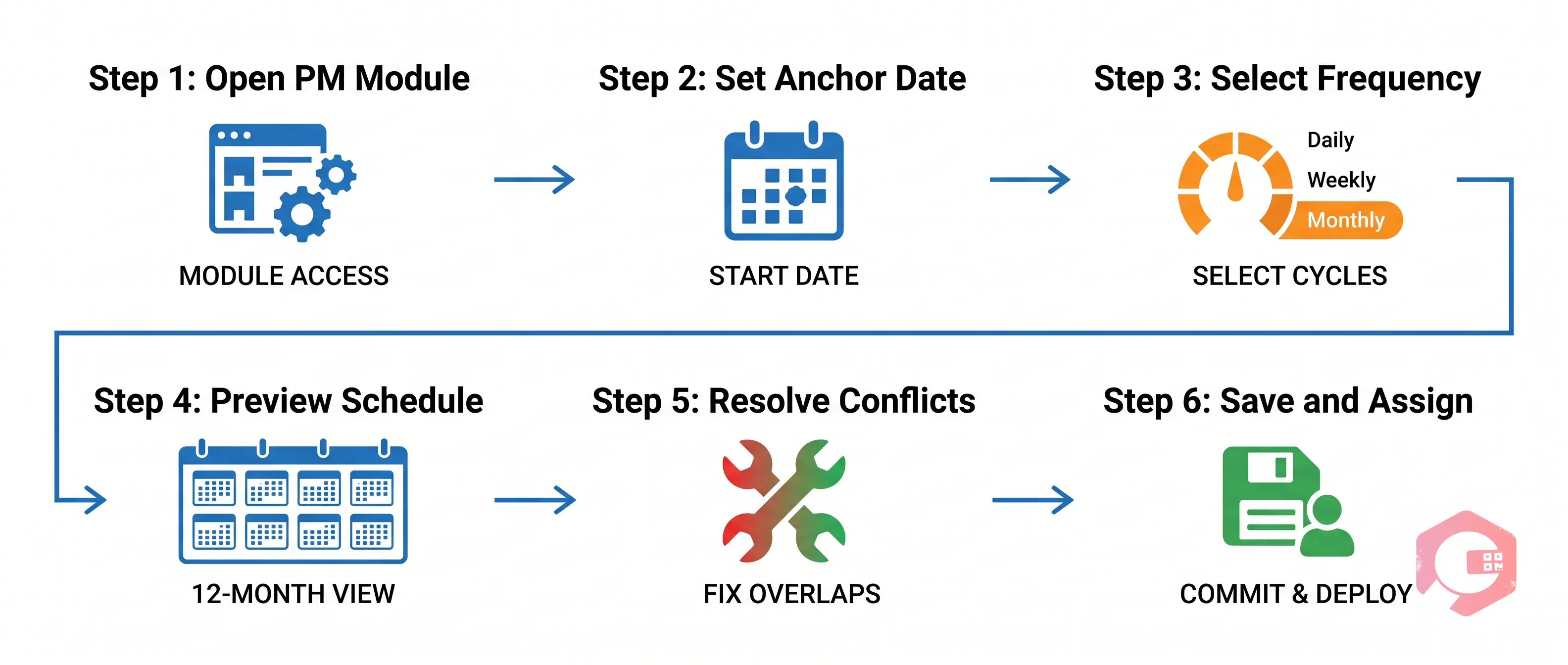
Here is how to configure a preventive maintenance schedule in Cryotos with date conflict detection enabled:
The entire setup process — from opening the module to saving a clean 12-month schedule — takes under 10 minutes for a single asset. For bulk schedule imports via Excel, Cryotos runs the same date validation on every row and returns a conflict report before importing anything.
The simplest way to eliminate date conflicts permanently is to choose a frequency that does not depend on calendar position. Cryotos supports several options that are inherently conflict-free:
Calendar-anchored frequencies (monthly on the 30th, quarterly from November 30) are the highest-risk category. According to ISO 55001 Asset Management standards, the requirement is for maintenance to occur at appropriate intervals — not that it must occur on a specific calendar date. Day-count intervals satisfy this requirement while eliminating scheduling errors.
Some regulatory frameworks do require calendar-date scheduling. Boiler inspections under ASME BPVC, fire suppression system checks under NFPA 25, and electrical equipment inspections under OSHA 1910.303 are examples where the regulation specifies an interval in calendar months. In these cases, use the Cryotos date alert system to resolve conflicts and ensure the audit log captures the resolution decision for each occurrence. This documentation demonstrates good-faith compliance even when the exact calendar date was unavailable.
Any industry that runs calendar-anchored PM schedules benefits from foolproof date validation, but certain sectors face higher stakes when dates are missed:
Cryotos customers in these verticals report that foolproof date validation eliminates calendar-anchor scheduling errors — because the system cannot save a schedule with an unresolved date conflict.
Beyond preventing missed work orders, the foolproof scheduling mechanism creates a compliance-grade audit trail. Every date conflict and its resolution is logged with a timestamp, the user who made the decision, and the reason code selected. This log is exportable as a PDF or CSV from the Cryotos CMMS reporting module and can be presented directly to auditors as evidence of proactive schedule management.
The audit trail entry for a February 30 conflict looks like this: "Schedule ID #PM-4872, generated date February 30 (invalid). Conflict resolved by [User Name] on [Date]: Option A selected — February 28 used. Next occurrence recalculated from February 28." This level of detail satisfies documentation requirements under OSHA preventive maintenance regulations, ISO 55001, and most OEM warranty conditions that require documented service intervals.
Facilities that manage 500 or more active PM schedules spend significant time before audits reconciling their maintenance logs against their scheduled intervals. With foolproof date validation and automatic logging, this reconciliation is automated. The Cryotos Report Builder generates a Schedule Compliance Report showing every PM, its planned date, its actual completion date, and any resolution decisions made.
According to a Deloitte Industry 4.0 report, maintenance teams that digitize scheduling and compliance documentation reduce audit preparation time by up to 70%. Foolproof date validation is one of the lowest-effort, highest-impact improvements a maintenance manager can make.
Ready to eliminate date gaps from your PM schedules? Cryotos Preventive Maintenance Software includes smart date validation, conflict alerts, and a full audit trail out of the box. Book a demo to see the February 30 scenario in a live environment.
Cryotos calculates the full 12-month occurrence list when you preview the schedule. When it reaches February 30 (the second occurrence), a date conflict alert fires in the scheduling interface. You can choose February 28, March 1, or switch to a day-count interval before saving. The schedule cannot be saved with an unresolved conflict.
No. The anchor date (November 30 in this example) is valid and is not changed. Only the generated occurrences that fall on non-existent dates trigger the alert. Your first work order still runs on November 30; only the February occurrence requires resolution.
A calendar-based schedule anchors to a specific date and adds calendar months to calculate future occurrences (e.g., always on the 30th of the month). A day-count schedule counts forward from the last completion date (e.g., every 90 days from the last service). Day-count schedules never generate invalid dates and adapt automatically to actual completion timing.
Yes. Every conflict detection event, the resolution option chosen (Option A, B, or C), the user who made the decision, and the timestamp are recorded in the Cryotos audit log. This log is exportable and satisfies documentation requirements for ISO 55001, FDA 21 CFR Part 11, and OSHA preventive maintenance compliance frameworks.
Yes. When you import PM schedules via Excel or CSV, Cryotos runs the same date validation across every row before importing anything. Rows with date conflicts are flagged in a pre-import conflict report. You resolve conflicts in the report, then re-import the clean file. No invalid schedules enter the system.
Pharmaceutical manufacturing (FDA 21 CFR Part 11), oil and gas (API 510, API 570), healthcare (Joint Commission), and food processing (HACCP, FDA Food Safety Modernization Act) have the most stringent documentation requirements. All of these sectors benefit directly from foolproof date validation and automatic audit trail generation in Cryotos.
Cryotos AI predicts failures, automates work orders, and simplifies maintenance—before problems slow you down.