

Converting OEM PM recommendations into a CMMS schedule means translating the maintenance intervals, task lists, and service procedures from an equipment manufacturer's manual into structured, automated work orders inside your computerised maintenance management system. Done correctly, this process turns a static document — typically a PDF or paper manual that lives in a drawer — into a live, self-executing maintenance programme that fires work orders at the right time, with the right instructions, assigned to the right technician. According to the Society for Maintenance and Reliability Professionals (SMRP), organisations that systematically load manufacturer recommendations into their CMMS reduce missed PM events by up to 35% compared with teams managing schedules manually. This guide walks through the full conversion process step by step.
Key Takeaways

Equipment manufacturers publish maintenance recommendations based on testing under controlled conditions — rated loads, stable ambient temperatures, clean environments, and standard operating cycles. Your facility almost certainly differs from those test conditions in at least one significant way.
A centrifugal pump manufacturer recommends bearing inspection every 2,000 operating hours. Your pump runs in a hot, humid environment at 110% of its rated flow rate for 18 hours a day. The OEM interval was set for a pump running at 75% load in a climate-controlled test cell. Applying it unchanged to your asset creates a real risk of failure before the next scheduled PM.
The reverse is equally common: a compressor rated for continuous industrial use may have an OEM oil change interval of 500 hours. In your application, it runs for 4 hours per day in a clean, temperature-controlled room. The 500-hour mark arrives after 125 working days. Your actual oil degradation rate is far slower than the OEM anticipated — and you are wasting parts and labour maintaining on a schedule designed for heavier use.
The right approach is to use OEM recommendations as the baseline, then adjust each interval based on three factors: your asset's actual operating conditions, its criticality score, and any failure history you have accumulated. Load the OEM baseline first, then calibrate.
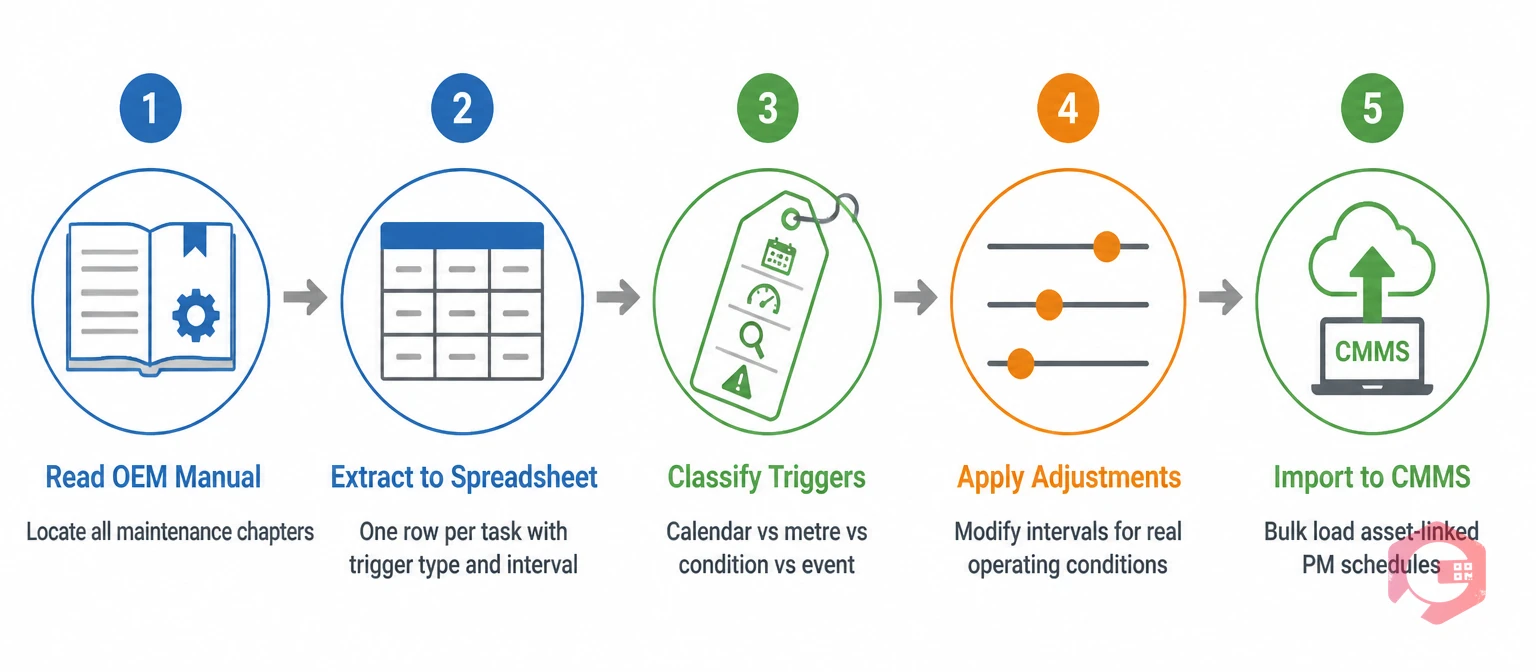
Before you can load anything into a CMMS, you need to turn an unstructured manual into a structured dataset. Most OEM manuals are not written for CMMS import — they are written for technicians, with tasks scattered across multiple chapters, expressed in prose rather than structured fields.
Work through the manual systematically and extract the following for each maintenance task:
A spreadsheet works well for this extraction phase. One row per task, with columns for each field above. You will import from this into your preventive maintenance software in the next step — having it structured now makes the import clean and fast.
Plan for 30–90 minutes per asset depending on manual complexity. A simple pump with 10 maintenance tasks takes 30 minutes to extract correctly. A complex CNC machining centre with 80+ tasks across multiple subsystems may take a full afternoon.
Not all OEM tasks should go into the CMMS as the same trigger type. Getting the trigger classification right is what determines whether your PM programme is efficient or wasteful.
A single asset may have tasks across all four trigger types. A compressor, for example, might have monthly calendar-based safety checks, 500-hour metre-based oil changes, condition-based filter replacements, and a post-overhaul inspection protocol. Each maps to a different trigger type in the CMMS.
Use the MTBF calculator to benchmark your asset's observed failure intervals against the OEM metre-based thresholds — if real-world MTBF is significantly longer than the OEM interval implies, you have room to extend; if shorter, tighten before loading.
| Condition Factor | OEM Baseline Assumption | Adjustment Direction | Example |
|---|---|---|---|
| Operating load | 75–80% of rated capacity | Shorten interval if running above rated load | Pump at 110% rated flow → reduce bearing inspection from 2,000h to 1,200h |
| Ambient temperature | 15–25°C controlled environment | Shorten interval in high heat; extend in cool environments | Compressor in 45°C plant room → halve oil change interval |
| Dust and contamination | Clean, low-particulate environment | Shorten filter and lubrication intervals significantly | Cement plant → filter PM every 2 weeks vs OEM monthly |
| Utilisation rate | Single-shift operation | Convert to metre-based and shorten for 24/7 operation | 24/7 generator → oil change at 500h not 12 months |
| Asset criticality | Standard production asset | Shorten for critical assets; extend for non-critical | Single-path cooling tower → tighten OEM interval by 25% |
Apply these adjustments to your extracted task list before loading into the CMMS. Document each adjustment and its rationale — this becomes your evidence base when reviewing schedule performance at the 90-day mark.
A PM trigger that fires without a specific checklist produces inconsistent work. Two technicians responding to the same "500-hour bearing inspection" work order will do different things if there is no checklist — one will do a visual check, another will take a temperature reading, a third will pack grease without checking the existing grease condition first.
Every OEM-sourced PM task needs a structured checklist in the CMMS. Build each checklist directly from the OEM procedure, field by field:
Detailed checklists loaded from OEM procedures also serve as on-site reference documents — technicians access them on their mobile devices at the machine, eliminating the need to carry paper manuals or return to the office to check a procedure.
Before importing, review your extracted task list for consolidation opportunities. Multiple tasks with identical or near-identical intervals on the same asset should be grouped into a single work order rather than separate ones. A compressor with a 500-hour oil change, a 500-hour belt inspection, and a 500-hour coupling check should be one work order with three checklist sections — not three separate work orders that all arrive at the same time and require the same shutdown.
Fragmented scheduling is one of the most common CMMS mistakes when converting from paper-based OEM schedules. It inflates work order volume, requires multiple separate shutdowns where one would do, and makes compliance reporting harder. A single consolidated 500-hour PM work order with a comprehensive checklist is cleaner, faster to execute, and easier to track than three separate orders.
When loading into the CMMS, map each task to the correct asset record. Every PM in the system should be linked to a specific asset ID — not just an asset type or location. This asset linkage is what enables the CMMS to build an accurate maintenance history, track parts consumption per asset, and eventually surface MTBF trends that allow you to validate and refine your OEM-sourced intervals.
Cryotos's CMMS supports bulk import of PM schedules via Excel template — you can import the entire extracted task list in a single operation rather than creating each PM manually. The import maps directly to asset records, trigger types, intervals, and checklist templates in one pass.
OEM intervals loaded directly into a CMMS are educated starting points. After 90 days of execution, your work order data will tell you whether those starting points are well-calibrated or need adjustment.
Pull these four data points from your CMMS at the 90-day mark:
According to Reliable Plant's guidance on PM programme development, most teams that load OEM-based schedules discover 20–30% of intervals need adjustment within the first 6 months — either tightened for harsh-environment assets or extended for light-duty applications. Build the 90-day review into your implementation plan from day one so it happens as a scheduled event, not an afterthought.

Cryotos is built to handle the full OEM-to-CMMS conversion workflow without manual workarounds. The platform supports all four PM trigger types natively — calendar, metre-based, condition-based, and event-based — on a single asset simultaneously, so assets with mixed OEM trigger types load cleanly without splitting into separate systems.
The bulk Excel import feature handles large asset fleets efficiently. Maintenance teams managing 200+ assets across multiple sites can import their entire OEM-extracted task library in a single file — with asset linkage, trigger configuration, and checklist attachment all resolved in the import template rather than through manual CMMS entry. The planned downtime calendar view shows the aggregate PM load week-by-week after import, making it easy to identify front-loaded schedules before they create execution backlogs.
The checklist builder allows maintenance managers to build OEM-faithful task procedures directly in the CMMS, with mandatory photo fields, numeric measurement inputs, and parts consumption logging built into each checklist step. Technicians access checklists on their mobile devices — including in fully offline environments — so the OEM procedure is at the machine, not in an office drawer.
After the 90-day calibration phase, Cryotos's reporting layer surfaces the findings data, reactive work order patterns, and MTBF trends that drive evidence-based interval adjustments. The PM schedule evolves from an OEM starting point into a data-calibrated programme — without manual spreadsheet analysis. According to Plant Maintenance Resource Center, facilities using CMMS-driven PM interval analysis reduce total maintenance labour costs by 15–25% within 18 months of systematic OEM-to-CMMS conversion.
Start by extracting every maintenance task from the OEM manual into a structured spreadsheet — one row per task, with columns for task description, trigger type (calendar/usage/condition), interval value, parts required, and safety requirements. This structured extract is what you import into the CMMS, and getting it clean before import saves significant rework later.
Use OEM intervals as your starting baseline, then adjust for your actual operating conditions before loading. Assets running above rated capacity, in high-temperature environments, or in dusty/corrosive conditions will need shorter intervals than the OEM specifies. Assets in light-duty, climate-controlled applications may support longer intervals. Always start conservative and extend with data — never the reverse.
Group all OEM tasks with the same interval into a single work order per asset rather than creating one work order per task. A compressor with 8 tasks all due at 500 hours should produce one 500-hour PM work order with 8 checklist items — not 8 separate work orders. This reduces scheduling complexity, prevents multiple shutdowns for tasks that could share one window, and keeps compliance reporting clean.
With a well-prepared structured extract and a CMMS that supports bulk import (like Cryotos's Excel template import), a maintenance team can load 50–100 assets with full PM schedules in a single working day. Without bulk import, the same work takes weeks of manual data entry. Allow 30–90 minutes per asset for the extraction phase from OEM manuals, plus 1–2 days for import, verification, and initial compliance configuration.
The difference between a PM programme that runs itself and one that requires constant manual intervention comes down to how cleanly the OEM data was converted in the first place. Cryotos gives your team the import tools, trigger flexibility, checklist builder, and calibration reporting to turn manufacturer documentation into a live, self-executing maintenance schedule. Schedule a free demo to see how maintenance teams use Cryotos to convert OEM manuals into running CMMS schedules — often within a single working week.




Cryotos AI predicts failures, automates work orders, and simplifies maintenance—before problems slow you down.



