To protect maintenance crews from heat stress in cement and steel plants, use five controls. Plan hot jobs around the heat, acclimatize every worker, set work-rest cycles, watch for symptoms and record each control. Each step lowers the heat load on the body before it turns into heat illness.
Maintenance crews face some of the heaviest exposure in a plant. Shutdowns pack long shifts, hot equipment, new contractors and flame-resistant clothing into a few weeks. Cement kilns burn material at around 1,450°C and electric arc furnaces tap steel at around 1,600°C, so radiant heat lingers long after the equipment stops. This guide gives six steps and a permit workflow you can build in Cryotos.
Key Takeaways
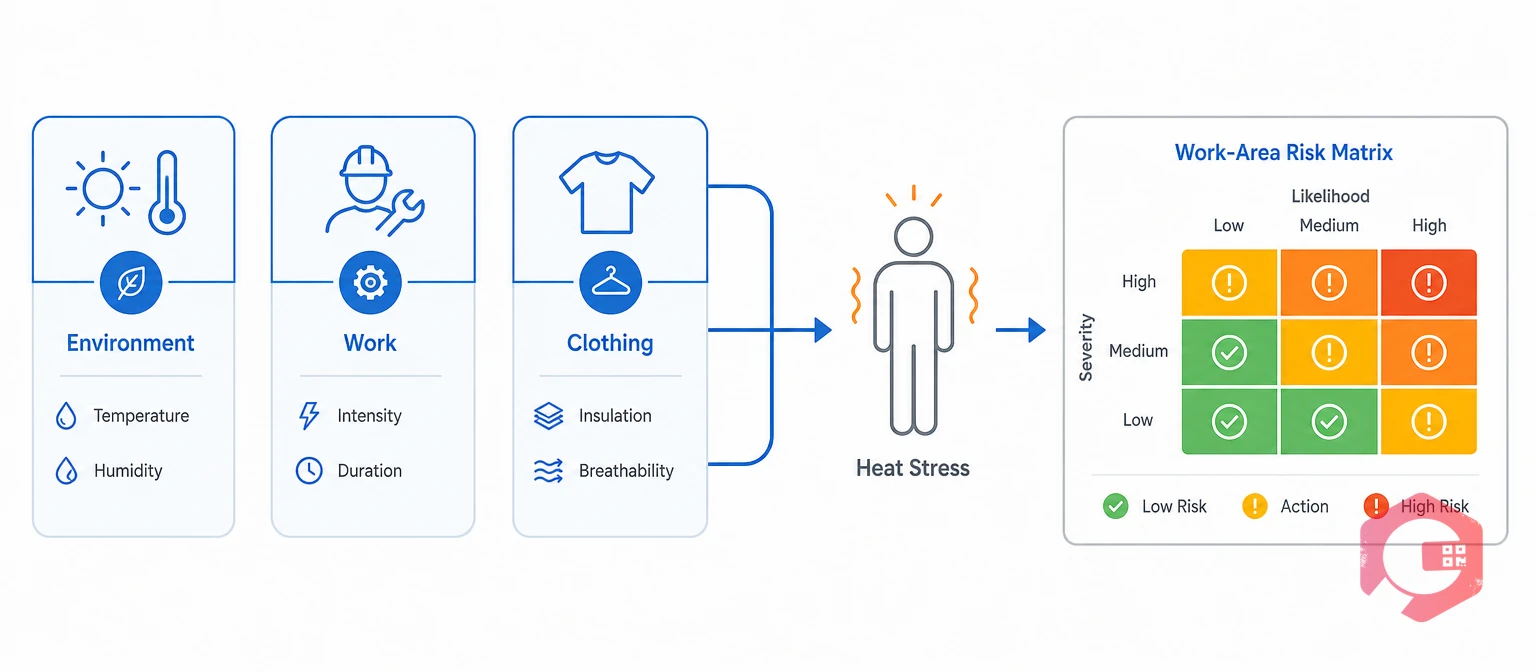
Heat stress is the total heat load on the body from the environment, the work and the clothing a person wears. It becomes heat illness when the body cannot shed that heat fast enough.
Cement and steel plants stack all three. OSHA's heat exposure guidance treats these sources as the starting point for any heat plan.
Rate each work area against these sources in a heat risk matrix, so supervisors know where maintenance crews need the strictest controls first.
| Work area | Main heat source | Typical maintenance task | Key controls | What to record |
|---|---|---|---|---|
| Kiln hood and burner platform (cement) | Radiant heat from the kiln shell and hood | Burner and shell checks | Short work-rest cycles, heat shields, cooling gear | Entry time, crew names, rest breaks. |
| Clinker cooler and preheater tower (cement) | Hot clinker, hot gas ducts, poor airflow | Blockage clearing, refractory repair | Verified cool-down, buddy system, water stations | Surface temperature check, permit approval. |
| Kiln refractory relining (cement) | Residual heat inside the kiln | Brick removal and installation | Staged entries, spot cooling, rescue plan | Cool-down confirmation, hours inside. |
| EAF and ladle bay (steel) | Molten metal and radiant heat | Roof, electrode and ladle repairs | Crew rotation, reflective gear, shaded rest area | Rotation log, PPE used. |
| Caster and reheat furnace (steel) | Hot strand and furnace walls | Roll, segment and burner work | Early starts, cooling vests, hydration breaks | Start time, break log. |
A matrix turns a vague worry about heat into a ranked list of where crews need protection first.
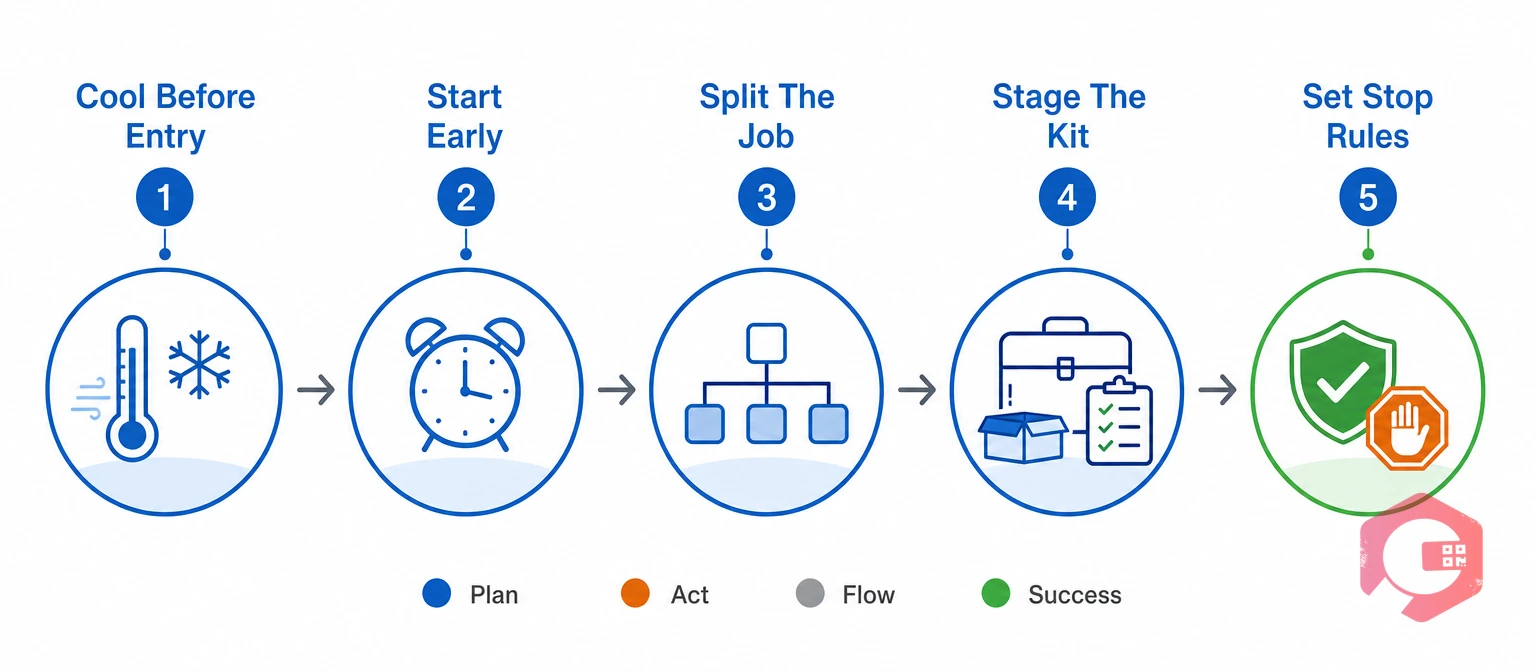
Plan hot jobs around the heat by setting when maintenance crews enter, how long they stay and what must cool first. A refractory job that starts at noon in summer carries a far higher load than the same job at dawn.
The Cool-Window Planning Method:
Calendar scheduling in preventive maintenance software lets planners place recurring inspections in cooler windows and planned shutdown periods. Planning that removes exposure hours does more than any cooling vest can.
Waiting in a hot area adds exposure without adding repairs. Measure how much of a shift goes to hands-on work with the wrench time calculator.
Acclimatization is the gradual physical adaptation to heat that builds over several days of exposure. OSHA notes that many heat-related deaths happen in the first days on a hot job, before the body has adapted.
NIOSH recommends a graded schedule for the first days in the heat.
Shutdowns are where this breaks down. Most maintenance teams bring in contractors who arrive on day one and expect full shifts. Record each worker's start date and acclimatization day on the crew list or permit, and give returning workers a short ramp-up after a long absence.
An acclimatization schedule costs only planning time and protects the workers at highest risk.
A work-rest cycle is a fixed pattern of work time followed by cooling time that limits heat build-up in the body. Set the cycle by measuring the heat load, then match breaks and equipment to it.
The standard heat stress measure is the wet-bulb globe temperature (WBGT), an index that combines air temperature, humidity, radiant heat and air movement. Use WBGT readings with the exposure limits in your site's safety standard to decide how long crews work before they rest.
A common mistake is placing water and shade at the plant gate instead of at the work area. Controls only work when crews can reach them without leaving the job.
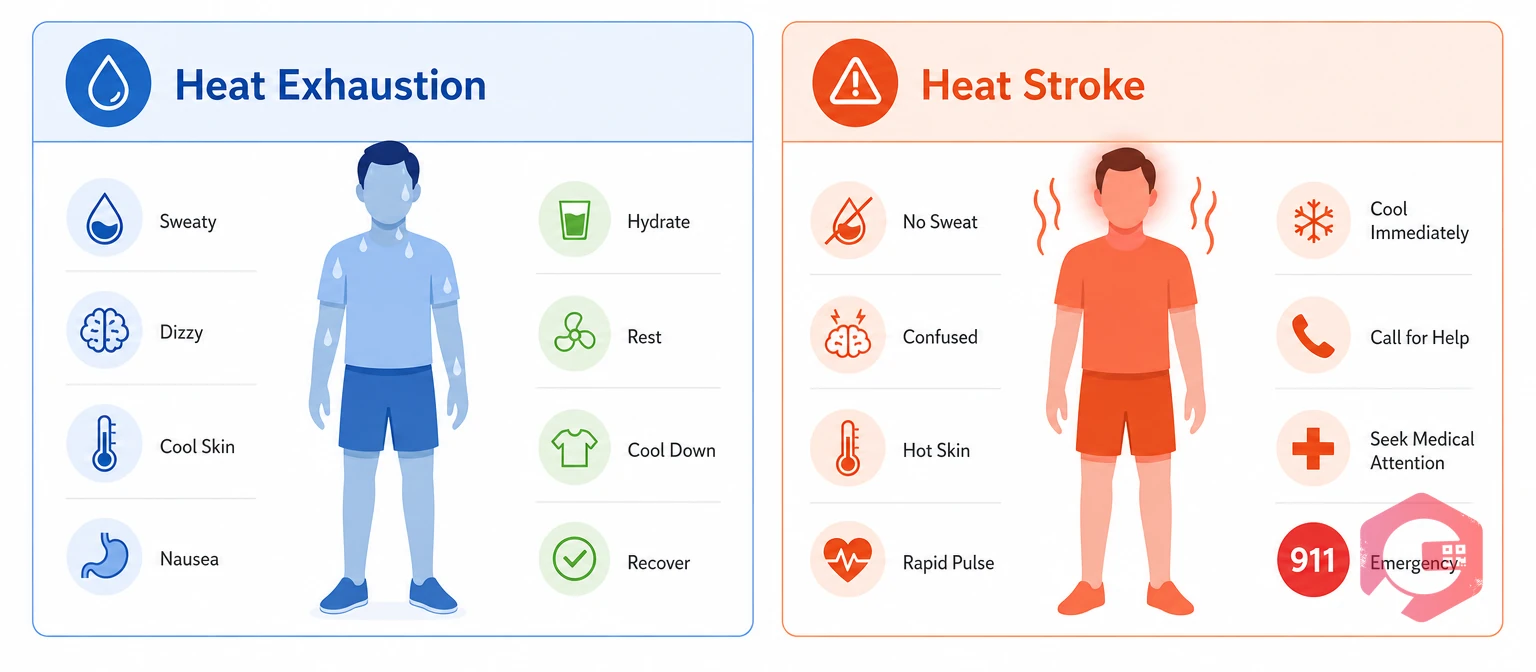
Spot the difference by checking skin, thinking and responsiveness. Heat exhaustion is serious but recoverable, while heat stroke is a life-threatening emergency. Heat stroke is a medical emergency in which the body core temperature rises above about 40°C and the brain is affected.
This heat stroke overview lists confusion, collapse and a core temperature above 40°C as the key warning signs. Train maintenance crews on both columns below.
| Sign | Heat exhaustion | Heat stroke |
|---|---|---|
| Skin | Heavy sweating, cool and clammy | Hot and flushed, either dry or still sweaty. |
| Thinking | Alert but dizzy, with headache and nausea | Confusion, slurred speech, seizures or collapse. |
| Core temperature | Raised, usually below 40°C | Above about 40°C. |
| First action | Move to a cool area, remove extra layers, give water, rest | Call emergency services, cool the body rapidly with water or ice, stay with the worker. |
Rehearse the response, including how rescuers reach a worker inside a kiln or ladle bay. Print the emergency number and the nearest cooling point on every permit, and follow your site's medical procedure.
Build heat stress controls into the same system that already assigns and approves maintenance work. A Computerized Maintenance Management System (CMMS) holds the assets, crews, schedules and permits that a heat plan depends on. It cannot cool a worker, but it makes sure your heat rules run on every job and leave a record.
Maintenance teams using Cryotos have reported up to 30% reduction in unplanned downtime and 25% faster repair turnaround. Fewer emergency repairs also mean fewer unplanned entries into hot equipment.
A hot job in Cryotos follows one connected workflow, from shutdown request to closed permit. Your plant sets the heat rules, and the system applies them every time.
Fields such as cool-down confirmation and the buddy name are set by your plant. The workflow makes sure crews complete them and leaves one record of who entered hot equipment, when and under which controls.
Plan hot jobs for cooler windows, confirm equipment has cooled before entry, acclimatize contractors and enforce work-rest cycles. Keep water, shade and cooling gear at the work area, and record hours, so supervisors see who is overexposed.
NIOSH schedules reach full exposure on day 4 for experienced workers. New workers add no more than 20% each day, so they take longer. Full adaptation commonly takes one to two weeks.
Heavy sweating, headache, dizziness and nausea signal heat exhaustion. Stop work, move the worker to a cool place and give water. Confusion, seizures or collapse signal heat stroke and need emergency services.
Rules vary by country and state. In the US, OSHA enforces heat hazards under its General Duty Clause and has been developing a dedicated heat rule, so check current requirements for your site.
Cryotos cannot cool anyone, but its permits, checklists and mobile approvals apply your heat rules to every job. Hold points and prerequisites prompt the right checks, and each permit leaves a timestamped record.
Heat stress controls only protect maintenance crews when every crew, every shift and every contractor follows them. Schedule a free demo to see how Cryotos links permits, checklists and labor reports so those controls are approved before work, tracked on mobile and recorded for review.


Cryotos AI predicts failures, automates work orders, and simplifies maintenance—before problems slow you down.