
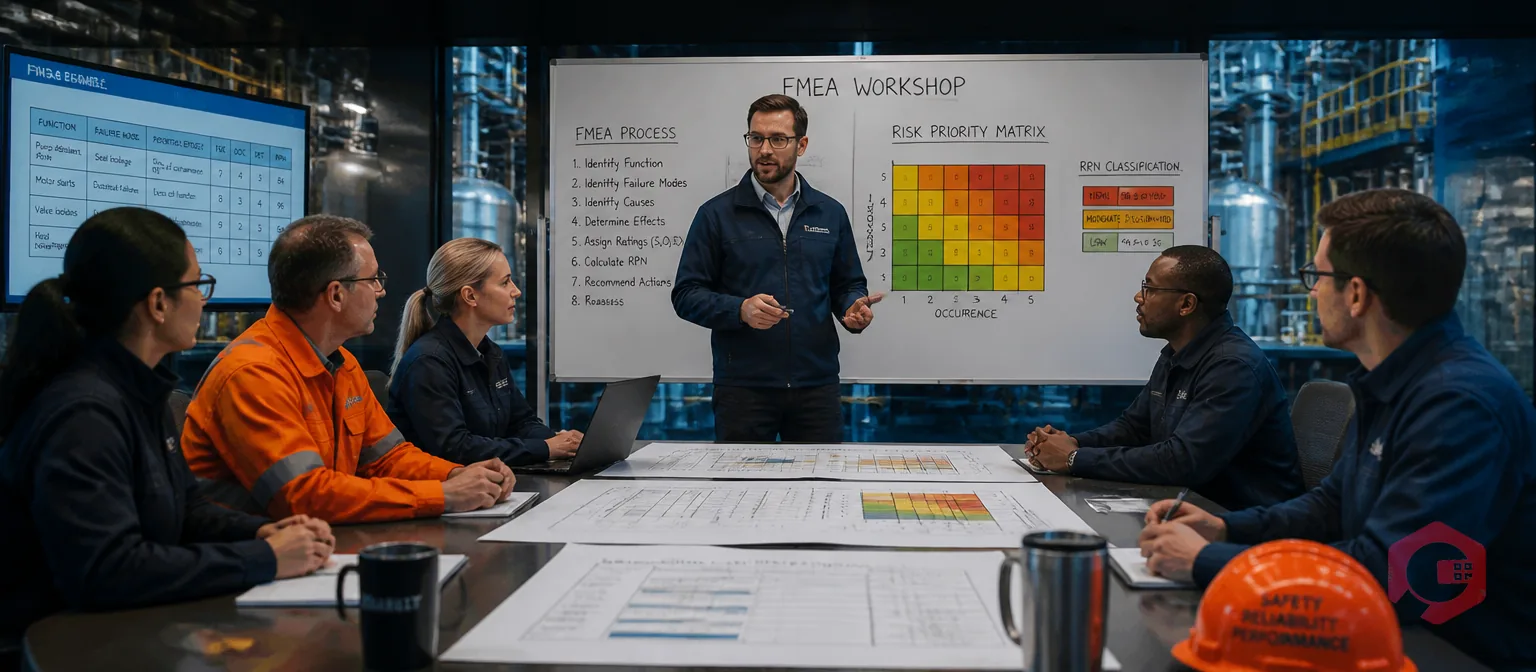
FMEA analysis — Failure Mode and Effects Analysis — is a structured, step-by-step method for identifying how equipment, processes, or systems can fail before those failures happen. Maintenance and reliability teams use FMEA to rank failure risks, prioritise resources on the most critical assets, and eliminate root causes before they trigger downtime. According to the American Society for Quality, FMEA is most effective when applied early in the asset or process lifecycle — when the cost of making changes is lowest and the impact of preventing failures is greatest.
This guide walks you through every step of conducting an FMEA analysis — from scoping the study to tracking corrective actions — with a practical worksheet your team can apply immediately.
Key Takeaways
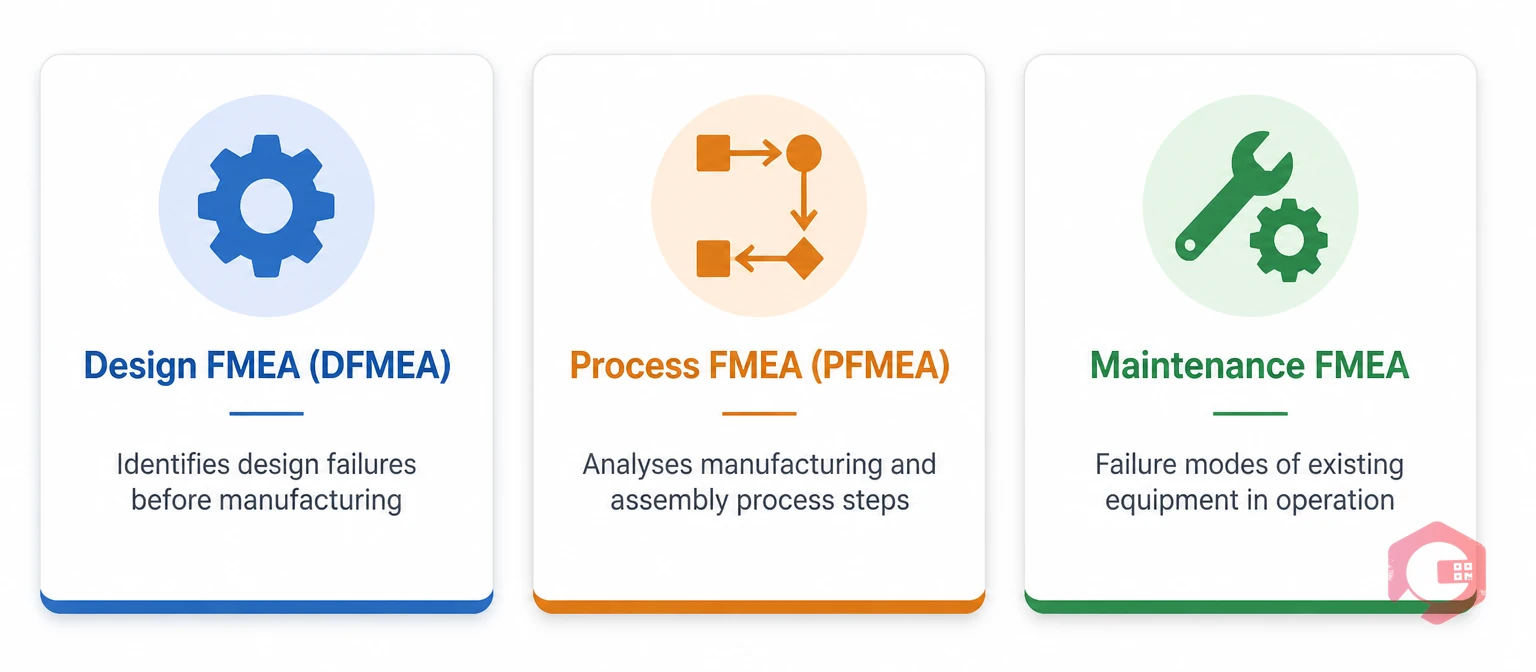
FMEA stands for Failure Mode and Effects Analysis. A "failure mode" is any way a component, process, or system could fail to perform its intended function. The "effect" is what happens downstream when that failure occurs — production stops, product quality drops, or a safety incident occurs. FMEA forces a team to think through these scenarios before they happen and take preventive action.
There are three main types of FMEA used in industrial and maintenance settings:
DFMEA is used during the product or equipment design phase to identify potential failures in design specifications before manufacturing begins. Engineers use it to compare design alternatives and reduce inherent failure risk in the asset from day one.
PFMEA analyses manufacturing and assembly processes. It identifies how process steps can fail — wrong torque, missing component, incorrect temperature — and what those failures mean for the final product or output quality.
Maintenance FMEA focuses on the failure modes of existing equipment in operation. This is the type most relevant to maintenance and reliability teams. It answers the question: "How can this asset fail, and what should we do about it before it does?" The output directly informs PM schedules, inspection intervals, and spare parts stocking levels.
Reactive maintenance is expensive. Industry data consistently shows that unplanned breakdowns cost three to five times more per repair than planned maintenance because of emergency labour rates, expedited parts, and lost production. FMEA shifts the team from reacting to breakdowns to preventing them at the source.
Beyond cost savings, FMEA gives maintenance teams three specific advantages:
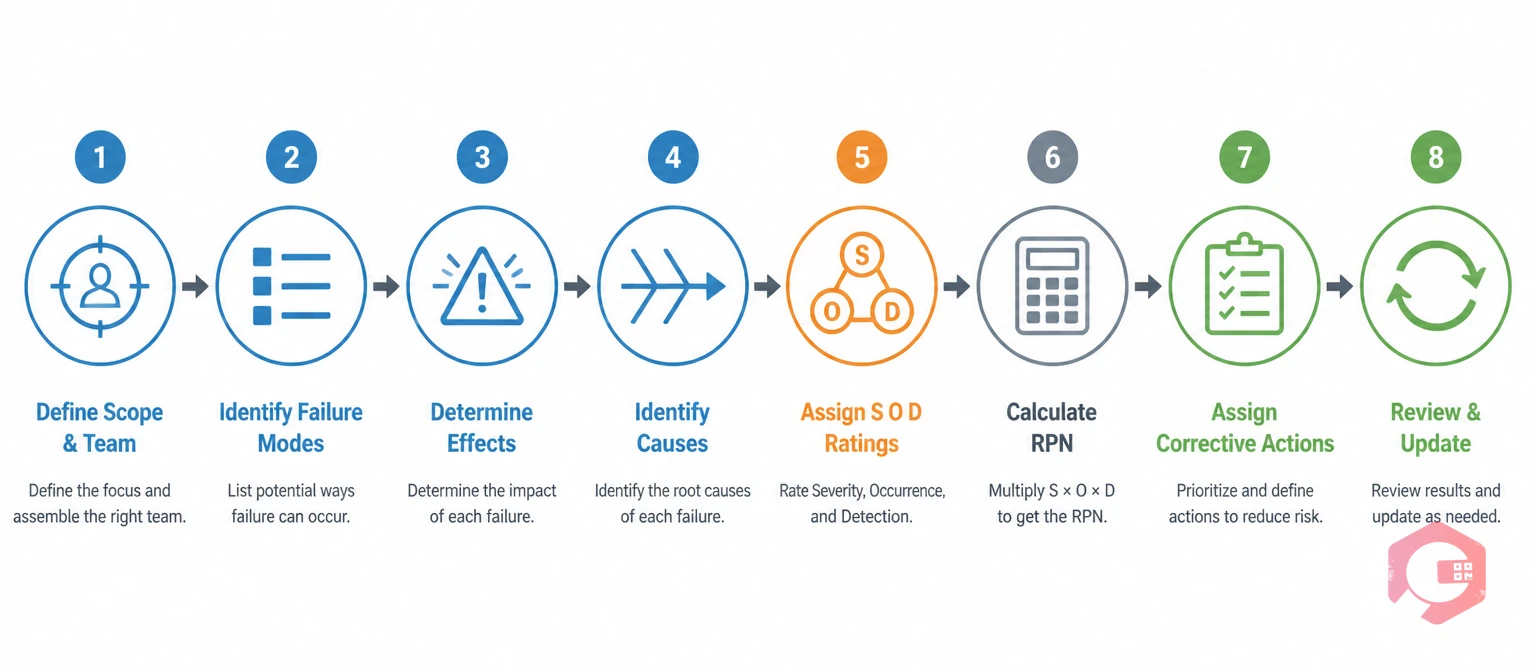
Follow this process in sequence. Skipping steps — especially the RPN calculation — produces incomplete risk assessments that teams rarely act on.
Start by defining exactly what system, process, or piece of equipment you are analysing. Broad scope ("the whole factory") produces vague results. Narrow scope ("the main compressor feed line in Unit 3") produces actionable ones.
Assemble a cross-functional team: a maintenance engineer, an operations technician who runs the equipment daily, a reliability engineer if available, and a quality or safety representative. The technician's operational knowledge is often the most valuable input in the room — as Lucidchart's FMEA guide notes, frontline team members catch failure modes that design engineers miss entirely.
For each component or process step in scope, list every way it could fail. Failure modes include things like bearing seizure, seal leak, valve stuck open, electrical short, corrosion, and fatigue cracking.
Use maintenance work order history, equipment manuals, and technician experience to build a complete list. A single component often has four to eight distinct failure modes — brainstorm until the team cannot add anything new, then review historical breakdowns to check for anything missed.
For each failure mode, describe what happens when the failure occurs. Does it stop the production line immediately? Does it reduce output quality? Does it create a safety hazard? Document effects at three levels: local (just this component), system-level (the assembly it belongs to), and end-user level (downstream process or customer impact).
For each failure mode, list every root cause that could produce it. A bearing seizure, for example, could be caused by inadequate lubrication, contamination, overloading, or misalignment. Use root cause analysis methods such as 5 Whys to dig past symptoms and surface true causes. One failure mode can have multiple root causes — document all of them.
This is the scoring core of FMEA. Rate each failure mode on three dimensions using a 1–10 scale:
Multiply the three scores together: RPN = Severity × Occurrence × Detection. The maximum possible RPN is 1,000. High RPNs — typically above 100 to 200, depending on your organisation's threshold — signal that a failure mode needs corrective action.
One important rule: RPN alone does not tell the full story. Any failure mode with a Severity score of 9 or 10 warrants immediate attention regardless of its combined RPN. A catastrophic but rare, detectable failure is still catastrophic if it occurs. Use the MTBF calculator to cross-reference how frequently your high-severity assets are actually failing — real failure rates sharpen your Occurrence scores.
Use the failure rate calculator to establish a data-driven baseline before assigning Occurrence scores to each failure mode.
Rank failure modes by RPN (highest first) and assign specific corrective actions to each high-priority item. Good corrective actions target the root cause — not just the symptom. For each action, assign a responsible owner, a due date, and a target for revised Severity, Occurrence, or Detection scores once the action is complete.
Corrective actions typically fall into three categories: design or engineering changes to eliminate the failure mode, improved maintenance or inspection procedures to reduce occurrence, and better detection methods such as condition monitoring sensors.
FMEA is a living document. After corrective actions are implemented, recalculate the RPN to confirm the risk has been reduced. Schedule regular reviews — quarterly for critical assets, annually for lower-criticality equipment — and update the FMEA whenever a design change, process change, or new failure mode appears. An FMEA last updated five years ago gives your team false confidence.
Here is how a simplified FMEA worksheet looks for a centrifugal pump in a water treatment facility. Three failure modes are analysed across the same asset to show how RPN ranks them in priority order:
Notice that the bearing seizure has the highest severity score (9) but the lowest RPN (81) because it occurs infrequently and is detectable. The seal leak (RPN 160) ranks as the highest priority. This is exactly why you cannot rely on severity alone.
Most FMEA efforts fall short not because the method is wrong, but because of how teams execute it. These four mistakes account for the majority of failed FMEA programmes:
The most common reason FMEA results do not translate into fewer failures is that the corrective actions never get implemented. Teams complete the analysis, produce a spreadsheet, and three months later nothing has changed on the shop floor.
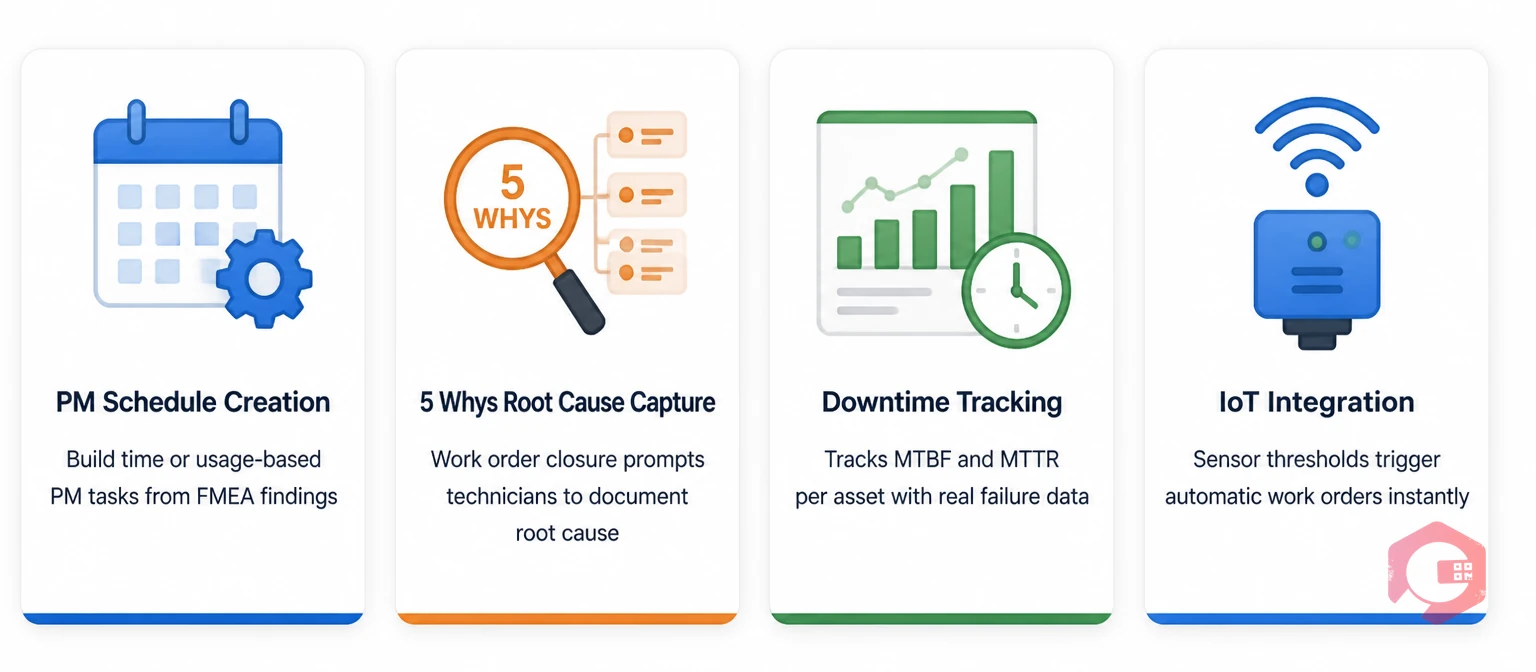
A CMMS closes that gap. Once your FMEA identifies that a centrifugal pump needs monthly vibration checks, you create a recurring preventive maintenance work order in the CMMS with a digital checklist tied directly to the pump asset. The FMEA finding becomes a scheduled, tracked, documented maintenance task — not a note on a spreadsheet.
Cryotos CMMS connects FMEA outcomes to daily operations in four specific ways:
Organisations that combine structured failure analysis with connected maintenance software consistently reduce unplanned downtime — because the analysis and the action are in the same system. According to CMS guidance on FMEA, the method is only as effective as the follow-through on corrective actions — and that follow-through requires systematic tracking, not manual spreadsheets.
FMEA is proactive — you conduct it before failures happen to identify and prevent them. RCA (Root Cause Analysis) is reactive — you conduct it after a failure has occurred to understand why it happened and prevent recurrence. The two methods are complementary: FMEA predicts the failures most worth preventing; RCA validates or updates those predictions after real failures occur. Running both together creates a continuous improvement loop where each real breakdown sharpens your FMEA scores.
A focused FMEA on one specific system or critical asset typically takes one to three working days for an experienced team. The initial session — scoping, identifying failure modes, and scoring — usually takes four to eight hours. Corrective action assignment and documentation take additional time. Large, complex systems with 50+ components may take several weeks across multiple sessions. Breaking the scope into sub-systems and running parallel FMEA sessions speeds the process considerably.
Most organisations set a threshold between 100 and 200 as the trigger for mandatory corrective action. However, any failure mode with a Severity score of 9 or 10 warrants attention regardless of its RPN — because a catastrophic but rare, detectable failure is still catastrophic if it occurs. Your organisation should define its own thresholds based on industry standards, regulatory requirements, and risk tolerance, and document those thresholds in the FMEA header so reviewers understand the logic.
An effective FMEA team includes the technician who operates or maintains the equipment, a maintenance or reliability engineer, a quality or process engineer, and a safety representative. For complex systems, an OEM representative or subject matter expert can add value. Teams of three to six people are most effective — large groups slow down the scoring process without adding proportionate insight. The person most familiar with how the equipment actually fails in the field (usually the technician) is the most important person in the room.
Turning FMEA findings into lasting reliability improvement requires more than a spreadsheet. Schedule a free demo to see how Cryotos connects your FMEA corrective actions to scheduled work orders, root cause capture, and real-time downtime data — so your analysis drives actual results on the shop floor.



Cryotos AI predicts failures, automates work orders, and simplifies maintenance—before problems slow you down.



