

In SLAs for maintenance contractors, response vs resolution is the gap between how fast a contractor starts work on a fault and how fast the asset is back in service. Response time measures engagement. Resolution time measures the fix. A contract that tracks only one of them lets a contractor hit every target while your equipment stays down.
Most contractor disputes don't come from the targets in a service-level agreement itself. They come from vague clock rules: who starts the clock, what pauses it, and what counts as "resolved." This guide explains response vs resolution in plain terms, gives typical targets by priority, and lists the clock rules to write into every contract. It also shows how a Computerized Maintenance Management System (CMMS) measures both clocks from the same data.
Key Takeaways
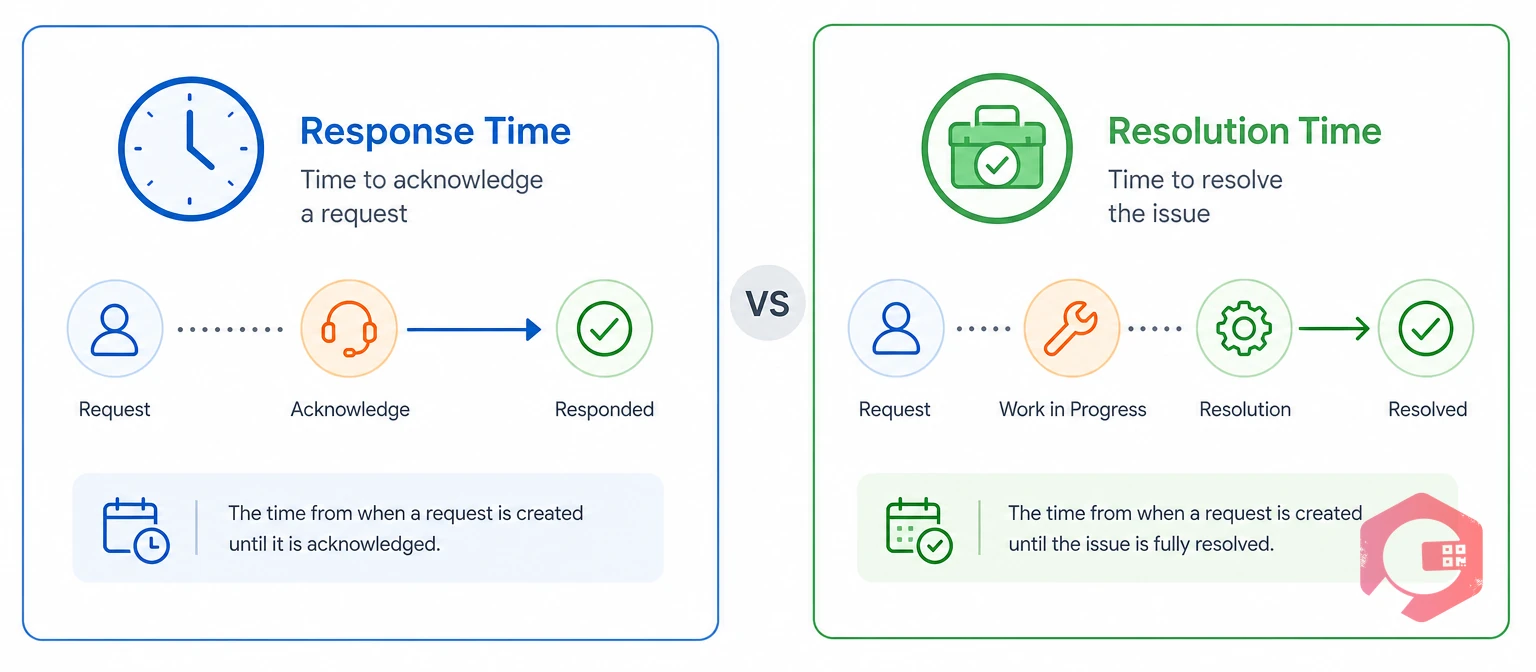
Response time is the elapsed time from a logged request until a technician starts working on it. Depending on the contract, "starting" means remote diagnosis or physical arrival at the asset.
Resolution time is the elapsed time from a logged request until the fault is fixed, and the job is verified closed. It proves the problem won't come straight back next week.
| Factor | Response Time | Resolution Time |
|---|---|---|
| What it measures | How fast the contractor engages | How fast the asset is back in service for good |
| Clock stops when | Technician starts diagnosis or checks in on site | Root cause is fixed and the job is signed off |
| What it proves | Someone is working on the fault | The fault is gone |
| Typical P1 target | 30 minutes to 1 hour | Restore in 4 hours, permanent fix in 24 hours |
| Risk if measured alone | Fast arrivals, long downtime | Silent triage, no early warning |
Asset management standards such as ISO 55000 judge maintenance by the value an asset delivers, not by activity logged. Reliability programs built on SMRP metrics also track mean time to repair (MTTR) as its own measure, apart from response speed.
The short version of response vs resolution: response time tells you the contractor showed up, and resolution time tells you the job is actually done.
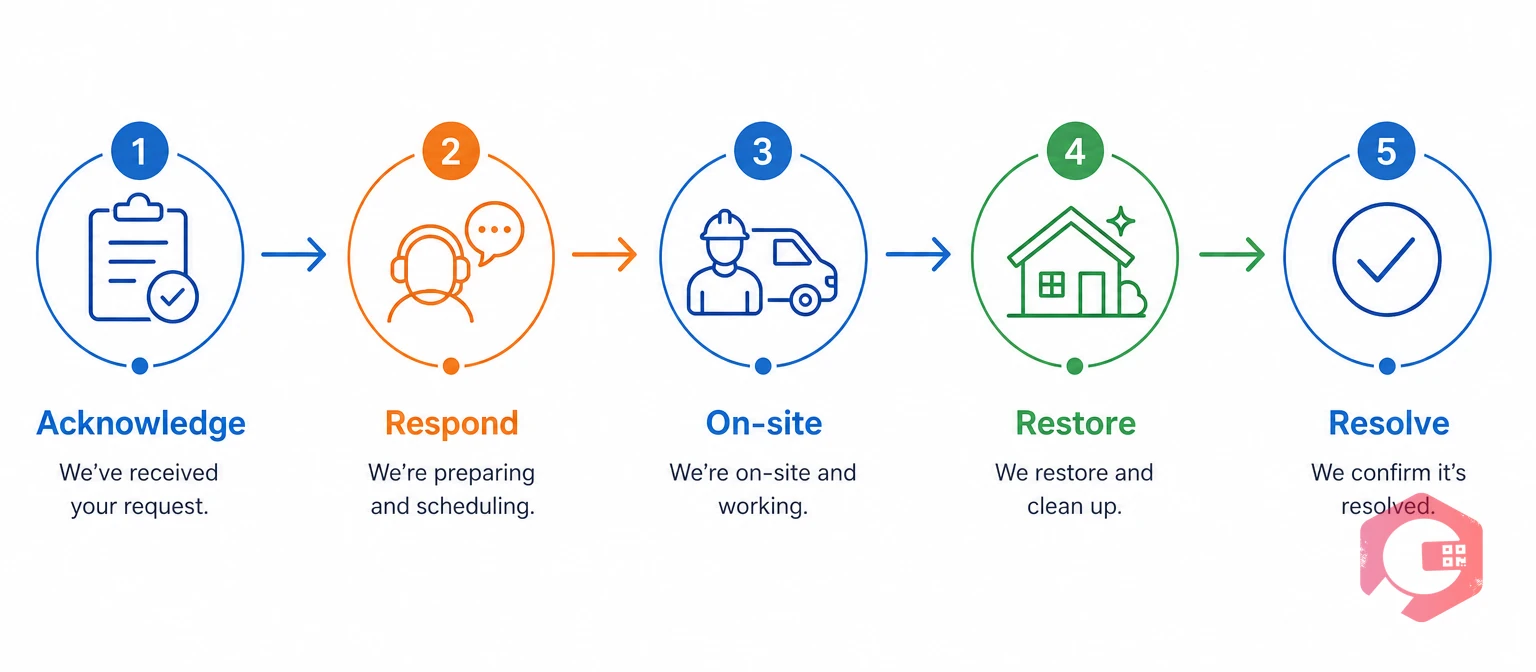
Every contractor job passes through five events, and each one needs a timestamp. This is where response vs resolution becomes concrete: both clocks start at the same moment, but they stop at different points.
Restoration is a temporary fix that gets an asset running while the permanent repair is planned. Many contracts set a separate restoration target for critical assets, because production can't wait for parts to arrive.
Logging every fault through digital work requests gives each job one reliable start time. Without that, every other timestamp in the SLA is open to argument.
A contract that measures one clock lets a contractor meet the SLA while the business still loses production. Most facilities discover this after a month of green SLA reports and red downtime numbers.
Tracking response vs resolution together, plus a reopen rule, lines up contractor incentives with uptime. It also gives you early warning, because a missed response target usually predicts a missed resolution target.
Want escalations to fire before a target slips? See how Cryotos workflow automation handles SLA escalations.
Set targets by priority, and set priority from asset criticality and failure impact. Don't let the loudest caller decide.
| Priority | Typical Trigger | Response Target | Resolution Target | Coverage |
|---|---|---|---|---|
| P1 Critical | Safety risk, line down, critical asset failed | 30 min to 1 h | Restore in 4 h, fix in 24 h | 24x7 |
| P2 High | Asset degraded, backup lost, compliance risk | 2 to 4 h | 24 to 48 h | 24x7 or extended hours |
| P3 Medium | Non-critical fault, workaround exists | 1 business day | 3 to 5 business days | Business hours |
| P4 Low | Minor or cosmetic request | 2 to 3 business days | 10 business days or next visit | Business hours |
These are common industry ranges, not fixed rules. Manufacturing and healthcare sites usually sit at the tight end. Commercial buildings usually sit at the looser end.
Rate each asset A (critical), B (important), or C (non-critical). Then cross that rating with the failure impact: stops operations, degrades operations, or no impact. A critical asset that stops production is always P1, while a non-critical asset with no impact is P4.
A written matrix keeps priority consistent across shifts, sites, and contractors, so the right response vs resolution target applies every time.
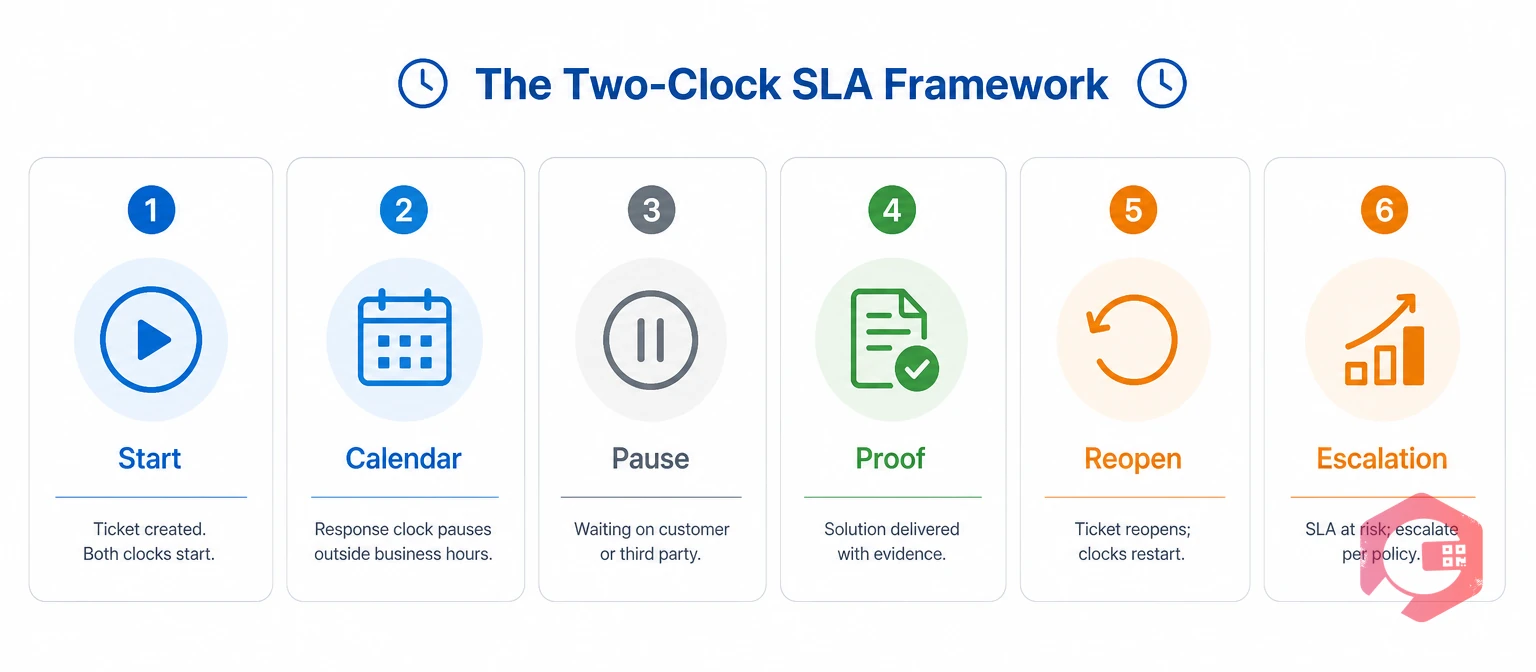
Clear clock rules prevent most response vs resolution disputes. Write them into the contract and set up the same rules in your maintenance system, so both sides calculate the same number.
The Two-Clock SLA Framework:
Contractor-sourced parts, technician availability, and travel time stay on the contractor's clock. If the contract allows these as pauses, the resolution target means very little.
Six written rules turn a vague SLA into one that both sides can measure and trust.
Report response vs resolution compliance separately, by priority and by contractor, every month. One blended number hides where the problem sits.
SLA compliance is the share of jobs closed within target: jobs within target divided by total jobs in the period, times 100. Effective elapsed time is the stop time minus the start time, minus any approved pause time.
Service credits usually scale with how far a contractor falls below target, with a monthly cap. A maintenance KPI dashboard lets you review these numbers from live data instead of a month-end spreadsheet.
Separate response and resolution reports show exactly which contractor, priority, or site needs attention.
The most common mistake is running SLAs on phone calls, WhatsApp chats, and paper job sheets. When timestamps live in five places, nobody can prove what happened.
Each of these is a process gap, not a contractor problem, and it blurs the response vs resolution picture. Each one closes once the SLA clocks run inside one shared system.
Cryotos turns each SLA clock event into a system timestamp on the work order. Your team and your contractors see the same record, so compliance comes from data, not memory.
Maintenance teams using Cryotos have reported up to 30% reduction in unplanned downtime and 25% faster repair turnaround. Much of that comes from seeing a slipping job while there's still time to act.
With work order management as the single source of truth, the monthly SLA review becomes a report you open, not a dispute you settle.
Response time is how long a contractor takes to start working on a logged fault. Resolution time is how long it takes to fix the fault and have the job verified closed. Strong SLAs set separate targets for each, by priority.
Most contracts set a 30-minute to 1-hour response for P1 critical failures, with 24x7 coverage. Restoration within 4 hours and a permanent fix within 24 hours are common resolution targets for the same priority.
Pause the clock only for delays the client causes, such as denied site access, waiting for quote approval, or a permit-to-work hold. Each pause needs a recorded reason and timestamp. Contractor-sourced parts and travel time should stay on the clock.
Require a completed checklist, photos, and client sign-off before a job counts as resolved. Add a reopen rule, so the same fault on the same asset within 7 to 14 days reopens the original job and its clock.
Yes. A CMMS time-stamps each stage of a work order, applies targets by priority, and sends alerts before a breach. It then reports response and resolution compliance by contractor without manual spreadsheets.
Clear response vs resolution targets only work when both clocks run on the same trusted data. Schedule a free demo to see how Cryotos time-stamps every contractor job, flags slipping SLAs early, and builds your monthly compliance report automatically.



Cryotos AI predicts failures, automates work orders, and simplifies maintenance—before problems slow you down.



