

Repeat breakdown alerts are automatic notifications that fire when the same asset fails with the same issue again within a set window. The alert goes to the technician with the right skill and history, with the repair record attached.
Most plants find recurring failures late, often at a monthly review after the third stoppage. A Computerized Maintenance Management System can close that gap, because every work order already records the asset, the issue, and the date. This guide explains how breakdown alerts for recurring failures work, who should receive them, and how to set the rules without flooding your team.
Key Takeaways

A repeat breakdown alert is a notification sent when the same failure returns on the same asset. It tells the team that the last repair did not hold.
An ordinary breakdown alert says something stopped. A repeat alert says this stopped before, and it adds the history a technician needs:
A recurrence window is the number of days in which a second matching failure counts as a repeat. Many maintenance teams start with 30 days and shorten it for critical assets.
Structured methods such as FMEA and RCM both depend on spotting recurring failure modes. Repeat breakdown alerts bring that habit into daily work, so history becomes a warning at the moment it matters.
Repeat failures go unnoticed without breakdown alerts because each breakdown is logged, repaired, and closed as a separate job. The history exists, but nobody reads it while a line is down.
A repeat breakdown is a failure that returns after a repair meant to fix it. Most maintenance teams know how it unfolds: day shift replaces a part, and night shift meets the same fault days later. Late discovery costs a team in four ways:
Maintenance teams using Cryotos have reported up to 30% reduction in unplanned downtime and 25% faster repair turnaround. Alerts help because they move the discovery from the review meeting to the work order itself.
The second failure is the cheapest moment to find a pattern.

Breakdown alerts for recurring failures work by comparing each new breakdown with the asset’s recent work orders and firing a rule when matches reach a set count. The sequence has five steps:
Matching on the issue type fires early, while the machine is still down. Matching on the failure code is stricter and fires at closure. Many teams use the early match for critical assets and the strict match for the rest.
In Cryotos, work order management stores the issue type, failure code, and technician on every job, so the history is ready for a rule to read. A rising mean time between failures, or MTBF, is the clearest sign that repeat alerts are working.
Not sure which assets to start with? Use the MTBF calculator to rank your most failure-prone equipment.
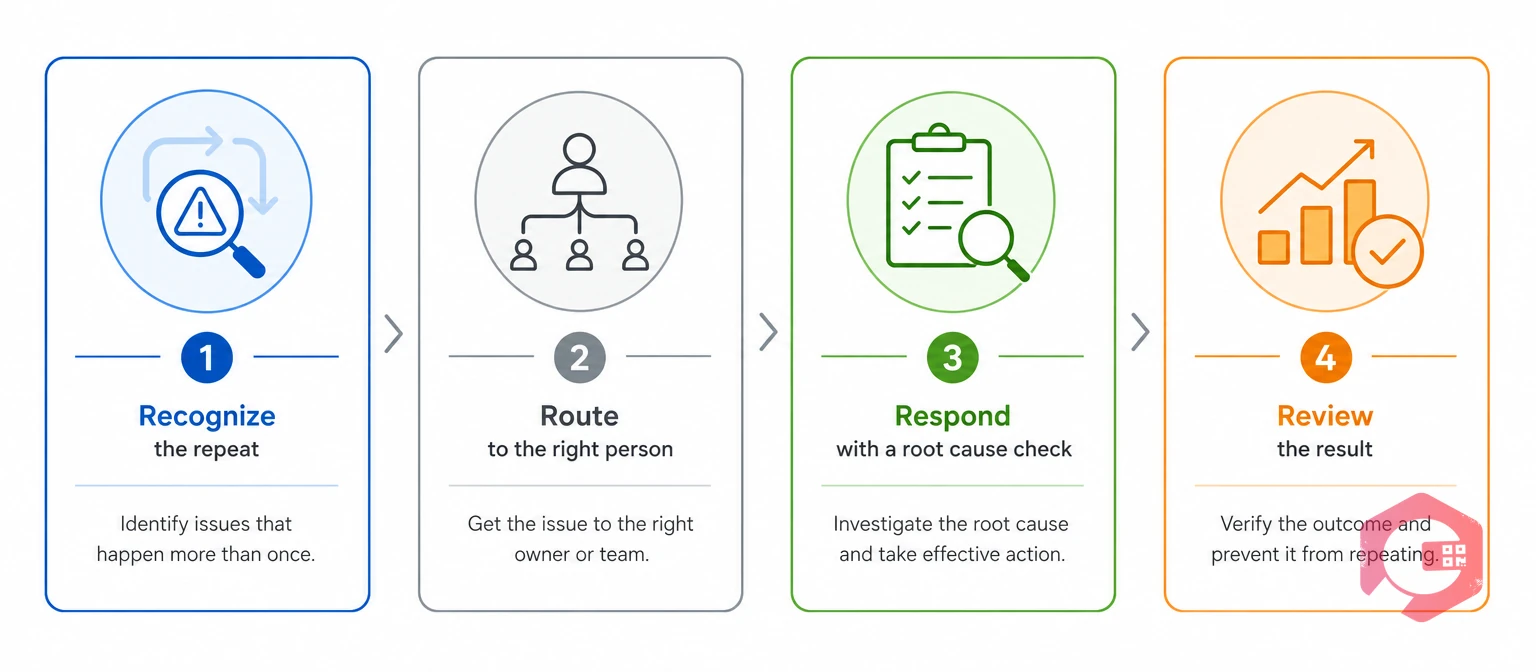
The Four-R framework gives every repeat breakdown alert four jobs: recognize the repeat, route it, respond with a different fix, and review the result. An alert that skips any of the four turns into noise.
The Four-R Repeat Failure Alert Framework:
The Respond step matters most. A repeat alert that leads to the same repair has only reported the problem. Add a short root cause analysis task, such as asking why five times, to the work order before the technician starts.
A breakdown alerts rule matrix sets the recurrence window, trigger count, recipient, and channel for each asset class. Use the starting points below, then adjust them with your own failure history.
| Asset criticality | Recurrence window | Alert fires on | Who is alerted | Channel |
|---|---|---|---|---|
| Critical (stops the line or creates a safety risk) | 30 days | 2nd failure | Last repairer plus supervisor | WhatsApp with email copy |
| High (major equipment with a backup path) | 30 days | 2nd failure | Last repairer plus planner | |
| Medium (supporting equipment) | 60 days | 3rd failure | Planner | |
| Low (non-critical or easy to replace) | 90 days | 4th failure | Supervisor, weekly digest |
These thresholds are illustrative starting points, not values from a standard. Review them after 60 days: raise the count if technicians ignore alerts, and lower it if repeat failures still slip through.
The right technician is the on-shift person with the most relevant history and the matching trade skill. Rank candidates in this order:
If nobody acknowledges in time, the alert escalates to the supervisor. Cryotos supports tiered escalation by WhatsApp or email and logs each step in the work order history.
This scenario is an illustrative composite built from patterns maintenance teams commonly report. It is not a named customer result.
A packaged-foods plant runs a filler line whose sealing jaw stops with a temperature fault. Over 19 days the line fails three times. Three technicians fix it on three shifts, and each replaces the heater band and closes the work order.
Every job looks routine. Nobody sees the pattern until the monthly review, after the third stoppage and a late customer order.
With a recurrence rule in place, the second temperature fault on the same jaw fires a repeat breakdown alert as soon as the work order is raised:
In this scenario the third stoppage never happens. The system does not repair the machine. It moves the pattern from a monthly review to the second work order, and it puts the history in front of the right person.

To set up breakdown alerts for repeat failures, standardize failure codes, rank assets, build the rule, name recipients, add escalation, and review monthly. Start with your ten costliest assets, not the whole plant.
Cryotos supplies the building blocks: failure codes on work orders, workflow automation, WhatsApp and email alerts, and a full escalation trail. A well-tuned rule set produces few alerts, and each one carries weight.
Repeat breakdown alerts are automatic notifications that fire when the same asset fails with the same issue or failure code again inside a set window. They send the repair history to the right technician, so the team can find the cause instead of repeating the fix.
Many teams alert on the second failure for critical assets and the third for less important ones. Use a 30-day window as a starting point, then adjust after reviewing 60 days of results.
Send the alert first to the technician who made the last repair, because that person holds the most context. Copy the supervisor on critical assets, and escalate if no one acknowledges in time.
They will not if you start with critical and high-priority assets and tune the counts. Alerts that fire only on true repeats stay rare. Review the alert count monthly and raise the threshold on any rule that technicians ignore.
A failure that returns is easiest to fix when the right technician hears about it first. Schedule a free demo to see how Cryotos puts repair history in front of the right person the moment a failure recurs.


Cryotos AI predicts failures, automates work orders, and simplifies maintenance—before problems slow you down.



