

A material gate pass is a formal document that authorizes the entry or exit of materials through a facility gate. A Material Receipt Note (MRN) is the document that confirms those materials have been physically received, inspected, and accepted into stock. Together, they form the two-document checkpoint that closes the loop between a purchase order and an updated inventory balance — and when either one breaks down, your stock records, audits, and maintenance operations pay the price.
According to a McKinsey supply chain report, companies with weak goods-receipt controls lose up to 8% of purchased materials to discrepancies and undocumented losses annually. For maintenance teams relying on MRO spare parts, a missing or delayed MRN can mean a stocked part that no one can find — or a work order that stalls because the system says a part is in stock when it isn't.
This guide explains both documents in detail, how they interact, the workflow that connects them, and how a modern CMMS turns a paper-based process into a real-time inventory update.
A material gate pass is a physical or digital document issued at a facility's entry or exit point to control the movement of materials. Security and stores personnel use it to verify that every item entering or leaving the site is authorized, documented, and traceable.
There are two types:
An inward gate pass is raised when a vendor delivers materials against a purchase order. It records the supplier name, PO number, vehicle details, item descriptions, and expected quantities. The gate team checks the delivery against this pass before allowing the truck to proceed to the unloading bay. Without it, any vendor could deliver unauthorized or excess materials that never get logged.
An outward gate pass authorizes materials to leave the premises — for returns, repairs, subcontracted work, or scrap disposal. It serves as a chain-of-custody record, preventing materials from leaving the site unaccounted for. A missing outward gate pass is a common source of inventory shrinkage and audit failures.
A Material Receipt Note (MRN) — also called a Goods Receipt Note (GRN) in some industries — is the document raised after materials have been physically received at the store, inspected for quality and quantity, and formally accepted into inventory. While the gate pass controls movement at the perimeter, the MRN updates the internal record.
A standard MRN captures:
Once the MRN is raised and approved, the inventory system increases the stock balance for each accepted item. Until the MRN is created, the materials physically sitting on a shelf do not exist in the system.
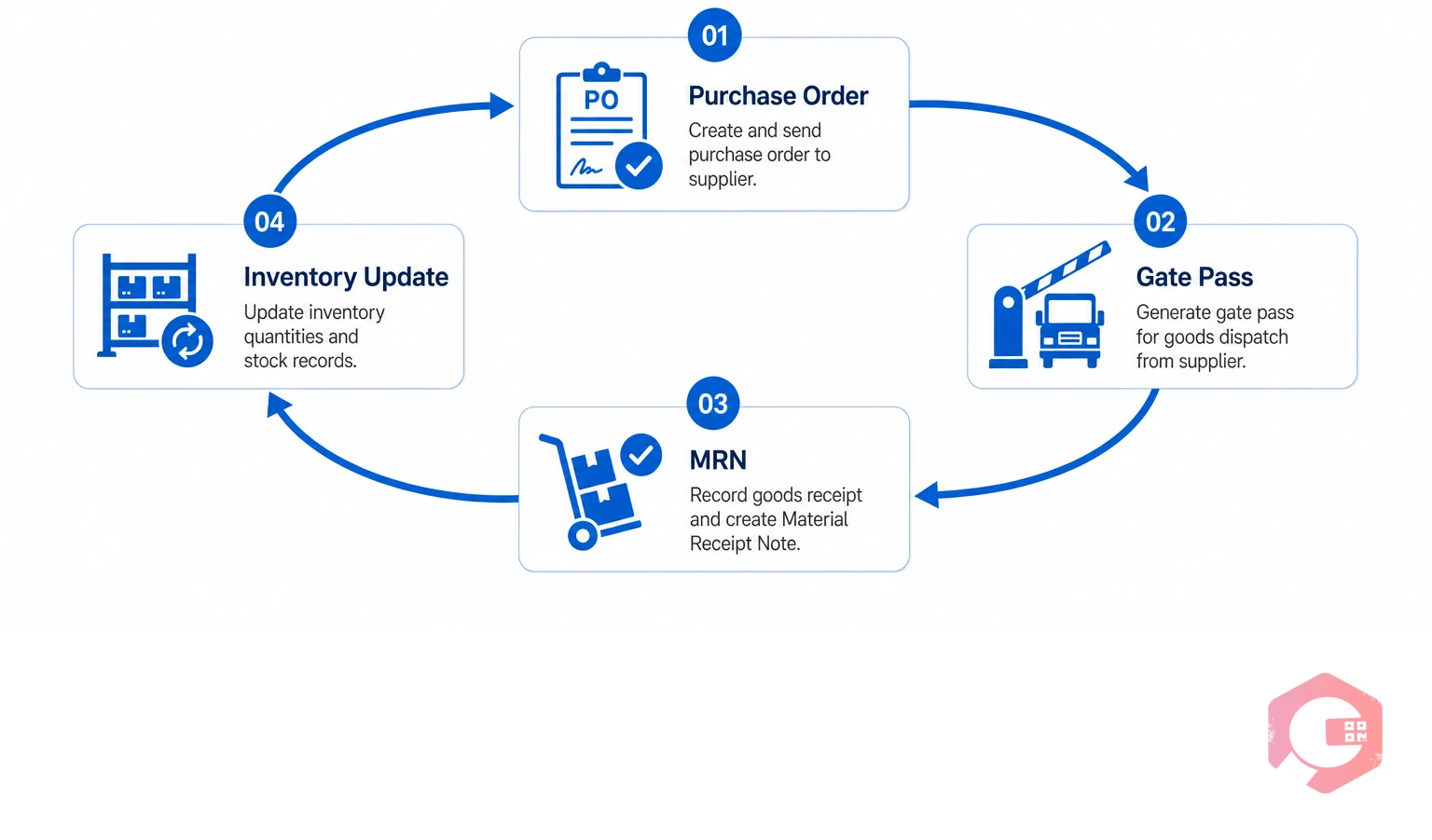
The gate pass and the MRN are two stages of the same procurement-to-inventory loop. The gate pass is the entry ticket — it confirms a delivery was authorized and received at the gate. The MRN is the acceptance ticket — it confirms the materials were inspected and added to stock.
When both documents are raised in sequence and linked to the same PO, your inventory records match physical reality. When either step is skipped, delayed, or disconnected, the loop breaks:
According to the International Society for Pharmaceutical Engineering (ISPE), goods receipt documentation failures are among the top five causes of inventory inaccuracies in regulated manufacturing environments — and the pattern holds across non-regulated industries too.
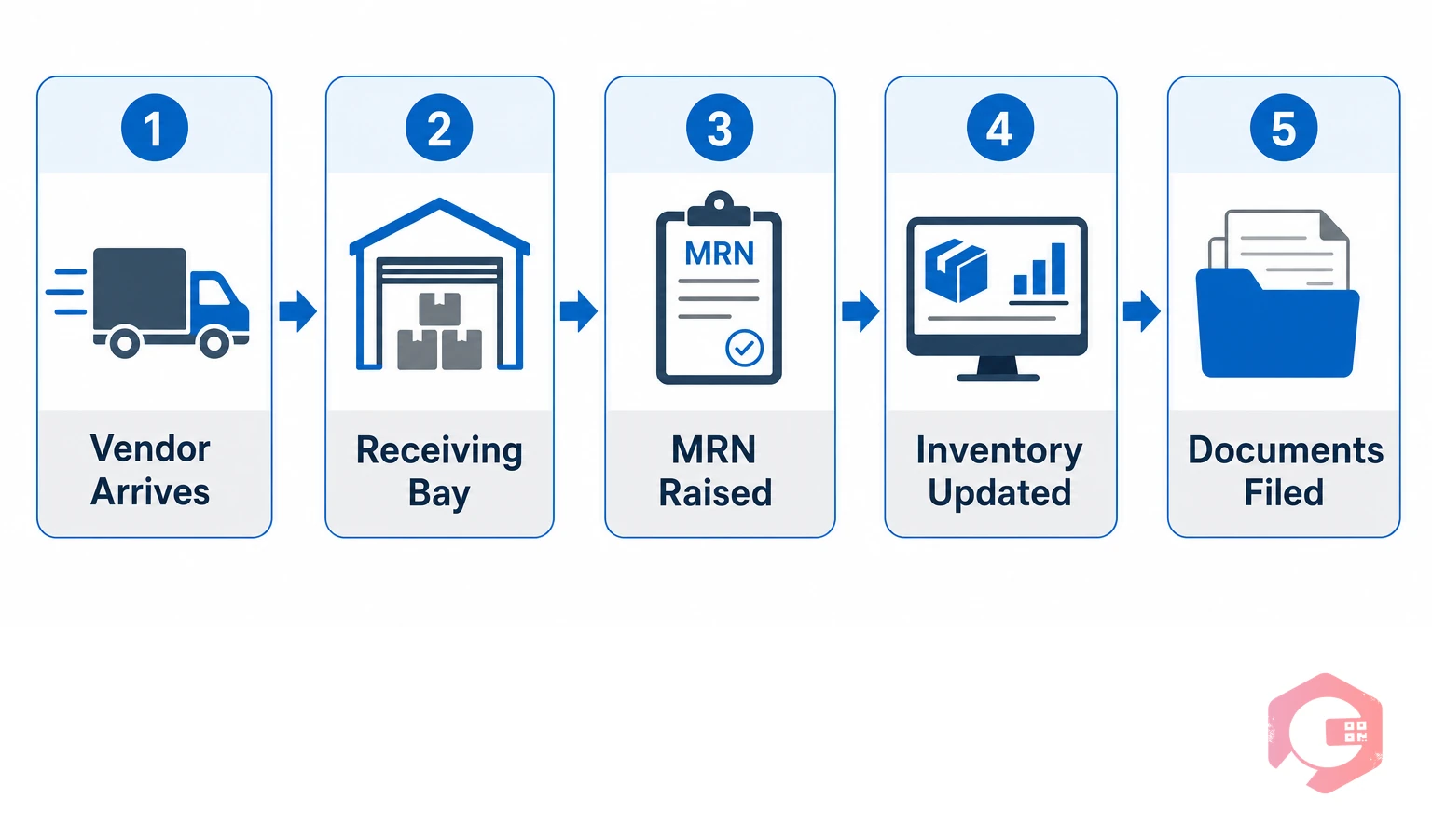
Here is how a well-run procurement-to-inventory cycle flows from vendor delivery to updated stock balance:
Security verifies the vendor against the open purchase orders in the system. An inward gate pass is generated with the PO number, vehicle details, and expected items. The driver signs the pass and receives a copy.
The gate pass is handed to the stores team with the delivery challan. Stores personnel physically count and inspect the items against the challan and the original PO. Any shortages or damages are flagged at this point — not discovered later.
The stores team creates the MRN against the gate pass reference. Each line item is entered with accepted quantity and inspection status. Rejected items are listed separately with reason codes to trigger a return or replacement process.
Once the MRN is approved by the stores supervisor, the system automatically increases the stock balance for every accepted item. The items are now available for issue against work orders. This is the moment the procurement loop closes.
The gate pass, delivery challan, MRN, and PO are all linked in the system as a single audit trail. Finance uses the MRN to process the vendor invoice. Any discrepancy between what was ordered, what was received, and what the vendor invoiced is visible in one place.
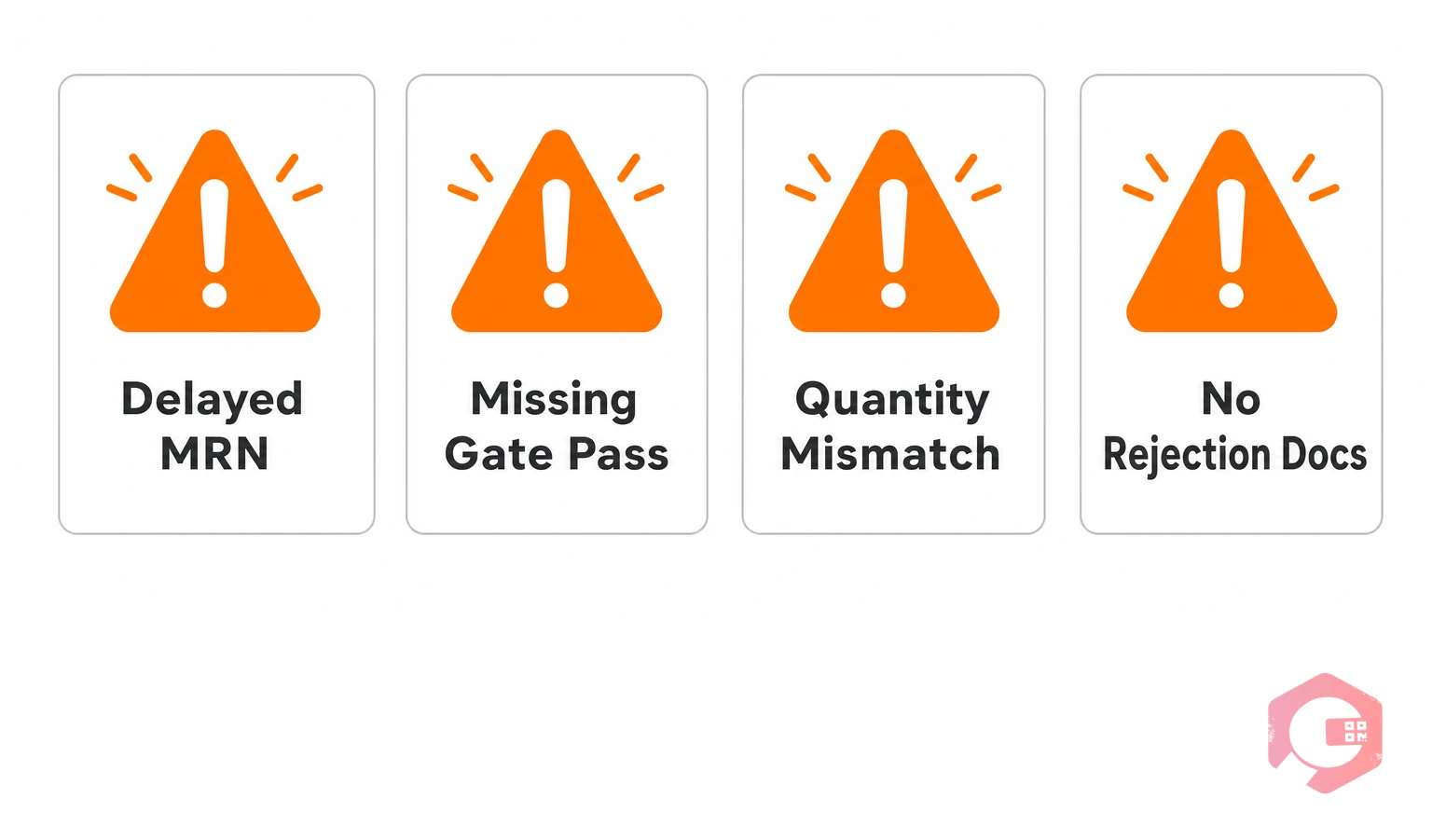
Most procurement and inventory problems in maintenance operations trace back to one of four failure points in the gate pass–MRN loop:
A Reliable Plant study on storeroom best practices found that facilities with a documented, digital gate pass–MRN workflow reported 23% fewer stockout events and 18% lower emergency procurement costs compared to those using paper-based processes.
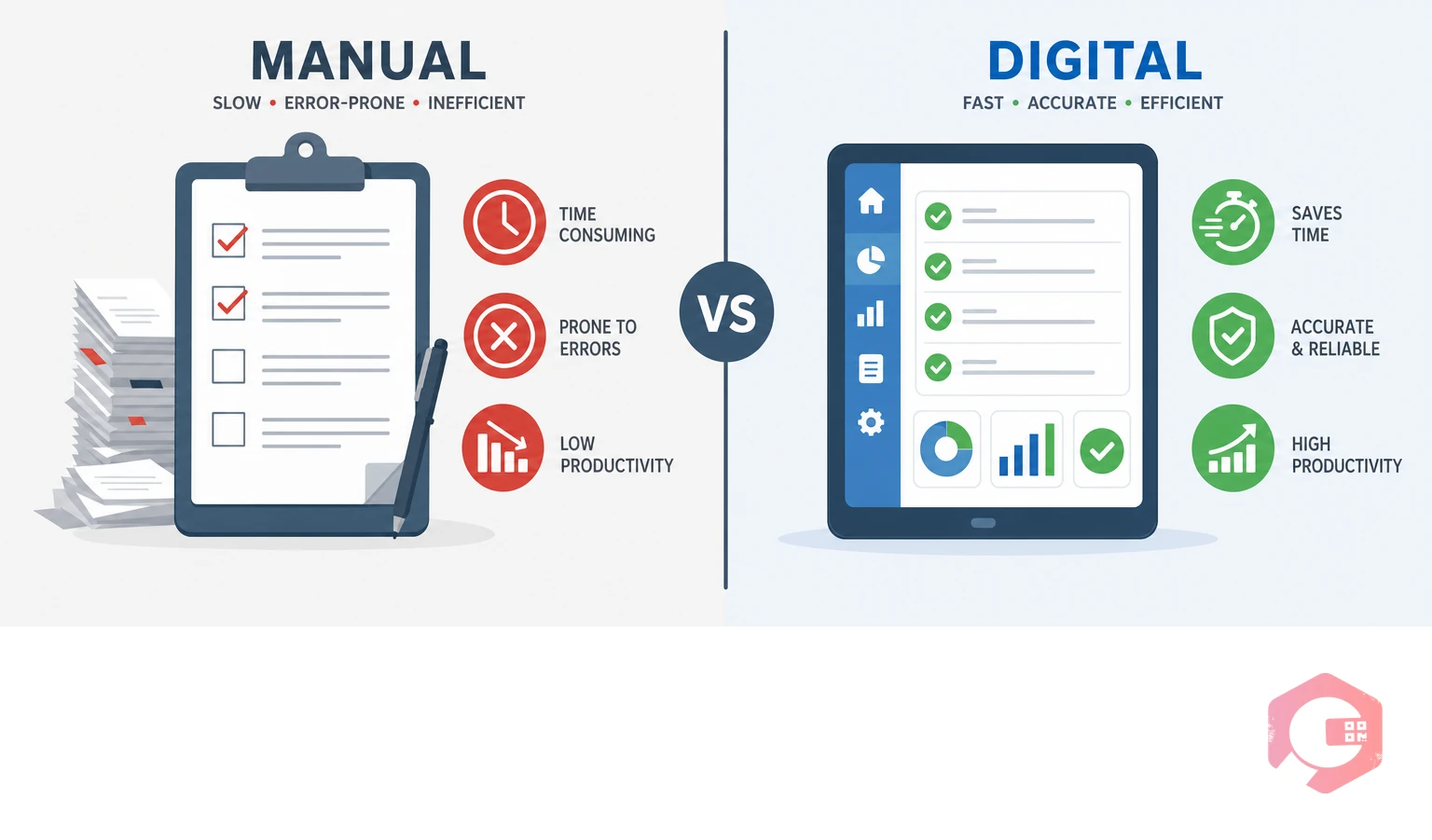
Many facilities still handle gate passes and MRNs on paper or in disconnected spreadsheets. The difference in outcomes between manual and digital approaches is measurable:
A CMMS with built-in inventory management transforms the gate pass–MRN workflow from a paper trail into a live data pipeline. Here's how the integration works in practice:
When a purchase order is raised in the CMMS, it creates a pending receipt that the stores team can act on the moment the vendor arrives. The gate pass is generated directly from the PO — vendor name, items, and expected quantities are pre-filled. No manual re-entry means no transcription errors.
At the receiving bay, the stores team uses the mobile QR code scanning feature to identify each incoming item, confirm quantities, log inspection results, and raise the MRN — all from a smartphone or tablet. The stock balance updates the moment the MRN is approved. Technicians looking at the put-away and picking module on their phones can see the new parts available for their work orders before the vendor's truck leaves the yard.
For items that fail inspection, the system automatically creates a return request linked to the original gate pass, purchase order, and MRN — giving procurement a complete rejection record to use with the supplier. Every document in the chain, from PO to gate pass to MRN to stock ledger, is connected and visible in a single BI dashboard.
Facilities using Cryotos report a 30% reduction in inventory discrepancies within six months of digitizing their gate pass and MRN workflows, with storeroom audit preparation time dropping from two days to under four hours.
To learn more about MRO inventory management and how digital receipts fit into a broader maintenance strategy, the MRO Inventory Checklist is a practical starting point for any facility looking to tighten its procurement controls.
A gate pass controls the physical entry or exit of materials at a facility's perimeter — it is raised at the gate before materials are unloaded. An MRN is raised after materials are inspected and accepted at the stores, updating the inventory balance. The gate pass proves materials entered the facility; the MRN proves they were accepted into stock.
MRN (Material Receipt Note) and GRN (Goods Receipt Note) refer to the same document in most industries — the internal document that records the acceptance of received materials into inventory. Some organizations use GRN for traded goods and MRN for raw materials or spare parts, but the function and required fields are identical.
In a well-controlled facility, a gate pass should always reference an approved purchase order. A gate pass without a PO reference — sometimes called a non-PO receipt — should require special authorization, because it bypasses the standard procurement approval chain and creates a documentation gap that is difficult to audit later.
When a vendor delivers only part of an order, a good CMMS allows you to raise an MRN for the delivered quantity while keeping the PO open for the outstanding balance. The system tracks the partial receipt, adjusts the expected delivery, and sends an alert when the remaining items are due — so nothing falls through the cracks between delivery runs.
A complete MRN file should include the original purchase order, the vendor's delivery challan, the inward gate pass, any quality inspection reports, and the supplier's invoice (once received). These documents together form the audit trail that finance, procurement, and compliance teams need for three-way matching and regulatory reviews.
If your team is still managing gate passes and MRNs on paper or in disconnected spreadsheets, Cryotos CMMS connects the entire procurement-to-inventory loop in one platform — from PO creation and gate pass generation to MRN approval and real-time stock updates. The result is an inventory record your maintenance team can trust, every time a vendor pulls up to the gate.




Cryotos AI predicts failures, automates work orders, and simplifies maintenance—before problems slow you down.



