

A no-code workflow builder for maintenance is a drag-and-drop tool that lets maintenance managers design, configure, and activate multi-step approval processes — without writing a single line of code or raising an IT ticket. Instead of emailing spreadsheets back and forth or waiting for a developer to build a custom form, your team sets up approval logic directly inside your maintenance workflow automation software: pick who approves what, define the conditions that trigger each step, and set up automatic notifications via email, mobile, or WhatsApp.
The term "no-code" simply means the configuration uses visual interfaces — dropdowns, drag handles, toggle switches — instead of programming. According to Gartner, no-code platforms cut application development time by up to 90% compared to traditional software builds. For maintenance teams, that means approval workflows that once took months to get from IT can go live in an afternoon.
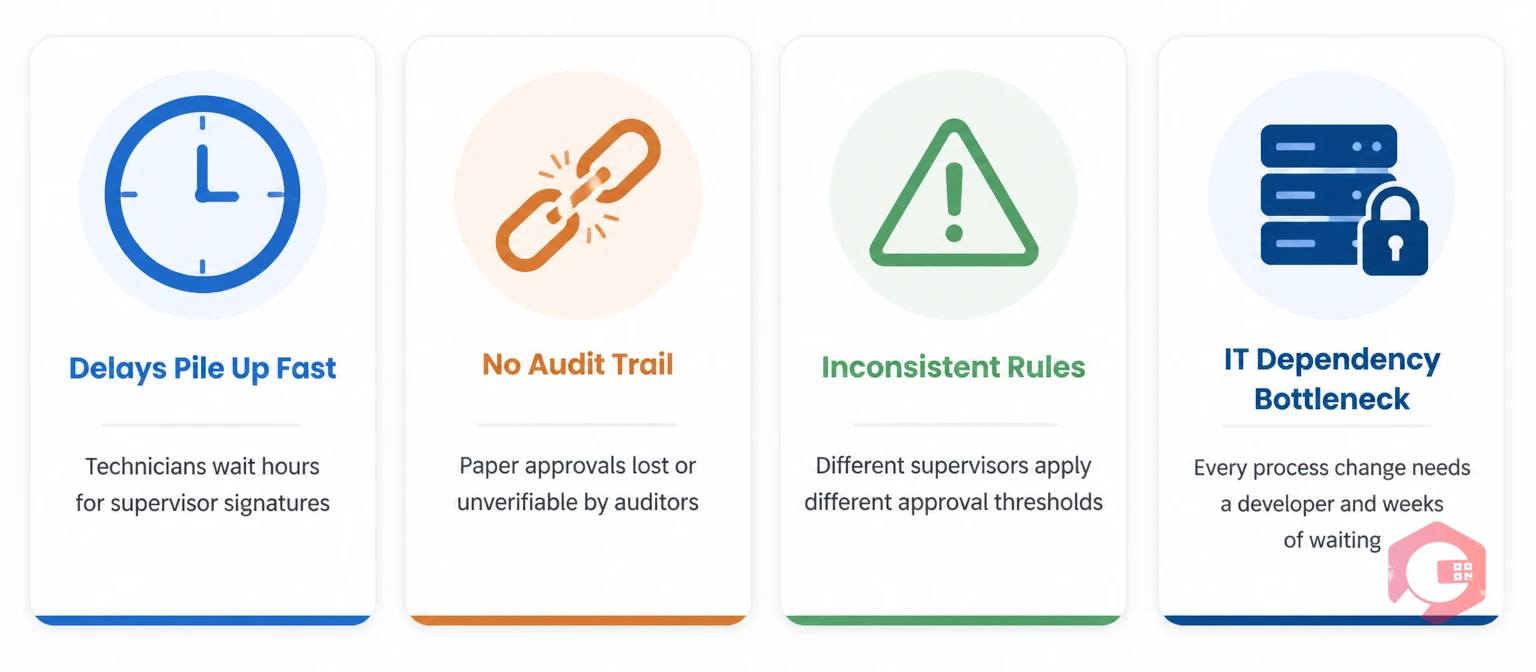
Most maintenance departments still rely on paper forms, shared inboxes, or phone calls to get work orders, purchase requests, and permit-to-work approvals signed off. This creates four recurring problems:
According to a McKinsey Operations report, organizations waste up to 20% of productive time on approval-related delays that could be automated. For a 10-person maintenance team, that's two full-time positions lost to administrative friction every year.
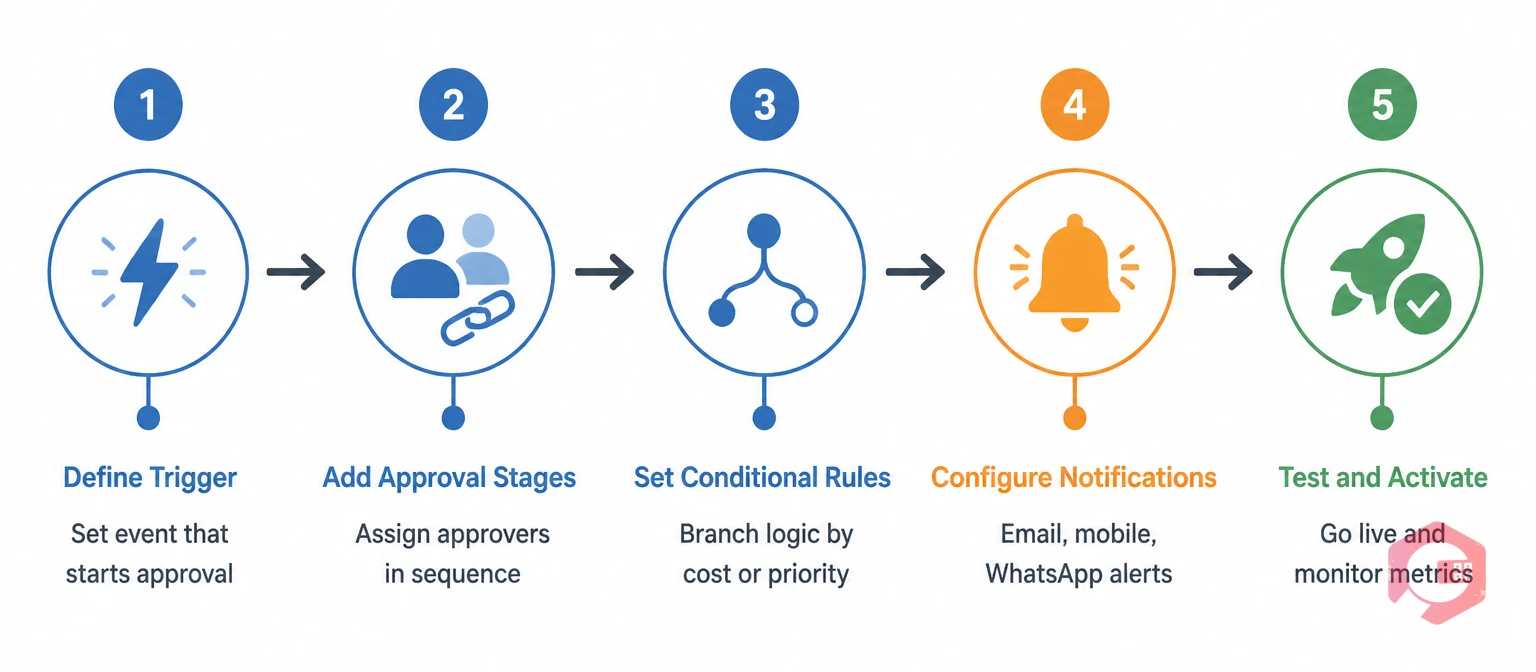
Modern work order management platforms with built-in no-code builders follow a consistent five-step design process. Here's exactly what it looks like from the maintenance manager's chair.
Every approval workflow starts with a trigger: the event that kicks off the process. In a no-code builder, you select this from a dropdown — no code required. Common maintenance triggers include: a new work order created above a certain cost estimate, a purchase request submitted for a spare part, a permit-to-work request for a high-risk job, or a corrective maintenance task flagged as critical priority. You set the trigger once; the system fires it automatically every time the condition is met.
Once the trigger fires, you define who approves it and in what order. A no-code builder lets you drag approval stages into a sequence. Stage 1 might be the shift supervisor. Stage 2 might be the maintenance manager. Stage 3 — for high-value requests — could be the finance controller. Each stage gets an assignee (a named person, a role, or a group) and a response deadline. If the assignee doesn't act within the deadline, the system automatically escalates.
This is where multi-step approval logic becomes genuinely powerful. Conditional rules let you branch the workflow based on the data in the request. For example: if cost estimate is under $1,000 single-stage approval by the shift supervisor. If cost estimate is $1,000 to $5,000 two-stage approval: supervisor then manager. If cost estimate exceeds $5,000 three-stage approval: supervisor, manager, then finance. You configure each branch visually — no developer, no SQL, no scripting. The role-based access controls inside the platform enforce who can see and act on each stage.
Approvals only move fast when approvers know it's their turn. A modern no-code builder lets you configure multi-channel notifications for each stage. You choose whether the approver gets an email, a push notification on the mobile app, or a WhatsApp message with a direct approve/reject link. You can also set reminder intervals — "send a follow-up if no action after 4 hours" — and configure escalation alerts that go to the stage's backup approver if the primary doesn't respond.
Before going live, most no-code platforms let you run a test submission to walk through every branch of the workflow. Once you're satisfied, you activate it with a toggle. From that point on, every matching request flows through the process automatically. Your BI dashboard shows you live metrics: average approval time per stage, bottleneck stages, and approval rates — so you can tune the process over time without rebuilding it from scratch.
No-code approval workflows apply across every maintenance scenario. Here are the most common configurations maintenance teams build in the first month:
The difference between a no-code approval system and a manual process isn't just speed — it's reliability, accountability, and scalability. Here's a direct comparison across the dimensions that matter most for maintenance operations:
| Factor | Manual/Paper Process | No-Code Workflow Builder |
|---|---|---|
| Setup time | Weeks (IT involvement required) | Hours (configured by maintenance team) |
| Approval speed | Hours to days (depends on who's reachable) | Minutes (auto-notification + mobile action) |
| Audit trail | Incomplete or non-existent | Full timestamped log per approval stage |
| Rule consistency | Depends on individual supervisor judgment | Enforced by logic rules every time |
| Process changes | Requires IT ticket + development time | Self-serve edits in minutes |
| Notification method | Email or phone (manual follow-up) | Email + mobile push + WhatsApp (automated) |
| Escalation handling | Manual (if remembered) | Automatic triggers on deadline breach |
| Regulatory compliance | Hard to prove and document | Auto-generated digital records per request |
Not every workflow tool is built for industrial maintenance environments. Before you evaluate platforms, make sure the builder includes these specific capabilities:

Cryotos CMMS includes a built-in no-code workflow builder designed specifically for maintenance operations — not generic business processes. Maintenance managers can design multi-step approval flows directly inside the platform, with no IT involvement at any stage.
Here's what the Cryotos workflow builder gives your team out of the box:
Teams using Cryotos report that setting up a new approval workflow takes less than two hours on average, compared to weeks when going through traditional IT channels. You can explore how the workflow automation feature works in practice through the Cryotos platform.
A no-code workflow builder is a software tool that lets non-technical users design, configure, and deploy automated processes — including multi-step approvals — using a visual interface instead of programming. For maintenance teams, this means building approval chains for work orders, permits, and purchase requests without writing code or involving IT developers.
Yes. Modern CMMS platforms with built-in no-code builders are designed for maintenance managers and supervisors, not developers. The interfaces use dropdowns, drag-and-drop stages, and toggle switches that any maintenance professional can configure after a short onboarding session. IT involvement is only needed for initial system setup and integrations — not for ongoing workflow management.
The most common include work order approvals, spare part purchase approvals, permit-to-work authorizations, contractor work authorizations, and preventive maintenance sign-offs. Each can be configured with multiple approval stages, conditional routing based on cost or asset type, automatic escalations, and multi-channel notifications.
With a purpose-built maintenance workflow builder like Cryotos, most teams configure and activate their first multi-step approval workflow in under two hours. Complex workflows with multiple conditional branches and escalation rules typically take half a day to set up and test.
A well-designed no-code workflow builder automatically escalates the request when a deadline is missed. The system can notify a backup approver, alert the maintenance manager, or move the request to the next stage depending on how you configure the escalation rule. Nothing gets stuck waiting silently in someone's inbox.
Most modern CMMS platforms — including Cryotos — have the workflow builder built in, so integration is native. When an approval is granted inside the system, it can automatically trigger linked actions like work order creation, inventory reservation, or permit issuance. For teams using ERP systems like SAP or Microsoft Dynamics, look for a CMMS with ERP integration support so approval data syncs across both platforms.
Yes — in fact, regulated industries benefit most. A no-code approval workflow creates automatic, timestamped audit trails for every decision. This is critical for industries governed by OSHA regulations, ISO 55001 asset management standards, or GMP requirements in pharmaceutical and food manufacturing. Paper-based approvals often fail audits because records are incomplete or can't be produced on demand.
Your maintenance team doesn't need IT permission to control your own approval processes. With Cryotos, you can design, activate, and adjust multi-step approval workflows yourself — in hours, not weeks. Whether you're approving emergency work orders at 2 a.m. or managing a three-tier purchase authorization chain, the no-code builder puts the logic in your hands. Explore Cryotos CMMS and see how fast your team can go from "we need an approval process" to "it's live."




Cryotos AI predicts failures, automates work orders, and simplifies maintenance—before problems slow you down.



