

Technician idle time between jobs is the gap between when one work order closes and the next begins — time spent waiting for assignments, travelling to the wrong location, hunting for parts, or sitting unproductive because the schedule had gaps nobody could see. According to the Society for Maintenance and Reliability Professionals (SMRP), maintenance technicians in typical industrial operations spend only 25–35% of their paid hours on active wrench time — meaning the average technician is unproductive for nearly two-thirds of their shift. A portion of that gap is unavoidable: travel, preparation, permit acquisition, and safety checks all eat time legitimately. But a significant share of technician idle time is a scheduling and dispatch problem, and it is directly addressable through better work order management, smarter job sequencing, and real-time visibility into who is available for what. This guide covers the specific causes of technician idle time and the operational changes that reduce it sustainably.
Key Takeaways

Idle time accumulates from multiple sources simultaneously, which is why a single intervention rarely eliminates it. Understanding the specific causes in your operation is the prerequisite for targeting the right fix.
| Type | Definition | Examples | Reducible? |
|---|---|---|---|
| Scheduled idle time | Planned non-wrench activity built into the shift | Pre-job safety checks, permit acquisition, tool preparation, travel between sites | Partially — can be overlapped or front-loaded |
| Unscheduled idle time | Unplanned waiting caused by system or process failures | Waiting for next assignment, parts stockout, incomplete work order info, access delays | Yes — directly addressable through scheduling and dispatch improvements |
| Travel idle time | Unnecessary travel caused by poor job sequencing | Driving across a large site or multi-building campus to a job when a closer technician was available | Yes — geo-based job sequencing reduces this by 20–35% |
| Administrative idle time | Time spent on paperwork and data entry that should be automated | Manual work order logging, handwritten job cards, end-of-shift reporting | Yes — mobile CMMS apps eliminate most of this at the source |
Most idle time reduction programmes focus exclusively on dispatch delay, which addresses only one quadrant of the problem. A complete programme targets all four types — and the highest-return interventions address multiple types simultaneously.
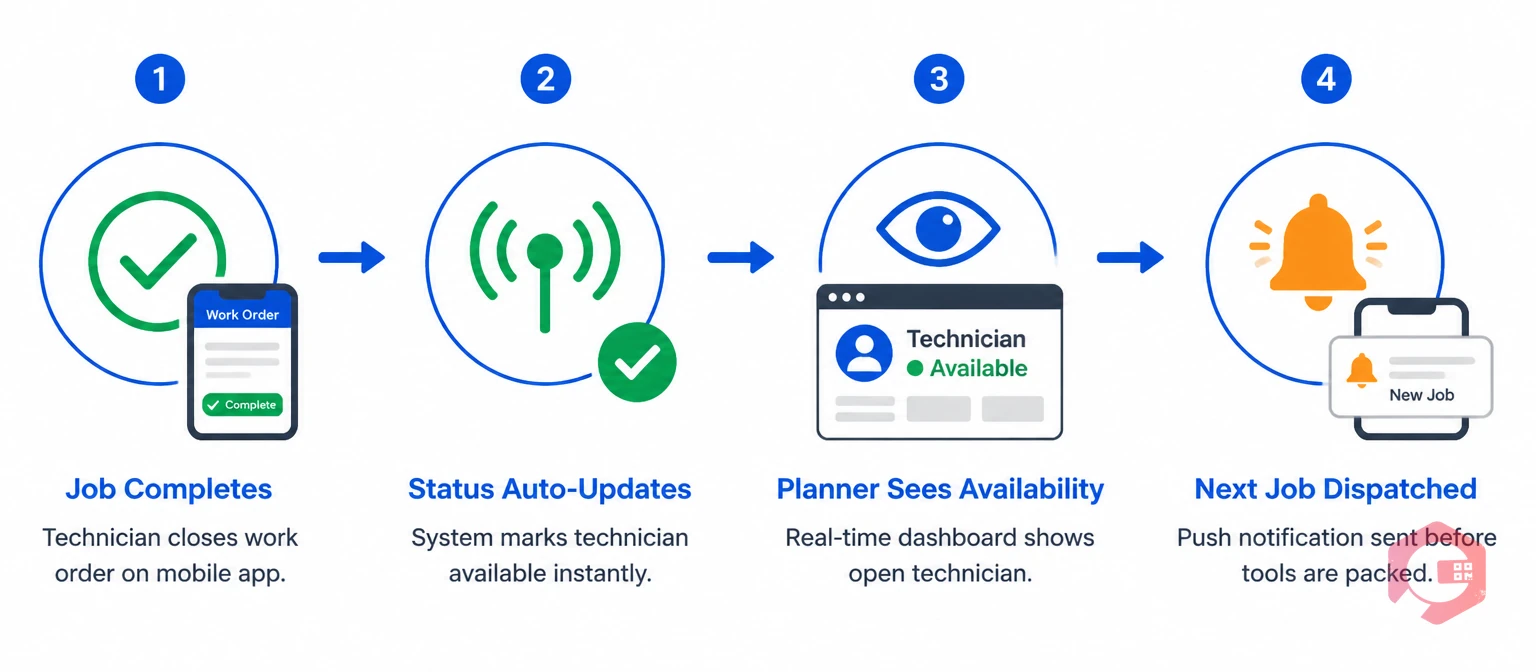
Dispatch delay — the gap between job completion and next assignment — is the most directly addressable form of idle time because it results entirely from information latency. The planner or supervisor doesn't know a technician is available because they haven't been told yet, or the notification arrived but the next assignment hasn't been processed.
The solution is a real-time work order management system where technician status updates are automatic and visible. When a technician closes a work order on their mobile app, their status updates to "available" in the system immediately — without a radio call, WhatsApp message, or manual update from the supervisor. The planner sees the availability in real time and can dispatch the next job before the technician has even packed their tools. The dispatch gap compresses from 15–45 minutes to under 5 minutes.
Automated next-job notification takes this further. When a work order queue is pre-built and the system knows a technician's current job is near completion, it can push the next assignment to the technician's phone automatically when the current job closes — eliminating the planner from the dispatch loop entirely for routine jobs. The technician receives the next work order as a push notification, reviews it, and starts moving before any human dispatcher is involved.
Travel is a legitimate component of maintenance work — but unnecessary travel caused by poor sequencing is avoidable idle time. When a technician completes a job in Building A and the system dispatches them to Building D while another technician already near Building D is idle, the result is two inefficiencies simultaneously: the first technician travels unnecessarily, and the second technician waits unnecessarily.
Geography-aware job sequencing assigns the next job based on proximity to the technician's current location, not just job priority order. In practice, this means the dispatch system knows where each technician is (from their last job-close location or real-time GPS) and suggests or auto-assigns the highest-priority open job within their nearest zone first — escalating to cross-zone assignments only when no high-priority work exists in the local zone.
For multi-building campuses, large manufacturing facilities, and multi-site operations, zone-based scheduling reduces travel time by 20–35% according to Plant Maintenance Resource Center's scheduling optimisation analysis. The practical implementation requires three things: a work request system that captures asset location precisely, a dispatch view that shows technician locations alongside open jobs, and a dispatcher (or automated rule) that prioritises location proximity alongside priority level.
Parts-related idle time is the most frustrating form of technician idle time because it is entirely preventable with the right inventory system configuration, yet it persists in most maintenance operations because parts management and work order management are not connected.
The connection that eliminates parts-related idle time is simple: every work order that requires specific parts should have those parts checked for availability — and staged at the job location or storeroom pick point — before the work order is dispatched to the technician. A work order that fires for a planned PM should automatically check whether the required filter, belt, or seal is in stock before the technician is sent. If the part is not in stock, the work order stays in a "parts pending" status and triggers a purchase request automatically — not after the technician has wasted a trip to an inaccessible job.
This requires the work order system and the inventory system to be integrated. When they are — as in Cryotos's CMMS — each PM template carries a defined parts list, and the system checks stock levels against that list when the work order generates. Parts below minimum stock trigger reorder requests automatically. Parts confirmed in stock are reserved against the work order so they are not consumed by another job before the technician arrives.
The second layer of parts idle time reduction is staging. For planned PM work, parts can be kitted and physically staged at the asset location or at the nearest storeroom pick point before the technician's scheduled arrival. The technician arrives and starts work immediately — no storeroom visit, no waiting. Kitting removes the pick-and-fetch time that adds 10–20 minutes to every planned PM visit where parts are not pre-staged.
A technician who arrives at a job and cannot start immediately because the work order is incomplete or ambiguous is idle for the duration of the information gap — whether that's 10 minutes to call the planner or 45 minutes waiting for an isolation permit that was never requested.
Work order quality is the preventive solution. Every dispatched work order should contain at minimum: asset location with building, floor, and asset tag; fault description specific enough to guide diagnosis; required tools and parts; safety isolation requirements with permit references where applicable; access contact if the area is restricted; and estimated job duration. Work orders missing any of these fields create predictable on-site delays.
Enforce completeness through a workflow automation process. When a fault is reported through a work request form, mandatory fields prevent incomplete submissions from entering the queue. The planner reviews and supplements the work order — adding parts, isolation requirements, and estimated duration — before approving for dispatch. A work order that leaves the planning stage incomplete is a future idle time event.
For reactive jobs raised outside the formal request process — field-reported faults, emergency call-outs — build a quick-capture template that records the minimum required fields without slowing the technician who logged it. A work order with five accurate fields is more useful than one with fifteen fields of which eight are wrong or blank.
You cannot reduce idle time without measuring it. Wrench time — the percentage of total paid technician hours spent on active maintenance work — is the primary metric for tracking idle time reduction progress. A wrench time baseline tells you where you are starting; weekly tracking tells you whether interventions are working.
Calculate wrench time from your CMMS work order data: sum the total labour hours logged against closed work orders (active wrench time) and divide by total paid hours for the same period. The gap is idle time, travel, administration, and preparation. World-class maintenance operations achieve wrench times of 55–65%; most industrial sites start between 25–35%.
Track wrench time weekly by technician and by team to identify patterns. A technician whose wrench time is consistently below the team average is experiencing more idle time — investigate whether the cause is dispatch delay, travel inefficiency, parts problems, or work order quality issues for that individual's job types. A team whose wrench time is consistently below average may have a zone-level scheduling problem or a storeroom accessibility issue. Use the root cause analysis framework to investigate which of the four idle time categories is dominant before applying fixes.

Reducing technician idle time requires addressing dispatch visibility, job sequencing, parts availability, and work order quality simultaneously — a fragmented set of interventions that only works at scale when they operate inside a single connected system.
Cryotos's mobile-first work order management gives technicians real-time job updates on their phones — new assignments appear as push notifications the moment the previous job closes, eliminating the dispatch wait entirely. The mobile app captures job-close location data, giving planners the real-time technician location context they need to sequence the next assignment by proximity. Parts lists attached to work order templates trigger automatic stock checks before dispatch, so the technician never arrives at a job without parts that could have been confirmed in advance.
The supervisor dashboard shows every open and in-progress work order alongside every available technician — location, current job status, and queue depth — in a single live view. This is the dispatch visibility layer that makes intelligent sequencing possible at scale, without requiring a dedicated dispatcher to manually track each technician's location and availability by radio. Maintenance teams using Cryotos consistently report 25–30% faster repair times and a measurable improvement in wrench time within the first six months of structured work order management.
Technician idle time is any paid working time during which a maintenance technician is not performing active maintenance work. It includes waiting for job assignments, travelling unnecessarily between jobs due to poor sequencing, waiting at a job site because parts are unavailable, and time lost to incomplete work order information. A meaningful portion of typical idle time — particularly dispatch delay, travel inefficiency, and parts-related waiting — is directly reducible through better scheduling, dispatch, and inventory practices.
World-class maintenance operations achieve wrench times of 55–65% of total paid hours. Most industrial maintenance teams start between 25–35%. A realistic first-year improvement target for a team implementing structured work order management and mobile dispatch is 10–15 percentage points — moving from 30% toward 40–45% wrench time. Sustained improvement above 50% requires addressing all four sources of idle time: dispatch delay, travel inefficiency, parts unavailability, and work order quality.
Poor job sequencing causes idle time in two ways. First, when jobs are dispatched in queue order rather than geographic order, technicians travel further than necessary between jobs — accumulating travel idle time on every transition. Second, when geographic proximity is ignored, a technician near a pending job may sit idle while a more distant technician is dispatched to that job instead. Both failures are visible and correctable in a CMMS with real-time technician location and job queue visibility.
A CMMS reduces technician idle time by automating work order dispatch so technicians receive their next assignment the moment their current job closes — eliminating manual dispatch delay. It provides planners with real-time technician location and availability for geography-aware job sequencing. It integrates parts availability checks into work order release so technicians are never dispatched to jobs with missing parts. And it tracks labour hours against work orders automatically, making wrench time a live metric that managers can act on rather than a monthly calculation derived from timesheet data.
Every hour of technician idle time is a labour cost that delivers zero maintenance output. Cryotos gives maintenance teams the mobile dispatch, real-time job visibility, and parts integration needed to recover that time systematically. Schedule a free demo to see how leading maintenance operations use Cryotos to improve wrench time, reduce dispatch gaps, and get more productive hours from the team they already have.



Cryotos AI predicts failures, automates work orders, and simplifies maintenance—before problems slow you down.



