
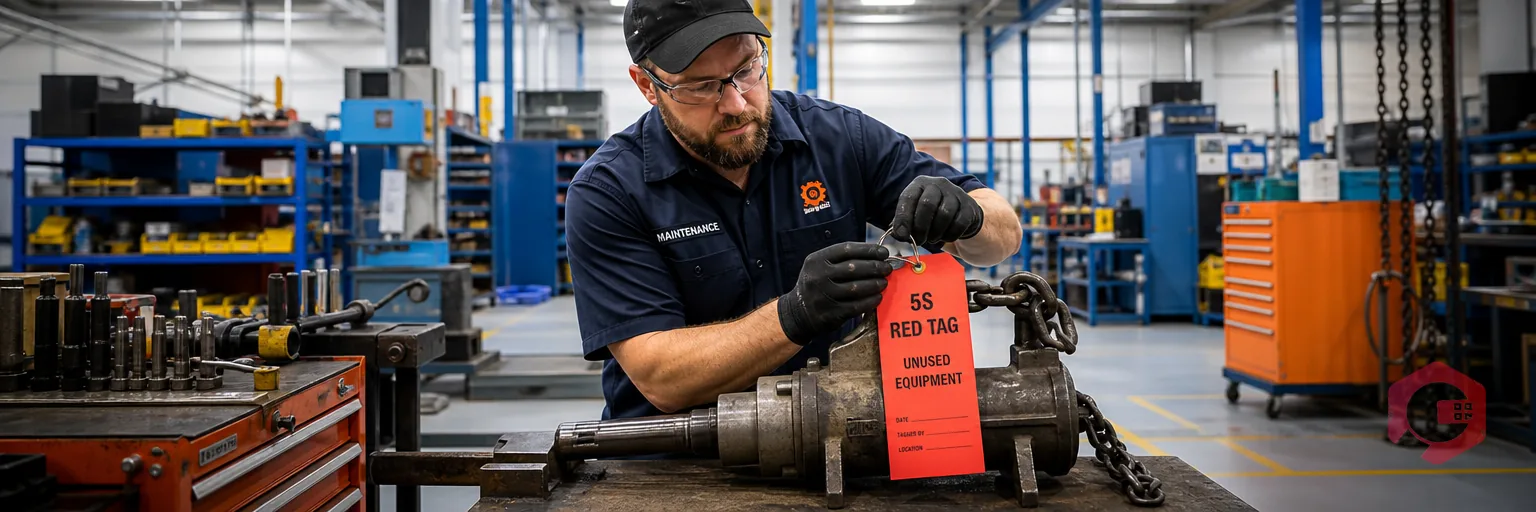
The 5S red tag process is the method used during the Sort (Seiri) phase of 5S to flag tools, materials, or equipment whose need, condition, or location is in question. Each flagged item moves to a holding area. A reviewer records a final decision within a set deadline. The 5S red tag process turns Sort from a one-time cleanup into a repeatable discipline with an owner, a deadline, and a documented outcome for every item.
Key Takeaways
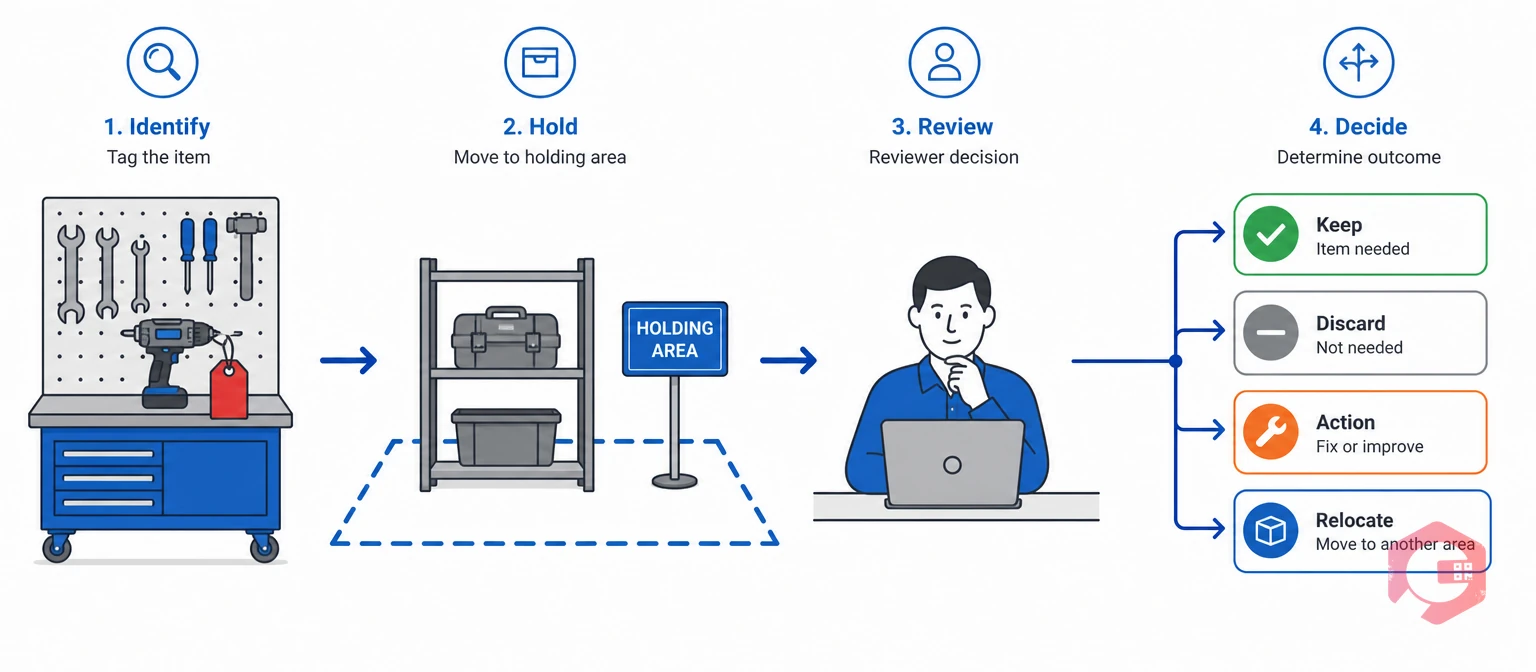
The 5S red tag process is a documented workflow for identifying, holding, and deciding the fate of any item whose value or purpose is unclear. It sits inside the Sort step of 5S: Sort, Set in Order, Shine, Standardize, Sustain. It keeps Sort from becoming a subjective argument about what to throw away.
A red tag is a marker attached to a tool, machine, material, or fixture. Anyone on the floor can attach one to something they're unsure about. The tag doesn't authorize removal on its own. It routes the decision to a reviewer, who has the authority to keep, relocate, repair, or dispose of the item.
An informal cleanup relies on whoever is in the room that day. That works for a few hours. It breaks down the moment someone questions a decision, or a manager finds a missing part the next week.
A formal 5S red tag process fixes three gaps that informal cleanups leave open:
For plant and facility managers, running the 5S red tag process well protects floor space and recovers capital tied up in unused assets. It also keeps audits and safety walk-throughs clean. A Computerized Maintenance Management System gives maintenance teams a structured way to log, track, and close out red tag items instead of letting them stall in a holding area.
A red tag program only holds up if the team follows the same rules every time, on every shift, in every zone. Skipping any one rule is usually where a 5S red tag process quietly breaks down.
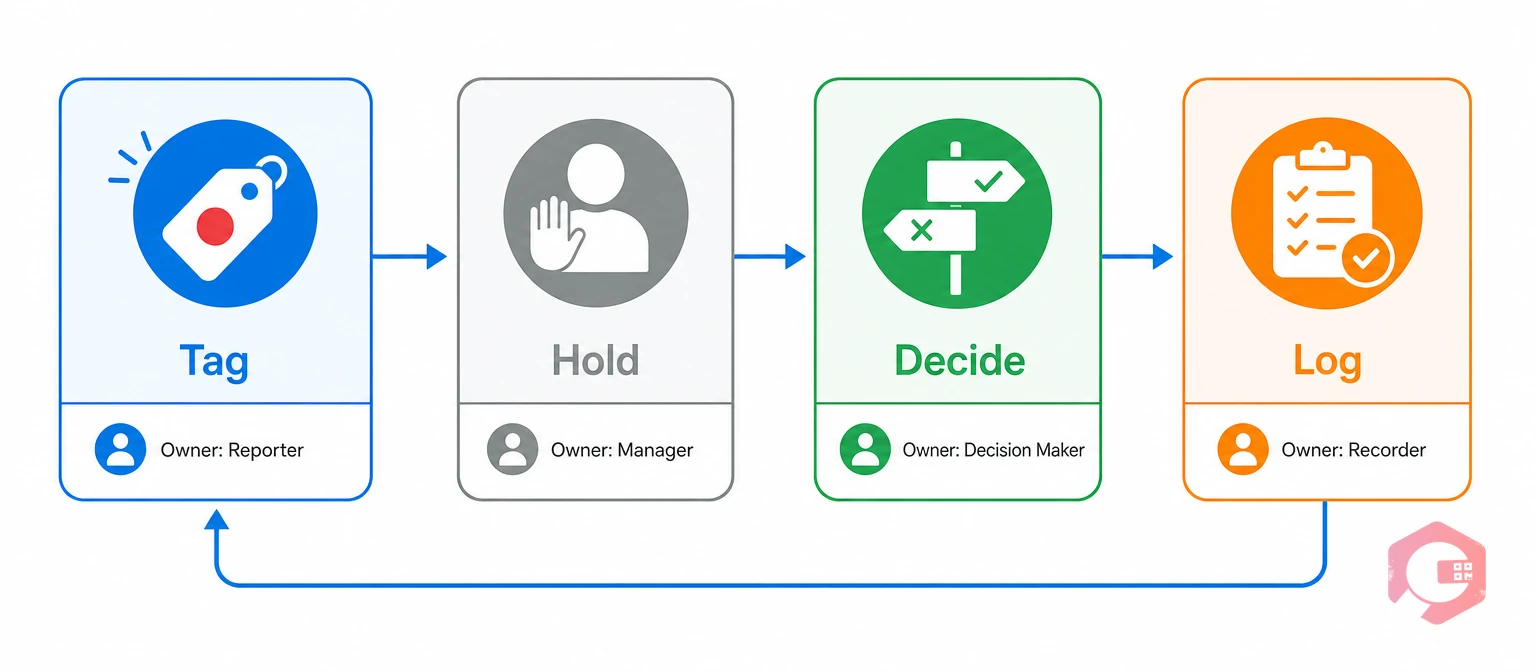
A four-stage cycle keeps every tagged item moving toward a decision instead of stalling. Each stage has one owner and a clear handoff to the next.
The Red Tag Accountability Loop:
Most facilities that run this loop find the Decide stage is where things stall. Reviewers get pulled onto other work and let tags sit past deadline. An automatic reminder tied to the deadline fixes this far better than a whiteboard nobody checks. Work order management software can generate a review task the moment a tag is logged, so the Decide stage has a due date from day one.
A red tag holding area is a clearly marked, bounded zone — floor tape, a caged section, or a dedicated room — where every tagged item goes right after tagging. It makes ambiguous items visible and countable. It should never become a second junkyard where things quietly pile up for months.
A holding area that actually functions has four traits. Skip any one and the other three tend to fall apart too:
Try the 30-second test for holding area placement. If a supervisor can't glance in and estimate the fill level in under 30 seconds while walking by, the zone is in the wrong spot. Facilities running manufacturing maintenance programs often place the holding area near the main walkway for this exact reason. Visibility drives urgency, and urgency keeps the four-outcome rule from becoming a five-outcome rule where "leave it for now" creeps back in.
See how much unplanned downtime a stalled Sort phase costs your operation with Cryotos's MTTR calculator. A cluttered holding area often means longer repair times, since technicians search through ambiguous stock for usable parts.
Every holding area needs one named owner, not a rotating job split across a shift. That person checks the log weekly, flags items nearing their deadline, and calls the disposition meeting once a limit is reached. Without an owner, the holding area drifts toward the exact problem it was built to stop: a quiet pile of maybes nobody feels responsible for.
A 5S red tag template only works if it captures enough detail for someone who wasn't on the floor to make a confident decision later. A tag that just says "broken" forces the reviewer to track down the item and the tagger to piece the story together. That delay is exactly what a red tag process should remove.
The table below shows the minimum fields a red tag template needs, what each one captures, and a sample entry:
| Field | What It Captures | Example Entry |
|---|---|---|
| Tag ID number | A unique reference so the tag is never confused with another | RT-2026-0142 |
| Date tagged | The start point for the deadline countdown | 04 Aug 2026 |
| Tagger name | Who to ask if the reviewer needs more context | J. Alvarez, Line 3 |
| Item description | Enough detail to identify the exact item, not just its category | 18in pipe wrench, cracked jaw |
| Location or department | Where the item was found, for pattern tracking | Maintenance bay, Bench 2 |
| Quantity | Stops one tag from silently covering a full pallet | 1 |
| Estimated value | Feeds facility-wide capital recovery reporting | $45 |
| Reason tagged | Unknown need, excess, obsolete, damaged, or misplaced | Damaged |
| Suggested disposition | The tagger's first guess, not the final word | Repair or scrap |
| Decision deadline | Forces a review before the item becomes permanent | 18 Aug 2026 |
| Reviewer sign-off | Name, date, and final call — the record that closes the loop | M. Chen, 15 Aug 2026, Scrap |
Paper tag books work fine for a small site with one zone and one shift. Anything bigger benefits from a digital template that timestamps entries and can't be lost, torn, or left blank halfway through. Maintenance checklists built into a mobile app can force every required field before a tag gets submitted. That removes the incomplete-tag problem instead of catching it after the fact.
Many facility managers treat red tagging as a slightly more formal cleanup. That framing undersells the 5S red tag process and explains why housekeeping-driven cleanups don't stick. The differences are structural, not just extra paperwork.
| Dimension | General Housekeeping | 5S Red Tag Process |
|---|---|---|
| Trigger for removal | Whoever is cleaning decides in the moment | Any unclear item gets tagged, decided later by a named reviewer |
| Decision authority | Whoever is present, informally | A designated reviewer with authority to keep, relocate, repair, or dispose |
| Time limit | None — items can sit indefinitely | A fixed 7 to 30 day deadline per tag |
| Documentation | Rarely recorded beyond a verbal note | Every decision logged against a tag ID, name, and date |
| Outcome options | Keep or throw away, decided ad hoc | Four fixed outcomes: keep, relocate, repair, or dispose |
| Repeat pattern visibility | Invisible — no record links this cleanup to the last one | Repeat tags on the same item or zone flag a root cause |
The biggest difference is the data trail. Every red tag produces a tag ID, a reason, a deadline, and a logged decision. General housekeeping produces none of that. Without a trail, nobody can show whether the same shelf or machine keeps generating clutter month after month. That visibility is what separates a 5S program that sticks from one that fades within a few months.
Curious how much of your MRO inventory value sits in duplicate or unlocatable stock because of this exact gap? Cryotos's asset lifecycle management resources show how tracked disposition data feeds that calculation.
Most red tag programs don't fail because the team misunderstands the rules. They fail because a few small habits quietly undo the structure the 5S red tag process depends on.
The 5S methodology overview notes that Sort is the foundation every later step depends on. A Sort phase that never closes leaves Set in Order, Shine, Standardize, and Sustain with nothing solid underneath. Facilities that treat the 5S red tag process as a one-time event tend to see the same clutter return within two or three quarters.
Digital red tag tracking logs tag details, holding area location, and deadlines the moment an item is flagged. There's no gap between tagging an item and recording it, unlike a paper tag book that can be lost, torn, or left blank.
Paper works fine for one department on one shift with a reviewer who checks the book daily. It breaks down once a facility runs multiple zones, multiple shifts, or more than a handful of tags a week. Common paper failures include tags falling off items, sign-off pages filed and forgotten, and no way to see facility-wide tagged value without adding up numbers by hand.
Maintenance teams using Cryotos have reported up to 30% reduction in unplanned downtime and 25% faster repair turnaround. Some of that gain shows up once a cluttered Sort phase stops hiding failed parts and mislabeled stock behind a wall of red-tagged uncertainty. The ASQ Five S tutorial describes the goal of 5S as "a place for everything and everything in its place." That's hard to sustain at scale without a system tracking where every unclear item actually sits.
Once tags are logged digitally, they become searchable history, not a one-time cleanup record. When the same shelf or item type gets tagged again and again, the pattern shows up right away. It points to a labeling or process gap, not a one-off housekeeping issue. Each disposed or resold item's value also rolls up into a facility-wide report, giving leadership a number for capital recovered or written off — turning the 5S red tag process into a line item finance can actually track.
The Lean Enterprise Institute frames lean practice as depending on standard work and visual management to hold over time. A digital red tag workflow provides both directly. It turns a Sort-phase audit into a routine, not a scramble that happens whenever someone remembers to schedule it.
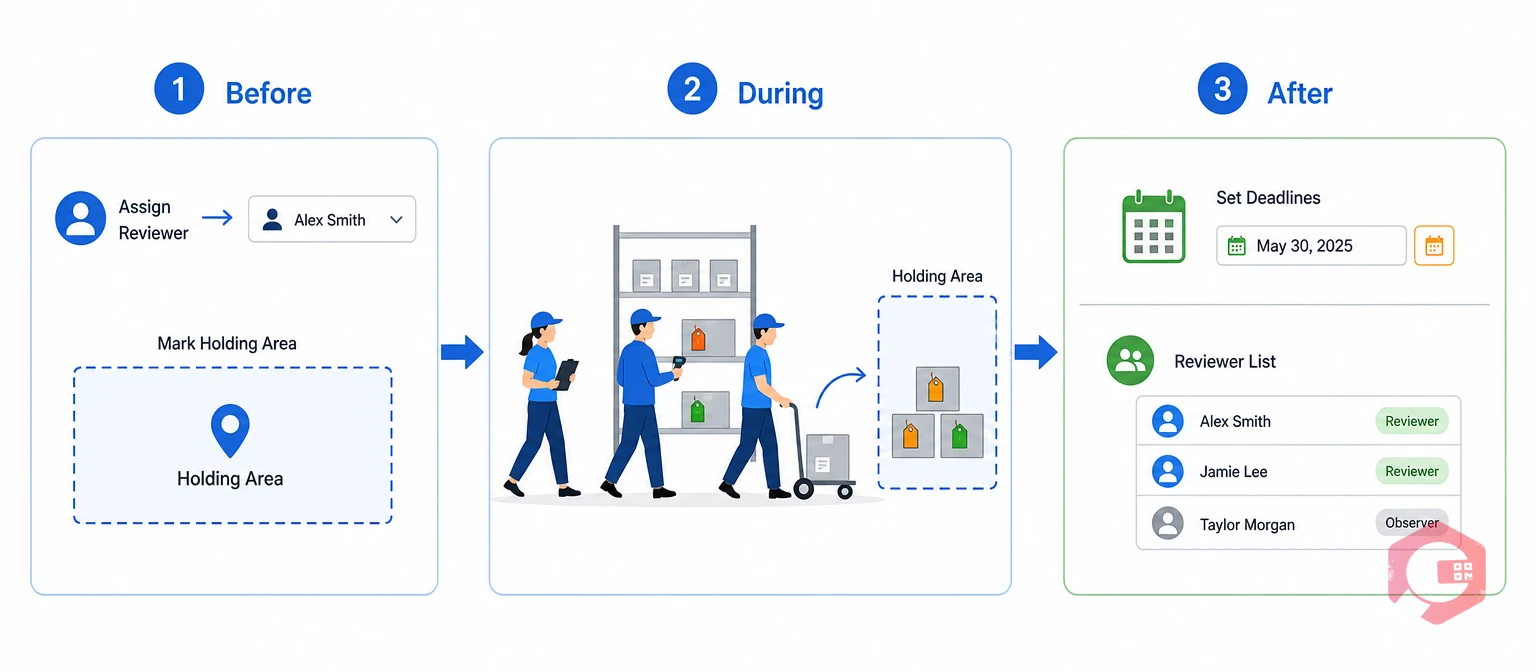
A red tag event is a scheduled, team-wide walk of a defined zone to find and tag every item whose need, condition, or location is in question. It puts the rules above into motion on a specific day, in a specific area, with a specific team.
Pick one zone at a time. A maintenance workshop, one production line, or one section of a warehouse is a realistic first scope. Trying to cover an entire plant in a weekend leads to rushed calls and a holding area that overflows fast.
Walk the zone bench by bench, shelf by shelf, rather than jumping around. Tag anything that is broken beyond repair, no longer needed, a duplicate above stock levels, past its expiry date, or simply unidentifiable to anyone present.
Move each tagged item to the holding area as soon as it's tagged. Don't leave a trail of tagged items scattered until the walk finishes. This keeps the zone visibly improving in real time and builds momentum for the rest of the walk.
Set every deadline the same day the tags get created, not days later. The reviewer should get a list of every new tag, its reason, and its deadline before the next shift starts. OSHA workplace standards require proper disposal paths for hazardous items — expired solvents, contaminated rags, pressurized cylinders — so loop in a safety officer whenever a tagged item falls into that category.
Most workshops remove 20% to 40% of stored items during a thorough first red tag event. The recovered floor space alone creates a real improvement before the team even reaches Set in Order.
One red tag event is rarely enough. Facilities that treat Sort as ongoing usually schedule a follow-up in the same zone 60 to 90 days later, once the first round of decisions has closed out. The second pass usually surfaces far fewer tags — a sign the zone is stabilizing. Skipping it is how clutter creeps back in.
A 5S red tag process built on real rules, a real holding area, and a complete template pays for itself in specific, calculable ways. Three types of return show up again and again once a facility runs the process with discipline.
Every item marked relocate or dispose frees space once held by something of unclear value. Some facilities haven't run a formal Sort phase in years. For them, the recovered space can be enough to skip a new storage rack or an off-site container. Estimated value fields on each tag roll up into one facility-wide figure. That figure shows capital recovered through resale, or written off through disposal. Finance can track it like any other cost-recovery effort.
Picture a workshop where every red-tagged item has a decision or a clear pending status. Technicians there spend less time digging through unclear stock for a usable part. A pile of maybe-broken items with no tags and no deadlines stretches repair time. Every search then includes a mental filter for parts that might not work at all.
Cluttered walkways and messy storage are leading causes of slip, trip, and struck-by incidents in industrial settings. A red tag process that actually clears unclear items cuts the physical hazards behind those incidents directly. Asset maintenance management platforms that log dispositions next to safety inspection data give managers one place to check this. They can see whether falling tag volume tracks with fewer near-misses over time.
A program that tracks tag volume, average time-to-decision, and recovered capital gives a facility manager three real numbers for a budget talk. That beats an anecdotal claim that the floor is "getting better." Two or three cycles of this data is usually enough to show a clear trend. Tag volume might be falling in a stabilizing zone, or rising in an area that needs attention. That trend line is what keeps a 5S red tag process funded past its first year.
Start with just three numbers per month: total tags opened, tags closed on time, and estimated value recovered. Most teams can pull these straight from a spreadsheet or a CMMS report within a few minutes. Track them for one full quarter before drawing any conclusions. A single slow month rarely means the program is failing — a full quarter of decline usually does.
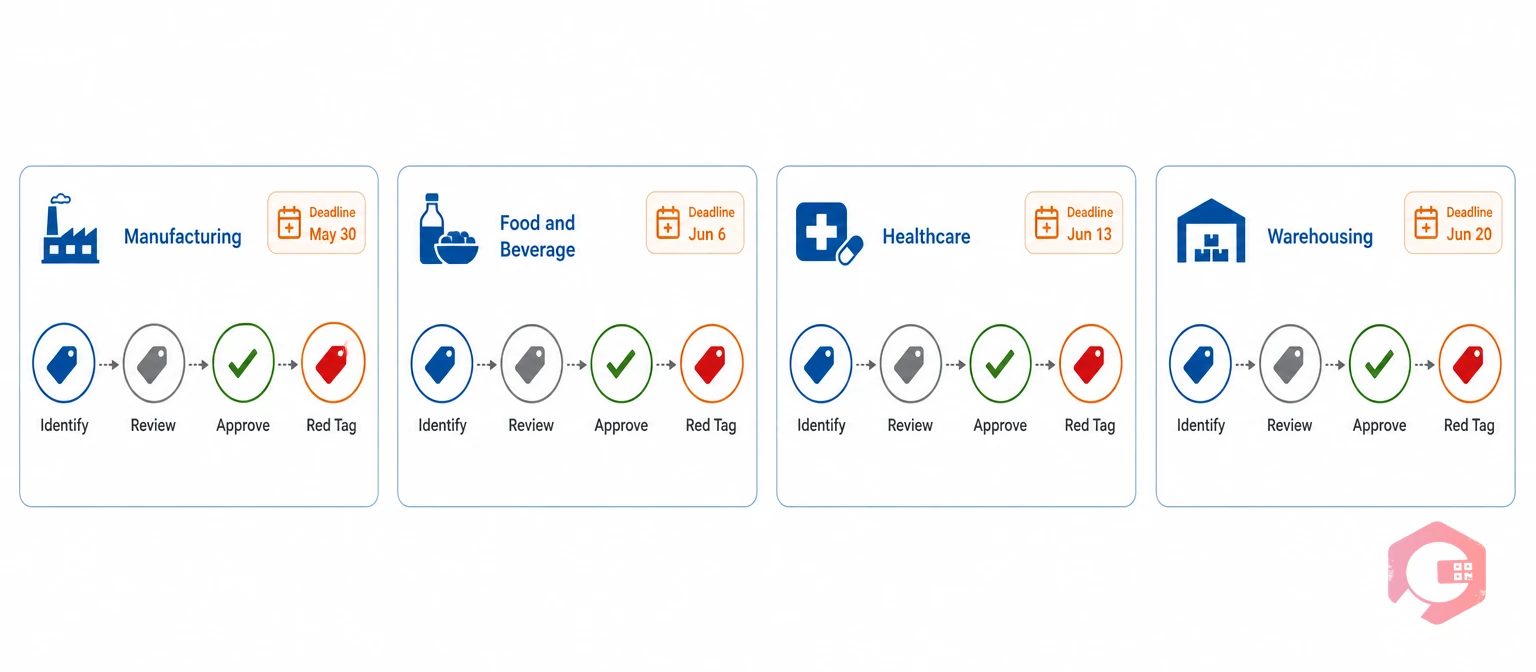
The core rules of the 5S red tag process stay the same across industries. But the reason tagged, the deadline, and the disposition options often need to flex for the risks of a given setting.
In heavy manufacturing, most tags cover obsolete tooling, old spare parts, and equipment waiting on a capital decision. A 30-day deadline is common for spare parts. A purchasing or engineering review is often needed first. Plants running structured maintenance programs often link red tag data straight to their spare parts inventory. A tagged part's decision then updates stock records on its own. The count stays in sync with the floor.
Red tags in food and beverage plants carry extra urgency. Expired items and equipment that no longer meets sanitation rules need fast action. A shorter deadline — often 7 to 14 days — is typical. A tagged item near production can itself become a contamination risk. Any tag involving chemicals or expired ingredients should go through a safety officer review before a final call.
In healthcare, red tagging often covers supply rooms, equipment storage, and retired medical devices. Some tagged items carry patient safety weight. Because of this, the reviewer role often goes to a biomedical or facilities engineering lead, not a general maintenance supervisor. Disposition records usually need to meet the same standard used for other compliance checks.
Warehouses tend to generate the most red tags per square foot. That's simply due to the sheer number of SKUs moving through racking and staging. A red tag process here works best with QR or barcode scanning at the point of tagging. Writing out a full description for every flagged pallet by hand quickly becomes the bottleneck that slows the whole Sort phase down.
Across every industry, the pattern holds. The four allowed outcomes, the logged decision, and the named reviewer stay the same. Only the deadline length and who holds reviewer authority flex to match the real risk of what's being tagged in that 5S red tag process.
A 5S red tag process only works if everyone tags the same way, every time. A ten-minute orientation before the first event is usually enough to cover the basics: what qualifies for a tag, where the holding area is, and who the reviewer is for that zone.
New hires and contractors should get this same orientation before their first shift, not weeks later. A single technician who doesn't know the rules of the 5S red tag process can undo a holding area's discipline fast — taking an item back "just this once," or skipping the tag form because it feels slower than just moving the part.
Post the four allowed outcomes somewhere visible in the zone, right next to the holding area log. A simple visual reminder keeps the rule in front of the team long after the initial training session ends.
Most facilities set a deadline of 7 to 30 days depending on item type. A clearly broken or excess item warrants a fast call within a week. A higher-value asset that needs a purchasing or engineering review can reasonably take closer to 30 days. The key is that every tag in the 5S red tag process has a deadline written on it — an open-ended tag is the most common reason holding areas turn into permanent clutter.
A single named reviewer per zone, not a group consensus. That person needs enough authority to approve disposal or relocation without escalating every call, and enough visibility to know whether an item genuinely has no further use. Rotating this job without a clear handoff is a common reason decisions stall past deadline.
An overdue tag should trigger an automatic escalation to the reviewer's supervisor rather than sitting untouched. Facilities running a digital tracking system often set this escalation to fire the day after the deadline. That keeps overdue items from disappearing into the general clutter of the holding area. A paper-based program needs someone checking the log by hand on a fixed schedule to catch the same overdue tags.
Yes, and it's worth doing even when the scrap call seems obvious. Logging the tag, reason, and estimated value still feeds the facility-wide capital recovery report. It also creates a record showing why the item was removed, which matters if anyone questions the call later, or if a pattern of similar scrapped items points to a deeper training or procurement issue.
A red tag holding area is explicitly temporary and tied to a decision deadline for every item inside it. Scrap or surplus storage is often a longer-term destination with no per-item review date. Items should move out of the holding area within their decision window. If an item is approved to move to longer-term surplus storage, that move is one of the four logged dispositions, not a way to skip the review.
No. The 5S red tag process is for items whose need, condition, or location is genuinely in question — not for items everyone already agrees are needed and correctly placed. Tagging every single item, including tools clearly in active use, wastes time and overwhelms the holding area with items that never needed a review. Save tags for the genuinely unclear cases, and let obviously necessary items move straight into Set in Order.
A structured 5S red tag process turns Sort from a one-time event into a discipline that closes out, decision by decision, item by item. Schedule a free demo to see how Cryotos helps maintenance and facilities teams log red tags from a mobile device, track holding area aging in real time, and turn every decision into data leadership can actually use.




Cryotos AI predicts failures, automates work orders, and simplifies maintenance—before problems slow you down.



