
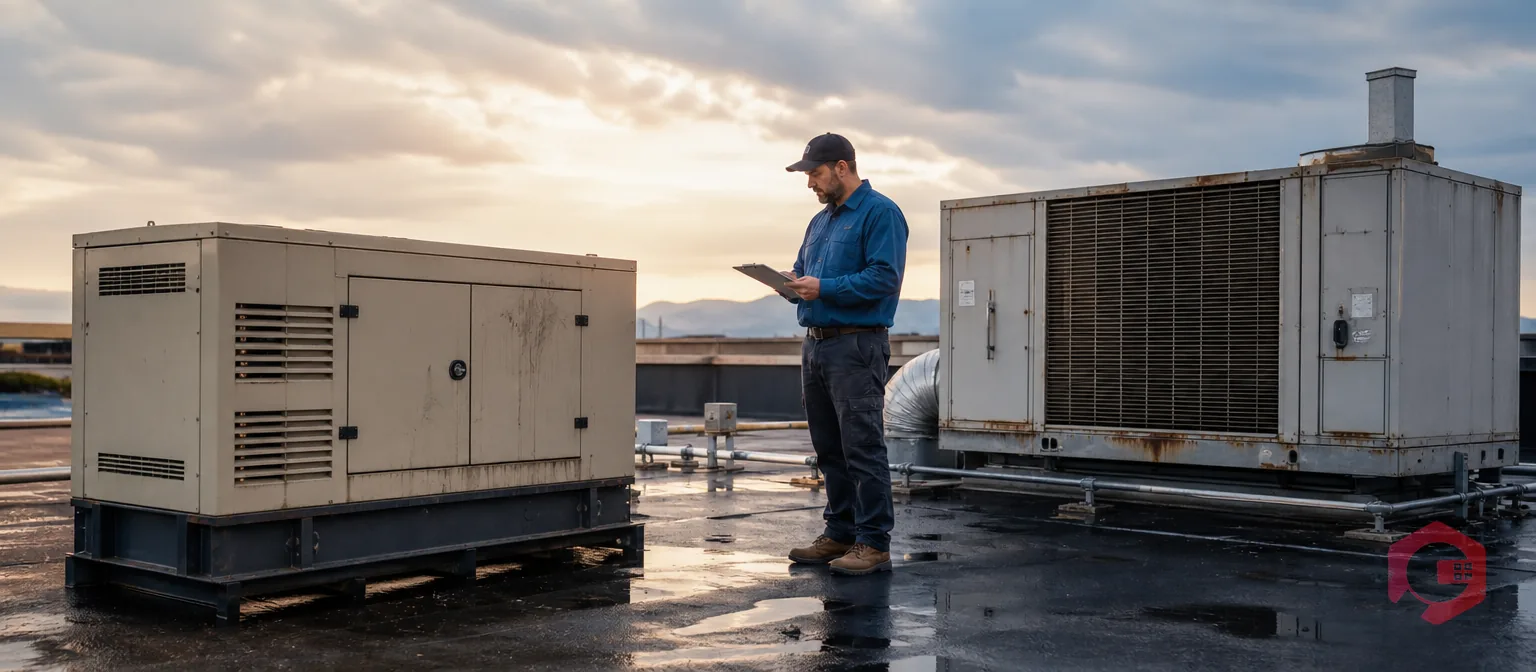
Office and administrative TPM often collapses in the same organizations that run flawless shop-floor programs, not because of weak intentions but because of missing structure. Autonomous maintenance checklists get completed on the line, OEE trends upward, and breakdowns fall — while a rooftop HVAC unit, a standby generator, or a fleet of vehicles parked outside the building degrades with no owner, no checklist, and no record until something fails. Facilities management, fleet administration, IT and network equipment, HVAC and building systems, and back-office assets such as printers, generators, and material-handling equipment used outside the line all fall into this same blind spot.
Office and administrative TPM is the application of Total Productive Maintenance principles — named ownership, structured capture, and fast escalation — to non-production assets such as HVAC, generators, fleet vehicles, and IT equipment. It fails most often not from a lack of will, but from the absence of the structural supports that make TPM work on the production floor, and closing that gap is a matter of process design rather than motivation.
Key Takeaways
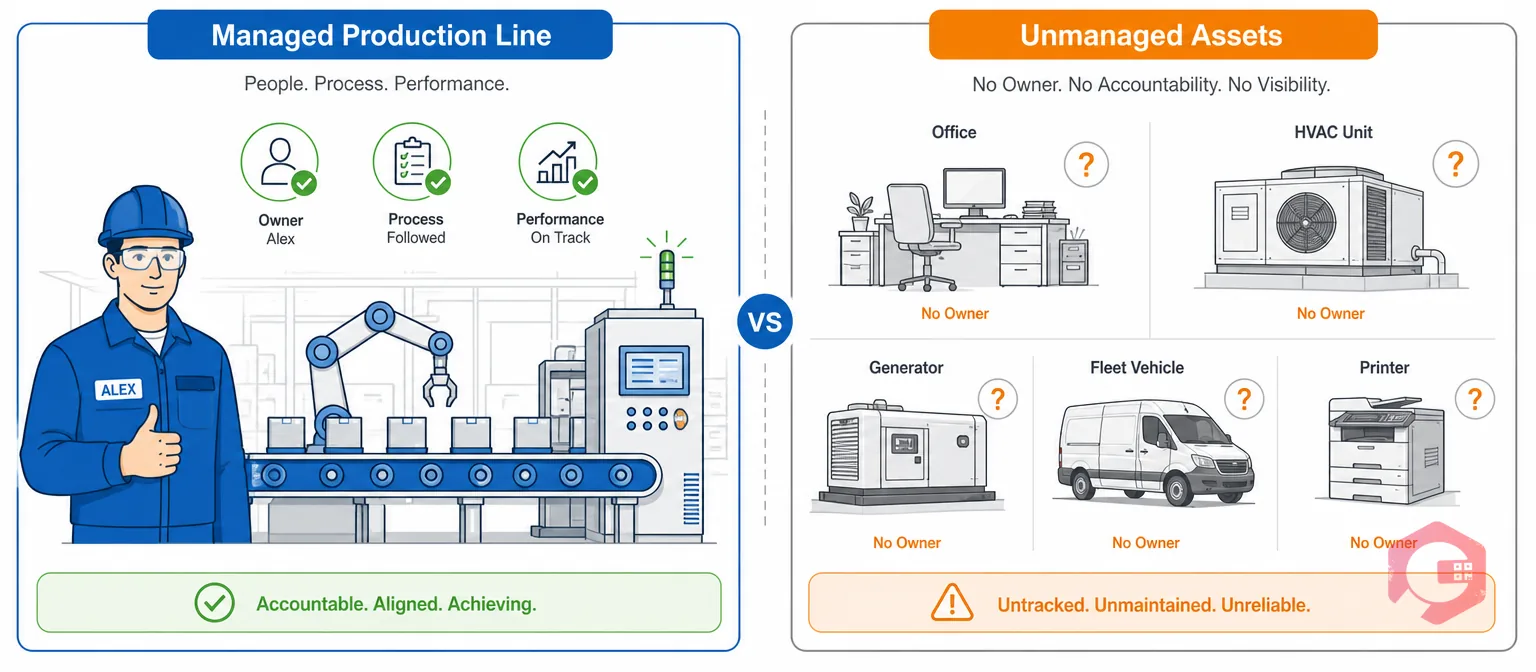
Office and administrative TPM failure looks like a plant that has genuinely mastered Total Productive Maintenance on the production floor while quietly abandoning the same principles the moment equipment sits outside the line. Facilities management, fleet administration, IT and network equipment, HVAC and building systems, and back-office assets such as printers, generators, and material-handling equipment used outside the production line all fall into this gap, often within the same building where shop-floor TPM is thriving one wall away.
This isn't a failure of TPM as a philosophy — Total Productive Maintenance was designed around visible, physically situated, high-consequence assets with a dedicated operator standing next to them. Office and administrative environments have none of these structural advantages by default. Assets are dispersed across floors and sites, the people around them have no ownership mandate, and failure modes are slow and invisible until they become expensive to fix.
Most facilities can point to a genuine shop-floor TPM success story and a completely informal approach everywhere else, and leadership rarely notices the split because no dashboard puts the two side by side. Recognizing why that gap exists is the first step toward closing it, and it's the same gap that structured, mobile-first CMMS platforms are built to close.
Most facilities that experience this gap describe it the same way once they look closely: production reliability data is reviewed weekly in a leadership meeting, while facility and fleet issues surface only when someone complains. That asymmetry isn't a sign that administrative equipment matters less — it's a sign that no one ever built a system for it to matter in the same measurable way.
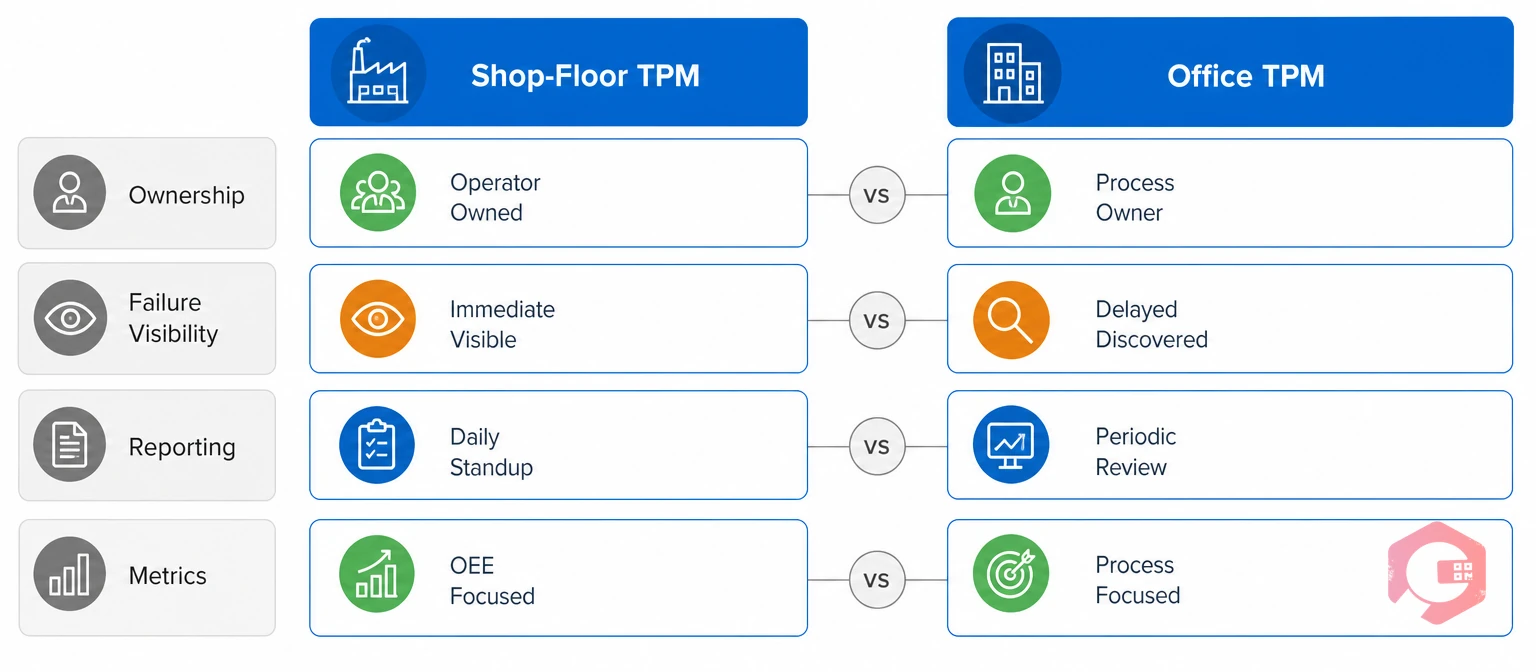
Shop-floor TPM and office TPM differ across nearly every structural dimension, from ownership to budget visibility, which is exactly why the same methodology produces opposite results in the two environments.
| Dimension | Shop-Floor TPM | Office and Administrative TPM (Before a CMMS) |
|---|---|---|
| Ownership | Named operator assigned to a named machine | No one owns the HVAC unit, generator, or fleet |
| Failure visibility | Stops output within minutes; escalated within the hour | Degrades silently for months before it fails |
| Reporting method | Standardized checklists and fault codes | Email, phone call, or a verbal note in a hallway |
| Metrics tracked | OEE, MTBF, MTTR on a reliability dashboard | Rarely tracked at all |
| Budget priority | Wins the argument with a quantifiable cost per hour | Deprioritized until a safety or compliance event |
| Training investment | Operators trained on 5S and autonomous maintenance | Facilities and admin staff rarely included in rollout |
Every row in that comparison traces back to one root cause: production assets have a structure built around them, and administrative assets don't — yet. None of these gaps require a different philosophy from TPM itself; they require the same structure the shop floor already has, applied to a different set of assets. Closing each row of that gap is what the rest of this guide walks through.
Shop-floor TPM succeeds and office and administrative TPM fails for eight specific, structural reasons — not because facilities and administrative staff care less about their equipment than production operators do.
Shop-floor TPM assigns a named operator to a named machine, with visible autonomous-maintenance tags and a supervisor who checks compliance daily. In an office or administrative setting, no one owns the rooftop HVAC unit, the standby generator, or the fleet of vehicles parked outside. Without named ownership recorded against an asset, first-line checks simply don't happen, because there is no one whose job it visibly is. That absence compounds over time: the longer an asset goes unowned, the less likely anyone questions why it has no maintenance record at all.
A seized bearing on a production line stops output within minutes and gets escalated within the hour. A neglected chiller, an aging UPS, or an under-serviced access-control system degrades silently for months before it fails — often at the worst possible moment, such as a heatwave, a board visit, or an audit. Slow-building risk doesn't generate the urgency that sustains a maintenance habit, so the same team that responds instantly to a line stoppage can walk past a failing rooftop unit for weeks.
Production assets sit inside a bounded, walkable area with a maintenance team physically present. Administrative and facility assets — HVAC across multiple floors, fire and life-safety systems, fleet vehicles, satellite offices, leased equipment — are geographically dispersed and frequently sit outside the maintenance department's org chart entirely. They're owned instead by facilities, IT, or general administration, with no shared system of record connecting any of them.
Shop-floor TPM runs on structured forms: standardized checklists, defined fault codes, and consistent severity ratings. Office and administrative maintenance, by contrast, is typically reported through an email, a phone call to facilities, or a verbal note in a hallway. Unstructured reporting cannot be trended, cannot be compared across sites, and rarely survives staff turnover — the one person who remembered that a unit failed twice last year usually isn't the person fielding the complaint this time.
Structured maintenance checklists close this gap by giving every reported issue the same fields a shop-floor fault report would use, regardless of which department logs it.
Autonomous maintenance is the TPM practice where an operator cleans, inspects, and lubricates their own machine on a fixed rhythm. It's the cornerstone of shop-floor TPM. Administrative staff — receptionists, office managers, drivers, IT support — are never trained or tasked with equivalent daily checks on the equipment around them, so early warning signs such as unusual noise, a flickering panel, or a slow leak go unreported until a technician happens to notice them on an unrelated visit.
OEE, MTBF, and MTTR dashboards are built around production lines because that is where the ROI case is easiest to make. Administrative and facility assets rarely appear in a reliability dashboard at all, so leadership has no visibility into how often the office HVAC fails, how long a generator takes to be repaired, or what a fleet breakdown actually costs — which means underperformance in these areas never reaches the level of a business problem worth solving.
Most facilities that later fix this problem start by extending a maintenance KPI dashboard to cover facility and fleet assets alongside production equipment, rather than building a separate spreadsheet just for the office.
Here's a quick way to see the size of the gap before reading further — try the MTTR calculator against your last three facility repairs and compare the result to your production line average.
Because production downtime has an immediately quantifiable cost per hour, it wins the budget argument every time. Facilities and administrative maintenance requests compete for the same technicians and the same capital budget but arrive without a downtime figure attached, so they are deprioritized by default — until a failure becomes a safety incident, a compliance finding, or a reputational event that forces the conversation.
TPM rollouts invest heavily in training production operators and supervisors on 5S, autonomous maintenance, and PM philosophy. Facilities coordinators, office managers, and administrative staff are rarely included in that training program, so the cultural shift that sustains shop-floor TPM never reaches the people who are closest to non-production assets day to day. The result is two parallel cultures inside one organization: one disciplined, one improvised.
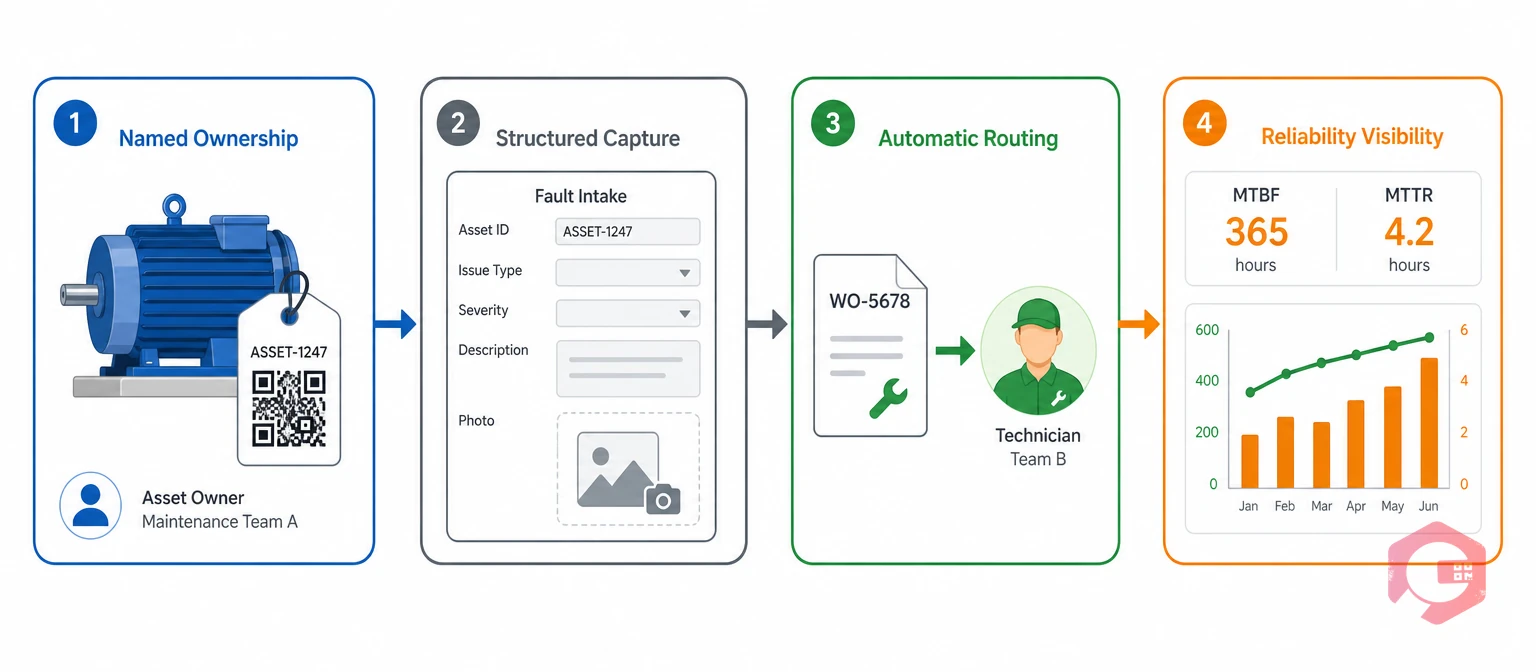
Closing the office and administrative TPM gap comes down to four structural pillars, each one directly answering one of the eight failure points above rather than asking facilities staff to simply "care more." The pillars build on each other in sequence — ownership has to exist before capture is meaningful, capture has to exist before routing can work, and routing has to exist before reliability metrics mean anything.
The 4-Pillar Office TPM Extension Framework:
A Computerized Maintenance Management System that gives every asset — production or otherwise — a QR-code identity, a defined owner, and a structured incident form removes the dependency on informal reporting. Facilities coordinators and administrative staff scan an asset, log a fault against defined fields, and attach a photo, exactly as a shop-floor operator would. The same discipline that makes TPM work on the line becomes available to the office, without asking anyone to learn a second system.
When a logged fault automatically generates a work order routed to the right technician, the absence of a named owner stops being a blocker. The system, not a person's job description, ensures the request reaches someone accountable, and the time from report to action collapses regardless of which department the asset belongs to.
Maintenance teams using Cryotos have reported up to 30% reduction in unplanned downtime and 25% faster repair turnaround once faults route automatically instead of waiting on an email chain to reach the right inbox.
Structured, comparable data makes it possible to see that three buildings across a portfolio are logging the same HVAC failure mode, or that a specific vehicle model in the fleet is generating a disproportionate share of breakdowns — patterns that stay invisible when every report is a one-off email with no shared format behind it. This is the same trend-detection logic that already drives PM schedule adjustments on the shop floor; it simply hasn't had comparable data to work with on the facilities side until now.
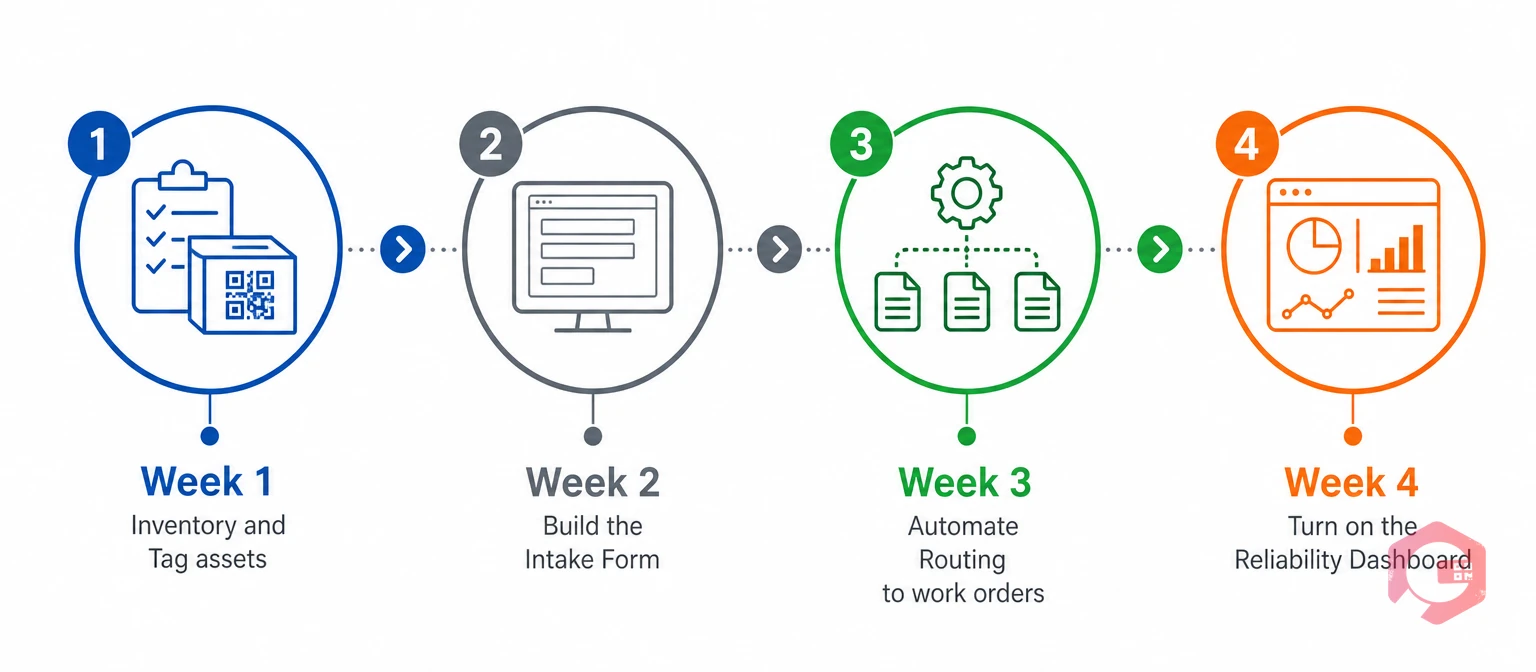
Most facilities don't need a year-long rollout to start closing this gap — a focused four-week plan gets the structural basics in place, with the cultural shift following once the system makes reporting easier than a phone call. Trying to fix all eight failure points at once tends to stall the project; sequencing them week by week keeps the rollout small enough that facilities and administrative staff can absorb it alongside their regular workload.
Facilities coordinators, office managers, and drivers should get the same short training session production operators received during the original TPM rollout — the tool only closes the gap if the people using it understand why the fields matter.
Not every non-production asset needs the same level of attention on day one — prioritizing by consequence and cost gets the biggest return from the first month of an office TPM rollout.
HVAC failures rarely show up as a single dramatic event; they show up as a slow loss of comfort, humidity control, or air quality that only becomes urgent during a heatwave or a client visit. Because these units run continuously and touch every occupant of a building, they're usually the highest-value starting point for named ownership and scheduled inspection.
A generator or UPS system is, by definition, an asset nobody notices until the moment it's needed most — during a grid outage or a power dip. That makes it one of the few non-production assets where the shop floor's "immediate consequence" logic actually applies once it fails, which is exactly why it deserves the same PM discipline as a production motor.
Fleet vehicles combine two of the eight failure points at once: they're geographically dispersed and their failures are rarely captured in a structured format, usually surfacing instead as a driver's text message. Tracking mileage-based PM schedules and repair history per vehicle model quickly reveals which vehicles are driving disproportionate cost.
Routers, switches, and on-site servers rarely fail with warning, and when they do, the business impact — a building losing connectivity, badge readers going offline — spreads far faster than a single broken machine on a line. Bringing this equipment into the same asset register as HVAC and generators closes a gap that's often owned by a completely separate department.
Fire suppression systems, emergency lighting, and life-safety equipment carry both a safety consequence and a compliance obligation, which makes them the clearest case for structured, time-stamped service records rather than informal tracking. These are usually the first assets worth digitizing, since the audit trail requirement already exists — a CMMS just gives it a permanent home.
Office and administrative TPM is working when facility and fleet assets appear in the same reliability dashboard as production equipment, with real MTBF, MTTR, and downtime-cost figures attached to each one — not just a maintenance log buried in an inbox.
Mean Time Between Failures (MTBF) is the average operating time an asset runs before it fails, and it applies just as directly to a generator or an elevator as to a production motor. A generator that fails twice as often as its peer group becomes visible before it fails during an outage, once that number is tracked consistently. Pairing MTBF with Mean Time to Repair gives facilities leaders both halves of the reliability picture — how often something breaks, and how long it stays broken once it does — rather than relying on memory or anecdote to judge whether a piece of equipment is becoming a liability.
Operations that successfully extend TPM past the plant gate tend to run one more check consistently: they revisit these numbers quarterly, the same way a plant manager reviews OEE, rather than waiting for a failure to prompt the conversation. That quarterly habit is what turns a one-time rollout into a lasting reliability culture instead of a project that quietly fades after six months.
It means applying the same three habits that make shop-floor TPM work — named ownership, structured fault capture, and fast escalation — to non-production assets like HVAC, generators, fleet vehicles, and office IT equipment. In practice, that usually starts with a QR code and an owner assigned to each asset.
Shop-floor TPM has a named operator, an immediate consequence for failure, and a structured reporting form built in from day one. Office and administrative environments typically have none of these by default, so the same philosophy has nothing to run on until a system supplies the missing structure.
A CMMS gives every asset a QR-code identity and a defined owner, turns logged faults into automatic work orders, and calculates MTBF and MTTR for non-production equipment the same way it does for production machines. That removes the three biggest blockers — no owner, no form, no dashboard — in one system.
Track MTBF, MTTR, downtime hours, and repair cost per asset class — HVAC, generators, fleet, and building systems — and review them on the same cadence as production reliability metrics. Comparing classes against each other also surfaces which equipment type needs attention first.
Yes. Fire suppression, generators, elevators, and life-safety systems are commonly subject to regulatory inspection independent of production output, so time-stamped, asset-linked service records directly support audit readiness. Facilities that already log these records in a structured system typically spend far less time reconstructing history before an inspection.
Most facilities can put the structural basics in place — asset tagging, a structured intake form, automatic routing, and a shared dashboard — in about four weeks. The cultural shift that makes the habit stick usually takes another full quarter, since it depends on facilities and administrative staff building the same reporting reflex production operators already have.
TPM was never meant to stop at the plant gate — its principles apply just as directly to a rooftop HVAC unit as to a production line motor. Schedule a free demo to see how Cryotos extends QR-linked assets, structured forms, and reliability metrics to every asset in your organization, not only the ones on the production line.


Cryotos AI predicts failures, automates work orders, and simplifies maintenance—before problems slow you down.



