

To create an AI assistant to analyze maintenance data and metrics, connect a large language model to your work orders, asset history, and sensor readings. Then give it clear metric definitions and strict guardrails. The finished AI assistant answers plain-English questions such as "Which pumps failed most often last quarter?" in seconds, with numbers you can trace back to the source.
Most maintenance teams already sit on years of data. The hard part is getting answers out of it without waiting a week for a custom report. This guide covers eight practical steps, from choosing the right questions to testing every answer. It also includes a build-or-buy comparison and the mistakes that sink most first attempts.
Key Takeaways
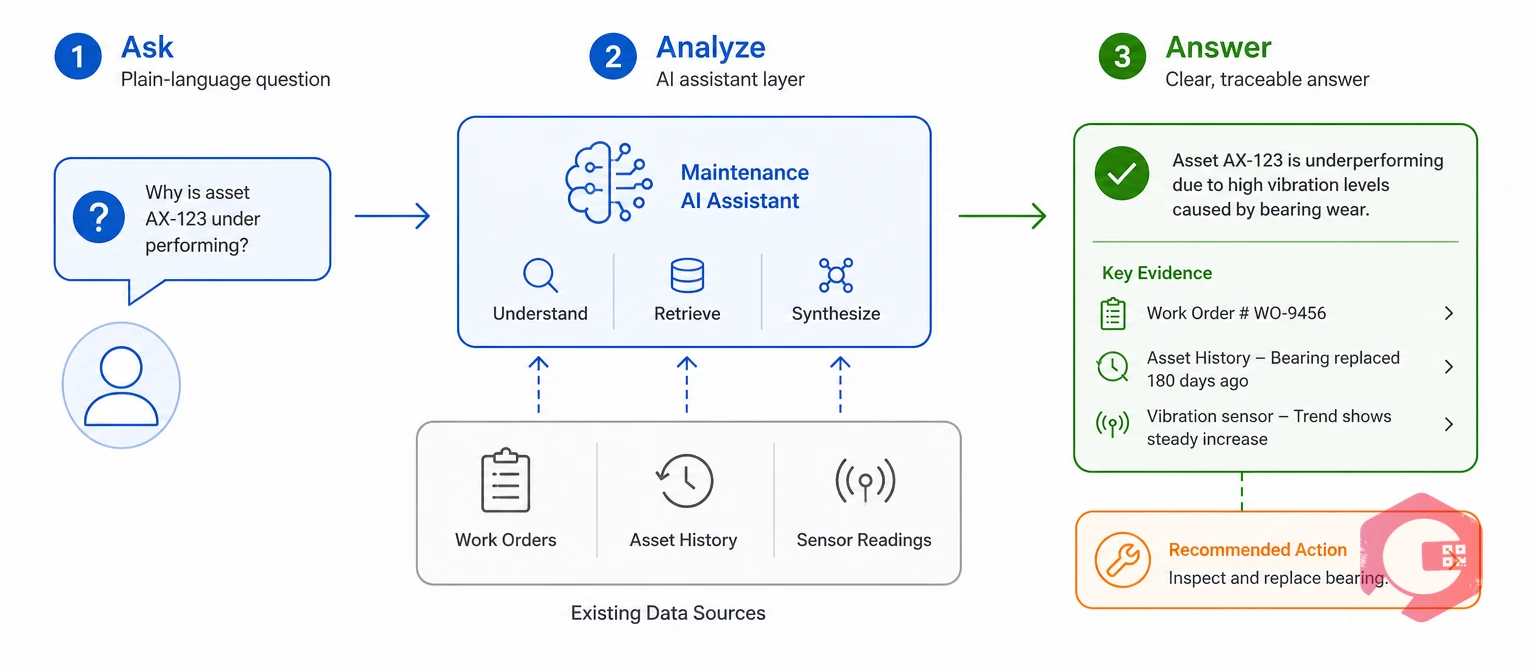
A maintenance AI assistant is a conversational tool that reads your maintenance records and answers questions about asset health, costs, and performance in plain language. It sits on top of your existing systems rather than replacing them.
Think of it as a reliability analyst who never sleeps. You type or speak a question, and the assistant finds the right records, runs the calculation, and explains the result. Good ones also show their working, so a planner can check the math in a few clicks.
An AI assistant supports the evidence-based decisions that ISO 55000 asset management calls for. This standard asks organizations to base asset decisions on reliable information about condition, risk, and cost. An assistant makes that information easier to reach, but only if the records underneath are accurate.
The takeaway: a maintenance AI assistant is a question-and-answer layer over data you already own.
Maintenance teams need an AI assistant because the data they collect grows faster than the time they have to study it. A mid-sized plant can log 10,000 or more work orders a year, and most of that history is never read again after the job closes.
In most facilities, one or two people know how to build reports. Every question from a supervisor joins their queue. By the time the answer arrives, the decision has often been made on gut feel.
Unplanned downtime is where this pays off fastest. Maintenance teams using Cryotos have reported up to 30% reduction in unplanned downtime and 25% faster repair turnaround when they act on failure patterns early. An assistant speeds up that pattern-finding by putting downtime tracking data one question away.
The takeaway: the real value is not the AI itself but the shorter path from a question to a decision.
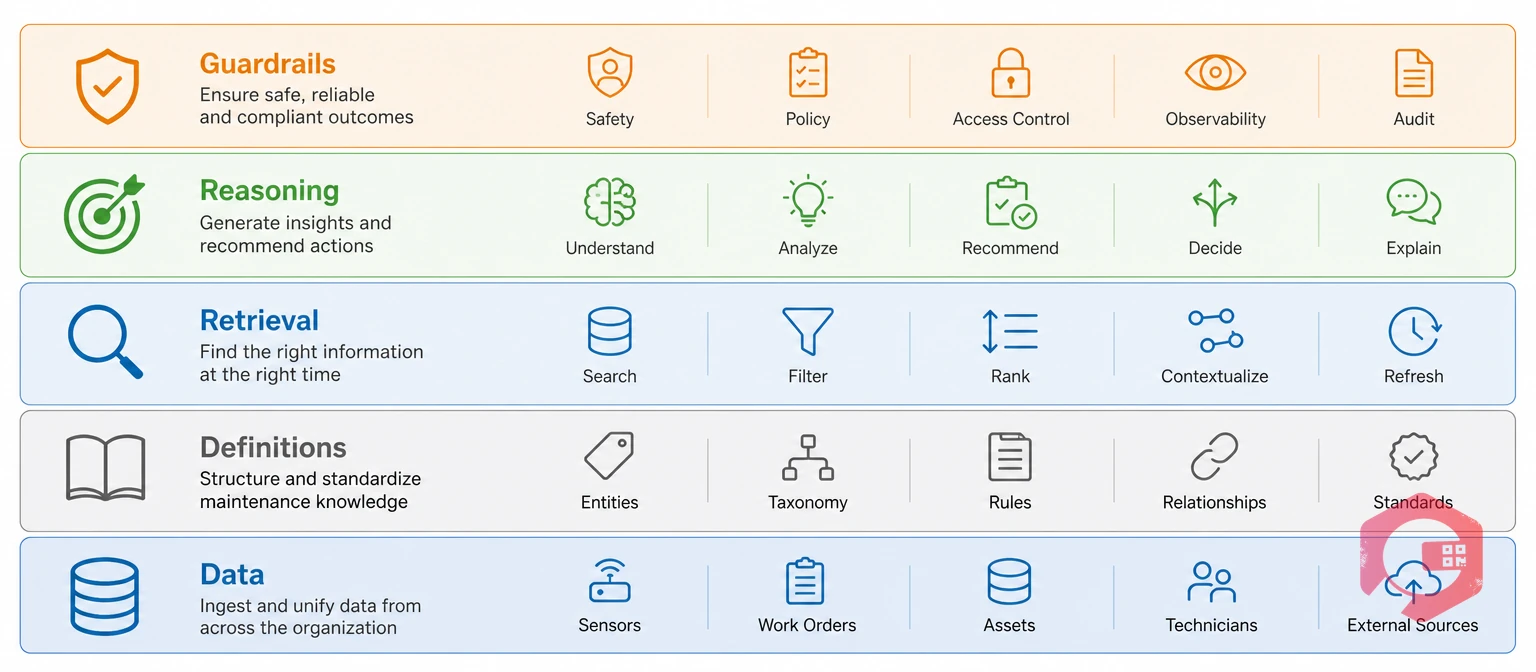
Every reliable maintenance AI assistant is built on five layers, and skipping any one of them produces wrong or unsafe answers. Use this model to plan your project and to check a vendor's product.
The Maintenance Intelligence Stack:
Most failed projects break at Layer 1 or Layer 2, not at the model. A top-tier model reading messy asset names will still give messy answers. The takeaway: build from the bottom up, and don't move to the next layer until the one below it holds.
Want a baseline before you build? Run your numbers through the free OEE calculator, so you can later confirm your AI assistant reports the same figure.
Start by listing the 20 to 30 questions your team asks most often, because an AI assistant built around real questions beats one built around whatever data is available. Interview planners, supervisors, reliability engineers, and the plant manager for 20 minutes each.
Score each question on two scales: how often people ask it and how much a good answer is worth. Start with frequent, high-value questions that use structured data, such as MTTR by asset or overdue PMs by crew.
Leave fuzzy questions like "Why is Line 2 unreliable?" for a later phase. Those need clean history, good failure codes, and a proven assistant before users will trust the answer.
The takeaway: a short, ranked question list becomes both your requirements document and your test set.
Your AI assistant can only be as accurate as the records it reads, so a data audit comes before any model work. Pull a sample of 500 recent work orders and check them against a simple quality list.
You don't need perfect data to start. Fix asset naming and failure codes first, since almost every metric depends on them. A structured work order management process with required fields stops new bad data from entering while you clean the old records.
A common mistake is letting the assistant guess around missing fields. Tell it to report gaps instead, for example: "12 of 40 work orders on this asset have no failure code."
The takeaway: clean asset names and failure codes deliver more accuracy than any model upgrade.
A KPI matrix gives your AI assistant one agreed formula for every metric, which stops it from inventing its own. Without one, two users asking for "MTTR" can get two different numbers from the same data.
A KPI matrix is a reference table that lists each metric with its formula and data source. It also records the business meaning and edge-case rules. The assistant reads it as part of its instructions every time it answers a metric question.
| Metric | Formula | Data Source | Example Question |
|---|---|---|---|
| MTTR | Total repair time ÷ number of repairs | Work order start and finish times | "What was MTTR for Line 2 conveyors in August?" |
| MTBF | Total operating time ÷ number of failures | Runtime meters and breakdown work orders | "Which compressors have MTBF under 500 hours?" |
| PM Compliance | PMs completed on time ÷ PMs scheduled × 100 | PM schedule and completion dates | "What was PM compliance by site last month?" |
| Planned Maintenance % | Planned hours ÷ total maintenance hours × 100 | Work order type and labor hours | "Is our planned percentage above 80% this quarter?" |
| OEE | Availability × Performance × Quality | Downtime logs and production counts | "Why did OEE drop on Line 1 last week?" |
| Backlog (weeks) | Open labor hours ÷ weekly available crew hours | Open work orders and crew capacity | "How many weeks of backlog does the electrical crew have?" |
| Wrench Time | Hands-on tool time ÷ total shift time × 100 | Labor logs or work sampling studies | "What share of shift time goes to actual repairs?" |
Add notes on edge cases for each row. For overall equipment effectiveness, decide whether planned downtime counts against availability. For MTBF, decide whether minor stops under five minutes count as failures.
SMRP publishes standard definitions for many maintenance metrics, and adopting them saves long internal debates. You can sanity-check the assistant's figures against a wrench time calculator or your last manual report. The takeaway: define every metric once, in writing, before the assistant calculates anything.

The right architecture for a maintenance AI assistant combines a language model with tools that query your data directly, instead of asking the model to remember numbers. Language models are strong at reading and explaining but weak at exact arithmetic across thousands of rows.
Read more about how retrieval-augmented generation grounds answers in your own documents instead of the model's general training.
Choose a large language model that supports tool calling and a long context window. Hosted models from major providers work well for most teams. Consider a privately hosted model only if your data policy forbids sending records outside your network.
Tool calling is a model feature that lets the AI request a specific function, such as a query for all work orders on one asset, and use the returned data in its answer. This keeps the numbers accurate because the database does the math.
The takeaway: let the database calculate and let the model explain.
Connecting the AI assistant to live systems turns it from a demo into a daily tool. Start with read-only access through APIs or a reporting database, never direct write access to production tables.
Decide how current each source must be. Work order data synced every 15 minutes is enough for most questions. Condition data may need near real-time feeds, which a platform with built-in IoT integration can provide without extra middleware.
Respect user permissions as well. A technician at Site A should not see cost data from Site B just because the assistant can reach it, so pass each user's role into every query.
The takeaway: read-only, permission-aware connections keep the assistant both useful and safe.
The system prompt is the instruction set that tells your AI assistant who it serves, which data it can use, and how it must answer. A clear prompt prevents most of the errors that people blame on the model.
Maintenance data drives safety and spending decisions, so guardrails are not optional. The NIST AI Risk Management Framework recommends mapping where an AI system could cause harm and adding controls at those points.
The takeaway: a strict prompt plus citations turns a chatty model into a trustworthy analyst.
Testing a maintenance AI assistant means comparing its answers to results you already trust before any user relies on them. The real questions your team collected during planning make the best test set.
Aim for at least 95% accuracy on metric questions before launch. Open-ended analysis can launch at a lower bar if answers show their sources clearly.
Re-run the full test set after every prompt change or model upgrade, since small edits can break answers that worked before. Cross-check totals against your existing maintenance report builder output. If the assistant says 42 breakdowns and the monthly report says 45, find out why before going live.
The takeaway: a repeatable test set is the only way to know the assistant is getting better, not just different.
Roll out the AI assistant to a small pilot group first, measure how they use it, and expand only when answers hold up in daily work. A pilot with one site or one crew for four to six weeks is usually enough.
Show these results on a shared maintenance KPI dashboard so leaders can see adoption next to plant performance. The takeaway: treat the assistant as a product that improves every week, not a one-time project.
Building a custom AI assistant gives you full control, while using AI built into your maintenance platform gets you results faster with less risk. The right choice depends on your team's skills, budget, and how many systems hold your data.
| Factor | Custom-Built AI Assistant | CMMS-Native AI Features |
|---|---|---|
| Time to first useful answer | Three to six months | Days to a few weeks |
| Upfront cost | High: developers, hosting, and model fees | Included in the plan or a paid add-on |
| Data connections | You build and maintain every integration | Already linked to work orders, assets, and PMs |
| Metric accuracy | Depends on your KPI matrix and testing | Uses the platform's built-in formulas |
| Customization | Nearly unlimited | Limited to vendor features |
| Ongoing upkeep | Your team updates prompts, tools, and models | The vendor handles updates |
| Best fit | Large enterprises with data teams and many source systems | Most plants and facility teams |
Many operations use a mix of both. They rely on the maintenance platform for daily questions and build a custom layer only for cross-system analysis, such as linking maintenance cost to production output or energy use.
The takeaway: buy for speed and build only for unique cross-system questions.
Most maintenance AI assistant projects fail for data and process reasons, not model reasons. Watch for these six mistakes.
Picture a food plant whose first assistant reports MTBF on its filling machines as 2,000 hours, while the real figure is closer to 400. The cause is simple: minor stops are logged as "adjustments" instead of failures, so the assistant counts far fewer failures.
Fixing the work order type rules corrects the number within a week. The takeaway: most accuracy problems trace back to how work gets recorded, so fix the process along with the tool.
No, not for a first version. A developer who can work with APIs and databases, plus a reliability engineer who knows the metrics, can build a useful pilot. A data scientist helps later if you add forecasting or anomaly detection.
Twelve months of work orders with consistent asset names and failure codes is a good starting point. Less history still works for lookups and summaries. Trend and reliability questions need more history to give stable answers.
A language model alone does not predict failures reliably. Prediction needs condition data and statistical or machine learning models built for that job. The assistant's role is to explain those predictions and connect them to work order history.
Give it a written KPI matrix, let the database do every calculation, and require citations on each answer. Then test it against 50 known answers and re-test after every change. These four habits prevent most metric errors.
It can be, if the provider does not train on your data and offers encryption and access controls. Check the provider's data retention terms with your IT team. For highly sensitive sites, a privately hosted model is another option.
Start with MTTR, MTBF, PM compliance, and backlog. These four rely on work order data most teams already collect, and they answer the questions supervisors ask most. Add OEE and cost metrics once production and purchasing data are connected.
An AI assistant is only as strong as the maintenance data behind it, and clean, connected records are where every successful project starts. Schedule a free demo to see how Cryotos turns your work orders, asset history, and sensor data into answers your team can act on.



Cryotos AI predicts failures, automates work orders, and simplifies maintenance—before problems slow you down.



