

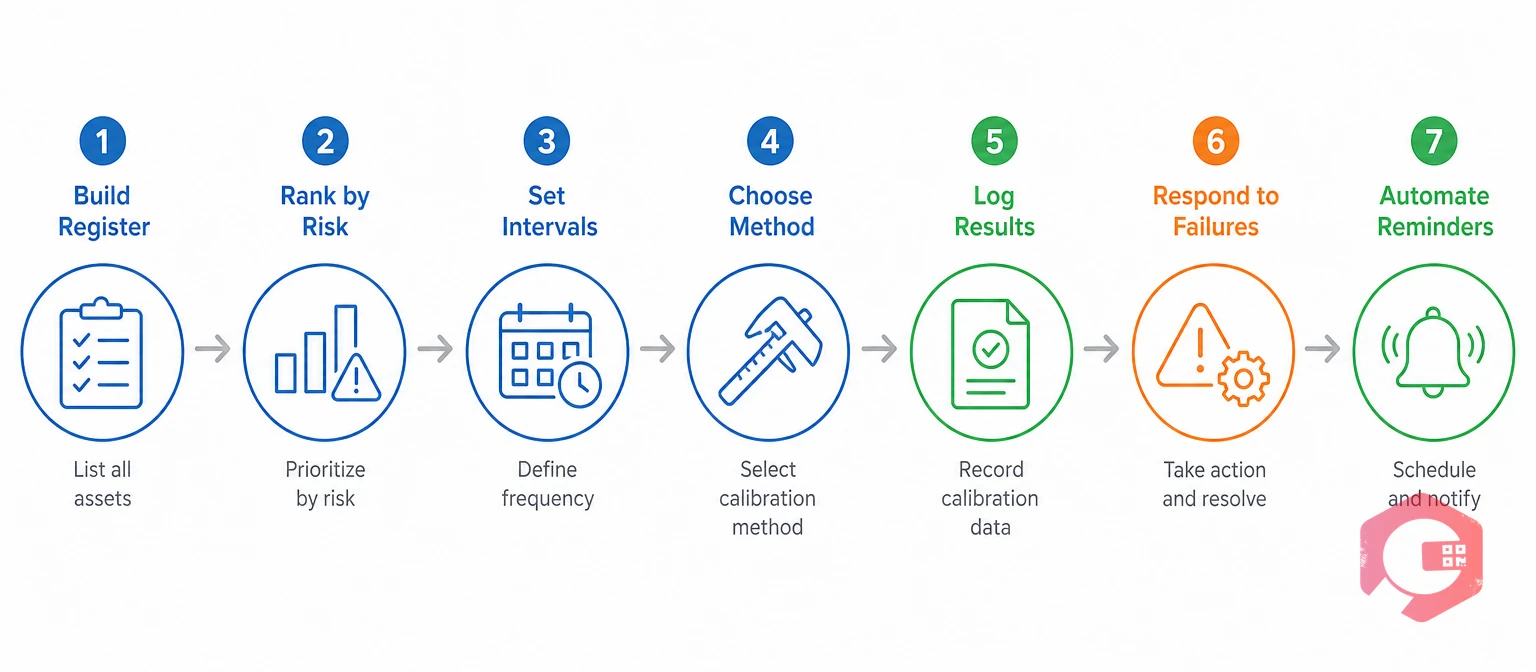
An asset calibration schedule is a documented plan listing each instrument, its interval, its owner and its next due date. To build one, register your instruments, rank them by risk, set an interval for each and log every result.
Most maintenance teams begin with a spreadsheet. It works until a technician leaves, an auditor asks for proof, or a gauge slips past its due date unnoticed. This guide gives you seven steps and a ready-to-copy calibration log template. It also shows how a Computerized Maintenance Management System can run the schedule for you.
Key Takeaways

Calibration is the comparison of an instrument against a reference standard to measure its error. A schedule makes that comparison happen on time, every time.
ISO 9001 (clause 7.1.5.2) requires organizations to calibrate or verify measuring equipment at set intervals against traceable standards, and to keep records as evidence. Most facilities already own the raw material for a schedule: an equipment list, a vendor contract and a drawer of certificates.
A schedule you can produce on request is far cheaper than an audit finding.
Every calibration schedule starts with a complete list of the instruments that measure something that matters. Walk each area with a phone or clipboard, and expect to find more handheld gauges than planned. The example below shows five fields that are enough to start.
| Asset ID | Instrument | Location | Range and tolerance | Reference standard |
|---|---|---|---|---|
| PG-0112 | Pressure gauge | Boiler room | 0 to 10 bar, ±1% | Deadweight tester DWT-02 |
| TQ-0045 | Torque wrench | Assembly line 2 | 20 to 100 Nm, ±4% | Torque tester TT-01 |
| TH-0231 | Digital thermometer | Cold store | -30 to 50 °C, ±0.5 °C | Reference probe RP-07 |
| BL-0018 | Analytical balance | QC lab | 0 to 220 g, ±0.1 mg | Class E2 weight set W-03 |
| MM-0307 | Micrometer | Machine shop | 0 to 25 mm, ±0.002 mm | Gauge block set GB-01 |
Tag each instrument with a QR label so a technician can scan it and open its record at the bench. Asset tracking in Cryotos links each tag to the asset record and its history.
Gaps in the register become gaps in the schedule.

Not every instrument needs the same attention. A pressure gauge on a safety line matters more than a thermometer in a break room, so rank by risk before you set any dates.
The Four-Tier Calibration Priority Framework:
Record the tier beside each instrument, because it drives the interval. Risk tier, not habit, should decide how much calibration effort an instrument gets.
Want due dates that chase themselves? See how expiration reminders alert owners by mobile, email or WhatsApp before a calibration lapses.
A calibration interval is the time or usage allowed between two calibrations of the same instrument. Start with the manufacturer's advice, then adjust it for risk tier, conditions and drift history.
A common starting point is 6 months for Tier 1 instruments and 12 months for most others. Your standards, regulators and past results set the final number. ILAC-G24 gives guidance on setting and reviewing intervals.
Once every interval is set, add the last calibration date and calculate the next due date. This sample uses the same five instruments as the register.
| Asset ID | Instrument | Tier | Interval | Last done | Next due | Owner |
|---|---|---|---|---|---|---|
| PG-0112 | Pressure gauge | 1 | 6 months | 15 Sep 2026 | 15 Mar 2027 | Maintenance lead |
| TQ-0045 | Torque wrench | 2 | 6 months | 02 Oct 2026 | 02 Apr 2027 | QA technician |
| TH-0231 | Digital thermometer | 1 | 12 months | 20 Aug 2026 | 20 Aug 2027 | Cold store supervisor |
| BL-0018 | Analytical balance | 2 | 12 months | 11 Sep 2026 | 11 Sep 2027 | QC analyst |
| MM-0307 | Micrometer | 2 | 12 months | 28 Sep 2026 | 28 Sep 2027 | Machine shop lead |
Spread due dates across the year instead of stacking them into one month. Where production allows, book each calibration into planned downtime windows.
Recurring tasks in preventive maintenance software can create each calibration task from the interval, by calendar or by usage count. A schedule that creates its own tasks does not depend on one person's memory.
Every task on the calibration schedule needs one named owner and one method. Simple checks suit trained staff, while formal certificates usually come from an accredited lab.
| Criteria | In-house calibration | External calibration lab |
|---|---|---|
| Ideal use | Daily checks and simple gauges, using a reference standard on site. | Reference standards, critical instruments and complex equipment. |
| Certificate | Internal record, traceable only if your own standards are traceable. | Formal certificate, often from an ISO/IEC 17025 accredited lab. |
| Downtime | Short, because the work happens on site. | Longer, because the instrument leaves the site. |
| Cost pattern | Staff time plus upkeep of reference standards. | A fee per instrument, plus shipping. |
| Skills needed | A trained technician and a written procedure. | Provided by the lab. |
Traceability means each reference standard links back to national standards through an unbroken chain of calibrations, usually via a national metrology institute. Ask every external lab to state that chain on the certificate.
When an instrument leaves for an external lab, schedule the task early enough to arrange a loan or spare. Choose the method per instrument, not per plant.
A calibration log is a dated record of every calibration, showing the readings, the result and who signed it off. It is the evidence behind the calibration schedule.
Copy the columns below into a spreadsheet or build them into a digital form. Each row records one calibration event.
| Date | Asset ID | Procedure | Reference standard | As-found | As-left | Result | Signed by |
|---|---|---|---|---|---|---|---|
| 15 Sep 2026 | PG-0112 | CAL-PR-01 | DWT-02, due 30 Nov 2026 | 5.08 bar at 5.00 bar | No adjustment | Pass | Maintenance lead |
| 02 Oct 2026 | TQ-0045 | CAL-TQ-02 | TT-01, due 15 Jan 2027 | 52.9 Nm at 50.0 Nm | 50.1 Nm | Fail, adjusted and retested | QA technician |
Record the tolerance and, where your procedure requires it, the measurement uncertainty too, because it decides whether a borderline pass can be trusted. Plants that follow good manufacturing practice keep these records ready for inspection. Retention rules vary by standard and company policy, so confirm the period in your SOP.
As-found data is the reading an instrument gives before any adjustment. It shows how far the instrument drifted since its last calibration, while the as-left reading proves it is back within tolerance.
Build these steps into maintenance checklists so every technician records the same readings in the same order. Cryotos supports customizable checklists with digital signatures and offline mobile use.
An out-of-tolerance result is an as-found reading outside the limit set for the instrument's use. Every measurement taken since the last passing calibration may be affected.
Take a torque wrench with a ±4% tolerance that reads 52.9 Nm at a 50.0 Nm setting. The as-found error is 5.8%, so every joint tightened since the last pass needs a risk review.
Route follow-up work with workflow automation so a failed calibration never waits in an inbox. A fixed response turns a failed calibration into a controlled event.
A spreadsheet stores the calibration schedule, but a CMMS runs it. Maintenance teams load each instrument once, and the system raises tasks, guides technicians and keeps the history.
Maintenance teams using Cryotos have reported up to 30% reduction in unplanned downtime and 25% faster repair turnaround.
A yearly review keeps the schedule matched to how your instruments behave.
Most manual schedules fail in the same few ways.
Fixing these habits removes much of the risk in a manual process.
It should list each instrument's unique ID, location, tolerance, interval, last and next due dates, owner and method. Add the reference standard and the risk tier, so reviewers can see why each interval was chosen.
Review it at least once a year. Compare as-found results across cycles, shorten the interval for instruments that drift, and extend it only when the history supports it.
Create one sheet with the columns shown above and add one row per calibration event. Use a drop-down list for the result, and add conditional formatting to flag due dates that are close or passed. Keep the sheet in a shared location with a named owner.
Many teams start at 6 to 12 months and adjust from there. Manufacturer guidance, usage, environment and drift history decide the final interval, and critical instruments usually get shorter ones.
Calibration compares an instrument with a traceable standard and records the error. Verification is a quicker check against a known value to confirm the instrument still performs. Many teams verify daily and calibrate on schedule.
Treat it as out of service until it is calibrated, unless your procedure allows a controlled exception. Then review the results measured since the last calibration to judge the risk, record the lapse and fix the cause.
Yes. A CMMS creates recurring calibration tasks, guides technicians with checklists, sends reminders and reports overdue work. Cryotos adds QR scanning, offline mobile access and digital sign-off.
Quality or maintenance teams usually own the program. Technicians run the tasks, and managers approve the intervals. Naming one owner for each instrument prevents gaps.
A calibration plan only protects you when due dates are never missed. Schedule a free demo to see how Cryotos keeps every instrument on its cycle and every record ready for audit.




Cryotos AI predicts failures, automates work orders, and simplifies maintenance—before problems slow you down.



