

Asset classification in maintenance is the process of organizing physical equipment into logical groups — by criticality, function, location, or type — so maintenance teams can plan, prioritize, and schedule work at scale rather than machine by machine. Without a clear classification system, your preventive maintenance schedules are generic, your downtime analysis is noise, and your technicians are making decisions from memory. With it, a single scheduling decision covers an entire group of assets, and every failure pattern rolls up to a category that gives you actionable insight. This guide walks you through five practical steps to classify your assets correctly and use those classifications to run smarter group maintenance inside a Computerized Maintenance Management System.
Key Takeaways
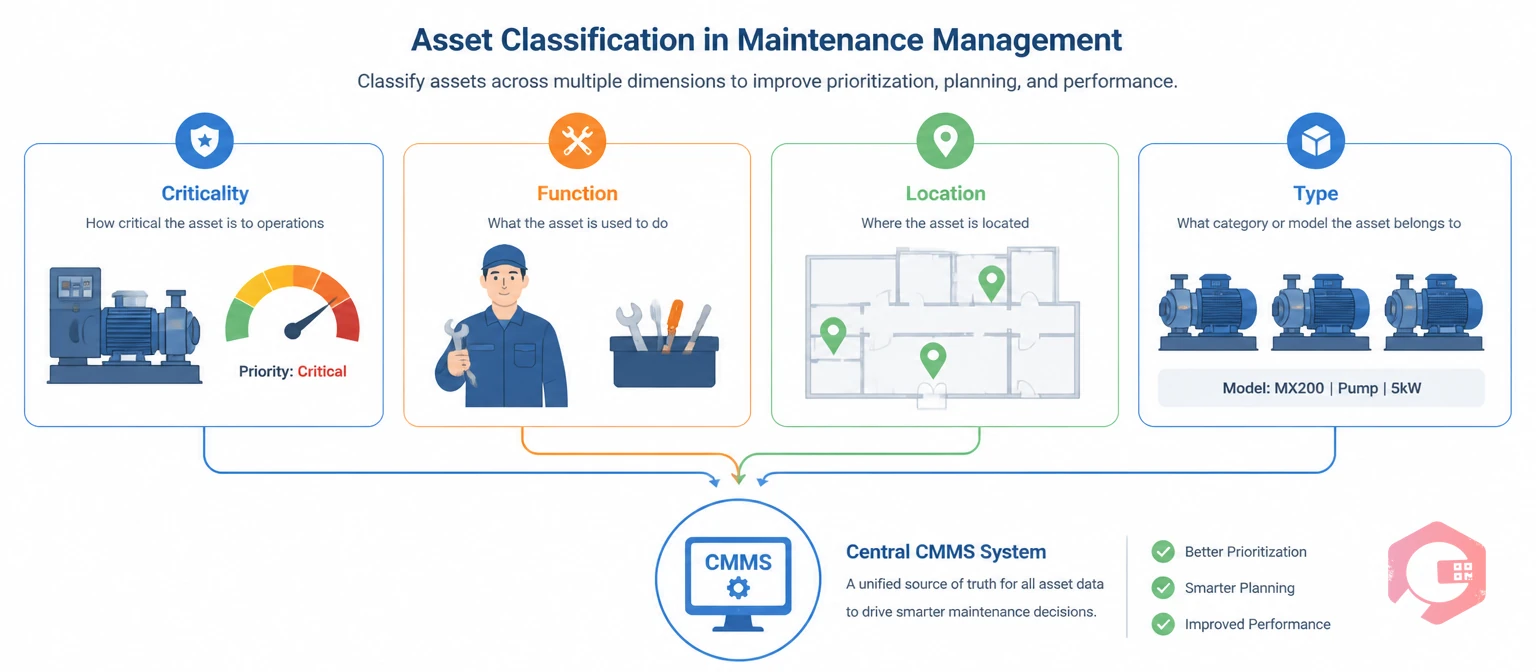
Asset classification is the systematic grouping of physical assets into defined categories based on shared characteristics, so maintenance policies can be applied consistently across the group rather than individually to each machine. The concept is formalized in ISO 55000, the international standard for asset management, which defines structured asset registers and lifecycle management as the foundation of any effective maintenance program.
In practice, classification answers four operational questions your maintenance team faces every day:
Maintenance teams using Cryotos have reported up to 30% reduction in unplanned downtime and 25% faster repair turnaround — both metrics that improve directly when classification drives scheduling and response decisions.

Before you create a single category in your CMMS, decide which criteria you will use to classify assets. Most facilities try to track too many dimensions at once and end up with an unusable system. The most effective classification schemes use four core criteria and nothing more.
The C-F-L-T Framework organizes every asset across four classification dimensions:
Operations that successfully apply C-F-L-T to asset classification in maintenance find that criticality drives their scheduling frequency decisions, function drives technician assignment, location drives shutdown planning, and type drives template standardization. Each dimension does a specific job; none of them overlap.
An asset hierarchy is a parent-child tree that shows every asset's physical and organizational context — from the facility level down to the individual component. A well-built hierarchy means that when one node in the tree fails or goes offline, you instantly know which related assets are nearby and potentially affected.
The standard hierarchy runs: Site → Building → Floor → Machine Line → Asset → Component. A food and beverage manufacturer might have: Central Plant → Building A → Production Floor 2 → Filling Line 3 → Filler Head #4 → Servo Motor.
A practical note for multi-site operations: replicate the same hierarchy template across sites before populating data. Inconsistent hierarchy depth between sites makes cross-site downtime comparisons meaningless.
See how Cryotos structures multi-level asset hierarchies with QR code tagging and full maintenance history per asset: asset tracking software.

Maintenance strategy assignment means selecting the right maintenance approach — preventive, condition-based, or run-to-fail — for each asset class, rather than applying the same policy to every machine on your floor.
Reliability-centered maintenance (RCM) principles define this clearly: not every asset deserves the same level of preventive attention. Over-maintaining a low-criticality asset wastes labor hours just as surely as under-maintaining a critical one causes unplanned failures.
Once you have assigned strategies by class, you apply the same PM template to every asset in that class. When a manufacturer updates service intervals, you change the template once and the update flows to every asset in the group automatically.
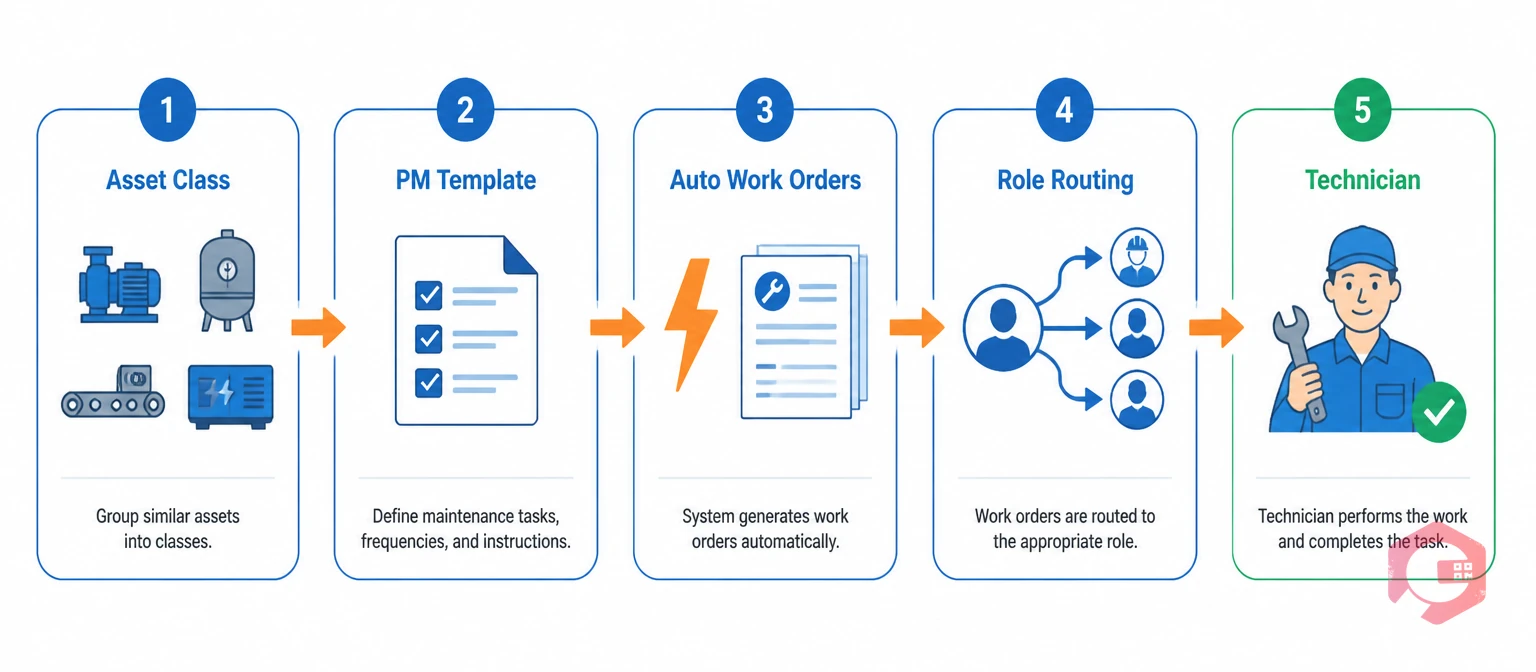
Group PM scheduling means creating one preventive maintenance work order template that generates tasks for every asset in a classified group, rather than creating separate work orders for each machine. This is where asset classification in maintenance delivers its clearest operational payoff.
Most facilities still manage PM schedules asset by asset. For a plant with 400 machines, that's 400 individual schedule entries, 400 separate work orders per PM cycle, and 400 opportunities for an asset to be missed when someone updates schedules manually. Group scheduling collapses that to the number of asset classes — typically 15 to 30 — and eliminates the coverage gaps.
Two scheduling approaches apply depending on asset class characteristics:
Well-implemented preventive maintenance software handles both schedule types simultaneously — applying static intervals to one asset class and meter-based triggers to another, all within the same system. Technicians get role-filtered work order queues so an electrical tech sees only electrical asset tasks and a mechanical tech sees only rotating equipment — classification drives assignment automatically.

Downtime tracking by asset group means analyzing failure data at the classification level, not just the individual machine level, so you can identify systemic issues and adjust schedules for an entire class in one step.
Individual machine failures often look random. Three failures in six months across 200 assets looks like normal statistical variation. But when you group those failures by classification, a pattern emerges: all three were the same make of pump, all failed between 800 and 850 operating hours, all on the same product line. That's not random — that's a PM interval that's 10% too long for that asset class under your operating conditions.
Key metrics to track at the group level:
The insight loop closes when downtime data at the group level feeds back into your asset classification in maintenance system. An asset you classified as Medium criticality three years ago may now be High criticality because production volumes increased and its failure impact grew. Classification should be reviewed annually against current downtime data, not set once and forgotten.
The asset lifecycle management discipline formalizes this loop — classification informs strategy, strategy drives PM frequency, downtime data validates the strategy, and updated data revises classification.
Cryotos builds asset classification into its core architecture, not as an add-on configuration layer. The platform's asset maintenance management software gives maintenance managers the tools to classify, act on, and continuously refine equipment groups at scale.
Cryotos lets you build a full site → building → floor → machine line hierarchy. Every asset in the tree carries a complete profile: purchase date, manufacturer, model, calibration status, maintenance history, and downtime records. Managers filter assets by any attribute and apply bulk scheduling or cost reporting to the filtered group in one step.
Every classified asset gets a unique QR or barcode label. Technicians scan in the field to pull the full asset record, open work orders, and maintenance history — no paper, no radio calls back to the office. Asset reconciliation reports verify location and status across the entire classified register, keeping idle and decommissioned assets out of active PM schedules.
For high-utilization asset classes, Cryotos uses meter readings — hours run, cycles, units produced — to trigger PM work orders automatically when the threshold is reached. Low-utilization classes run on static calendar intervals. Both schedule types feed into role-based work routing: electricians see electrical asset queues, mechanical technicians see rotating equipment queues.
The Cryotos BI dashboard answers plain-language queries: "Which asset class had the highest downtime last quarter?" or "What is the MTBF for our pump category?" Managers get chart-based answers without running manual reports. Every work order links to its classified asset in the hierarchy, so labor costs, parts consumption, and repair times roll up accurately by asset class.
Asset classification assigns assets to structured groups based on defined criteria like criticality, function, location, and type — enabling automated scheduling and routing decisions. Asset categorization is a broader, often informal grouping by equipment type or department. Classification is the more structured approach that feeds directly into maintenance strategy assignment and PM scheduling rules inside a CMMS.
Most facilities get the best results with four to five classification dimensions (C-F-L-T plus an optional lifecycle stage) and a hierarchy of no more than five levels deep. Going deeper than five hierarchy levels creates navigation friction for field technicians and makes bulk scheduling actions harder to apply without unintended overlap between groups.
Yes — in fact, smaller operations benefit most from classification because they have limited maintenance staff and every misallocated hour is proportionally more costly. Even a 50-asset register benefits from a simple High / Medium / Low criticality split that tells a two-person team which machines to prioritize when two failures happen simultaneously.
Classifications should be reviewed at least annually, and immediately after any major production change, equipment upgrade, or significant failure event. As throughput requirements increase or equipment ages, the criticality score for a previously Medium-rated asset can shift to High — and the PM frequency needs to reflect that change before the next failure, not after it.
Without classification, every scheduling decision requires manual asset-by-asset data entry, downtime analysis loses its pattern-detection value, and technicians receive undifferentiated work queues with no prioritization. The result is reactive maintenance: teams respond to failures rather than preventing them, and labor hours accumulate on low-priority machines while critical equipment waits. Classification is what makes the CMMS act like a planning system rather than a work order log.
Asset classification is the structural foundation that makes every other maintenance decision more precise. When your equipment groups are defined correctly, PM schedules run on the right machines at the right intervals, technicians work on the asset classes they are qualified for, and managers see cost and downtime data that is actually meaningful. Schedule a free demo to see how Cryotos turns your asset classification into automated group scheduling, role-based routing, and actionable group-level analytics.




Cryotos AI predicts failures, automates work orders, and simplifies maintenance—before problems slow you down.



