

A unified asset history is the complete, structured record of everything that has happened to a piece of equipment. Every work order, repair, part, inspection, and cost sits in one place, tied to one asset — not scattered across spreadsheets, paper logs, and emails. Once a maintenance team has this, repair decisions stop being guesswork. Technicians see what failed before, what it cost, and whether the same fault keeps coming back. That visibility changes how every repair call gets made, from a five-minute fix on the floor to a six-figure capital decision in a budget meeting.
Key Takeaways
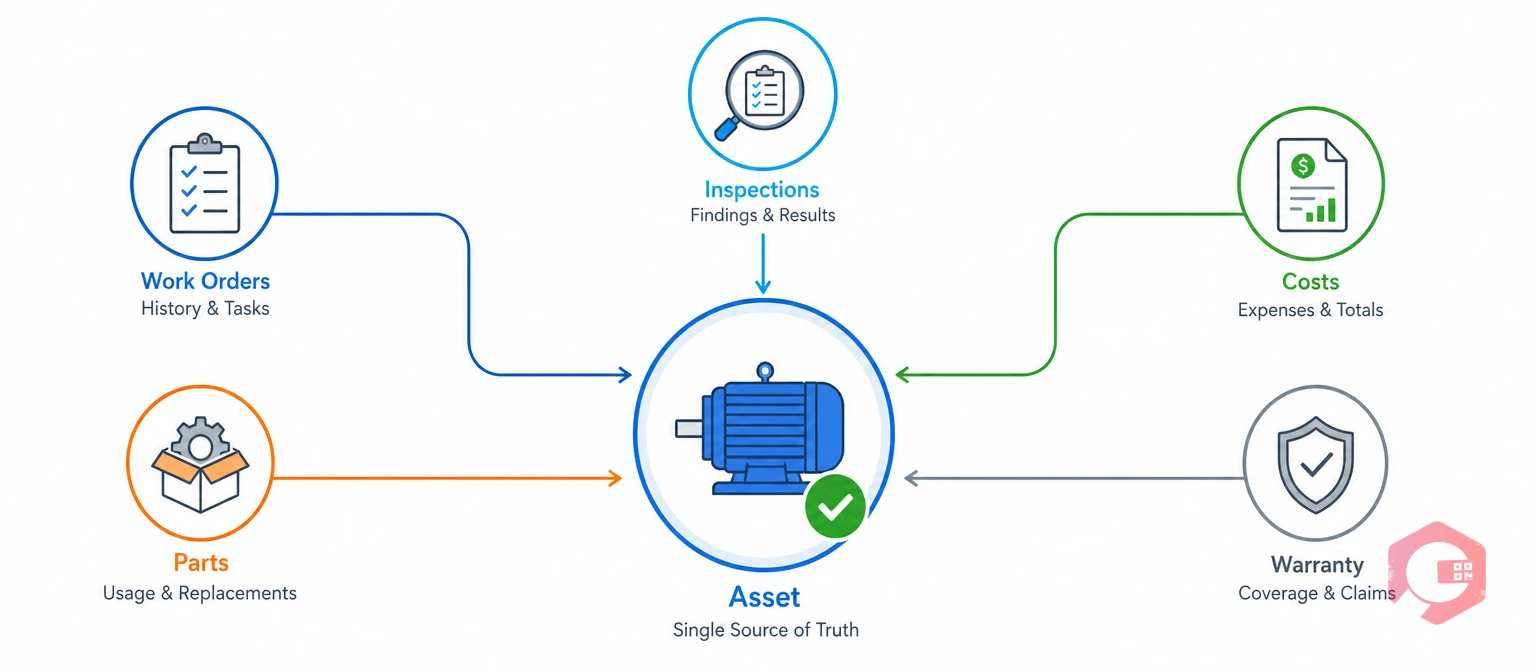
A unified asset history links every work order, repair, part, inspection, and cost to one specific piece of equipment, for the life of that equipment. It lives inside a Computerized Maintenance Management System, updated automatically as work happens. Instead of a repair log in one spreadsheet and a warranty file in another folder, everything sits against the same asset ID.
The part that actually matters isn't whether the data exists. It's whether someone can see it the moment a repair decision gets made. A technician standing at a broken machine needs an answer fast: is this new, or has it happened before?
Most facilities running on disconnected systems don't actually lack maintenance data. They lack a way to surface it before a decision gets made — and that's the exact gap a Computerized Maintenance Management System closes for good.
When repair history is scattered, every failure gets treated as if it's brand new. A technician replaces a bearing without knowing it's the third bearing replacement on that motor this year. So nobody ever stops to ask why the bearing keeps failing in the first place.
This plays out in three predictable ways. Repeat repairs never trigger a real investigation. Faults get misdiagnosed because nobody remembers a similar failure from months back. And a chronic problem asset gets treated the same as a healthy one, right up until it fails at the worst possible time.
Guesswork just isn't free at all. Every misdiagnosed repair means a second visit, a second parts order, and a second round of downtime. Multiply that across a fleet of hundreds of assets, and the hidden cost of scattered records adds up to real money every single quarter. Reliability-centered maintenance programs exist specifically to counter this pattern — reliability-centered maintenance (RCM) depends on accurate failure history to decide which assets need proactive attention and which don't.
Most maintenance teams that struggle with recurring failures aren't short on technical skill. They're short on visibility into what already happened to that exact machine.
See how a unified record changes the math on repair-versus-replace decisions with the MTBF calculator from Cryotos.
Cryotos pulls every touchpoint an asset has — from installation to its most recent repair — into one record that updates itself as work happens. Here's how each piece fits together.
Every asset gets one digital record. Specifications, installation date, warranty terms, PM schedules, past work orders, and cost history all live in the same place. There's no separate spreadsheet for repairs and a separate binder for warranty paperwork.
Scanning an asset's label opens its complete history right away — prior failures, parts used, and any open work orders. This happens through asset tracking tools built for use on the floor, not just at a desk.
Every entry in work order management links to the asset it was performed on, in order. A technician can scroll an asset's entire repair timeline in seconds and spot whether today's fault is new or the fourth time around.
Every part used gets recorded against the specific asset, not logged as generic stock movement. Over time, inventory management tied to each asset reveals which components fail again and again.
Technician notes and photos of failed parts attach directly to the asset record at the time of repair. The next person to work on that machine inherits real context, not just a closed ticket.
Install date, warranty expiry, expected service life, and depreciation sit next to repair history. A team can see at a glance whether today's repair is covered and how much useful life is left.
Where sensors are deployed, vibration, temperature, and runtime data feed into the same asset record as manual work orders, through IoT integration that ties condition trends to the failures they eventually cause.
History rolls up across every asset of the same class — all compressors, all conveyor motors — no matter which site they sit in. A failure that looks like a one-off at a single plant often turns out to be a fleet-wide pattern once every site's history sits in one place, shared across teams that would otherwise never compare notes.

Once history sits in one place, it stops being a passive record. It becomes an active input into every repair call a team makes. Most operations that successfully cut repeat failures check the same four signals every time, before a wrench touches the machine.
The Four-Signal Repair Decision Framework:
A technician who checks all four signals against a unified asset record turns a repair call into a calculation, not a guess.
Failure frequency and cumulative cost tell you what's happening now. Remaining useful life and fleet pattern match tell you what's coming next. Checking all four in that order gives a team the full picture before they commit budget or labour to a fix.
A repair-versus-replace decision is only as good as the history behind it. Without cumulative cost and failure frequency in one place, teams default to fixing whatever broke today, whether or not that's the smarter long-term call.
| Decision Input | Without Unified Asset History | With Unified Asset History |
|---|---|---|
| Repair frequency | Recalled from memory, often underestimated | Counted automatically from the work order timeline |
| Cumulative cost | Scattered across invoices and spreadsheets | Rolled up per asset in real time |
| Remaining useful life | Estimated informally | Tracked against a depreciation schedule |
| Fleet-wide pattern | Rarely checked | Flagged automatically across sites |
Teams that run this comparison every time stop replacing healthy assets too early. They also stop pouring repair budget into machines that were due for retirement months ago, freeing up capital for the equipment that actually needs it.
Root cause analysis is tracing a failure back to its true cause, not just fixing the symptom. It only works well when the investigator can see every prior work order, part, and PM interval for that exact asset.
With a unified record, a technician chasing a recurring failure sees the complete timeline right away, instead of piecing it together from memory or three separate systems. Structured methods like the Five Whys and formal root cause analysis both depend on this kind of complete history. As a discipline, root cause analysis assumes the investigator has the full failure record, not a partial one.
Picture a conveyor motor that trips twice in one quarter. Without history, each trip gets logged and closed as its own event. With a unified record, the second trip flags the first automatically, and a technician catches the pattern before a third failure shuts down the line.
Root cause analysis stops being a research project once every prior incident is already attached to the asset.
MTBF is the average time an asset runs before it fails again. Cryotos calculates it, along with Mean Time To Repair, straight from the unified history — at the asset level and across an entire equipment class.
Reliability metrics built this way are only as good as the record feeding them. A single missed work order in a spreadsheet can quietly throw off an MTBF figure. Nobody may notice for months.
Maintenance teams using Cryotos have reported up to 30% reduction in unplanned downtime and 25% faster repair turnaround once reliability metrics run off one unified asset history instead of reconstructed logs.
For industries under regular audits — food and beverage, pharma, healthcare, utilities — a unified history means every repair is time-stamped, linked to an asset, and tied to the technician who did the work. A food plant proving sanitation equipment was serviced on schedule doesn't need to dig through binders. A hospital confirming a ventilator's maintenance record doesn't need to call three departments. The record already exists, dated and attributed, ready to hand to an inspector on request.
Compliance reports built from real system data hold up far better under scrutiny than logs pieced together from memory after the fact. Asset management frameworks like ISO 55000 expect this kind of traceable history. They want a system of record, not a paper trail pieced together after the fact.
A regulatory compliance checklist built against a unified asset history turns an audit from a scramble into a formality.
Total cost of ownership is the full lifetime cost of an asset. It combines labour, parts, contractor spend, and downtime against the original purchase and install cost. This number only becomes visible when every cost rolls up to the same asset record over its full lifecycle.
With that visibility, a capital replacement decision stops being intuition. It becomes a business case backed by maintenance cost data that leadership can defend to finance. Most facilities that skip this step end up approving replacements based on age alone. That approach misses assets that are actually cheaper to keep repairing than to replace.
A strong capital request lists three numbers. What has the asset cost this year? What will it likely cost next year if kept? What does a replacement cost, fully installed? Leadership can compare those three numbers in seconds when they come from one unified record. Pulling the same numbers from three separate spreadsheets takes a lot longer, and the numbers rarely match up cleanly.
Capital planning built on lifetime cost data consistently beats planning built on purchase date or gut feel.
A unified asset history only pays off if technicians check it before they start work, not after. Adoption usually comes down to three habits.
Facilities that treat the asset history as a step in the repair workflow, rather than paperwork done afterward, see it used consistently within a few weeks.
Most teams don't fail at unified asset history because the software can't handle it. They fail because a few habits quietly undermine the record. None of these mistakes look serious on any given day. They add up over months until the record can't be trusted anymore.
Each of these gaps seems small on its own. A missing asset ID here, a skipped photo there. But six months in, the record has enough holes that technicians stop trusting it, and they go back to relying on memory. Once trust in the system drops, adoption drops with it, and the whole point of a unified history falls apart. The fix isn't more training. It's making the correct habit the easiest one — scanning an asset before typing anything, and attaching a photo as a default step rather than an afterthought.

Teams don't need to digitize twenty years of paper records on day one. A unified asset history builds itself over time, as long as the starting steps are right. The goal in month one isn't a complete archive. It's a system where every new work order automatically adds to a record that didn't exist before.
Before any history can attach to an asset, that asset needs a fixed identity. A QR code or barcode label gives every machine a permanent anchor point that survives staff turnover and system changes.
History only stays unified if nothing slips outside it. That means routing planned, corrective, and emergency work through one Computerized Maintenance Management System, not a mix of paper tickets and side spreadsheets.
Import whatever historical data exists — old work orders, warranty documents, past incident reports — even if it's incomplete. From that point forward, every new repair adds to the same growing record, and the value compounds with each passing month. A partial history is still far better than no history at all. Even six months of clean data is enough to catch a repeat failure that would otherwise go unnoticed.
Within a year, most teams have enough history on their highest-failure assets to make real repair-versus-replace calls with confidence. Prioritize the assets that fail most often first. Those are the machines where a unified history pays off fastest, and where the case for change is easiest to prove to leadership.
Picture a mid-size manufacturing plant with forty compressors spread across three buildings. Before Cryotos, each building kept its own maintenance log. A compressor in Building A failed twice in six months. Nobody in Building B knew about it, even though they ran the same model.
After the plant moved to a unified asset history, the picture changed fast. Every compressor got a QR code. Every work order, part, and photo attached to that specific machine. Within three months, a technician scanning a failing unit in Building C saw two prior failures on the same model in Building A. The pattern was obvious. The team ordered a replacement part in bulk and scheduled inspections on every unit of that model, before a third failure could shut down a line.
That kind of catch used to take a phone call to the right person on the right shift, if it happened at all. With a unified record, it takes a scan and a scroll. The technician doesn't need to remember who to call. The history already has the answer.
This is the practical payoff of a unified asset history. It's not a reporting nicety. It's the difference between catching a pattern in week one and discovering it after the third breakdown. Multiply that one compressor example across every asset class in a plant, and the savings in downtime and parts spend add up fast.
A standard maintenance log usually records work orders on their own. It often sits in a spreadsheet or a paper binder. A unified asset history links every work order, part, cost, and inspection to one asset record automatically. The full picture is visible right away, with no need to cross-reference several sources.
It puts cumulative repair cost, failure frequency, and remaining useful life side by side for a single asset. That turns what used to be a judgment call into a calculation backed by real numbers. A manager doesn't need to guess how many times a machine has failed. The record already shows it.
Yes. Every prior work order and part replacement is already attached to the asset. A technician investigating a new failure sees the complete timeline right away, instead of reconstructing it from memory or old paperwork.
Yes. Every repair gets time-stamped, linked to a specific asset, and tied to the technician who did the work. That gives auditors system-generated records instead of paperwork pulled together after the fact.
Sensor data on vibration, temperature, and runtime feeds into the same asset record as manual work orders. A technician can connect a rising condition trend to the failure it eventually caused, often before the failure actually happens.
Most teams see real value within one or two maintenance cycles. Every new work order adds to the record on its own, without extra effort. The history becomes genuinely useful once an asset has gone through at least one repeat repair with the system already logging it.
Yes. A small team with a handful of critical assets benefits just as much as a large plant with hundreds. The value comes from linking history to each asset, not from the size of the fleet. Even a two-person maintenance team can catch a repeat failure faster once every prior repair is attached to the machine.
A unified asset history turns every repair into structured data that sharpens root cause analysis, clarifies repair-versus-replace decisions, and gives leadership the evidence to plan capital spend with confidence. It replaces guesswork with a record every technician can trust, no matter which shift or site they work from. Schedule a free demo to see how Cryotos brings your asset records into one place, from the first work order to the most recent repair.


Cryotos AI predicts failures, automates work orders, and simplifies maintenance—before problems slow you down.



