

Asset QR code scanning lets a maintenance technician point their phone at a machine and instantly see its full history. Every work order, last service date, open faults, and spare parts list appear before they touch a single wrench. No login screen hunting. No walking back to the office. No paper binders. The scan happens in under five seconds, and the technician is already working with the context they need.
Most maintenance teams lose 20 to 30 minutes per technician per shift to information hunting — and according to a Reliable Plant wrench time study, the average technician spends only 25 to 35% of their shift on actual hands-on work. QR code scanning directly attacks the rest.
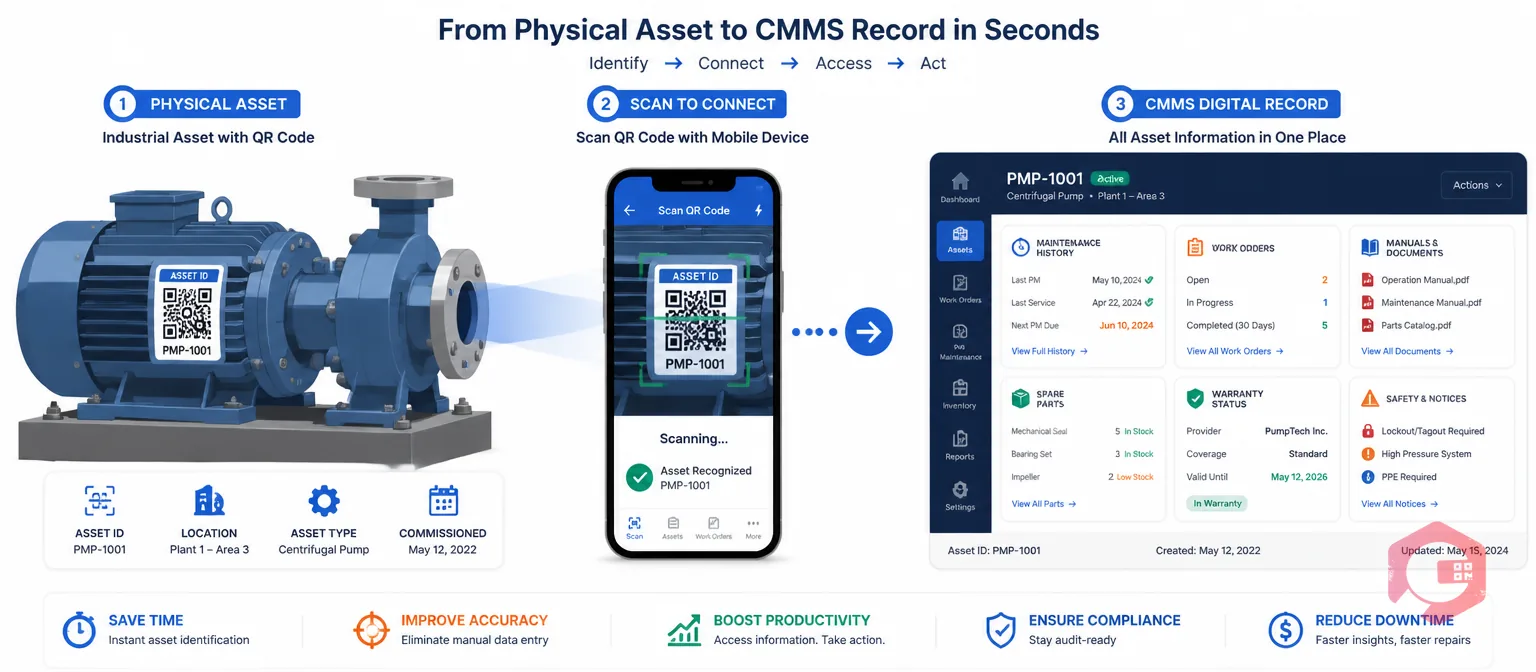
Asset QR code scanning is the practice of attaching a unique QR code label to every physical asset in your facility — machines, equipment, tools, vehicles — and linking each code to that asset's complete digital record in your CMMS. When a technician scans the code with their smartphone or tablet, the CMMS instantly loads the asset profile: full maintenance history, open work orders, scheduled PMs, attached manuals, spare parts specifications, warranty status, and any active safety notices.
The QR code itself contains nothing sensitive — it is simply a unique identifier that points the CMMS to the right asset record. The intelligence lives in the CMMS. The scan is just the fastest possible way to tell the system which asset you are standing next to.
A well-configured CMMS surfaces the following immediately after a scan:
In facilities without QR code scanning, a technician responding to a fault alarm goes through a predictable sequence. They walk to the asset, identify it, look up the asset ID, log into the CMMS on a desktop or shared tablet, navigate to the asset, and finally find the relevant history. In a plant with poor network coverage or a shared workstation, that sequence routinely takes 10 to 15 minutes.
Each of those minutes is downtime continuing. For a production line running at $10,000 per hour, a 15-minute information delay on every fault response adds $2,500 in unnecessary production loss — before the repair even starts. Multiply that across a team of 10 technicians and 50 fault responses per month, and the accumulated cost of slow information access is significant.
There is a quality dimension too. Technicians who do not have asset history before starting work are more likely to misdiagnose a fault or apply a temporary fix that masks a deeper issue. The McKinsey maintenance efficiency research consistently finds that first-time fix rate is one of the strongest predictors of low maintenance cost. Asset history access is a direct driver of first-time fix rate.
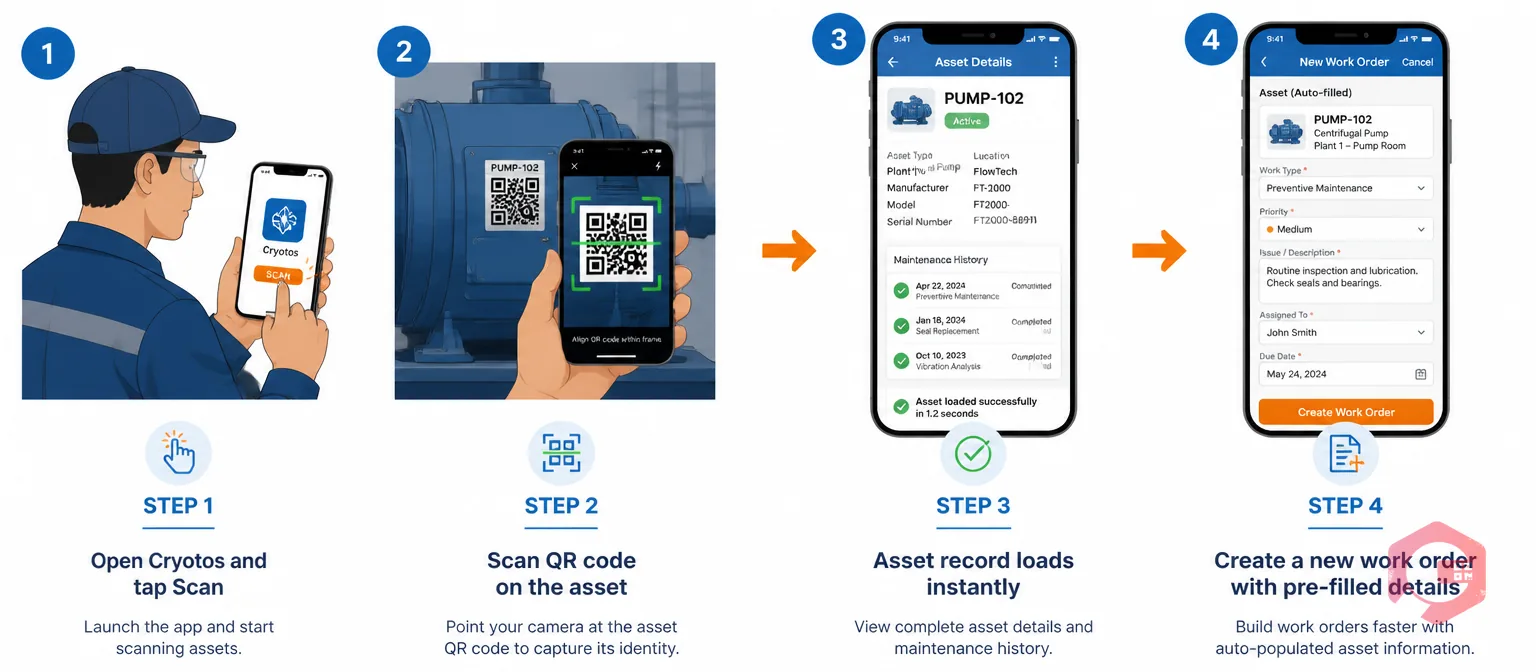
In Cryotos CMMS, every asset registered in the system automatically receives a unique QR code that can be printed directly from the platform. Labels can be printed individually or in batch. For industrial environments, print on durable polyester or metal-backed stock with UV-resistant lamination — a label that fades in three months defeats the purpose.
When a technician opens the Cryotos mobile app and taps the scan button, the phone's camera reads the QR code in one to two seconds and immediately navigates to the asset record. No typing, no searching, no scrolling through a list of hundreds of assets. From the asset record, the technician can create a new corrective work order, check in on an existing assignment, log a meter reading, attach a photo of a defect, or check permit requirements — all while standing at the machine.
Cryotos's mobile app also works in offline mode. Asset records are cached on the device for recently accessed assets, and any updates sync automatically when connectivity is restored. Technicians in underground plant rooms, refrigerated warehouses, or remote substations are not left without information simply because the network is unreliable.
Three specific scenarios show the highest return from QR code scanning deployment.
QR codes are the right default choice for most maintenance environments, but understanding the alternatives helps you make the right call for specific use cases.
| Technology | Scan Method | Range | Durability | Cost | Best For |
|---|---|---|---|---|---|
| QR Codes | Any smartphone camera, no app needed | Direct contact to ~30 cm | High with polyester/metal-backed labels | Near zero (print from CMMS) | Most assets in most facilities |
| Barcodes | Barcode scanner or smartphone | Direct | Same as QR | Near zero | Small assets where QR code space is limited |
| NFC Tags | NFC-enabled smartphone (tap) | Direct tap | Very high; embedded in metal enclosures | $0.50–$2.00 per tag | High-vibration, dirty, or outdoor environments where labels degrade |
| RFID | Dedicated RFID reader | 1–10 meters (passive) | Very high | $1–5 per tag + reader hardware | High-volume inventory scanning or asset tracking without line of sight |
For the majority of maintenance operations, QR codes cover 90% of assets effectively. Cryotos asset QR code scanning supports QR, NFC, and barcode identification — so you can mix approaches within a single deployment without managing separate systems.
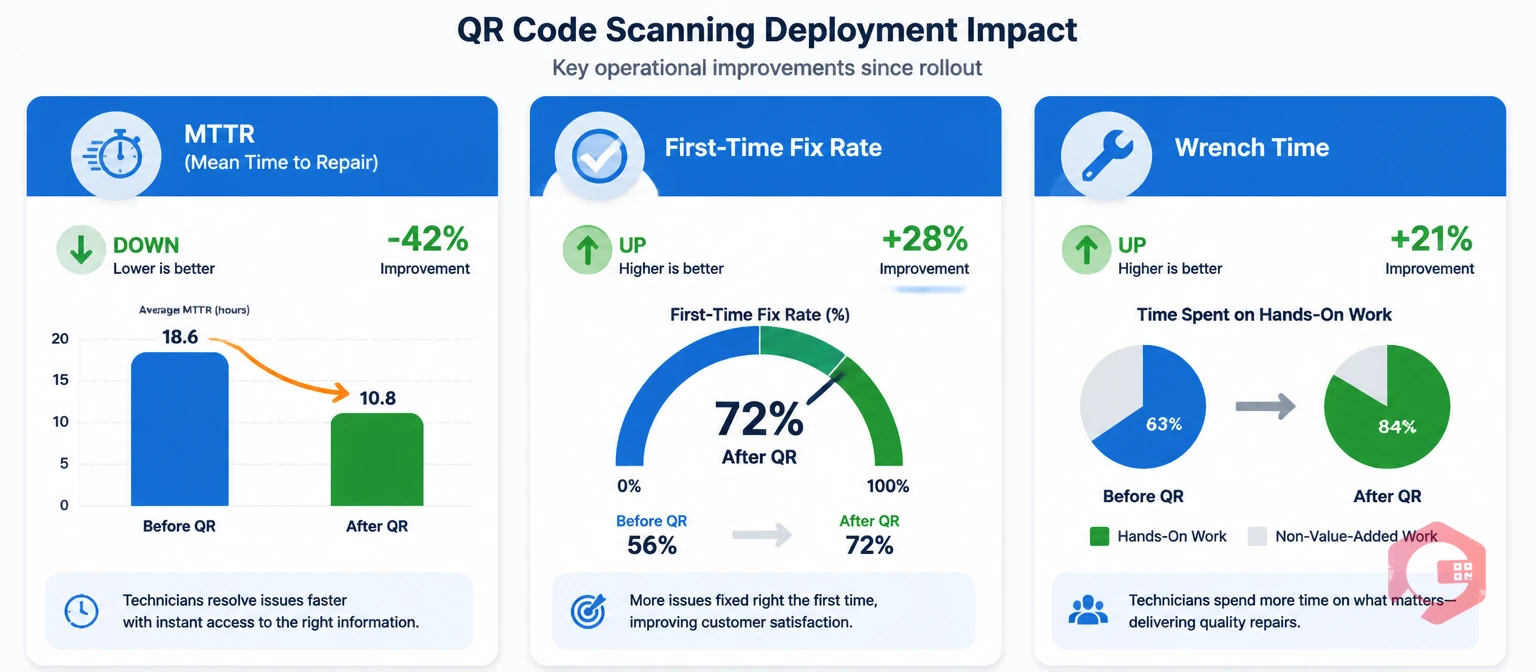
The benefits of QR code scanning show up in three KPIs worth tracking before and after deployment.
Cryotos's BI Dashboard tracks all three metrics in real time, broken down by asset, technician, and department — so you can see the impact accumulate without building a separate report.
If your technicians are still walking back to a workstation to look up asset history, QR code scanning is the fastest fix available. Cryotos CMMS gives every asset a scannable identity that puts the complete maintenance record in a technician's hand in under five seconds — on any device, on any shift, even offline. Book a demo to see how Cryotos sets up QR code scanning across your asset register.
Scanning an asset QR code in Cryotos opens the full asset profile: complete maintenance history, open and scheduled work orders, attached OEM manuals, spare parts list with current stock levels, warranty status, and any active safety notices or LOTO requirements. The depth of information available depends on how thoroughly the asset records have been populated in the CMMS.
No. Any standard Android or iOS smartphone or tablet with the Cryotos mobile app can scan asset QR codes using the built-in camera. For environments where phones are impractical, NFC-enabled devices and industrial scanners are also supported.
Yes. In Cryotos, scanning an asset QR code and tapping "New Work Order" opens a pre-filled form with the asset ID, location, and details already populated. The technician adds the fault description, attaches photos, and submits — without leaving the asset or switching to a different system.
For a facility with an existing asset list, setup typically takes three to five days: one to two days to import the asset register, one day to print and attach labels, and one day for training. Most teams are scanning operational assets within their first week of Cryotos deployment.



Cryotos AI predicts failures, automates work orders, and simplifies maintenance—before problems slow you down.



