

What you can actually ask Claude once Cryotos is connected through MCP covers everything from live work order status and overdue preventive maintenance to spare parts stock levels, breakdown patterns, and maintenance performance summaries — all through natural-language questions instead of manual dashboard navigation. Model Context Protocol (MCP) is the open standard that makes this possible, letting Claude connect directly to your Cryotos CMMS and query real-time maintenance data conversationally.
This guide walks through the specific types of questions maintenance teams can ask Claude once Cryotos is connected — organized by work orders, preventive maintenance, assets, inventory, calibration, and analytics — with real example prompts you can use from day one.
Key Takeaways
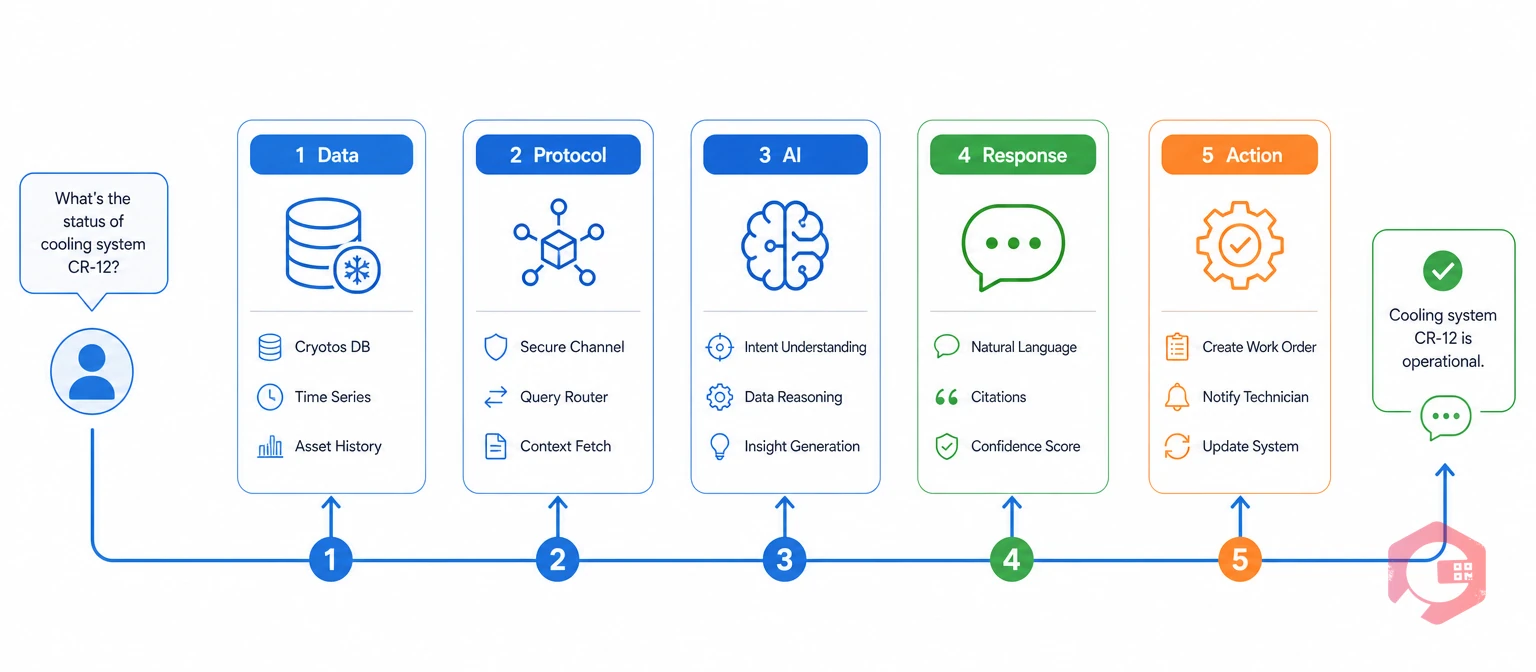
Model Context Protocol (MCP) is an open standard that lets AI assistants like Claude connect directly to external software systems and query live data in real time. For maintenance teams, this means Claude can pull information straight from your Computerized Maintenance Management System without you ever opening a dashboard or running a report manually.
Before MCP, using AI for maintenance meant copying data into a chat window, pasting spreadsheet rows, or describing problems from memory. MCP removes that friction entirely. Claude reads your Cryotos data the same way a colleague with full system access would — except it responds in seconds and never forgets the question you asked three messages ago.
According to ISO 55000 asset management standards, timely access to accurate maintenance data is foundational to effective asset management. MCP makes that access conversational rather than manual, closing the gap between having data and actually using it for faster decisions.
The 5-Layer Conversational Maintenance Stack:
This framework explains why MCP-connected CMMS feels fundamentally different from traditional reporting. Every layer works together so you spend less time navigating screens and more time fixing equipment and preventing failures.
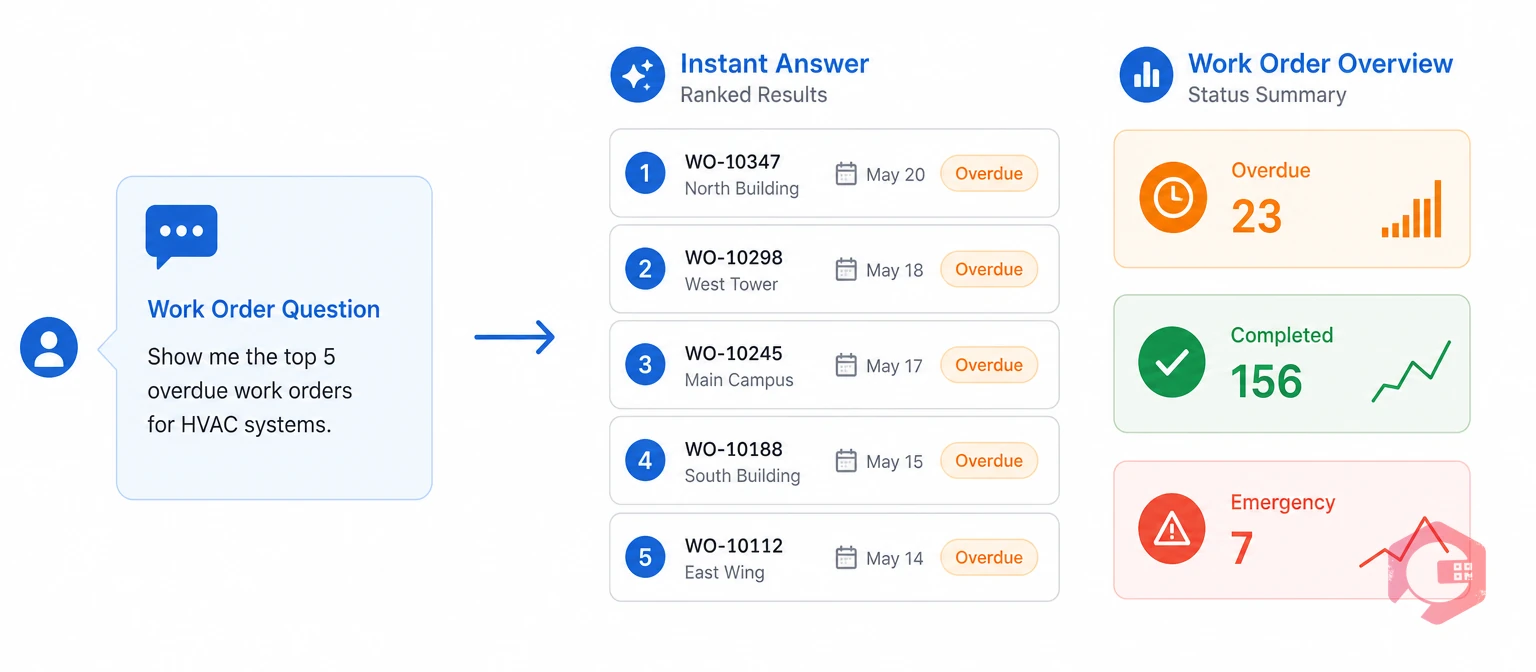
Work order visibility is the single biggest time-saver when Claude connects to Cryotos through MCP. Instead of filtering dashboards, exporting CSVs, and cross-referencing status columns, you ask a question and get an answer in plain language.
Maintenance managers typically start their day checking what's open, what's overdue, and what needs escalation. With MCP, those three checks become one sentence:
Claude can filter work orders by priority level, assigned technician, location, department, or asset type. You might ask: "Which high-priority work orders are assigned to the night shift?" and get a direct list with due dates and current status. Cryotos work order management software tracks every status change in real time, so Claude always pulls the latest state — not stale data from yesterday's export.
You can also combine filters naturally. Asking "How many work orders did the electrical team close last week, and how many are still pending?" gives you both numbers in one response. This kind of multi-part query would typically require two separate report runs in a traditional CMMS interface.
Maintenance teams using Cryotos have reported up to 30% reduction in unplanned downtime and 25% faster repair turnaround. Conversational access to work order data through MCP accelerates the decision-making that drives those improvements.
Preventive maintenance compliance directly impacts equipment reliability, safety records, and long-term maintenance costs. Claude connected to Cryotos through MCP gives you instant PM visibility without clicking through scheduling screens or calendar views.
Most facilities struggle with missed PMs — not because technicians are negligent, but because the information is buried in calendars and task lists that nobody checks fast enough. With MCP, you can ask:
Claude can break down PM completion rates by asset, location, technician, or time period. Ask "What's our PM compliance rate for production line assets this quarter?" and get a percentage with supporting context. Cryotos preventive maintenance software logs every scheduled and completed task, so the data Claude returns reflects actual field execution — not just what was planned on paper.
You can also ask forward-looking questions like "Which PMs are scheduled for next week that require specific spare parts?" to help your team prepare materials and avoid delays on the day of execution.
Struggling to track repair turnaround times? Try the Cryotos MTTR Calculator to benchmark your team's performance against industry standards.
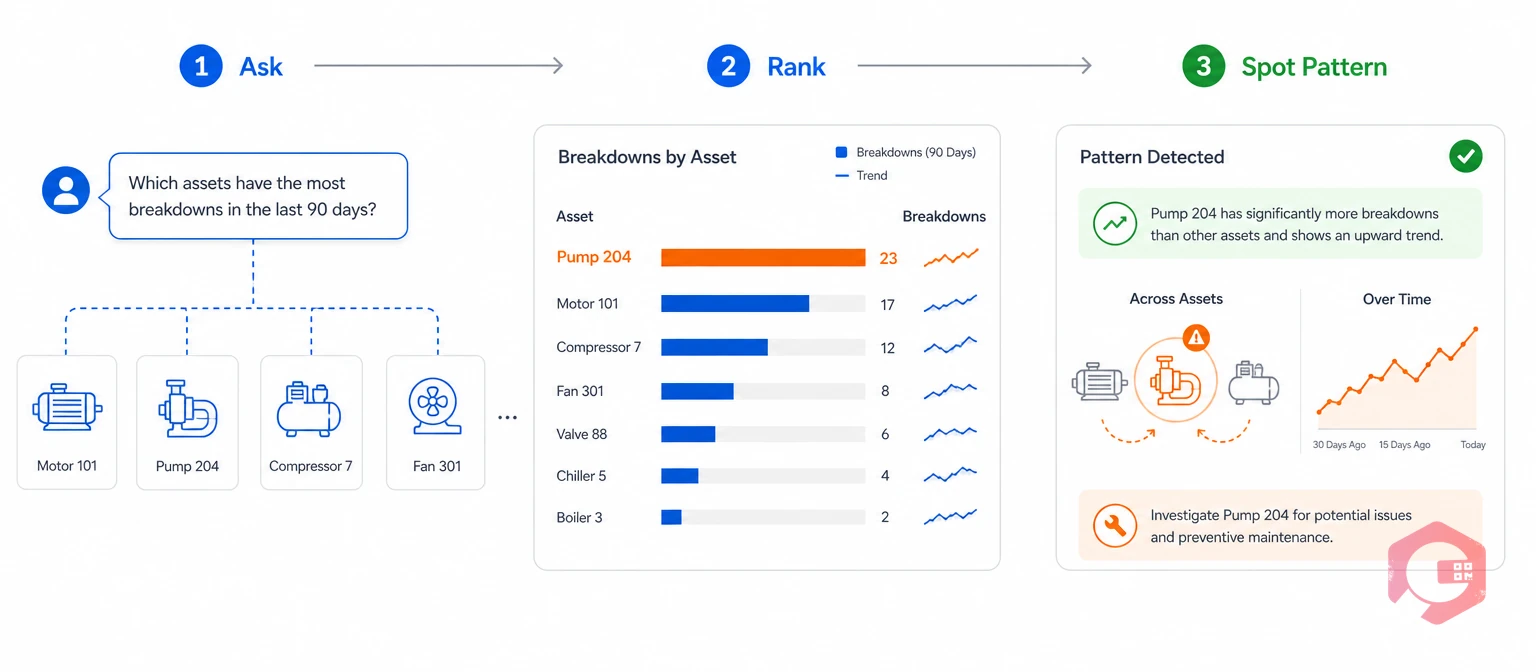
Breakdown analysis is where conversational CMMS access delivers the most operational value. Identifying recurring failure patterns usually requires exporting data, building pivot tables, and analyzing trends manually. Claude does it in one question.
Maintenance engineers often need to know which assets are failing most often and why. MCP makes these queries instant:
Every maintenance decision benefits from historical context. Claude can retrieve full asset histories — maintenance records, downtime logs, parts replaced, and technician notes — through Cryotos asset tracking. Ask "Which critical assets have the highest downtime?" and Claude returns a ranked list with total downtime hours and availability percentages calculated automatically.
Breakdown maintenance is any corrective action performed after an asset has already failed, resulting in unplanned production stoppage. The faster teams identify breakdown patterns, the sooner they can shift those assets to preventive or predictive maintenance strategies — reducing both emergency repair costs and production losses.
Claude can also connect the dots between breakdowns and other data. Asking "Which breakdowns last month were on assets that also missed their scheduled PM?" reveals whether PM non-compliance is contributing to your unplanned failures — a connection that takes hours to find manually.
Spare parts shortages cause more maintenance delays than most teams realize. According to SMRP (Society for Maintenance and Reliability Professionals) benchmarks, MRO inventory typically represents 5-10% of a facility's total asset value. Managing it through conversational queries saves hours of manual stock checks every week.
Instead of navigating warehouse screens and running inventory reports, ask Claude directly:
Cryotos inventory management tracks every stock movement with QR and barcode scanning, so Claude always returns current quantities — not last week's count or an approximation from the last physical audit.
Calibration tracking is the process of monitoring instrument accuracy and scheduling periodic recertification to maintain measurement reliability. For facilities with regulated instruments, calibration compliance is non-negotiable. Claude surfaces calibration status instantly:
Cryotos tracks calibration schedules, certificates, and historical records — all accessible through MCP without opening a separate calibration module or logging into a different system.
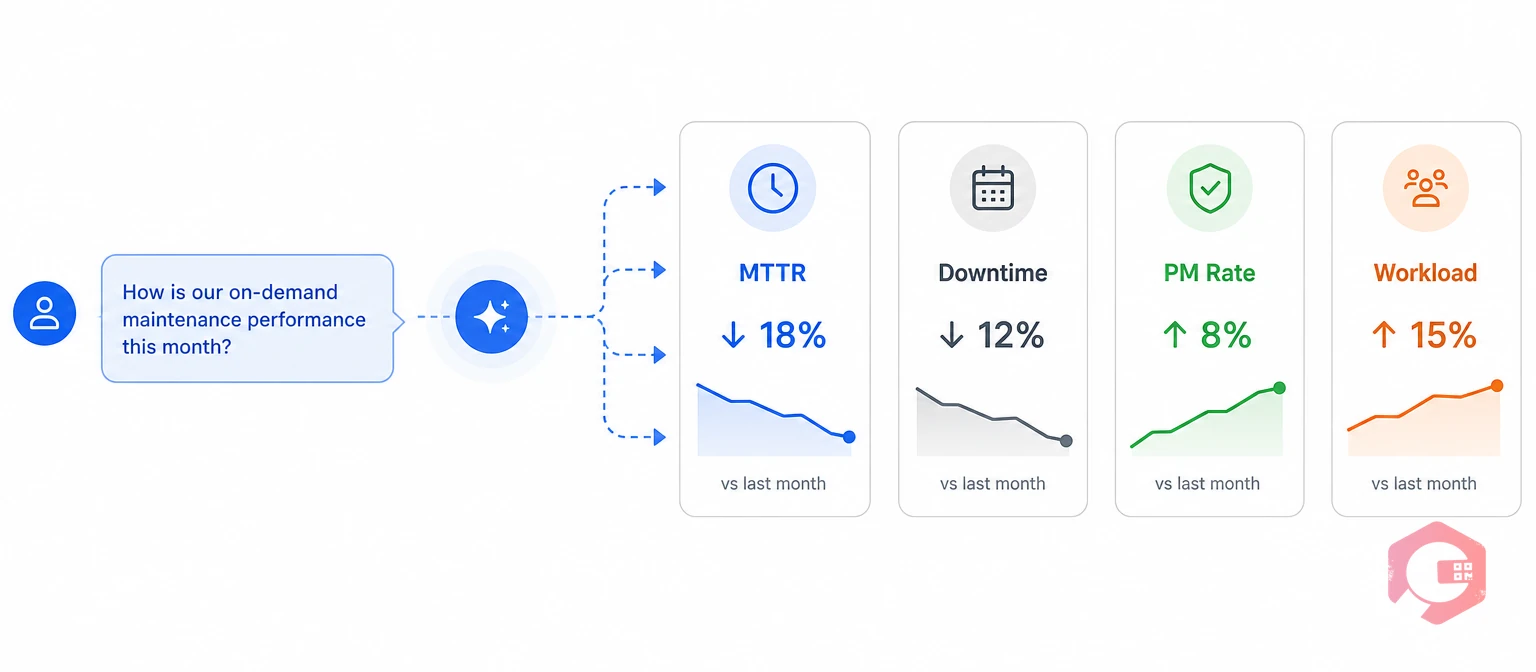
Maintenance reporting traditionally requires running scheduled reports, waiting for data exports, and interpreting dashboards filled with charts you may not need. MCP flips that workflow — you ask Claude a specific question and get the insight immediately, formatted as a direct answer.
Claude can summarize key maintenance metrics on demand without requiring you to configure report parameters. The types of analytics questions you can ask include:
Cryotos BI dashboard powers these analytics behind the scenes, but MCP lets you access them through conversation rather than navigation. This is particularly valuable for maintenance managers who need quick answers during planning meetings, shift handovers, or management reviews.
Claude can surface overdue tasks, critical maintenance issues, and activities requiring immediate attention — all in a single consolidated response. Ask "Are there any critical escalations I should know about?" and Claude checks across work orders, PMs, inventory alerts, and calibration deadlines to give you a prioritized view of what needs action first.
Most maintenance operations that successfully reduce unplanned downtime share one trait: they act on data faster than competitors. MCP-connected conversational access through Claude and Cryotos makes that speed advantage accessible to every maintenance team — not just those with dedicated data analysts or BI specialists.
Claude can access work orders, preventive maintenance schedules, asset records, breakdown histories, inventory levels, calibration data, checklists, workflow information, and maintenance analytics. Any data stored in Cryotos becomes queryable through natural-language questions once MCP is connected. The integration covers all core CMMS modules.
No technical skills are required. You ask questions in plain English — "Show me overdue PMs" or "Which assets broke down most this month?" — and Claude translates those into the right data queries automatically. MCP handles all the technical communication between Claude and Cryotos behind the scenes.
Claude can summarize maintenance performance, identify trends, rank assets by downtime or breakdown frequency, and consolidate data across multiple categories. While it generates text-based summaries and analysis rather than formatted PDF reports, the insights are immediate and conversational — often faster than waiting for a scheduled report run or configuring dashboard filters.
Yes. Since Claude is accessible via mobile apps and web browsers, technicians and managers can query Cryotos maintenance data from anywhere with an internet connection. Cryotos also offers full offline mobile capabilities for field work, ensuring the underlying data is always current when MCP queries run.
Connecting Cryotos to Claude through MCP transforms how maintenance teams interact with their data — from clicking through screens to asking questions in plain language. Whether you need a quick status check on open work orders, a breakdown trend analysis for a specific asset, or a consolidated performance summary for a management review, conversational CMMS access saves time and accelerates decisions across every maintenance function. Schedule a free demo to see how Cryotos MCP integration works with your maintenance data.
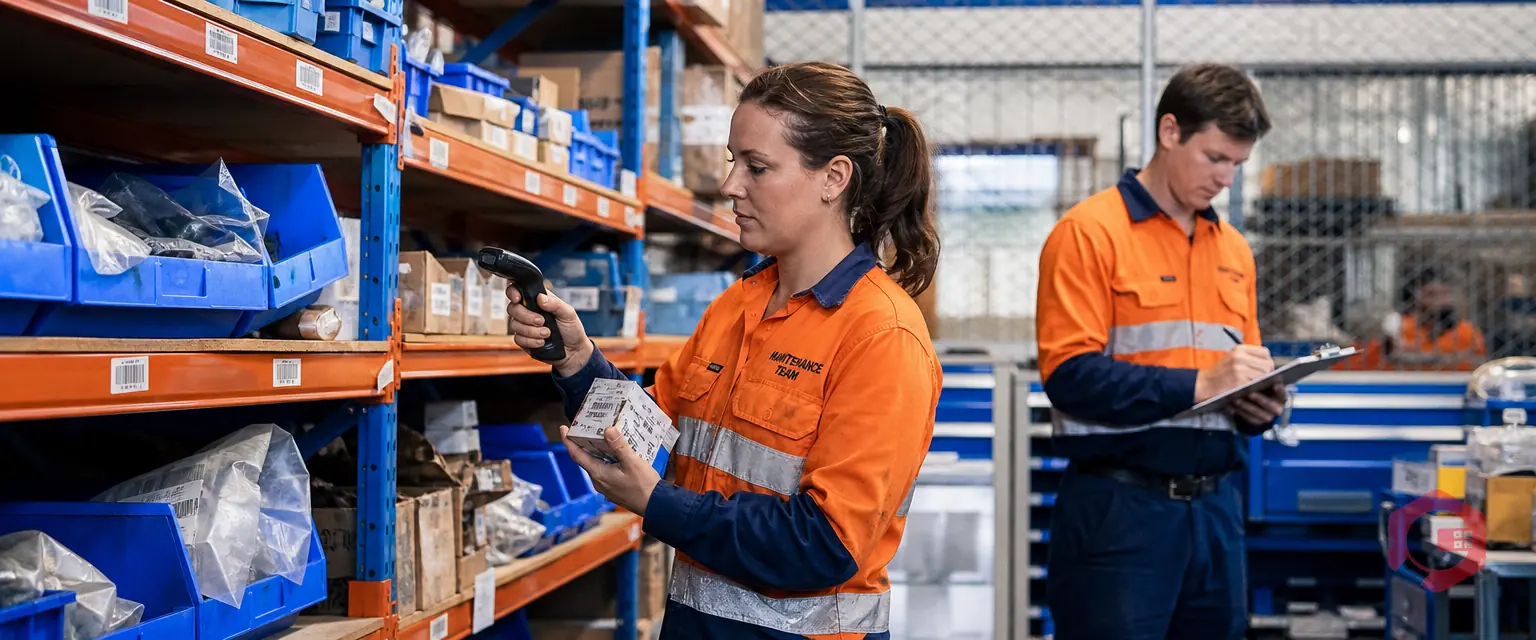



Cryotos AI predicts failures, automates work orders, and simplifies maintenance—before problems slow you down.



