

Manual inventory management costs maintenance teams far more than most operations managers realize. From mismatched stock counts on spreadsheets to emergency procurement runs for spare parts that should have been on the shelf, the hidden expenses add up fast. According to the Aberdeen Group, companies using manual or spreadsheet-based inventory methods experience up to 18% higher carrying costs and 35% more stock-outs than those using automated systems. For maintenance-intensive facilities, these numbers translate directly into equipment downtime, missed preventive maintenance schedules, and inflated MRO budgets.
Switching from clipboards and spreadsheets to a digital inventory management system — especially one built into a Computerized Maintenance Management System — eliminates the root causes of these losses. This guide walks through the real costs of sticking with manual methods and shows you exactly what to fix.
Key Takeaways
Manual inventory management is any stock management system that relies on paper logs, spreadsheets, or manual counts to track spare parts and supplies. While it may seem cost-effective on the surface — no software license, no training — the indirect costs are substantial.
Human data entry errors are unavoidable when technicians log parts usage on paper or in shared spreadsheets. A single transposition mistake — recording 51 bearings instead of 15 — can trigger a false sense of security or an unnecessary reorder. The Institute of Supply Management estimates that manual data entry produces error rates between 1% and 5%. In a spare parts inventory of 2,000+ SKUs, that means 20 to 100 line items may be wrong at any given time.
When inventory records don't match reality, stock-outs happen at the worst possible moments. A technician arrives to complete a preventive maintenance task only to discover the needed filter, belt, or valve isn't on the shelf. The work order stalls, the asset stays down, and the team scrambles for an emergency purchase — often at premium pricing with expedited shipping.
Maintenance teams using Cryotos have reported up to 30% reduction in unplanned downtime and 25% faster repair turnaround, largely because spare parts availability is no longer a guessing game.
The opposite problem is equally damaging. Without real-time inventory tracking, purchasing managers order parts "just in case," leading to excess inventory that ties up capital. Carrying costs — storage, insurance, depreciation, obsolescence — typically run 20% to 30% of the inventory value per year according to ASCM (formerly APICS) benchmarks. For a facility sitting on $200,000 of spare parts, that is $40,000 to $60,000 a year in hidden holding costs.
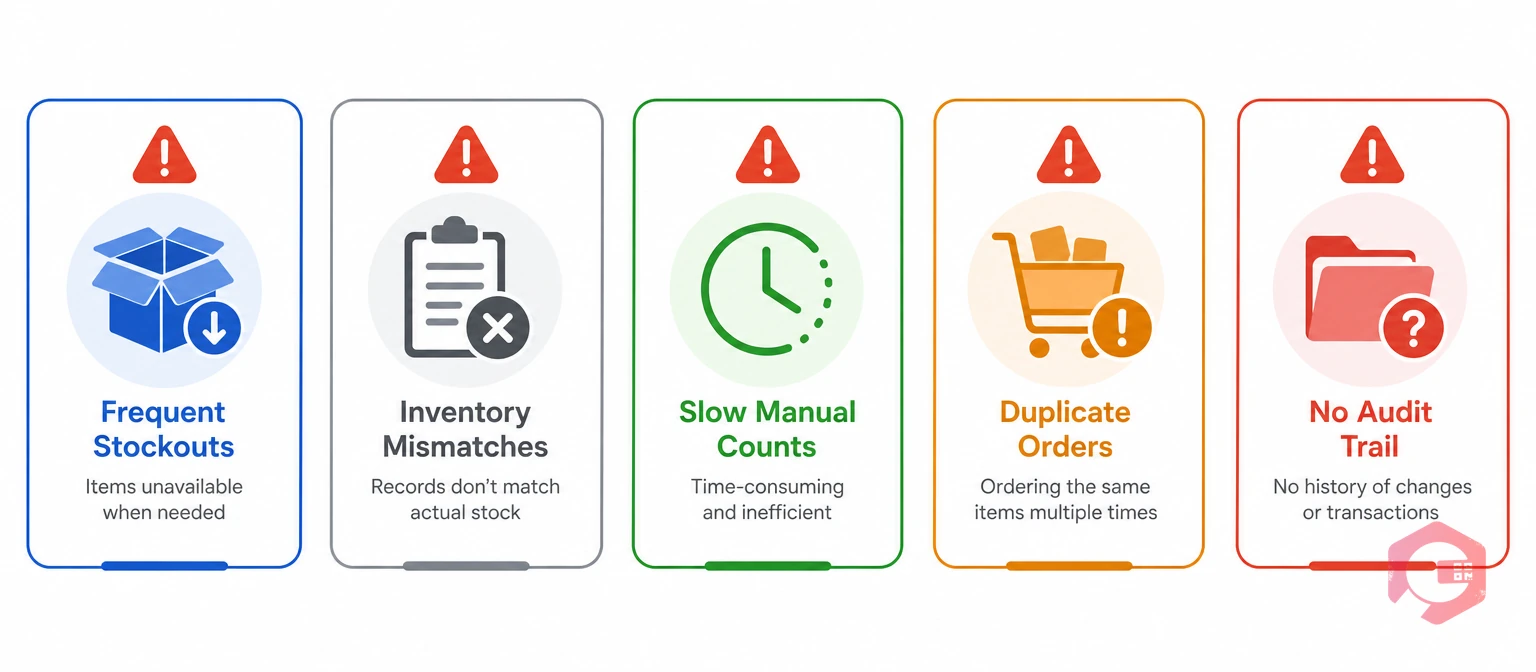
Most facilities don't wake up one morning and decide their inventory process is broken. The problems creep in slowly. Here are five warning signs that your current stock management system is already costing you money.
If your procurement team regularly places rush orders for parts that should be stocked, your reorder points are either wrong or aren't being tracked at all. Emergency purchases typically cost 15–30% more than planned procurement.
When multiple people update the same inventory spreadsheet — or worse, maintain separate versions — trust erodes. Technicians start doing their own informal counts, purchasing double-orders "just to be safe," and the cycle of waste accelerates.
Preventive maintenance inventory should never be the bottleneck. If your PM completion rates are low because parts aren't available, the manual system is the root cause. Every delayed PM task increases the probability of an unplanned breakdown.
Facilities with multiple plants or warehouses often have spare parts sitting idle at one location while another location issues an emergency PO for the same part. Without warehouse inventory tracking across all sites, you can't redistribute stock before spending money on new orders.
If your annual physical count regularly reveals significant discrepancies — missing parts, phantom stock, or obsolete items taking up shelf space — it is a clear sign that day-to-day tracking has been unreliable all year.

Fixing manual inventory problems requires more than swapping a spreadsheet for software. Operations that successfully transition to digital inventory management address five foundational pillars.
The S.T.O.C.K. Framework:
Each pillar addresses a specific failure mode of manual systems. Standardization eliminates search-and-count confusion. Tracking removes human entry errors. Optimization prevents both stock-outs and overstocking. Connection enables cost-per-asset analysis. Knowledge replaces reactive guessing with data-driven decisions.
Want to see how automated inventory management works in practice? Explore Cryotos spare parts inventory software to see real-time tracking, automated alerts, and barcode scanning in action.
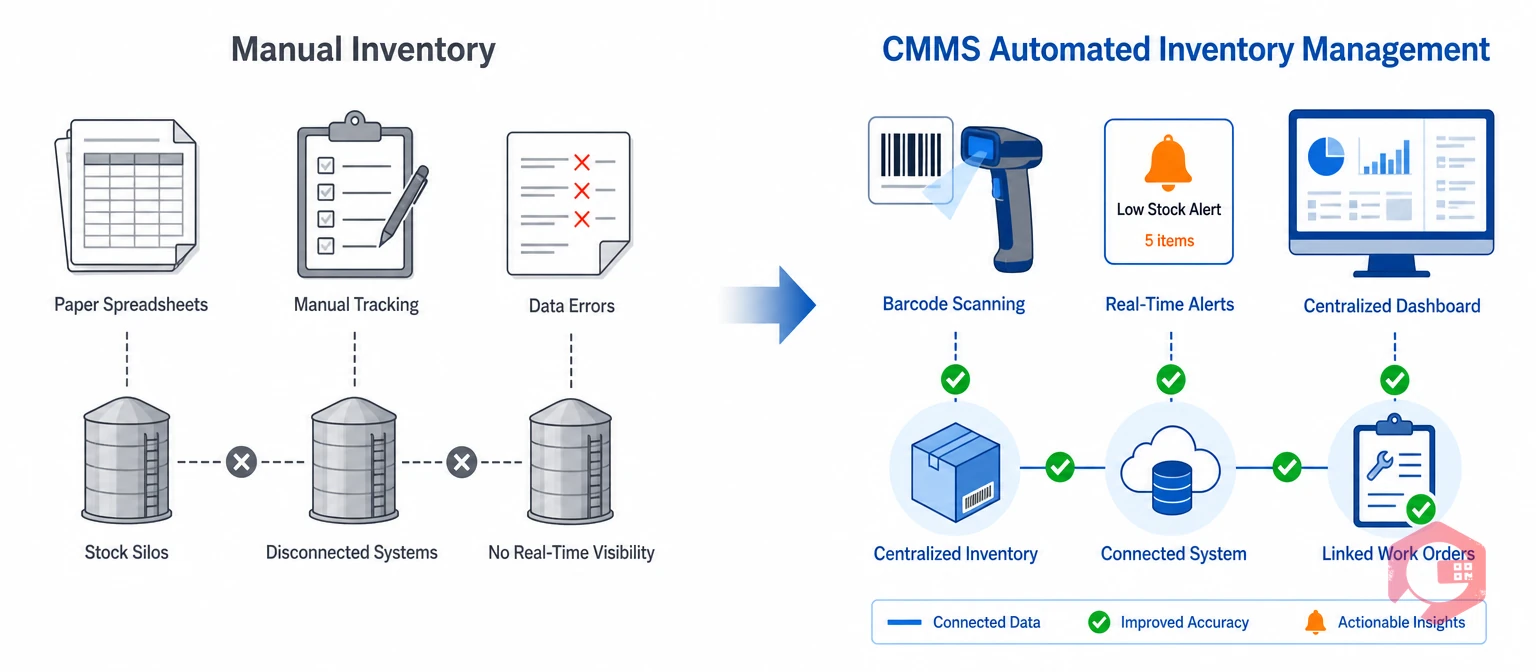
The shift from manual spare parts tracking to CMMS inventory management isn't about adding complexity — it's about removing friction from every step of the inventory lifecycle. Here is how the two approaches compare across the factors that matter most to maintenance operations.
| Factor | Manual Inventory | CMMS Inventory Management |
|---|---|---|
| Stock Accuracy | Error-prone — relies on human data entry, typically 1–5% error rate | Near-perfect — barcode/QR scanning with automatic logging, less than 0.1% error rate |
| Reorder Alerts | None — someone must manually check stock levels | Automated — real-time low stock alerts and reorder triggers |
| Multi-Location Visibility | Siloed — each site manages its own spreadsheet | Centralized — single dashboard across all warehouses and plants |
| Work Order Integration | Disconnected — parts usage not tied to maintenance records | Integrated — parts auto-deducted when work orders close |
| Reporting | Time-consuming — manual compilation from multiple sources | Instant — pre-built and custom reports on consumption, valuation, and trends |
| Mobile Access | None — updates happen at a desk after the fact | Full — technicians update inventory from mobile devices in real time |
| Procurement | Manual — emails, phone calls, paper POs | Streamlined — vendor data, purchase history, and reorder in one system |
The pattern is clear: every manual step that depends on a person remembering, writing, or cross-referencing is a failure point. Inventory automation replaces those failure points with system-enforced accuracy.
Cryotos CMMS is purpose-built equipment maintenance software with a fully integrated spare parts inventory module. Rather than bolting inventory management onto a maintenance system as an afterthought, Cryotos treats inventory as a core pillar of maintenance operations.
Cryotos gives maintenance and procurement teams a centralized dashboard showing live stock levels across every warehouse and storeroom. Multi-location inventory control means you can see exactly what is available at Plant A, Plant B, and any field location — all in one view. Stock transfers between locations are logged with full traceability.
Manual reorder tracking is one of the biggest sources of maintenance delays. Cryotos eliminates this by allowing you to set minimum stock thresholds for every part. When inventory drops below the threshold, the system sends automatic notifications — no more relying on someone to "check the shelf" every week. This keeps preventive maintenance inventory stocked and ready.
Every part issue, receipt, and transfer can be recorded by scanning a barcode or QR code with a mobile device. This barcode inventory system reduces manual entry errors to near zero and ensures transactions are logged in real time. Technicians spend less time on paperwork and more time on actual maintenance. Cryotos supports asset QR code scanning across all inventory and maintenance workflows.
When a technician completes a work order in Cryotos, the spare parts consumed are automatically deducted from inventory. This creates a direct link between asset maintenance and parts consumption — enabling accurate cost-per-asset analysis, consumption trend tracking, and smarter purchasing decisions.
Cryotos streamlines procurement by storing vendor information, purchase history, and pricing within the system. When it is time to reorder, maintenance managers can generate purchase requests with pre-populated vendor and part details. Supplier performance tracking helps you identify which vendors deliver on time and which ones don't.
Technicians working in the field or on the shop floor can check stock availability, issue parts, and update inventory records directly from their mobile devices. This mobile inventory management capability means no more walking back to the office to log a transaction or waiting until the end of the shift to update a spreadsheet.
Cryotos generates reports on stock valuation, inventory movement, consumption by asset, purchase history, and slow-moving or dead stock. These inventory usage analytics support data-driven inventory planning, budgeting, and audit preparation. Operations teams can identify which parts are used most, which are overstocked, and where MRO inventory spending can be optimized.
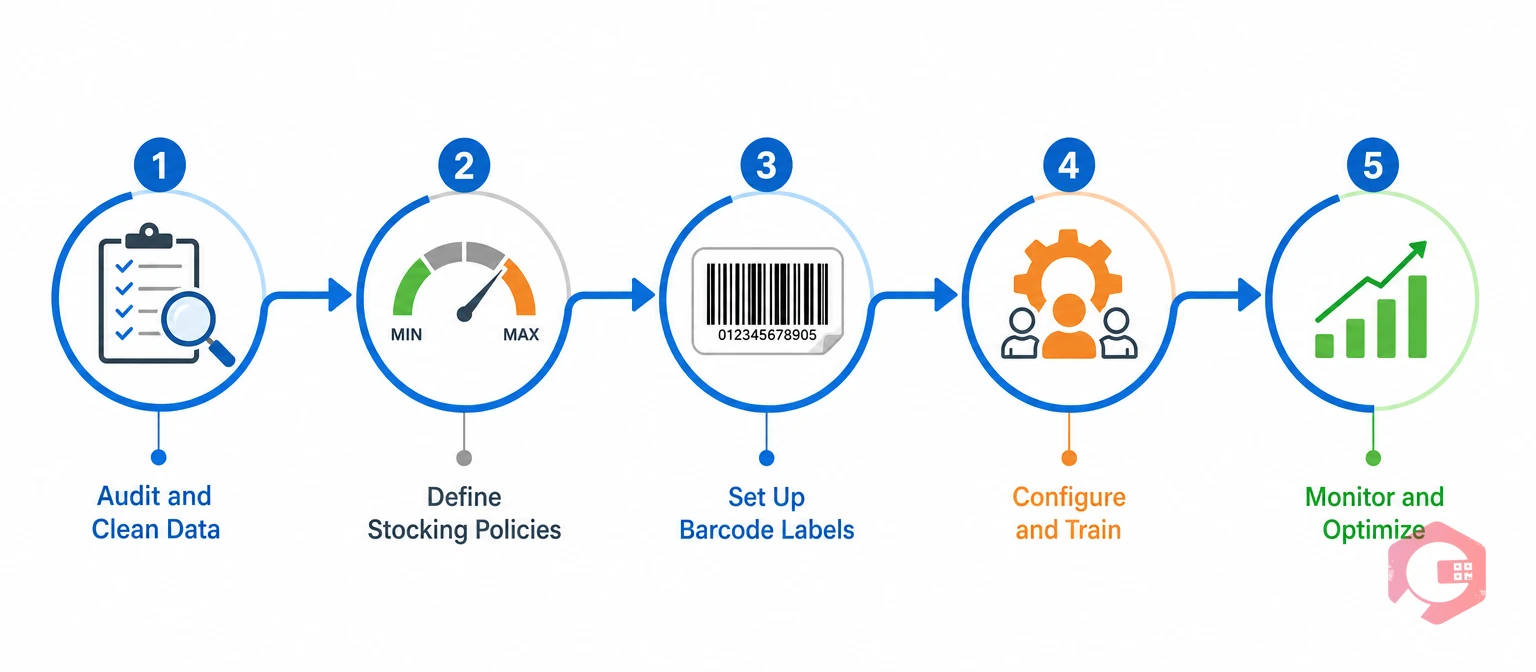
Moving away from spreadsheets doesn't have to be an all-or-nothing leap. Most facilities that successfully transition to a digital stock management system follow a phased approach.
Start with a full physical count. Reconcile what is on the shelf against what your spreadsheets say. Identify duplicates, obsolete parts, and items with inconsistent naming. This is the foundation — automated systems amplify whatever data quality you put in.
Set min/max levels for each SKU based on historical consumption, lead times, and criticality. ISO 55000 asset management standards recommend aligning spare parts policies with asset criticality rankings — critical assets get safety stock buffers, low-criticality assets get leaner stocking.
Label every bin, shelf location, and part with a scannable code. Cryotos supports asset QR code scanning out of the box. This step alone eliminates the single biggest source of manual errors: writing down the wrong part number.
Import your cleaned data into Cryotos, configure alert thresholds, and run hands-on training sessions. Focus training on the daily workflows — issuing parts, receiving deliveries, running low-stock reports. Adoption improves when the team sees the system saving them time on day one.
After 30–60 days of live use, review the data. Adjust reorder points based on actual consumption patterns. Use the BI dashboard to spot anomalies — unexpected usage spikes, parts with zero movement, vendors consistently missing delivery windows. Continuous improvement is where the real ROI compounds.
The biggest cost is unplanned downtime caused by stock-outs. When a critical spare part isn't available for a repair, equipment stays down, production stops, and emergency procurement costs spike. Manual tracking makes stock-outs far more likely because records are often inaccurate or outdated.
CMMS inventory management integrates spare parts tracking directly with work orders, preventive maintenance schedules, and asset records. Standalone inventory software tracks stock levels but doesn't connect to maintenance operations. The integration means parts are automatically deducted when work orders close, consumption is tied to specific assets, and reorder triggers are driven by actual maintenance demand.
Yes. Cryotos supports multi-location inventory control from a single dashboard. You can view stock levels at every facility, transfer parts between locations with full traceability, and set location-specific reorder thresholds. This prevents situations where one site orders new parts while another site has surplus stock.
Barcode and QR code scanning replaces manual data entry with automated capture. Instead of writing down a part number and quantity — which introduces transposition errors, typos, and omissions — a technician scans the code and the system logs the transaction instantly. Error rates drop from 1–5% with manual entry to under 0.1% with scan-based systems.
MRO inventory management is the process of tracking maintenance, repair, and operations supplies — filters, lubricants, bearings, electrical components, safety equipment, and other items that keep assets running. It matters because MRO spend can account for 5–10% of a facility's total operating budget. Poor MRO tracking leads to overspending, stock-outs, and maintenance delays.
Manual inventory systems create a chain of hidden costs — from inaccurate stock counts and emergency purchases to delayed preventive maintenance and inflated carrying costs. Every one of these problems has a fix, and it starts with replacing spreadsheets with a connected, automated spare parts inventory system. Schedule a free demo to see how Cryotos CMMS gives your maintenance team real-time inventory visibility, automated alerts, and integrated work order tracking — so spare parts are always where they need to be, when they need to be there.


Cryotos AI predicts failures, automates work orders, and simplifies maintenance—before problems slow you down.



