

An asset status approval workflow requires a named approver to sign off before an asset changes lifecycle status. Typical statuses are commissioning, active, retiring, and retired. The workflow answers two questions. Who may change an asset's status? And where is the proof of what happened?
Without that control, assets vanish from the register. Retired equipment keeps receiving work orders, and audits turn into email searches. This guide explains how the process works, who should approve each change, and what the audit trail must record.
Key Takeaways
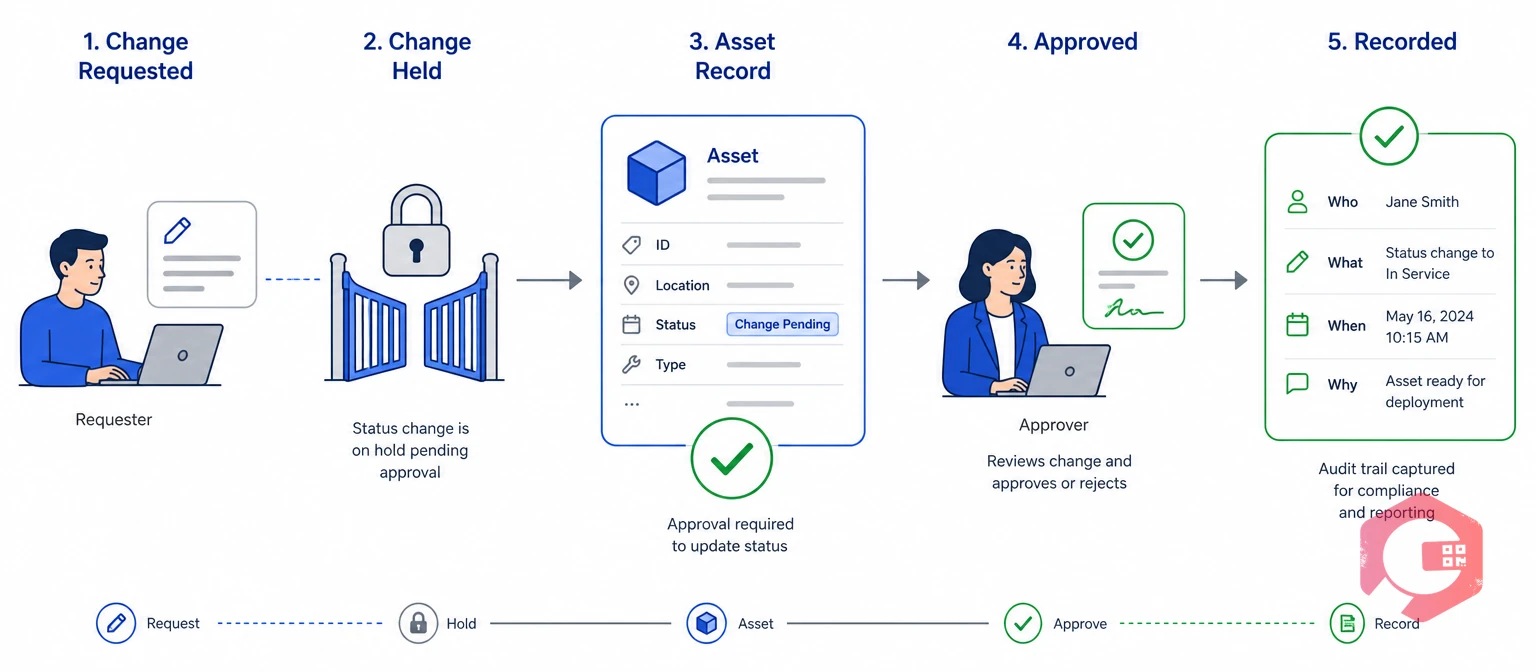
An asset status approval workflow is a rule set that holds each status change until an authorized approver signs off. The system then records the decision, the approver, and the reason.
In a Computerized Maintenance Management System, every asset carries a status field. The ISO 55000 family of asset management standards expects organizations to plan and control changes. It also expects them to keep documented information. An approval workflow is a practical way to show both.
Most maintenance teams start with a free-text note or a spreadsheet column for status, and that is where control breaks down. An asset status approval workflow turns that column into a controlled decision.
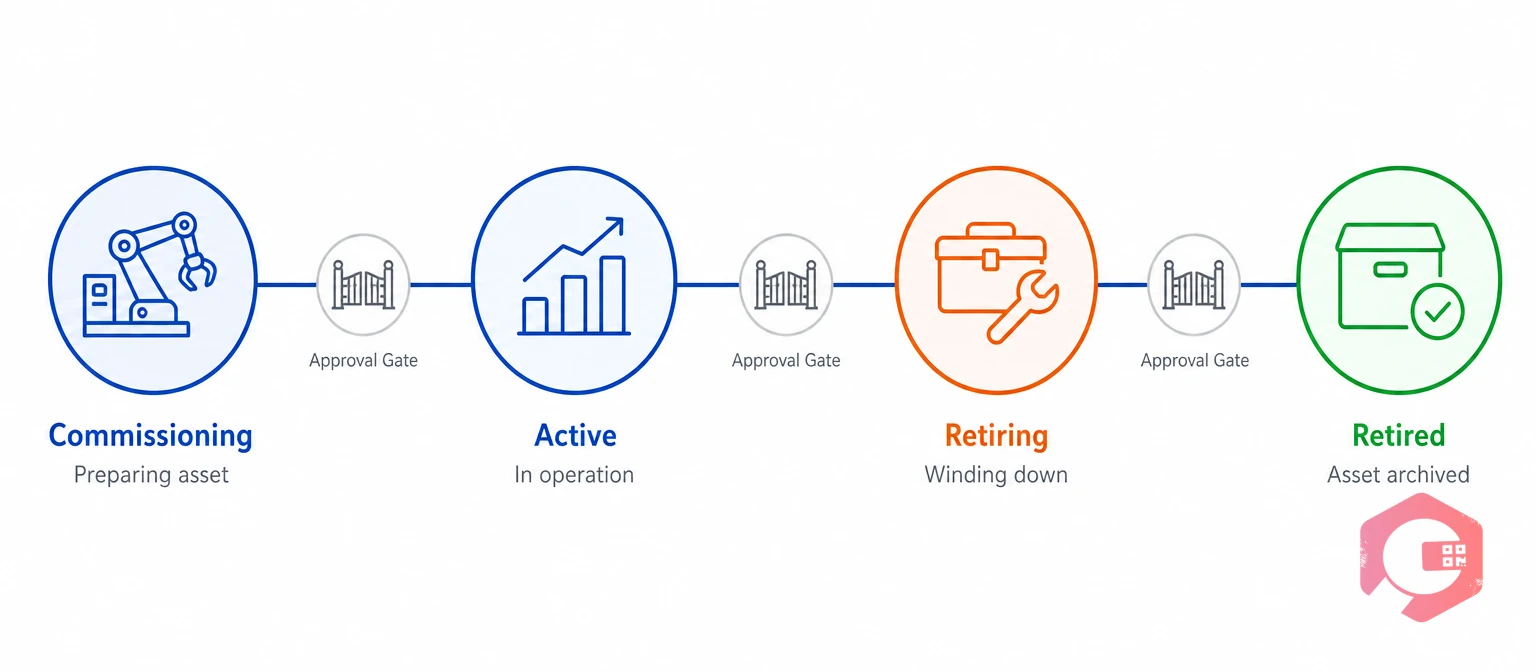
A complete lifecycle uses four statuses: commissioning, active, retiring, and retired. Each status matches a stage of asset lifecycle management, and each one changes what the asset is allowed to do.
The Four-Gate Asset Status Framework:
In Cryotos, each asset carries one of these four statuses, and a move between them can require approval. Each gate tests one question, which keeps approvals short and consistent.

In an asset status approval workflow, no one person should both request and approve a retirement. The request should come from the asset owner. The approval should come from a role that does not own the asset.
Separation of duties is the rule that no single person controls every step of a sensitive action. Finance teams apply this separation of duties control to payments, and it works the same way for physical assets.
Most facilities do not need all four roles on every asset. A low-value hand tool may need one approver. A regulated production line may need three. Set approval levels by asset value or criticality, so routine retirements stay quick.
Emergencies and site closures will happen. Allow an emergency path where one senior approver acts at once. Require a second reviewer within a set number of days. For bulk retirements, such as a closed production line, approve the list once but log every asset separately. Each record then keeps its own history.
Want to see status controls inside a live asset register? Explore Cryotos asset maintenance management software.
An approval matrix maps every status change to its requester, approver, required evidence, and audit entry. Use the table below as a starting point for your asset status approval workflow, and adjust the roles to your own structure.
| Status Change | Requested By | Approved By | Evidence Required | Audit Entry |
|---|---|---|---|---|
| Commissioning to Active | Project or installation lead | Maintenance manager | Test results, handover documents, and safety sign-off | User, timestamp, and handover document reference |
| Active to Retiring | Asset owner | Maintenance manager, plus finance above a set value | Reason code and a condition or repair cost report | User, reason, approver, and previous status |
| Retiring to Retired | Maintenance planner | Maintenance manager and compliance reviewer | Closed work orders and a disposal or transfer record | Closing user, disposal reference, and open-item count |
| Retired to Active | Asset owner | Senior manager | Written justification and an inspection report | Both users, justification, and inspection reference |
Keep the evidence column fixed even when approvers change, because evidence is what an auditor asks to see first. A matrix that fits on one page is more likely to be followed.
The audit trail behind an asset status approval workflow must record who acted, what changed, when it happened, and why.
An asset audit trail is a time-stamped record of every change made to an asset record. Auditors expect the same audit trail discipline they see in accounting and IT security.
A short coded list makes retirement reports meaningful. Most teams need six to eight codes.
Cryotos stores field-level change history in its audit log. Each status change shows the user, the time, and the before and after values. Teams can review that history beside their asset tracking data when an auditor asks how an asset reached its current status. An audit trail that cannot answer who, what, when, and why is a log, not evidence.
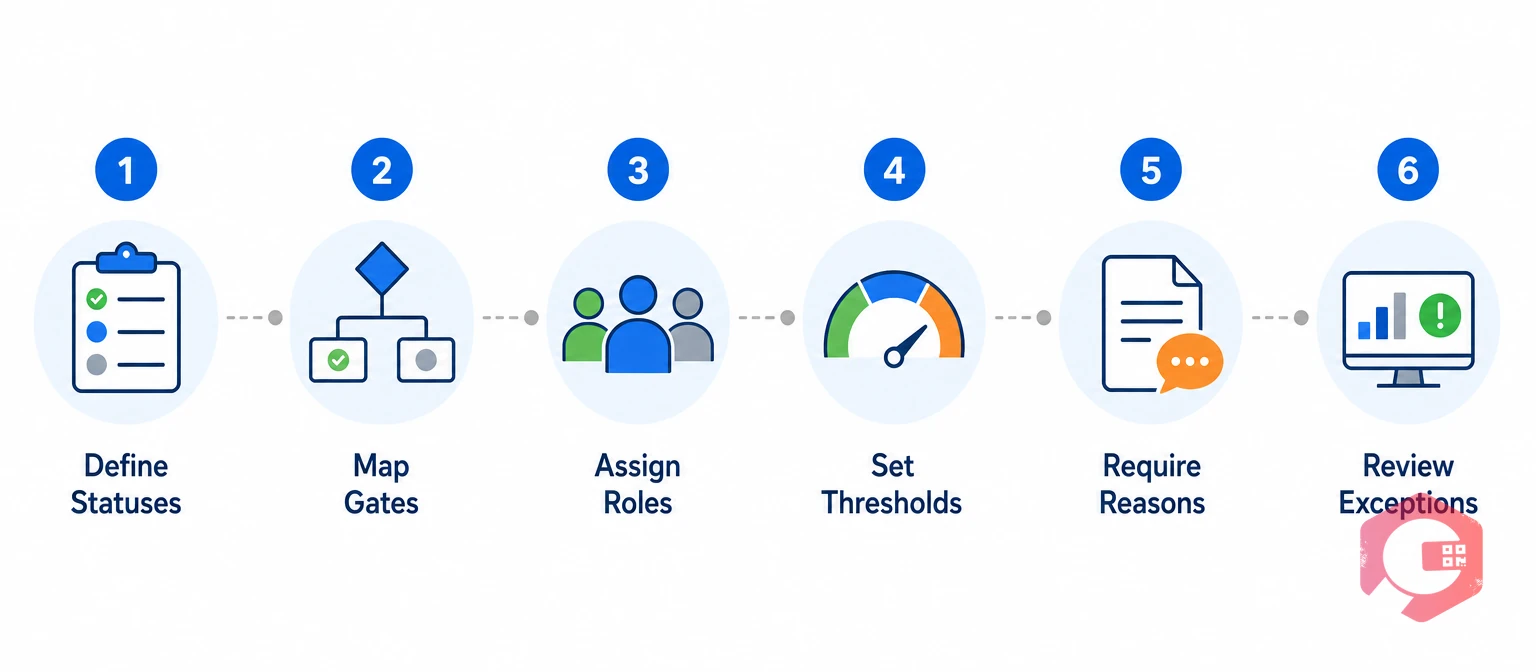
Set up an asset status approval workflow by defining statuses, mapping gates, assigning roles, setting thresholds, requiring reasons, and reviewing exceptions. Most teams can start with a single gate and add the rest later.
Teams that manage assets across several plants often run this setup through EAM software. The same approval rules then cover every site. Start with the retirement gate, because it is the hardest change to reverse.
When status changes skip approval, the register slowly stops matching the plant floor. The scenario below is an illustrative composite of what maintenance teams describe, not a named customer.
Picture a manufacturer with two plants. A supervisor retires an old compressor by sending a chat message to a planner. Nobody updates the record, so the compressor keeps its monthly preventive schedule.
With an asset status approval workflow in place, the request would have stopped at the maintenance manager. The open schedule would have blocked the close-out. The audit log would have named every step.
The most common failure in an asset status approval workflow is approving changes outside the system. Email and chat leave no audit trail.
Reliable asset records support better planning. Maintenance teams using Cryotos have reported up to 30% reduction in unplanned downtime and 25% faster repair turnaround. Results depend on how consistently teams record data. Fix the approval path first, and the register gets cleaner with every cycle.
The asset owner can request retirement, but a separate maintenance or finance approver should approve it. High-value or regulated assets should need a second approver. Administrators should override a step only with a logged reason.
Yes, but treat it as a controlled exception. Require a written justification, an inspection report, and senior approval. Keep the original retirement record visible so the history stays intact.
Open work orders should be completed or cancelled before the asset can move to retired. The close-out gate should block the change while any open work or active preventive schedule remains.
Only in emergencies, and only with a logged reason. Every override should appear in a review report, because an unlogged override removes separation of duties.
Assign a named owner and review retiring assets every month. Any asset that stays in retiring past your set limit should go back to its approver with a reason for the delay.
ISO 55001 does not prescribe specific roles or workflows. It does expect organizations to control changes and keep documented information. An approval workflow with an audit trail is a practical way to show both. The standard sits within the wider field of enterprise asset management.
Keep them at least as long as the asset's own records and any retention rule that applies to your industry. Retention periods vary by sector and country, so confirm the requirement with your compliance team.
A clear asset status approval workflow keeps your register accurate and your audits short. Schedule a free demo to see how Cryotos handles asset lifecycle status, approvals, and audit history in one system.


Cryotos AI predicts failures, automates work orders, and simplifies maintenance—before problems slow you down.



