

An autonomous maintenance checklist is a structured inspection document that enables machine operators — not just maintenance technicians — to perform routine cleaning, lubrication, inspection, and minor adjustment tasks on the equipment they use every day. Rooted in the autonomous maintenance pillar of Total Productive Maintenance (TPM), these checklists shift front-line ownership of equipment health to the people closest to the machines. Research from the Japan Institute of Plant Maintenance (JIPM) shows that organisations with mature autonomous maintenance programs achieve 30–50% reductions in equipment breakdowns and measurably higher Overall Equipment Effectiveness (OEE).
Building a checklist that operators actually follow — and that drives real reliability gains — takes more than listing tasks on a spreadsheet. This guide walks through the seven critical steps to create an autonomous maintenance checklist that standardises daily equipment inspections, catches abnormalities early, and feeds directly into your preventive maintenance program.
Key Takeaways
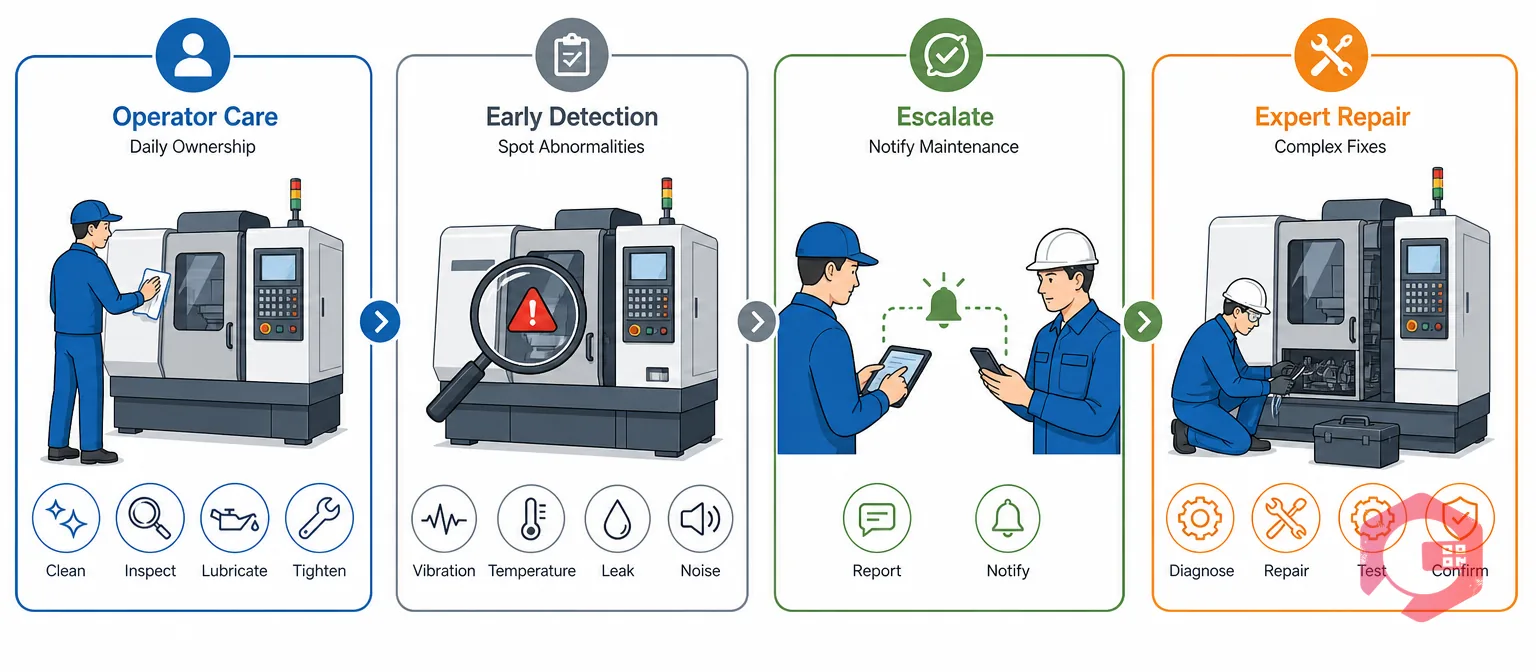
Autonomous maintenance is the TPM pillar that trains machine operators to take ownership of basic equipment care — cleaning, inspecting, lubricating, and tightening — rather than waiting for the maintenance department to handle every task. The goal is early detection: operators who run a machine eight hours a day notice abnormalities — unusual vibrations, small leaks, temperature changes — long before those issues escalate into unplanned breakdowns.
Without a standardised checklist, however, autonomous maintenance becomes inconsistent. One operator checks oil levels; another skips it. The morning shift inspects guards; the night shift doesn't. A checklist eliminates this variability by defining exactly what to inspect, when, how, and what to do when something looks wrong.
Maintenance teams using Cryotos have reported up to 30% reduction in unplanned downtime and 25% faster repair turnaround — and a significant share of that improvement comes from operators catching small problems during daily checklist routines before they become emergency work orders.
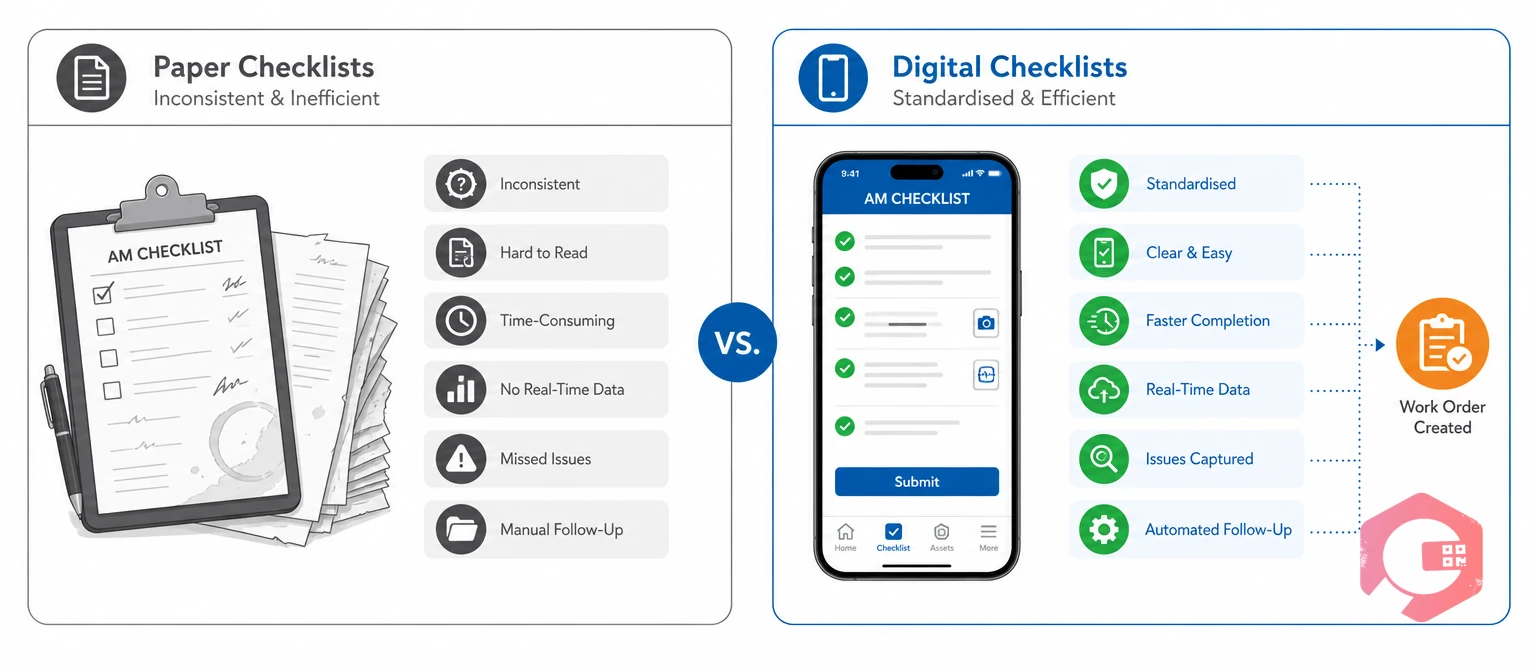
Many facilities start autonomous maintenance with paper inspection forms or shared spreadsheets. While these get the program off the ground, they create data blind spots and compliance gaps that limit long-term results. Here is how the two approaches compare.
| Factor | Paper / Spreadsheet Checklists | Digital Autonomous Maintenance Checklists |
|---|---|---|
| Standardisation | Inconsistent — varies by operator, shift, and location | Uniform — same checklist template enforced across all facilities |
| Data Capture | Manual pen-and-paper or typed entries with high error rates | Mobile-first — photos, comments, readings captured in real time |
| Abnormality Reporting | Written notes or verbal reports — often delayed or lost | Instant — triggers automated work orders and escalation workflows |
| Compliance Tracking | Difficult — requires manual auditing of paper logs | Automatic — dashboards show completion rates, overdue items, and gaps |
| SOP Access | Separate binders or shared drives — rarely consulted on the floor | Embedded — SOPs, videos, and safety docs attached directly to each checklist step |
| Trend Analysis | Virtually impossible without manual data compilation | Built-in — analytics track recurring issues, failure patterns, and KPIs |
| Scheduling | Relies on supervisors remembering or calendar reminders | Automated — recurring schedules trigger by time, usage, or meter readings |
Digital maintenance checklists don't just digitise the paper form — they add layers of automation, accountability, and insight that paper cannot replicate. For facilities serious about TPM autonomous maintenance, the transition from paper to a CMMS-based system is where results accelerate.
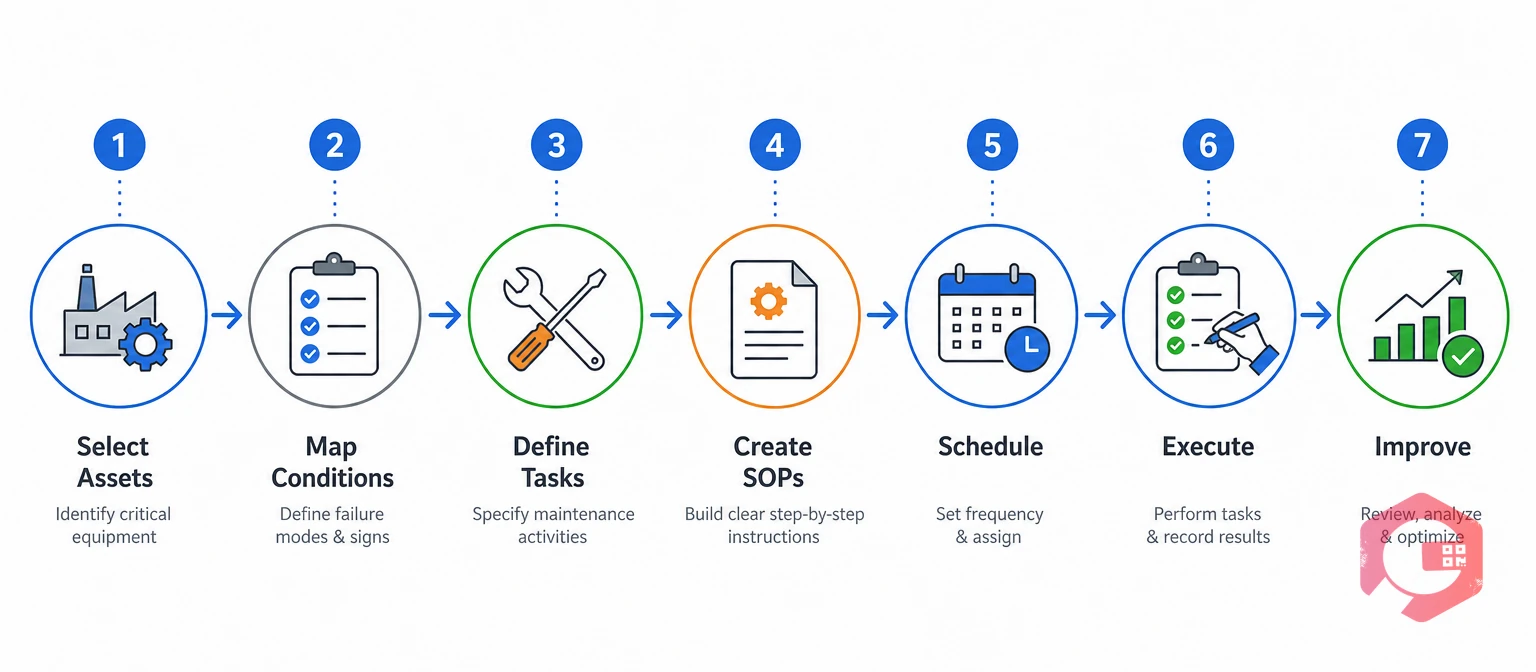
The following seven-step process applies whether you are building your first checklist from scratch or upgrading an existing paper-based program to a digital system. Each step maps to a specific failure mode that causes autonomous maintenance programs to stall.
Not every piece of equipment needs the same level of operator-driven inspection. Start by ranking your assets based on criticality — production impact, breakdown frequency, safety risk, and repair cost. Equipment that causes the most downtime or poses the greatest safety hazard goes to the top of the list.
Cryotos CMMS maintains a complete asset register with QR code scanning, GPS tracking, and full maintenance history — giving you the reliability data you need to prioritise which assets get autonomous maintenance checklists first.
Before writing a single checklist item, document the current baseline condition of each target asset. Walk the equipment with operators and maintenance technicians together. Record what "normal" looks like — operating temperatures, vibration levels, fluid levels, belt tension, guard positions — so the checklist defines clear pass/fail criteria.
This step aligns directly with the JIPM's "initial cleaning" and "eliminate contamination sources" stages of autonomous maintenance. The checklist tasks you define in Step 3 will be grounded in these real conditions — not generic templates.
Each checklist item needs three elements: what to inspect, how to inspect it, and what constitutes a pass or fail. Vague items like "check motor" waste time and produce unreliable data. Specific items like "verify motor bearing temperature is below 75°C using infrared thermometer" give operators a clear action and a measurable standard.
The C.L.I.C.K. Task Design Framework:
Cryotos lets you build customisable inspection checklists with dropdown responses, numeric fields, photo capture requirements, and conditional logic — so each task enforces the specificity that drives accurate data.
A checklist tells operators what to inspect. Standard Operating Procedures (SOPs) tell them how to do it safely and correctly. Every inspection task that involves a technique, tool, or safety precaution should have a linked SOP — not buried in a binder in the maintenance office, but accessible at the point of use.
Cryotos CMMS allows you to attach SOPs, manuals, instructional videos, and safety documents directly to each checklist step. When an operator opens their daily equipment inspection on a mobile CMMS device, the supporting documentation is one tap away — not locked in a filing cabinet.
Consistency is non-negotiable. Autonomous maintenance checklists must run on a defined schedule — daily, per-shift, weekly, or based on equipment runtime hours. Manual scheduling through supervisors or calendar reminders is a reliability risk; missed inspections compound silently until a breakdown forces attention.
Cryotos automates preventive maintenance scheduling based on time, usage, or meter readings. Operators receive push notifications when inspections are due, and supervisors see real-time dashboards showing completion rates and overdue items — eliminating the reliance on manual follow-up.
Execution is where most paper-based programs break down. Operators fill out forms at the end of the shift from memory, skip items they consider unimportant, and report abnormalities verbally to a supervisor who may or may not log them. Digital execution changes every part of this workflow.
Cryotos work order automation generates and assigns tasks automatically when operators report abnormalities during checklist execution. Configurable approval and escalation workflows ensure the right team gets the right information at the right urgency level — no handwritten notes, no lost verbal reports.
An autonomous maintenance checklist is not a static document. The data it generates — completion rates, failure trends, recurring defect types, mean time between operator-reported issues — is the raw material for continuous improvement. Without analysis, you have a compliance exercise. With analysis, you have a reliability improvement engine.
Cryotos provides real-time dashboards and analytics that track all of these KPIs. Maintenance managers can identify which assets generate the most operator-reported defects, which checklist items have the highest failure rates, and where additional training or equipment investment will deliver the greatest reliability return.
Autonomous maintenance is performed by machine operators and focuses on routine cleaning, inspection, lubrication, and early abnormality detection. Preventive maintenance is performed by skilled maintenance technicians on a scheduled basis and covers more complex tasks like part replacements, calibrations, and overhauls. The two programs are complementary — autonomous maintenance catches small problems daily so that preventive maintenance schedules can focus on planned, higher-skill work.
Most effective daily operator checklists contain 10–25 items that can be completed in 10–20 minutes per shift. If a checklist regularly takes longer than 20 minutes, operators start skipping items or rushing through. Break longer lists into daily, weekly, and monthly tiers so the daily burden stays manageable.
Yes. Cryotos supports fully customisable checklist templates that can be configured per asset, asset type, location, or maintenance tier. You can create a daily cleaning checklist for a CNC machine, a weekly lubrication checklist for a conveyor system, and a monthly deep-inspection checklist for an HVAC unit — each with its own tasks, acceptance criteria, and linked SOPs.
Autonomous maintenance is one of eight pillars in the TPM framework defined by the Japan Institute of Plant Maintenance. It works alongside planned maintenance, quality maintenance, focused improvement, and the other pillars to create a culture of zero breakdowns, zero defects, and zero accidents. A well-executed autonomous maintenance checklist feeds data into every other TPM pillar by surfacing equipment conditions that inform preventive schedules, root cause analysis, and reliability engineering decisions.
Start with a small pilot on 3–5 assets, involve operators in writing the checklist items (they know the machines best), keep the daily checklist short enough to complete in under 15 minutes, and make the reporting process easy — mobile-first with photo capture. Show operators how their defect reports lead to repairs. When people see their input driving action, adoption follows naturally.
Building an autonomous maintenance checklist that operators actually use — and that drives measurable reliability improvements — requires the right structure, the right tools, and a commitment to continuous improvement. Schedule a free demo to see how Cryotos CMMS gives your team digital checklists, automated scheduling, instant defect escalation, and real-time analytics to strengthen every step of your autonomous maintenance program.

Cryotos AI predicts failures, automates work orders, and simplifies maintenance—before problems slow you down.



