

Inventory software implementation in one week is possible when the week is the last stage of a prepared project, not the whole project. Inventory software is rarely the slow part. Projects stretch into quarters because scope, data, hardware, and decisions get settled during the rollout instead of before it.
Published guidance for cloud inventory systems often quotes four to twelve weeks for smaller sites. A one-week go-live beats that with narrow scope and clean data. It also counts stock at cutover and agrees on a rollback rule in advance. Below are the day-by-day plan, what to defer, and the metrics to track.
Key Takeaways
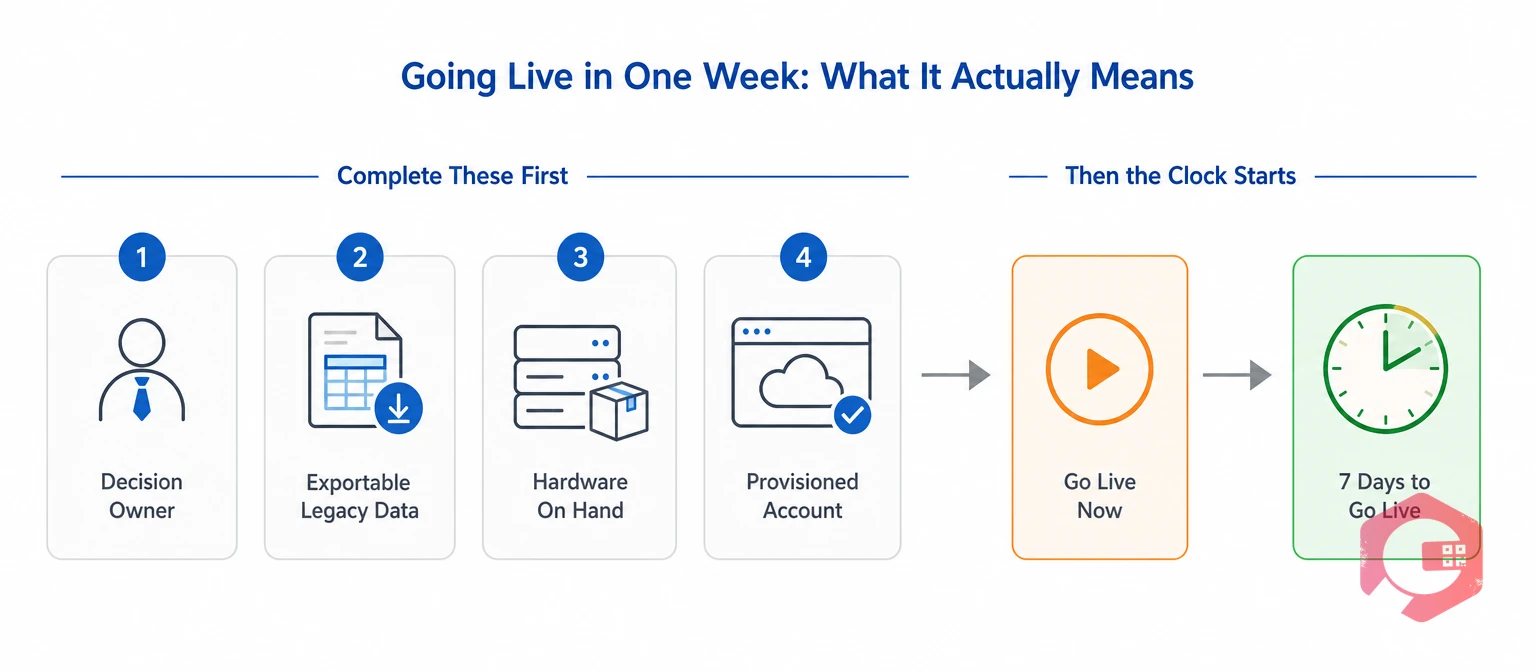
Going live is the moment real users post real transactions in the production system. In a one-week rollout, that covers a set scope of locations, items, and transactions. Opening balances are counted and reconciled to finance, with a tested fallback.
The same rules apply to standalone inventory software and to the inventory module of a Computerized Maintenance Management System. The seven days work only when four conditions are true before the clock starts:
If any of these is missing, the honest plan is a longer one. The takeaway: a one-week go-live is a claim about narrow scope and a clean start, not about faster software.
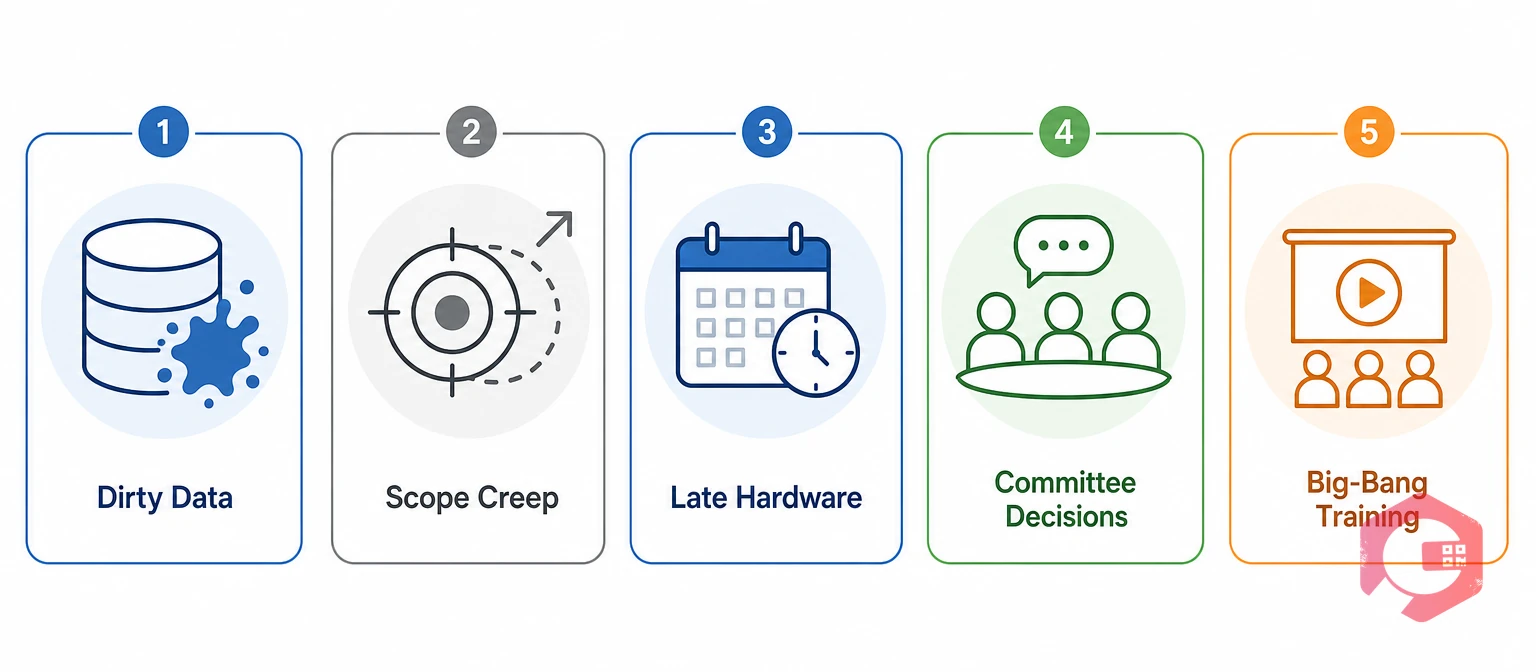
Inventory software implementation usually takes a quarter because delay is built into how the project runs. Every stakeholder wants their report in release one, and problems surface one at a time.
Record accuracy is the weak point most teams underestimate. A study of nearly 370,000 inventory records across 37 stores of one retailer found that 65% did not match physical stock at audit. Later research on record inaccuracy traces those gaps to shrinkage, transaction errors, and misplaced stock.
Load legacy quantities as opening balances, and every one of those errors moves into the new system. The takeaway: most of a quarter-long rollout is spent fixing problems a scoped plan settles before day one.
Before you start the clock, audit your stockroom with this free MRO inventory checklist to find bin, label, and data gaps early.
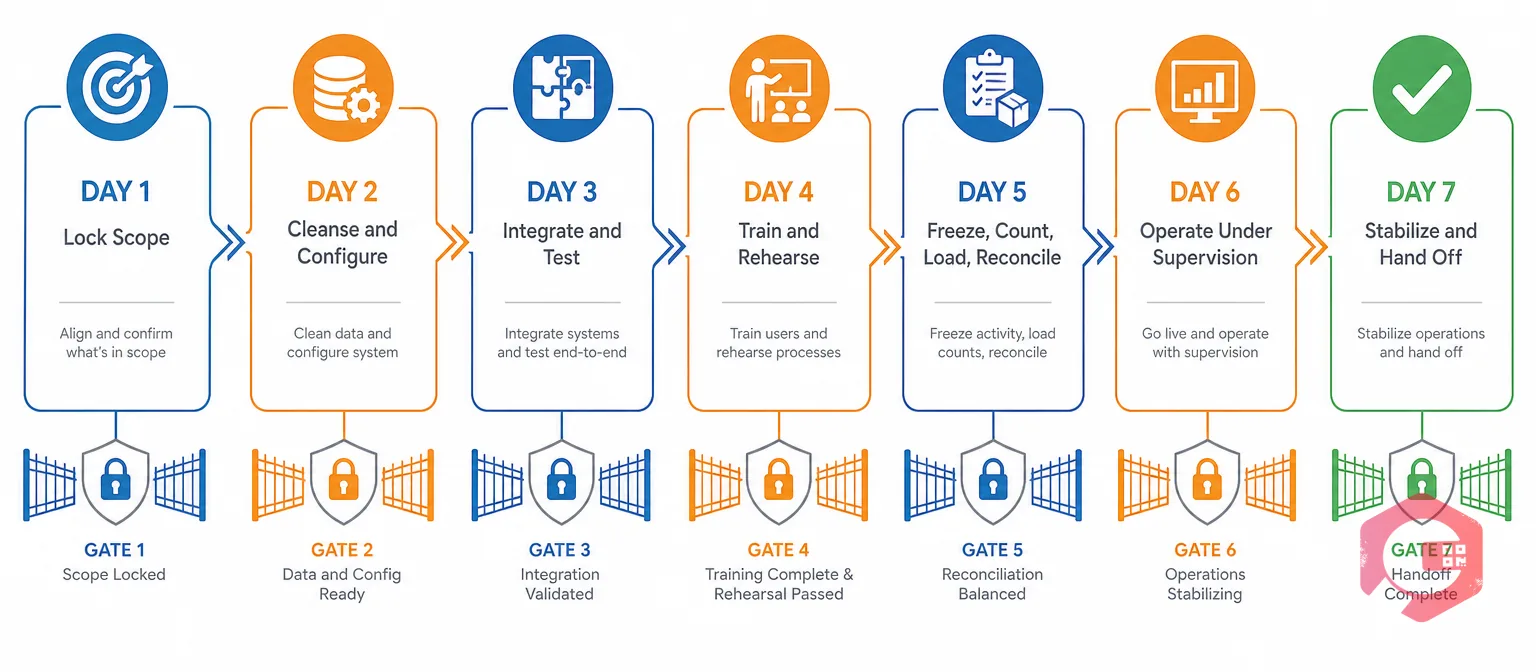
A one-week plan works when every day ends with a pass or fail check. Problems then surface early, not at cutover. The model below is a planning framework drawn from published implementation practice, not a vendor promise.
The Seven-Gate Go-Live Method:
Structured inventory management with QR and barcode scanning, min-stock alerts, and role-based access covers most day-two setup out of the box. The takeaway: the gates, not the calendar, decide whether you go live.
Week-one scope should cover only what the operation needs to receive, store, move, issue, and count stock safely. Everything else goes on a dated backlog for a second wave.
| Area | Include in Week One | Defer to Wave Two |
|---|---|---|
| Item master | Active items only, unique SKUs, one unit of measure, barcodes on scanned items | Obsolete SKUs, extra attributes, image libraries |
| Locations | Simple site, zone, and bin codes that match physical labels | Multi-warehouse slotting |
| Transactions | Receive, put away, transfer, issue, return, and adjust with reason codes | Kitting, lot or serial detail beyond what compliance requires |
| Counting | ABC cycle count schedule and variance thresholds | Redesign of the annual full count |
| Integrations | Accounting and the primary sales channel, each with a manual fallback | Any integration without a clear owner |
| Reporting | On-hand by location, low-stock alerts, transaction history, count variance | Custom dashboards, advanced replenishment optimization |
Cycle counting belongs in week one because accuracy starts to decay the day you go live. The APICS approach to cycle counting ranks items by value, so high-value A items get counted most often. For stockrooms that hold critical spares, dedicated spare parts inventory software can apply ABC rules and reorder points per item. The takeaway: defer features, never controls.
Cutover day succeeds when counted quantities become the opening position. Legacy quantities are for comparison only. Speed matters less here than a clear chain of evidence.
A cutover freeze is a short, agreed stop on legacy inventory transactions during the count. Without it, stock moves while you count, and the opening balance is wrong before day six begins.
Here's a typical example. Legacy transactions freeze at 6:00 p.m. The team counts 240 A-class locations, and 212 match the old system. The 28 variances are logged with count sheets, and the counted quantities load as opening balances.
Maintenance teams that get this right treat variances as data problems, not numbers to overwrite. Map bins in structured warehouse management before cutover. That keeps count sheets, labels, and system locations aligned. The takeaway: a rehearsed cutover with pre-agreed rules beats a fast one every time.
A fast inventory software go-live is judged by data quality and adoption. Track these daily during stabilization, then weekly.
Inventory record accuracy is the share of SKU-location records where system and counted quantity match. Calculate it as matching records divided by records counted, times 100, and set targets per ABC class.
Operational gains follow accurate stock. Maintenance teams using Cryotos have reported up to 30% reduction in unplanned downtime and 25% faster repair turnaround. Part of that gain comes from having the right spare in the right bin.
The value of speed is the monthly net benefit times the months saved. It is not the full benefit of the software. Say verified benefits, such as fewer stockouts and less count labor, net out at $8,000 a month. Going live in one week instead of twelve saves about 2.5 months, or roughly $20,000 of value that arrives sooner.
Count one-time costs honestly: data cleanup, count labor, scanners, labels, training, and contingency. Our guide to maintenance costs shows how to separate one-time and recurring spend. Avoid double counting, too: recovered sales and avoided expedite fees from the same stockout need separate proof.
A one-week go-live is the wrong plan when the operation is too complex for a safe first wave. In those cases, treat the week as wave one.
If trading partners require it, follow a recognized scheme such as GS1 identification keys before you print a single label. The takeaway: when in doubt, shrink the scope, not the testing.
Yes, for a defined scope. A single site with clean data, scanners on hand, and one decision owner can post live transactions within seven days. Multi-site, regulated, or heavily integrated operations should treat the week as a first wave.
Count the agreed scope at a transaction freeze and load the counted quantities as opening balances. Use legacy quantities only for comparison. Loading legacy records moves years of errors into the new system.
Defer advanced replenishment, multi-warehouse slotting, custom dashboards, and any integration without a clear owner. Keep core transactions, cycle counting, low-stock alerts, and the accounting link, and give every deferred item an owner and a date.
Profile the item master on day one and calculate the data readiness rate. Look for duplicate SKUs, blank descriptions, missing barcodes, and conflicting units of measure. If critical errors remain after the day-two sandbox load, delay go-live rather than load unverified records.
A one-week go-live comes down to tight scope, clean data, and counted opening balances on day one. Schedule a free demo to see how Cryotos helps teams launch barcode-based inventory, low-stock alerts, and cycle counting through a scoped, week-one rollout.



Cryotos AI predicts failures, automates work orders, and simplifies maintenance—before problems slow you down.



