

Autonomous maintenance reduces central maintenance workload by moving routine tasks from technicians to operators. Operators handle daily inspection, cleaning, lubrication, and small adjustments instead of waiting for a technician. When an operator catches a loose bolt, a fluid leak, or an odd noise early, the central team gets fewer work orders. They also get fewer emergency calls. And when a real repair is needed, they get clear notes instead of starting from zero.
CMMS data shows this shift in four places: total work order volume, the mix of planned versus reactive work, average repair time, and technician travel time. This guide breaks down what changes, by how much, and how to track it.
Key Takeaways

Autonomous maintenance is the Total Productive Maintenance (TPM) pillar that hands first-line equipment care to the operators running the machine. Inspection, cleaning, lubrication, and small adjustments move off the central team’s plate. The goal isn’t to remove the maintenance team from the picture. It’s to stop using skilled technicians on work that doesn’t need their training.
Before autonomous maintenance, a Computerized Maintenance Management System (CMMS) at most plants fills up fast. A loose guard. A dirty filter. A fluid top-off. Each one still needs a technician to travel, look, fix, and close the ticket. Across dozens of machines, that adds up to more hours spent moving than repairing.
Operators already know their machines better than anyone who visits once a week. Autonomous maintenance turns that knowledge into checklists, escalation rules, and accountability. The central team ends up seeing only the work that genuinely needs them.
Most facilities that run a mature program treat this as an ongoing process, not a one-time handoff. Operators take on more advanced checks as they build confidence. The line between “operator task” and “technician task” gets reviewed and adjusted over time, instead of being fixed on day one.
The clearest way to see the impact is a side-by-side comparison. Here’s how the same four workload metrics typically look before launch and six to twelve months after a program matures on a given asset group. The exact numbers vary by industry and starting baseline, but the direction of the shift holds across most plants that stick with the program.
| Workload Metric | Before Autonomous Maintenance | After Autonomous Maintenance Matures |
|---|---|---|
| Total work order volume | High — every minor task goes to central team | Lower — routine tasks closed by operators directly |
| Reactive/emergency work order share | High — problems surface mid-shift as failures | Lower — problems caught during daily checks |
| Average repair time (MTTR) | Longer — technician starts diagnosis from scratch | Shorter — operator notes are already attached |
| Technician travel time per shift | High — technicians dispatched for minor checks | Lower — fewer low-value trips between machines |
Cryotos tracks all four metrics automatically through downtime analytics and work order reports. The before-and-after comparison becomes a live report, not a one-time audit.
Use the MTTR calculator to set a baseline for current repair times before comparing them to a mature program.

“Workload reduction” as a vague feeling doesn’t hold up in a budget review. The 4-Metric Workload Shift Framework gives maintenance managers four specific numbers to track instead, all reportable straight from a CMMS.
The 4-Metric Workload Shift Framework:
Track these four together, not separately. A facility can see work order volume drop while travel time stays flat. That’s usually a sign operators are catching issues, but technicians are still being dispatched for tasks that no longer need them.
Routine maintenance tasks are inspection, cleaning, lubrication, and minor adjustment work that doesn’t require a technical certification. These are the first tasks to leave the central team’s schedule. They’re also usually the biggest share of total ticket volume before autonomous maintenance starts.
A digital checklist assigned directly to an operator closes that loop fast. The operator scans the machine’s QR code and sees the day’s tasks. They complete each one with a timestamp and a photo. The record lands in the CMMS without a single paper form.
None of this requires a technician. Once it’s off the central queue, the team’s remaining tickets skew toward work that actually matches their training.
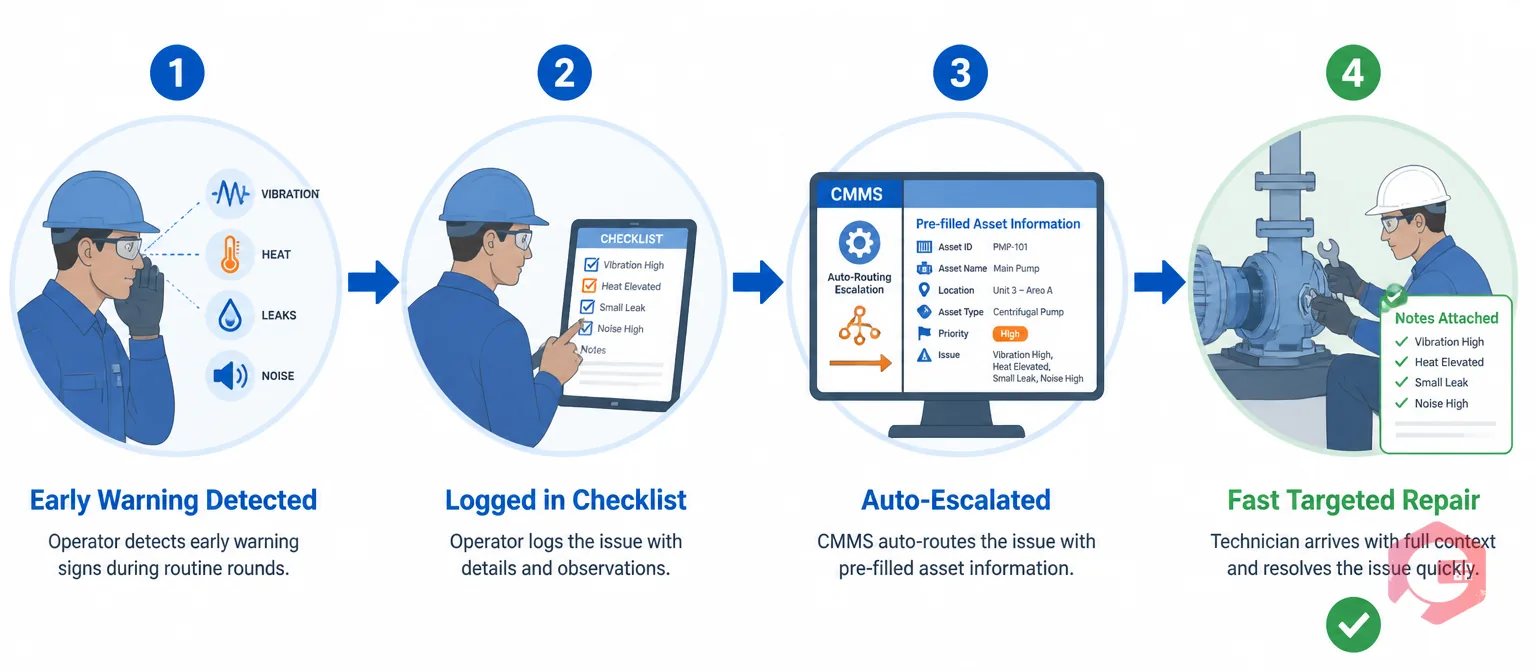
A loose coupling caught during a morning checklist is a five-minute fix. The same coupling failing mid-shift becomes an unplanned shutdown and a reactive work order. A technician gets pulled off whatever they were already doing. Emergency work is the most expensive and disruptive part of any maintenance team’s load — and it’s the part autonomous maintenance shrinks fastest once operators are checking daily.
Mature programs show a consistent pattern. Emergency tickets fall before total ticket volume fully settles down. That’s because the costliest failures usually give the clearest early warning.
None of these need special instruments to catch. They just need someone looking and listening on a fixed schedule, which is exactly what an operator checklist enforces. Maintenance teams using Cryotos have reported up to 30% reduction in unplanned downtime and 25% faster repair turnaround once checklists and escalation routing are both running.
Escalations through Cryotos arrive pre-documented: asset ID, location, what was checked, what was found. Technicians spend less time figuring out what already happened and more time fixing it.

Workload reduction only matters if the freed hours go somewhere productive. In practice, they shift toward three kinds of work that routine checklists were crowding out: complex repairs, planned overhauls, and reliability analysis tied to standards like ISO 55000 asset management practice.
Technician travel time drops for the same reason. When operators handle first-line care on their own machines, technicians stop getting dispatched across the facility for minor checks. In large multi-building plants, that travel time alone can eat a big share of a shift.
This reallocation is the real payoff of autonomous maintenance. It isn’t headcount cuts — it’s the right people spending time on work that matches their training. Teams running manufacturing maintenance software alongside an autonomous maintenance program usually see this show up first in overtime hours, which drop as planned work fills more of the schedule.
It also shows up in retention. Technicians who spend their days on diagnostics and real repairs tend to report higher job satisfaction than those stuck doing rounds an operator could just as easily handle.
None of this matters to a maintenance manager without proof. Cryotos ties every piece of the workload shift to a number, not an impression, so the case for the program holds up in front of finance as well as operations.
Run the comparison every quarter, not just once at launch. Workload reduction compounds as more asset groups join the program. The same four metrics from earlier in this guide tell you whether that compounding is actually happening, or whether the program has stalled after the first easy wins.
Most programs show a measurable drop in total work order volume within the first few months. That’s driven mainly by routine inspection and cleaning tasks moving to operators. The bigger gains — fewer emergency tickets and shorter repair times — usually show up over six to twelve months, as operators build the habit of catching problems early.
Not in most well-run programs. The freed-up hours typically move toward complex repairs, planned overhauls, and reliability work that routine tickets were crowding out. Plants that try to use autonomous maintenance purely as a cost-cutting move tend to see operator buy-in collapse, which undermines the whole program.
Work order volume usually shifts within the first one to three months, since checklist tasks move to operators almost right away. Emergency work order frequency and repair time take longer, usually six to twelve months, because they depend on operators building the habit of catching problems before they escalate.
Track all four metrics in the workload shift framework together: total work order volume, the planned-to-reactive ratio, average repair time, and technician travel time. If volume drops but travel time and MTTR stay flat, technicians are probably still being dispatched for tasks operators have already taken over. That’s a sign the program needs tighter checklist assignment, not more operator training.
A paper-based version can shift some routine tasks to operators. But it rarely produces a measurable workload reduction, because there’s no consistent way to track checklist completion, escalation response time, or the planned-to-reactive ratio. A CMMS is what turns operator-led care into data the central team can actually act on.
Yes, but the training is narrow and specific, not a full maintenance certification. Operators typically need a short walkthrough of each checklist item, what a normal reading looks like, and when to escalate instead of attempting a fix themselves. Most programs phase this in, starting with simple visual checks and adding tasks as operators build confidence and the central team confirms quality.
Autonomous maintenance only reduces central maintenance workload when the shift is tracked, not assumed. Schedule a free demo to see how Cryotos turns operator-led checklists, escalation routing, and downtime data into a measurable workload reduction for your maintenance team.



Cryotos AI predicts failures, automates work orders, and simplifies maintenance—before problems slow you down.



