
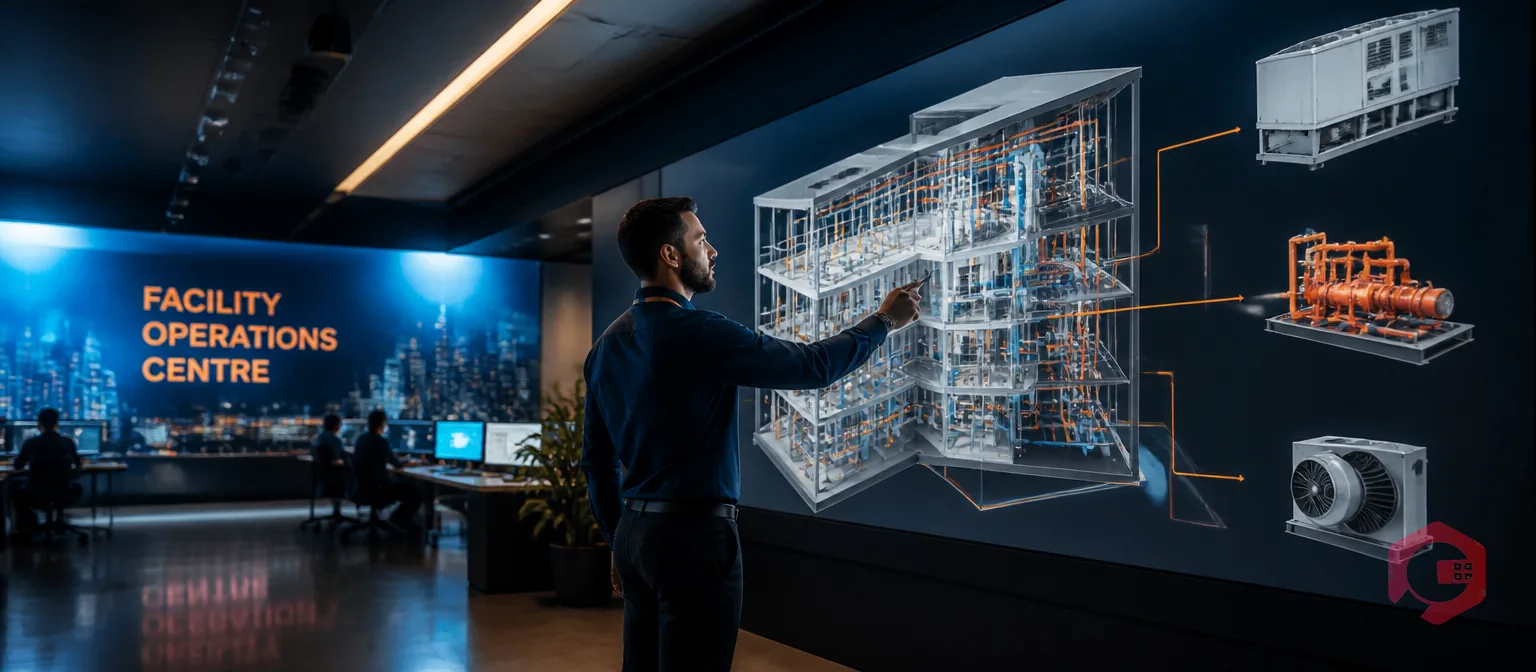
BIM CMMS integration is the practice of connecting Building Information Modeling (BIM) 3D models directly to a CMMS — so every asset in your building has a live digital record that drives real maintenance work orders. Instead of hunting through paper binders for equipment specs or chasing down floor plans across shared drives, your technician clicks an asset in the 3D model and instantly sees its full maintenance history, open work orders, spare parts requirements, and service manuals.
The payoff is measurable. Buildings managed with BIM-connected operations tools see up to 20% reduction in operating costs over their lifecycle, according to McKinsey Global Institute research on digital adoption in the built environment. When that same data feeds your CMMS, those savings stop being theoretical — they become operational outcomes visible in your next maintenance report. This guide explains exactly how BIM CMMS integration works, what data moves between the two systems, and how your team can make it practical starting today.
Key Takeaways
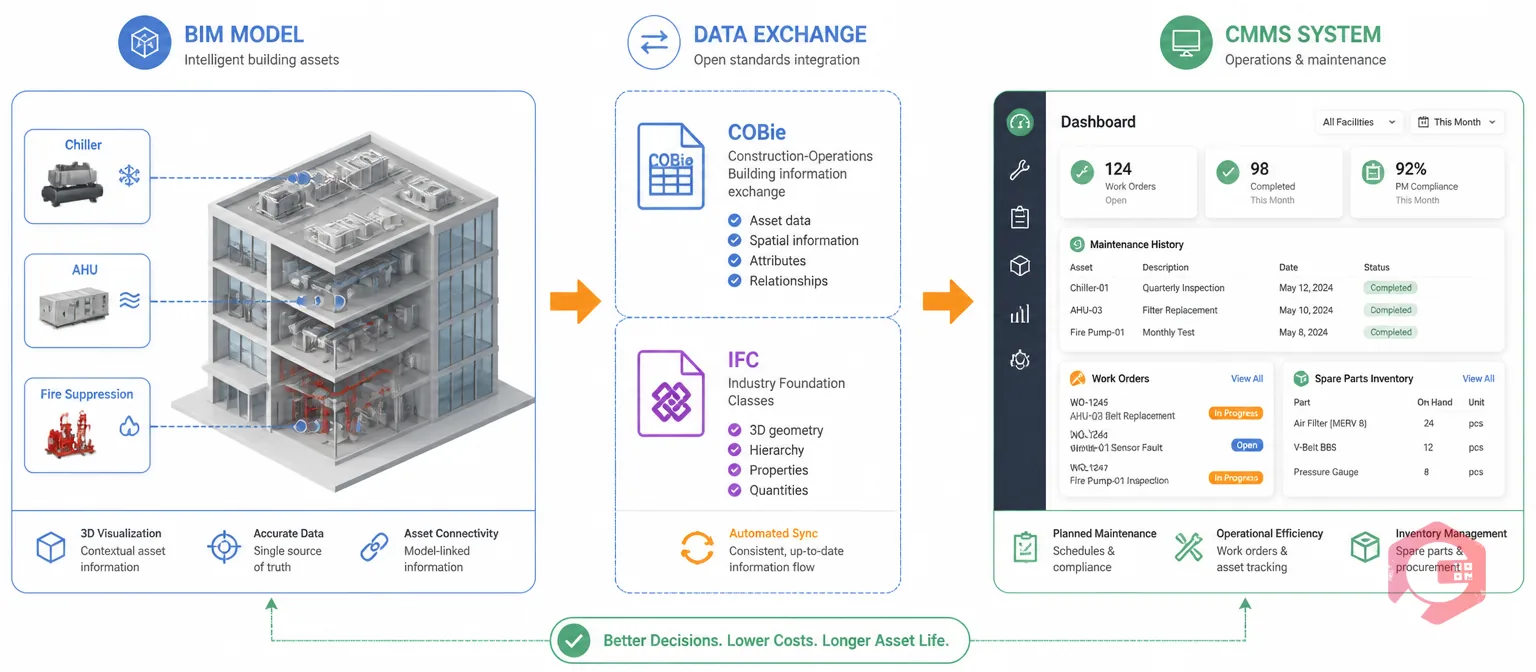
BIM CMMS integration means linking the rich spatial and technical data stored in a 3D building model — created in tools like Autodesk Revit, ArchiCAD, or Bentley MicroStation — to the operational records in your facility management software. Once connected, a facility manager can click on any asset in the 3D model (a chiller, an AHU, a fire suppression zone) and immediately raise a maintenance request, view scheduled PMs, or pull up the asset's full service history.
The connection works through two standard data exchange formats. COBie (Construction Operations Building Information Exchange) structures equipment data into clearly labelled spreadsheet sheets — Facility, Floor, Space, Component, Type — that CMMS systems ingest without custom development. IFC (Industry Foundation Classes) is the more technically complete open standard, required by government projects in the UK, Singapore, and across the EU under BIM Level 2 mandates. According to the buildingSMART IFC standard documentation, IFC covers geometry, spatial structure, and component relationships in a single interoperable format.
Together, these formats let the BIM model act as a spatial front-end to your CMMS — a visual, clickable map of your entire facility where every asset is linked to its maintenance data.
Most facility teams today operate with a hard disconnect: the building model lives in a CAD folder that only the design team touches after handover, while the CMMS holds asset records that were built manually — usually from scratch, and often incompletely. This gap costs time and money in predictable ways.
Technicians waste time on asset identification. When a fault is reported in Zone 3B, Floor 7, the technician needs to know exactly which AHU is involved, its model number, the last service date, and where the isolation valve is. Without BIM integration, this means calls to colleagues, searches through filing cabinets, or guesswork on the job. Studies from the National Institute of Building Sciences estimate that inadequate information interoperability costs the U.S. capital facilities industry over $15 billion annually — a large share of which flows from this exact problem.
Manual asset records degrade over time. When equipment is replaced, upgraded, or relocated, the CMMS record only gets updated if someone remembers to do it. BIM CMMS integration closes this gap. The 3D model becomes the single source of truth for every asset, and the CMMS becomes the operational engine that acts on that truth — automatically, not by memory.
Not all BIM models are equally ready for CMMS integration. The Level of Development (LOD) framework defines how much information a model contains and how reliable that information is. For facility management purposes, understanding which LOD you have — and which you need — determines what integration is possible right now.
| LOD Level | What It Contains | FM Suitability | CMMS Integration Readiness |
|---|---|---|---|
| LOD 100 | Concept massing only — no component detail | Not suitable | Not usable |
| LOD 200 | Approximate geometry, generic components | Limited planning only | Not recommended |
| LOD 300 | Accurate geometry, manufacturer data, asset parameters | Minimum for FM use | Practical minimum — most CMMS fields can be populated |
| LOD 400 | Fabrication-level detail, installation sequences | Good for complex M&E systems | Strong — full asset parameter coverage |
| LOD 500 | As-built, field-verified condition | Ideal for long-term FM | Best — every field populated with verified data |
LOD 300 is where most integration projects start. At this level, every asset has accurate geometry and the parameters your CMMS needs: make, model, serial number, rated capacity, installation date, and expected service life. LOD 500 (as-built) is ideal but expensive to achieve across an entire building, so most teams prioritise it for critical systems — fire suppression, electrical distribution, and HVAC.
Not all BIM data is equally useful for maintenance. The mapping exercise — deciding which fields from BIM should populate which fields in your CMMS — is one of the most important steps in any integration project. Here is how the key categories align.
Every asset in a BIM model has a unique identifier (GUID) and a spatial location defined by level, zone, room, and X-Y-Z coordinates. In the CMMS, this maps to the asset's location hierarchy: building → floor → zone → room. When the BIM GUID travels with the asset record, technicians can always return to the 3D model view with a single click, regardless of how many years have passed since handover. This is the foundation of effective asset tracking in large multi-floor facilities.
BIM models built to LOD 300 and above contain rich equipment parameters: make, model, serial number, rated capacity, installation date, and expected service life. These fields populate directly into your CMMS asset records, eliminating manual data entry and ensuring warranty expiry dates are captured before they lapse. Cryotos supports asset QR code scanning natively, so physical-to-digital asset tagging is built into the same workflow from day one.
BIM space objects — rooms, zones, and functional areas — map to the CMMS location hierarchy. This is particularly valuable for CAFM software workflows where maintenance tasks are organised by zone. When a zone changes in the BIM model — because of a fit-out renovation — that change propagates to the CMMS automatically, keeping location data accurate without manual updates.
O&M manuals, warranty certificates, commissioning reports, and test certificates can be attached to BIM asset objects and carried forward into the CMMS. Instead of scanning paper binders or hunting shared drives, technicians access live O&M documentation directly from their work order on mobile. This alone recovers significant time per maintenance visit in complex buildings.
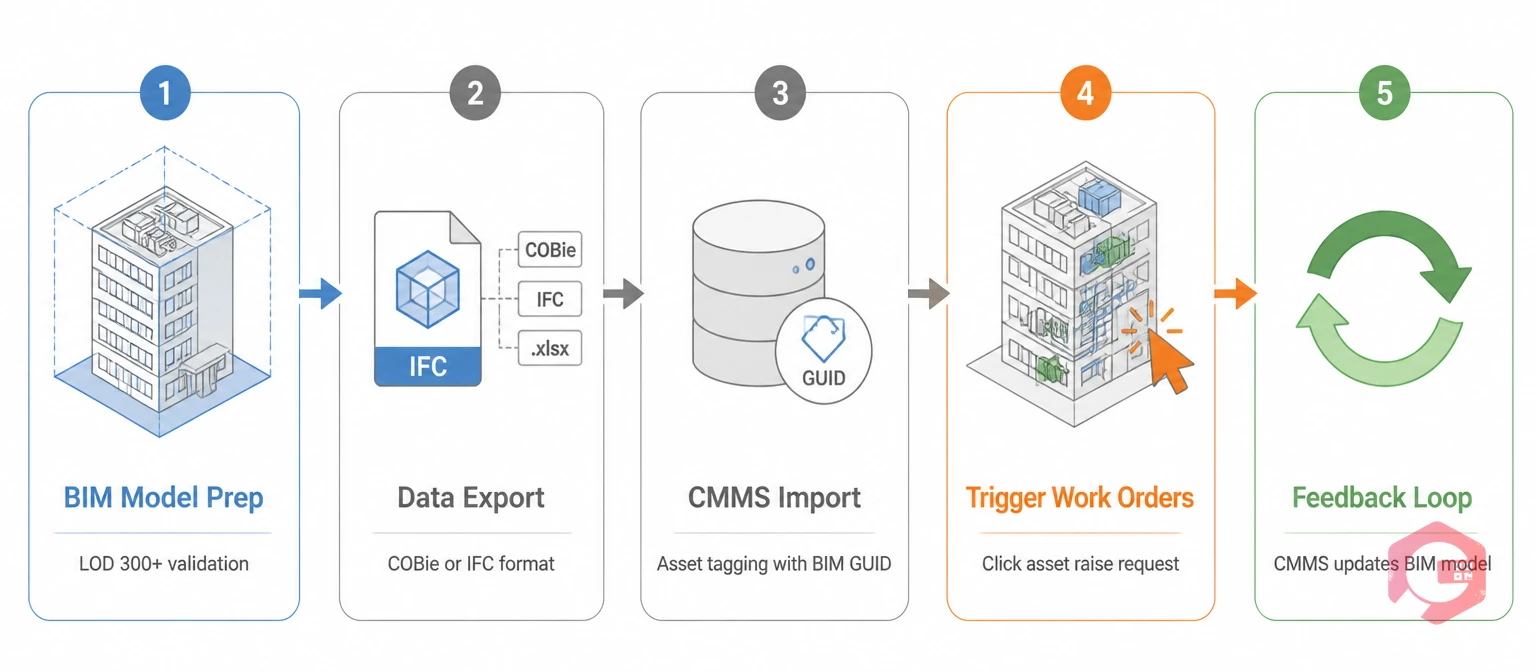
Understanding the theory is one thing. Here is how BIM-to-CMMS data flow works in a real facility team's daily operations.
Before any integration is possible, the BIM model needs to be at a sufficient Level of Development. During this stage, the BIM team validates the parameters the CMMS will need: asset type, manufacturer, model number, capacity, warranty date, and maintenance zone assignment. If any fields are missing or inconsistent — which is common in models handed over from design teams — this is where you clean and standardise them. Data cleansing at this stage prevents import errors later and is almost always the most time-consuming part of the project.
The model is exported as a COBie spreadsheet or IFC file. COBie is the more FM-friendly format — it structures equipment data into clearly labelled sheets that CMMS systems can ingest without custom development. IFC is the more technically complete option and is required by government projects in the UK, Singapore, and EU. The choice between them often depends on what your CMMS natively supports and what the design team's authoring tool can export reliably.
The exported file loads into the CMMS through a structured import. Each asset record gets tagged with its BIM GUID, so the link between the 3D model and the CMMS record is permanent. From this point on, every work order raised against that asset automatically references the correct BIM location, specification data, and document links — without any manual input from the technician.
Once assets are linked, the facility manager or technician clicks any asset in the 3D model viewer and raises a maintenance request directly against it. The work order management system inherits the asset's location, specification data, and maintenance history automatically. The 3D spatial view also makes it easy to group nearby assets into a single work order — reducing travel time between tasks and cutting labour cost per maintenance visit.
The integration is most valuable when it runs in both directions. As technicians complete work orders, the CMMS captures actual condition data, replacement part numbers, and updated service dates. This information feeds back into the BIM model, keeping it accurate as the building ages. Facilities that maintain this feedback loop end up with a self-updating asset register — one that reflects actual condition rather than original design intent.
The terms BIM and digital twin are often used interchangeably in facility management discussions, but they describe very different things. Understanding the distinction matters because it determines what outcomes your integration project can realistically deliver — and what additional investment is needed to go further.
| Attribute | BIM Model | Digital Twin |
|---|---|---|
| Data source | Design and construction data — static after handover unless manually updated | BIM + real-time sensor, IoT, and operational data streams |
| State it reflects | Design intent or as-built condition at a point in time | Live operational state of the physical asset |
| Update frequency | Updated by BIM team on project milestones | Continuous, automated via sensor integration |
| Maintenance use | Asset identification, location, and specification reference | Predictive maintenance triggers based on real condition data |
| Implementation cost | Lower — primarily BIM modelling and data export | Higher — requires IoT sensors, data pipelines, and real-time analytics |
| Prerequisite | LOD 300+ BIM model | BIM CMMS integration as the foundation layer |
BIM CMMS integration is the first step toward a full digital twin. You cannot have a live operational model without first having an accurate static model linked to your maintenance operations. Most facilities are well-served by BIM CMMS integration alone — and can layer in real-time IoT data incrementally once the foundation is in place.

BIM-integrated maintenance produces measurable results across four dimensions that show up directly in your maintenance KPIs.
Asset identification time drops dramatically. In facilities where technicians currently spend 15–30 minutes per callout confirming which asset is involved and where it physically sits, BIM integration reduces that to a 30-second 3D model lookup. For a team handling 40 work orders per week, this alone recovers multiple hours of productive labour daily.
Preventive maintenance compliance improves. When asset specifications and PM schedules are populated from the BIM model rather than manually entered, the data is more complete and accurate from day one. Facilities report that PM completion rates increase by 15–25% in the first year after BIM integration, simply because the correct assets are in the system with the correct service intervals.
Warranty capture improves significantly. In buildings without BIM integration, warranty expiry dates are frequently missed because they live in handover documents that never make it into the CMMS. BIM handover with COBie data transfers warranty dates directly to asset records, protecting the full value of manufacturer coverage through the building's early operational years.
Capital planning becomes more accurate. When maintenance histories accumulate against BIM-linked assets, facility managers can see actual degradation rates versus manufacturer projections. This turns capital replacement planning from a budget estimate into a data-supported forecast — reducing both surprise failures and premature replacements. Cryotos customers using the BI Dashboard alongside structured asset data have reported up to 30% reduction in unplanned downtime.
BIM CMMS integration is powerful, but it is not plug-and-play. Three challenges come up in nearly every implementation.
Most buildings more than 10 years old don't have a BIM model at all — let alone one maintained to LOD 300. In these cases, teams need to create a BIM model from as-built drawings or laser scan data (point clouds). The practical approach: start with your most critical asset classes — HVAC, fire systems, electrical distribution — and build the BIM model in phases rather than trying to digitise everything at once. Even a partial BIM covering 30% of your asset portfolio delivers immediate CMMS integration value.
Not every CMMS accepts IFC or COBie natively. Before committing to any CMMS platform for BIM-linked workflows, verify that it supports COBie import and can store the BIM GUID against each asset record. Cryotos's ERP integration capability and open API make connecting to BIM export pipelines technically feasible without heavy custom development. Standard ETL tools can transform COBie files into Cryotos's import format as a bridge step while native integration is configured.
The biggest barrier to BIM CMMS integration success is human, not technical. Facility teams need training and clear process documentation before they'll trust a 3D model as their primary reference for raising work orders. Change management plans should include hands-on training sessions, champion users embedded in each maintenance team, and a parallel-run transition period where both old and new workflows operate simultaneously. Teams that skip this step consistently report lower adoption rates and underutilised integrations six months after go-live.
Cryotos is built for exactly the kind of asset-rich, spatially complex environments where BIM integration delivers the most value — large commercial facilities, hospitals, campuses, and industrial plants. The platform's structured asset hierarchies align directly with BIM's building → floor → zone → room data model, which means imported BIM data populates into logical CMMS locations without transformation gymnastics.
The facility maintenance software module handles multi-site, multi-floor asset registers with the same workflow used for single-location facilities. Technicians use the mobile app — with full offline mode — to access BIM-sourced asset data, raise work orders, and log service outcomes from anywhere on site. When they're back in network range, everything syncs automatically. Use the facility inspection checklist to validate your asset data completeness before starting a BIM import, ensuring your CMMS records are accurate from the first day of integration.
A BIM model is a static or semi-static 3D representation of a building's design and construction data. A digital twin goes further — it's a BIM model connected to real-time sensor data and operational systems so it reflects the actual live state of the building. BIM CMMS integration is the required first step toward a full digital twin: you cannot have a real-time model without first having an accurate static model linked to your maintenance operations.
No. Existing buildings can have BIM models created from as-built drawings, scan-to-BIM processes using laser scanners, or structured data extraction from legacy CAD files. The operational benefits are the same once the model is linked to the CMMS. For older buildings, start with the highest-criticality asset classes rather than attempting a full-building digitisation in one phase.
LOD 300 is the practical minimum. At LOD 300, assets have accurate geometry and the parameters your CMMS needs: make, model, serial number, capacity, installation date, and warranty expiry. LOD 500 (as-built) is ideal but expensive to achieve across an entire building, and is usually prioritised for critical systems — fire suppression, electrical, and HVAC.
For a mid-sized commercial facility with an existing LOD 300 BIM model, the project typically takes 8–16 weeks from data mapping to go-live. Most of that time goes toward data cleansing — not system configuration. For buildings without an existing BIM model, add 3–6 months for the scan-to-BIM or as-built modelling phase before integration work begins.
Cryotos supports structured asset data import via its open API and bulk import tools. COBie files can be transformed into Cryotos's import format using standard ETL tools or integration middleware. Contact the Cryotos team to discuss your specific BIM export format and the fastest path to a live integration.
Not at all. Any facility with more than 200 managed assets — whether a mid-size office building, a school campus, or a manufacturing plant — benefits from BIM-linked asset data in the CMMS. The ROI from eliminating manual asset lookups, capturing warranty data, and improving PM accuracy applies regardless of building size. Larger facilities see larger absolute savings, but the percentage improvements are consistent across facility types.
If you're ready to move your facility management beyond spreadsheets and manual asset records, schedule a free demo with Cryotos to see how BIM-linked asset data powers faster work orders, better PM compliance, and smarter capital planning across your entire building portfolio.




Cryotos AI predicts failures, automates work orders, and simplifies maintenance—before problems slow you down.



