

When a new commercial building reaches practical completion, the construction team hands over a Building Information Model — a 3D digital representation of every structural element, system, and piece of equipment in the building, complete with specifications, manufacturer data, and spatial coordinates. The facility management team receives it, files it, and continues running maintenance off a folder of PDF drawings, a spreadsheet of asset serial numbers, and the previous site manager's memory of where the second isolation valve actually is.
This is the BIM handover gap — and it exists in the majority of commercial and institutional buildings completed in the last decade. The model has the data. The maintenance operation doesn't know how to access it. According to NBS's BIM adoption research, over 70% of construction projects now deliver a BIM model at handover — but the proportion of FM teams that actively use that model in maintenance planning is a fraction of that figure. The data is there. The operational connection isn't. This guide explains what BIM actually gives a maintenance operation, why the handover gap persists, and how to close it without becoming a BIM specialist.

A PDF drawing tells you where a piece of equipment is on a 2D plan. It doesn't tell you what the equipment is, who made it, when it was installed, how it connects to the systems around it, or where specifically on the fourth floor you'll find it when you're standing in a corridor with a work order in your hand. A Building Information Model does all of those things — and for maintenance operations, that difference is operationally significant.
At its most basic, a BIM model is a spatial database. Every object in the model — every pump, every air handling unit, every valve, every ceiling tile — has attributes attached to it: manufacturer, model number, specification, location coordinates, system membership, installation date. In a well-constructed BIM model delivered to Level of Information Need 3 or above, a facility manager can click on an asset in the model and retrieve the data they'd previously spend two hours hunting through handover documentation to find.
For maintenance specifically, three data types in a BIM model have direct operational value. The first is spatial location — not just "mechanical plant room, Level 2" but precise coordinates within the room, linked to the building geometry. The second is system membership — which assets are connected to which systems, which isolation valve controls which branch circuit, which AHU serves which zones. The third is nameplate data — manufacturer, model, serial number, specification — already captured during construction, already structured, already associated with the correct location in the building.
A CMMS without BIM can store all of this data, but someone has to manually enter it. A CMMS connected to BIM receives it automatically, at handover, for every asset in the building, in structured form. The asset register that would take an FM team three months to build manually is ready on day one of occupation.
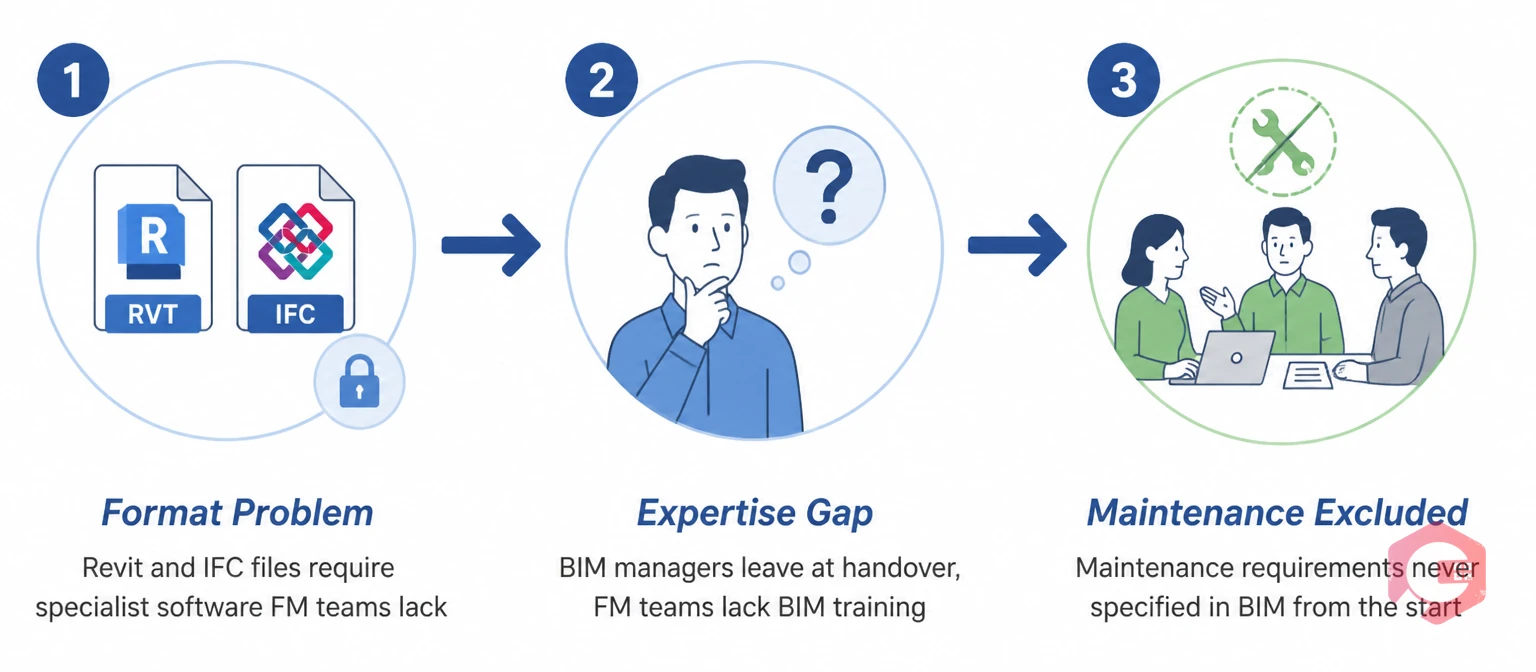
If BIM delivers such clear operational value for maintenance, why does the model sit in a folder rather than driving maintenance planning? Three specific obstacles account for almost every case.
BIM models are typically delivered as Revit files (.rvt), IFC files, or Navisworks models. These formats are designed for construction design and coordination, not for facility management operations. Opening and navigating a Revit model requires software that most FM teams don't have, training that most maintenance professionals haven't received, and computing hardware that the FM helpdesk isn't running. The model is technically accessible — it's just not accessible to the people who need it, in the workflow where they'd use it.
The IFC (Industry Foundation Classes) format was developed by buildingSMART International specifically to address this — it's an open, software-neutral format for BIM data exchange that allows model data to be read by any compliant software without requiring the original authoring application. But IFC files still require a viewer, and more critically, they require someone to map the BIM object data to the asset categories and field structures used in the CMMS. Without that mapping, the data stays in the model rather than flowing into the operational system.
BIM coordination during construction is managed by BIM managers with specialist training. Facility management is managed by facility managers and maintenance engineers with operational training. These are different professional disciplines, and in most organisations they sit in different teams — often different organisations entirely, since the construction team and the FM team are rarely the same entity. The BIM model was built by people who won't be running it. The people running it weren't in the room when it was built.
This expertise gap means that even when an FM team wants to use the BIM model, there's no obvious person to turn to who can explain what data is in the model, whether it's accurate, how to extract specific asset information, and how to keep the model current as assets are replaced or modified over the building's operational life.
The deepest root of the BIM handover gap is that maintenance requirements are rarely incorporated into BIM model specifications during the design and construction phase. The model is built to the design team's Level of Information Need — which typically covers geometry, structure, and building services coordination. The maintenance-relevant data — PM schedules, spare parts references, service access requirements, isolation procedures — is either absent from the model or held in separate documentation that was never linked to the BIM objects.
According to the BS EN ISO 19650 standard for managing information over the whole life cycle of built assets, the information requirements for operational maintenance should be defined at the start of a construction project — not at handover. When that conversation doesn't happen, the model that arrives at practical completion is useful for design coordination but largely absent the maintenance-specific data that would make it operationally valuable.

Despite the handover gap, even a partial BIM integration delivers immediate operational value in three areas that matter to every maintenance manager.
When a fault is raised against a specific asset — "AHU-04, Level 3, cooling coil fault" — the technician dispatched to the job needs to find that asset. In a building without spatial asset data, finding the asset consumes part of the job time: checking a PDF plan, asking the building manager, looking for a label that may or may not match the work order reference. In a building with BIM-linked asset data, the work order carries the asset's precise spatial location — floor, zone, room, and coordinates within the room. The technician arrives and goes directly to the asset.
For complex commercial buildings with multiple plant rooms, false ceilings, and interstitial maintenance spaces, this spatial precision isn't a convenience — it's a meaningful reduction in job time that compounds across every reactive and planned work order in the building. A 15-minute location saving per job across 50 maintenance visits per week is a substantial recovery of productive technician time over a year.
A work order for a failed pump requires the attending technician to know the pump's model number before they can order the correct replacement seal. In a building without structured asset data, that information might be on a nameplate that's difficult to read in a confined plant room, in a paper maintenance file that's in the FM office, or simply unavailable. In a CMMS populated from BIM data, the pump's manufacturer, model number, and specification are in the work order. The technician knows what part to order before they leave the depot.
This data completeness — having correct asset information at the point of work — reduces the frequency of aborted jobs (where the technician arrives but can't complete the repair without a part they didn't know they'd need), reduces the purchasing errors that come from ordering replacement parts from memory, and provides the baseline data for spare parts stocking decisions in the inventory management module.
A maintenance history attached to an asset in a CMMS is valuable. A maintenance history that can be visualised spatially in a BIM model is more valuable still. When an FM manager can see — on a floor plan — which assets have the most reactive work orders, which zones generate the most maintenance demand, and where the building's highest-cost assets are concentrated, they can allocate PM resource intelligently rather than proportionally.
A cluster of reactive work orders concentrated on a specific section of a floor isn't just six individual fault events — it may be a systemic issue with a specific AHU, a water ingress problem affecting multiple assets, or an access restriction that causes maintenance to be repeatedly deferred in that area. Spatial visualisation makes that pattern visible. Asset-by-asset work order history doesn't.
COBie — Construction Operations Building Information Exchange — is the data standard that translates a BIM model's asset data into a structured format that a CMMS can import. Rather than requiring the CMMS to understand BIM geometry, COBie extracts the maintenance-relevant data from the model — asset type, location, manufacturer, model, serial number, PM requirements — into a spreadsheet-like format (typically delivered as an Excel file) that maps directly to CMMS asset register fields.
COBie was developed by the US Army Corps of Engineers and has been adopted as a UK Government requirement for public sector construction projects under the BIM Level 2 mandate. Its practical significance for FM teams is that it separates the "use the BIM geometry" challenge from the "use the BIM data" opportunity. You don't need to navigate a 3D model to benefit from BIM data in your maintenance operation — you need a COBie export from the model and a CMMS that can import it.
A COBie import into a CMMS at building handover can populate the entire asset register — every maintainable asset, with its location, specification, and system membership — in a fraction of the time it would take to manually create those records. The asset register that's usually the most time-consuming part of a new FM contract mobilisation becomes a structured data import rather than a manual data-entry project.
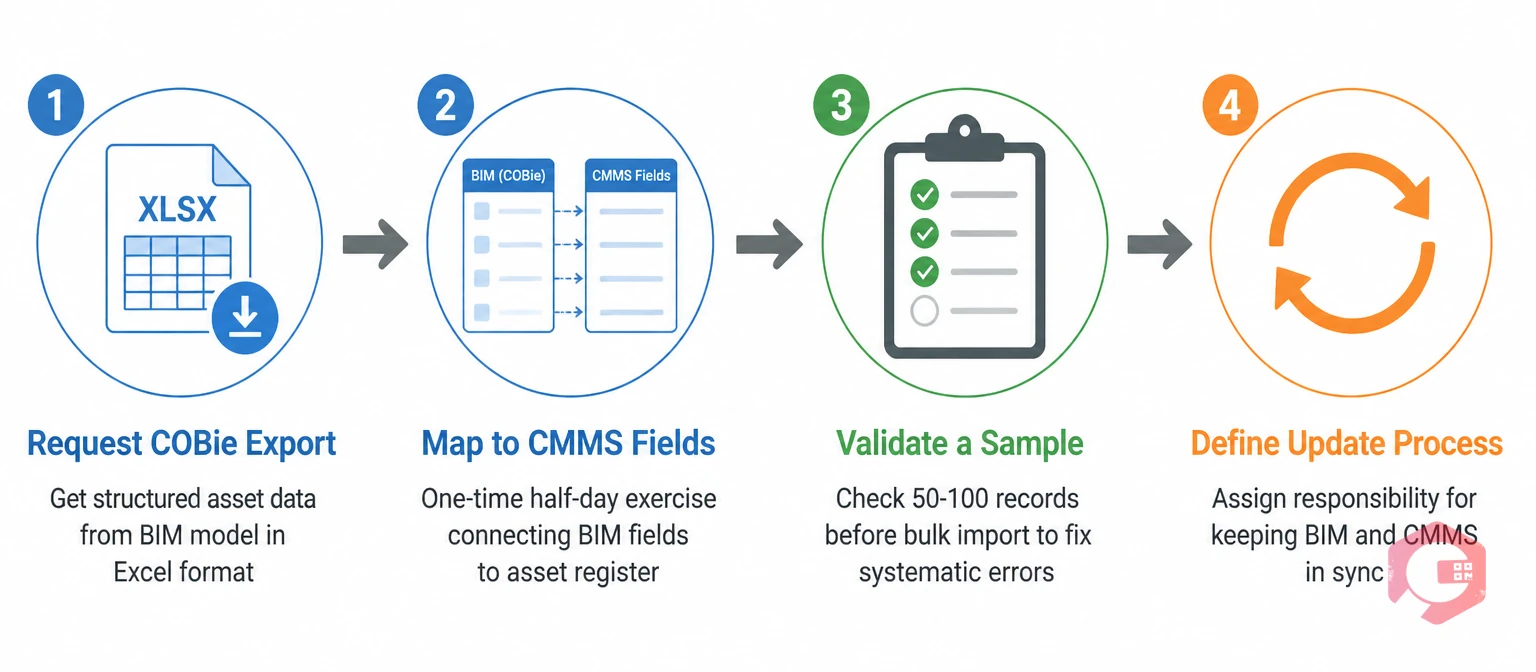
Most FM teams don't need to become BIM managers to extract operational value from a BIM model. The practical entry points are simpler than the technical complexity of BIM might suggest. These four steps work whether you're starting a new FM contract with a fresh handover or trying to extract value from a model that's been sitting in a folder for two years.
Cryotos CMMS is built to receive structured asset data from BIM and COBie exports and integrate it directly into the maintenance workflow — making the spatial and specification data from the BIM model operationally accessible to every technician and maintenance manager who needs it.
Key capabilities for BIM-connected maintenance in Cryotos:
FM teams that connect BIM handover data to Cryotos at the start of a contract consistently report faster mobilisation, lower time-to-competence for new technicians, and cleaner asset registers than those that build the register manually from paper documentation. If your building's BIM model has been sitting unused since handover, Cryotos CMMS gives your maintenance operation the practical entry point to start using it today — without a BIM specialist and without a multi-month implementation project.
BIM-integrated maintenance is the practice of using data from a Building Information Model — asset locations, specifications, system memberships, and nameplate data — to populate and enrich a CMMS asset register, enabling spatially-precise work order dispatch, accurate PM scheduling from structured asset data, and spatial analysis of maintenance patterns across a building. It doesn't require facility managers to work directly in BIM authoring tools; the operational value comes from the data in the model, which can be extracted via COBie exports and imported into a CMMS.
COBie (Construction Operations Building Information Exchange) is a data standard that extracts the maintenance-relevant data from a BIM model — asset types, locations, manufacturers, models, serial numbers, and PM requirements — into a structured spreadsheet format that can be imported into a CMMS. It's the practical bridge between the BIM model (which is designed for construction) and the CMMS (which is designed for operations). A COBie import at building handover can populate a full asset register in hours rather than months.
If the building predates BIM adoption or wasn't delivered with a model, you can still achieve structured asset data through a survey and asset tagging exercise — physically visiting and recording every maintainable asset, its location, and its specification data. This is slower than a COBie import but produces the same outcome: a structured CMMS asset register with accurate spatial and specification data. Some FM companies commission a retrospective BIM survey for large or complex buildings where the spatial intelligence of the model justifies the survey cost.
BIM data accuracy for maintenance depends on the Level of Information Need (LoIN) specified for the original model. Models built to LoIN 3 or above typically contain complete nameplate and specification data for maintained assets. Models built primarily for design coordination may have geometry without detailed asset specifications. Before importing COBie data into a CMMS, validate a sample of records against the physical assets — discrepancies in location data or specification fields are common in models that weren't delivered with maintenance use in mind.
Not necessarily. If you're working from a COBie export, you need a CMMS that supports structured asset data import — which Cryotos does. If you want to visualise work orders spatially within the 3D model, you need a BIM viewer, but this is supplementary to the operational workflow rather than required for it. The majority of BIM's maintenance value comes from the asset data, not the geometry — and that data is accessible through COBie without requiring any BIM-specific software in the maintenance workflow.
Most commercial and institutional buildings built or refurbished in the last decade contain a detailed digital record of every maintainable asset — its location, specification, and system membership — sitting in a BIM model that the FM team has never opened. The maintenance programme is running without that data. The technicians are spending job time locating assets that the model could pinpoint in seconds. The asset register was built manually from incomplete documentation when the full dataset was available at handover.
Closing the BIM handover gap doesn't require a dedicated BIM manager or a multi-year digital transformation programme. It requires a COBie export, a CMMS that can receive it, and a mapping exercise that connects the BIM data structure to the CMMS asset register. Done once, it creates an asset register that's accurate, complete, and spatially organised from day one — and a maintenance programme that knows its building in the same detail that the construction team did.
If your building has a BIM model that your maintenance operation has never touched, book a free Cryotos demo to see how BIM and COBie asset data imports work in practice — and what your asset register looks like when it's populated from the building's own digital record rather than built from scratch.




Cryotos AI predicts failures, automates work orders, and simplifies maintenance—before problems slow you down.



