

BIM-integrated maintenance connects your 3D building model directly to your maintenance management system — so when you plan a chiller overhaul or respond to a pipe burst, the asset's full specification, location, service history, and related systems are visible in one place. Building Information Modelling (BIM) gives facility managers a precise digital map of every piece of equipment inside a structure, including where it sits, how it connects to other systems, and what the manufacturer requires for upkeep. According to a Whole Building Design Guide study on BIM in facilities management, organizations that integrate BIM data with operational maintenance systems reduce equipment-related response times by up to 30% and cut unplanned downtime significantly in the first year.
This guide walks facility managers through how to extract value from BIM for day-to-day equipment upkeep — from building the asset registry to creating PM schedules and linking 3D model data to a facility management software platform.
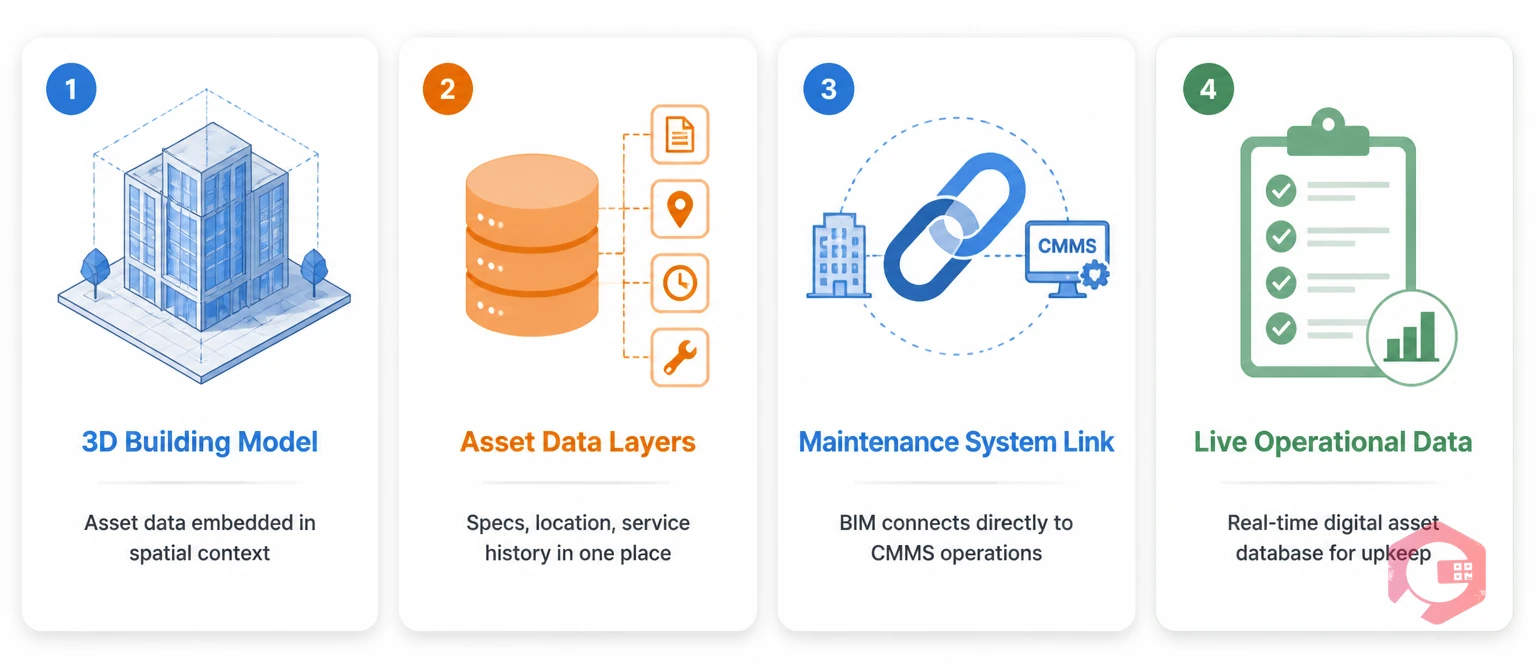
BIM-integrated maintenance is the practice of using the data embedded in a building's 3D model — asset IDs, equipment specs, spatial location, system relationships, and manufacturer data — to drive maintenance planning, scheduling, and execution. Most BIM files created during construction contain far more than geometry. They hold information layers: equipment make and model, rated capacity, installation date, warranty period, and often the recommended service intervals from the OEM.
Traditional facility maintenance treats that data as construction handover documentation that gets filed and forgotten. BIM-integrated maintenance treats it as a living operational database. When a technician needs to service a rooftop air handling unit, instead of searching for a paper manual or tracing ductwork on an old drawing, they pull up the BIM model, click the asset, and see every relevant detail — including which downstream zones depend on it and which other equipment shares the same electrical circuit.
The key distinction from generic asset tracking is spatial context. A BIM model tells you not just what an asset is, but exactly where it sits within the building fabric — floor level, room, zone, relationship to structural elements — which matters enormously when coordinating access, planning shutdowns, or responding to a fault that affects multiple interconnected systems.
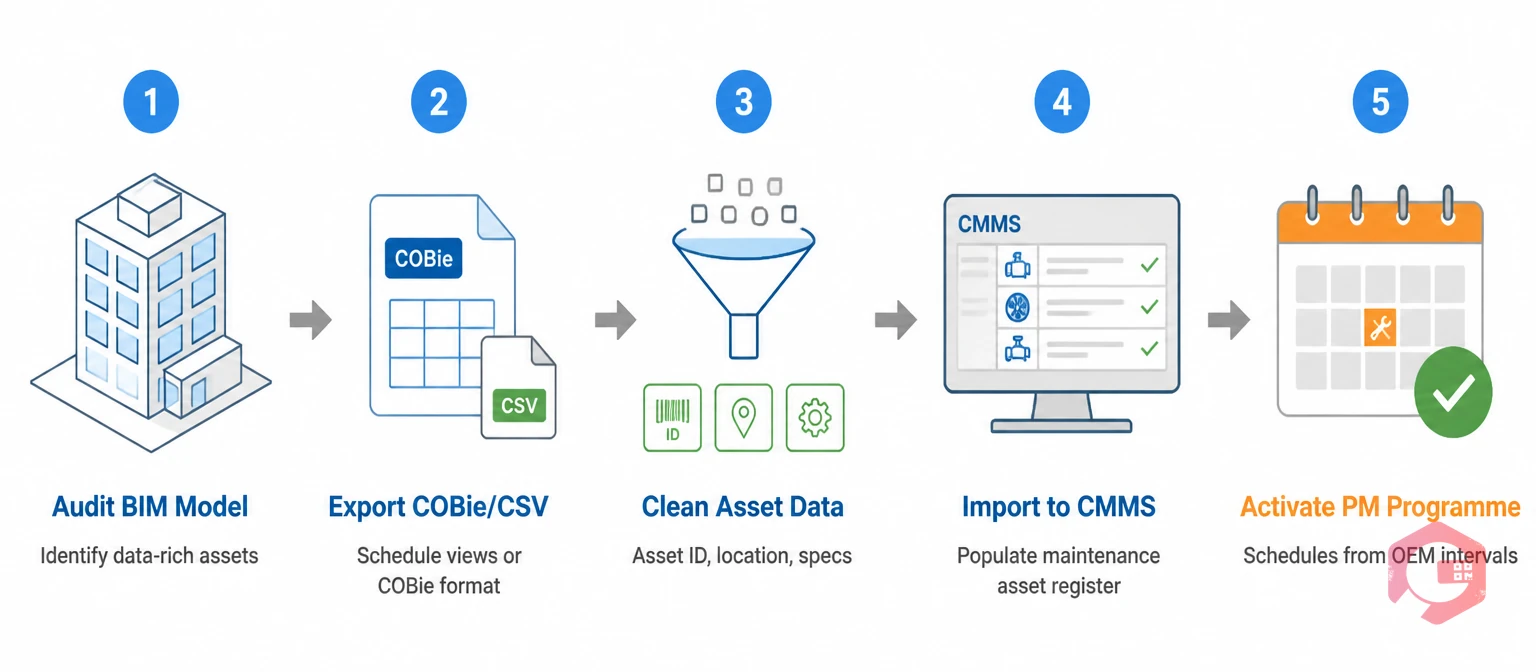
The first practical step is pulling usable asset data out of the BIM model and into your maintenance system. Most BIM files use either IFC (Industry Foundation Classes) or proprietary formats like Autodesk Revit. The process of extraction follows a consistent pattern regardless of format.
Start by auditing what data actually exists in the model. Many handover BIM files are geometry-rich but data-sparse — the 3D model is accurate, but the property fields (manufacturer, model number, warranty) are blank. Work with your construction team or BIM manager to identify which assets have complete data sets and which need to be populated before the model becomes useful for maintenance. Equipment categories typically well-documented in BIM include HVAC systems, electrical panels, plumbing risers, elevators, fire suppression equipment, and emergency systems.
Once you know what data exists, export asset lists from the BIM authoring tool using either built-in schedule views (in Revit, a mechanical equipment schedule exports every MEP asset with its properties as a spreadsheet) or through COBie (Construction Operations Building Information Exchange) format, which is specifically designed for facilities management handover. COBie produces a structured spreadsheet of component data that imports directly into most maintenance management software platforms.
The output you are looking for is a clean asset register with at minimum: unique asset ID, equipment type, location (floor/zone/room), make and model, installation date, warranty expiry, and service interval. That register becomes the foundation of your BIM-driven PM programme.

One of the highest-value applications of BIM in maintenance is using the model's equipment data to build preventive maintenance schedules that are grounded in actual manufacturer recommendations rather than generic industry defaults.
In a well-executed BIM handover, the model will include COBie properties for each piece of equipment listing the recommended maintenance intervals — for example, a fan coil unit might carry a property field stating "filter replacement: quarterly, coil cleaning: annually, full overhaul: every 5 years." When you import that COBie data into a CMMS, those intervals become the basis of your PM calendar automatically, mapped to the specific asset ID and location pulled from the model.
For equipment where the BIM data is incomplete, use the model's make and model fields to look up OEM maintenance requirements and backfill them before creating schedules. The key advantage over traditional methods is that the asset linkage is already done — you are not trying to match a paper service card to an equipment number on a spreadsheet. The BIM ID ties everything together.
Spatial data from BIM also makes schedule sequencing smarter. If a plant room contains a boiler, a pressurisation unit, and a buffer vessel that all require annual service, a BIM-aware maintenance planner can see that all three share the same confined access route and schedule them in the same visit window — something that only emerges clearly when you can see the spatial layout. This kind of coordination reduces total planned downtime and technician travel time within the building.
The operational payoff of BIM integration is fastest in fault response. When an alarm fires or a tenant reports equipment failure, a technician with access to the BIM model can identify the faulty asset by clicking it in the 3D view, see its full specification and maintenance history, understand which connected systems will be affected by a shutdown, and navigate to its precise location — all before leaving the desk.
In a BIM-to-CMMS workflow, a work order raised against an asset in the maintenance system carries the BIM object ID. When the technician opens the work order on mobile, they can access the 3D model viewer linked to that specific asset, pull up the manufacturer documentation stored against it, and see a spatial view of nearby connected equipment. This is especially valuable in complex buildings where mechanical plant rooms contain dozens of interconnected components and misidentifying an asset wastes significant repair time.
Cryotos's work order management software supports asset linkage through unique IDs and QR codes, allowing technicians to scan a physical tag on the equipment and instantly access the linked digital record — including any BIM-derived specification data stored in the asset profile. The mobile app works offline for technicians in basement plant rooms or areas with poor connectivity, syncing all updates when they return to coverage.
Regulated building types — hospitals, schools, commercial high-rises, data centres — face statutory inspection requirements for fire systems, elevators, pressure vessels, and more. BIM integration substantially reduces the administrative burden of compliance by placing all relevant documentation in one place.
When a compliance inspection is due, the BIM model provides the asset record: installation date, specification, previous inspection outcomes, and maintenance history. In a CMMS linked to BIM data, inspection checklists are generated automatically from the asset's required inspection schedule and the technician completes them digitally — producing a timestamped, audit-ready record stored against the BIM asset ID.
The facility inspection checklist can be configured to match statutory requirements for each equipment type, with mandatory sign-off fields that prevent closure without completion. For complex assets like sprinkler systems or emergency generators that span multiple BIM objects, the inspection scope can group those linked assets into a single work order covering all required checks in one visit.
Documentation stored against BIM asset records also supports warranty management. When equipment under warranty fails, the BIM record provides the installation date, warranty terms, and supplier contact data without any manual searching — which is exactly when warranty lookups are most valuable and most time-pressured.
Facility managers often ask whether BIM-to-CMMS integration requires expensive middleware or a custom development project. The answer depends on how deep the integration needs to go. There are three practical approaches, each suited to different budgets and technical environments.
The lightest approach is a data import at handover. Export COBie or a CSV from the BIM model, clean it up, and import it into your CMMS as the initial asset register. This is a one-time exercise that populates your maintenance system with BIM-quality data without any ongoing connection. It works well for buildings where the model will not be actively updated after construction.
A more connected approach uses the BIM viewer as a front end to the CMMS. Platforms like Autodesk BIM 360 or Bentley AssetWise can link model objects to maintenance records, so clicking an asset in the 3D view opens its work order history in the CMMS. This requires API integration between the two systems but is increasingly supported by both BIM platforms and modern CMMS vendors through standard connectors.
The most sophisticated approach involves a common data environment (CDE) that acts as the single source of truth for both model data and maintenance records, with both systems reading and writing to it. This is typically only practical for large facilities with dedicated BIM management capability and is more common in hospitals, airports, and major commercial real estate portfolios than in standard commercial buildings.
For most facility managers, the COBie import approach gets 80% of the value at a fraction of the cost. The key is ensuring the BIM model is as complete as possible at handover — which means specifying BIM data requirements in the construction contract, not as an afterthought at practical completion.
Cryotos gives facility maintenance teams the digital backbone to put BIM asset data to work. Every asset imported from a BIM or COBie export becomes a live record in the Cryotos asset register — carrying its location, specification, and service requirements forward into the operational maintenance programme.
From that asset register, Cryotos automatically generates preventive maintenance schedules using the intervals derived from BIM data, assigns work orders to technicians, and tracks completion against each asset's history. Asset tracking via QR codes means technicians can scan a physical tag on equipment and immediately see its BIM-linked specification, last service, and any open work orders — on mobile, even offline.
The BI Dashboard gives facilities managers a live view of PM compliance, downtime by equipment type, and maintenance cost per asset — all the performance data needed to manage a BIM-driven programme and report to building owners. For compliance, every inspection and maintenance event is timestamped, signed off digitally, and stored permanently against the asset record.
Maintenance teams using Cryotos report a 30% reduction in unplanned downtime and 25% faster repair times. For facility managers using BIM to plan equipment upkeep, those gains come from having the right asset data in the hands of every technician, every time. Visit cryotos.com to see how Cryotos supports BIM-integrated maintenance programmes.
The most valuable BIM data for maintenance is the COBie properties attached to mechanical, electrical, and plumbing assets: equipment type, make and model, installation date, warranty period, service intervals, and location (floor, room, zone). Equipment specification sheets and OEM documentation attached to BIM objects also save significant time when technicians need to diagnose faults or order replacement parts.
A BIM model is the ideal starting point, but the underlying principles apply whenever you have structured asset data linked to spatial location information. If you have accurate as-built drawings and a complete asset register, you can replicate many of the benefits by populating those details into a CMMS and tagging equipment with QR codes. The BIM model makes the spatial context richer and the initial data population faster.
Specify a BIM Execution Plan (BEP) at the start of the project that defines required COBie properties for each asset category. Include an Employer's Information Requirements (EIR) document detailing exactly which fields must be populated by handover. Appoint a BIM coordinator to validate data completeness before practical completion. Without these contractual requirements in place, handover BIM models frequently have complete geometry but empty property fields that are useless for maintenance planning.
Yes — the COBie import approach requires no specialist BIM software or ongoing model management. A small team benefits most from the initial asset register population (which eliminates weeks of manual data gathering at building takeover) and the PM schedule creation from embedded OEM intervals. After import, the maintenance system handles the ongoing programme without any further BIM interaction required.
BIM-linked asset records give inspectors and compliance auditors instant access to installation dates, warranty documentation, and complete service histories for any piece of equipment. For fire systems, pressure vessels, and elevators that require statutory annual inspections, the BIM asset record becomes the single reference point for all compliance documentation — eliminating the paper file searches that delay audit responses in traditionally managed buildings.



Cryotos AI predicts failures, automates work orders, and simplifies maintenance—before problems slow you down.



