

A BOM in manufacturing is the complete list of every raw material, component, sub-assembly, and consumable needed to build a finished product. It defines what goes in, how much, and in what build order. Without an accurate BOM, production teams cannot reliably plan materials, schedule work, or control costs.
Teams using spreadsheet BOMs face the same recurring problems: part number errors, version mismatches, and materials shortages that stop production. This guide covers the five types of BOM in manufacturing, with real examples and actionable best practices — including how a CMMS connects BOM management to manufacturing maintenance.
Key Takeaways

A BOM in manufacturing is a structured document listing every component, raw material, and sub-assembly required to build a specific product. It defines quantities, parent-child relationships, and when each item is needed in the build sequence.
A BOM in manufacturing connects design, procurement, scheduling, and inventory management into one source of truth. When a production order is created, the BOM tells the materials team what to order. It tells the scheduler when to stage parts. It tells the assembler what goes where. The bill of materials concept started in discrete manufacturing but now covers maintenance, services, and process industries.
A BOM in manufacturing is not the same as a parts list. A parts list is a flat catalogue of what you have in the storeroom. A BOM is tied to a specific product. It defines build quantities, component relationships, and assembly order. A parts list tells you what you have. A BOM tells you what you need to build something specific.
Confusing the two leads to shortages. Teams order based on stock on hand — not on the actual demand for the next production run.
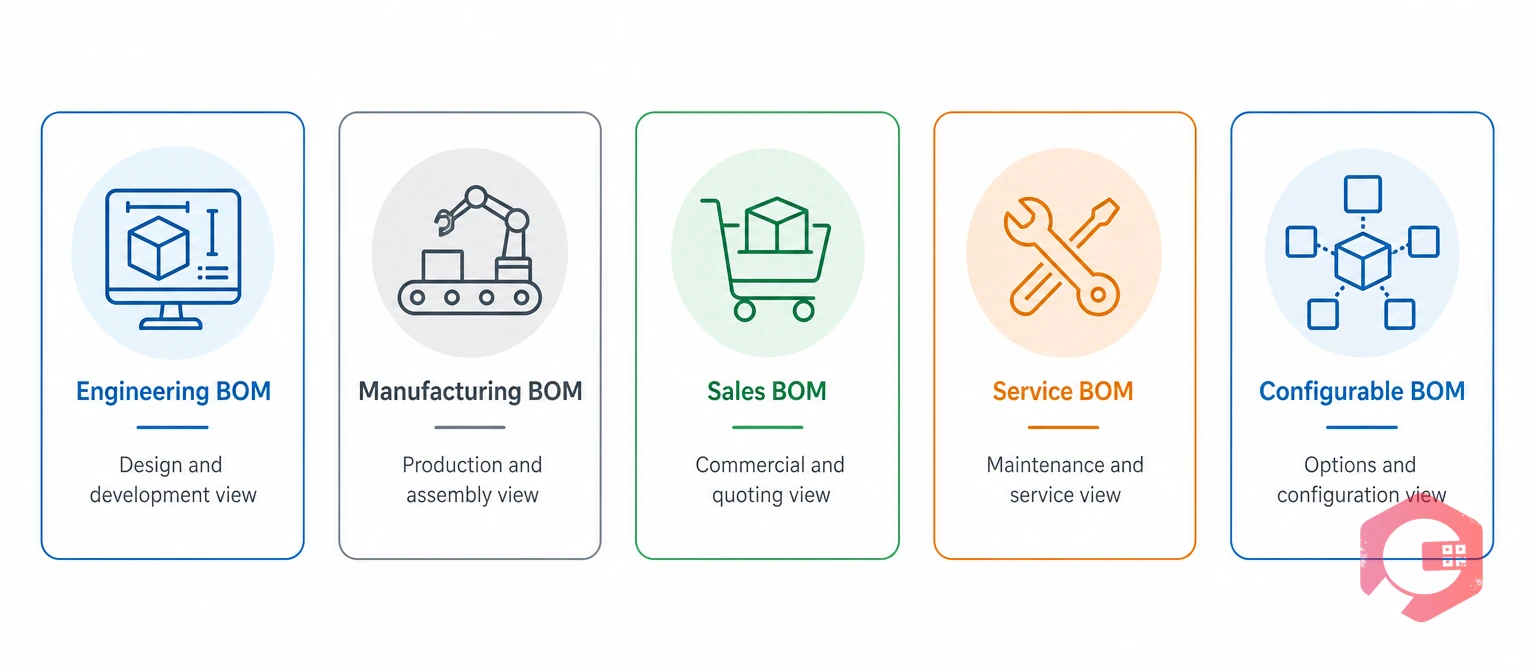
Manufacturing uses five types of BOM in manufacturing, each designed for a specific lifecycle stage. Using the wrong type causes EBOM-to-MBOM misalignment. That is one of the most common causes of production errors and shop floor delays.
An Engineering BOM (EBOM) is the design-based BOM that reflects the product as designed. It lists components and materials based on engineering drawings. The EBOM is managed in a PLM system. It defines design intent — not always how the product gets built on the floor.
A Manufacturing BOM (MBOM) is the production BOM that reflects how a product is actually built on the shop floor. It adds details the EBOM omits: sub-assemblies, tooling and fixtures, consumables like adhesives, and routing steps. For any production run, the MBOM is the governing document.
A Sales BOM (SBOM) defines a product as sold — a bundle where the parent is the saleable item and the children are the components shipped with it. SBOMs are common in make-to-order environments. Each customer option selection pulls different components into the BOM automatically.
A Service BOM lists the spare parts, consumables, and tools needed to maintain or repair a specific asset. In manufacturing, Service BOMs link to equipment records in a CMMS. When a work order is generated, the system already knows which parts the repair needs. Accurate Service BOMs reduce first-time fix failures — technicians arrive with the right parts already confirmed.
A Configurable BOM manages a product family with multiple variants using rules that select which components apply to each configuration. One Configurable BOM generates the correct variant on demand. This is standard practice in automotive and industrial equipment manufacturing — no separate BOM per variant needed.
BOM-driven production gaps affect equipment output in measurable ways. Use the OEE calculator to quantify how BOM inaccuracies translate into lost equipment effectiveness across production shifts.
The EBOM-to-MBOM transition is one of the most critical handoffs in manufacturing. Misalignments between the two cause production errors and costly rework. The table below shows where each type applies and what it includes.
| Attribute | Engineering BOM (EBOM) | Manufacturing BOM (MBOM) |
|---|---|---|
| Owner | Engineering / R&D | Manufacturing Engineering |
| Purpose | Design intent and specifications | How to build the product on the floor |
| Managed in | PLM system | ERP / MES system |
| Includes process steps | No | Yes — routing, sequence, tooling |
| Consumables included | No (or minimal) | Yes — adhesives, lubricants, cleaning agents |
| Reflects substitutions | No — design-specified only | Yes — approved supplier alternates included |
| Used by | Design, initial procurement | Production planning, shop floor, scheduling |
When engineering updates the EBOM, manufacturing engineering must review the production impact. They update the MBOM before the change takes effect. Use a tracked Engineering Change Order (ECO) process — not email — to manage this handoff.
The structure of a BOM in manufacturing varies significantly by sector. Industry rules, product complexity, and traceability needs all shape how BOMs are built. Two examples show the contrast clearly.
An automotive MBOM for a vehicle door assembly spans 80 to 120 line items across four levels. Level 1 holds the door shell, window mechanism, door lock, and wiring harness. Level 2 breaks the window mechanism into motor, regulator channel, glass panel, and seal. Each line item lists part number, revision level, quantity per assembly, and approved supplier codes.
IATF 16949 quality rules make change traceability mandatory. Every part revision on a safety component must link to the design change that approved it. Without BOM version control, passing a quality audit is not possible.
A pharma BOM for a tablet lists the active ingredient, binders, coating materials, and packaging items. Each entry includes the ingredient grade, approved supplier, and test requirements. The BOM for a 500mg tablet links the active ingredient, binder, lubricant, coating, and packaging to one controlled document.
Under ISO quality management standards and FDA 21 CFR Part 211, every BOM item must trace to the batch record. BOM accuracy here is a legal requirement — not just an operational preference.
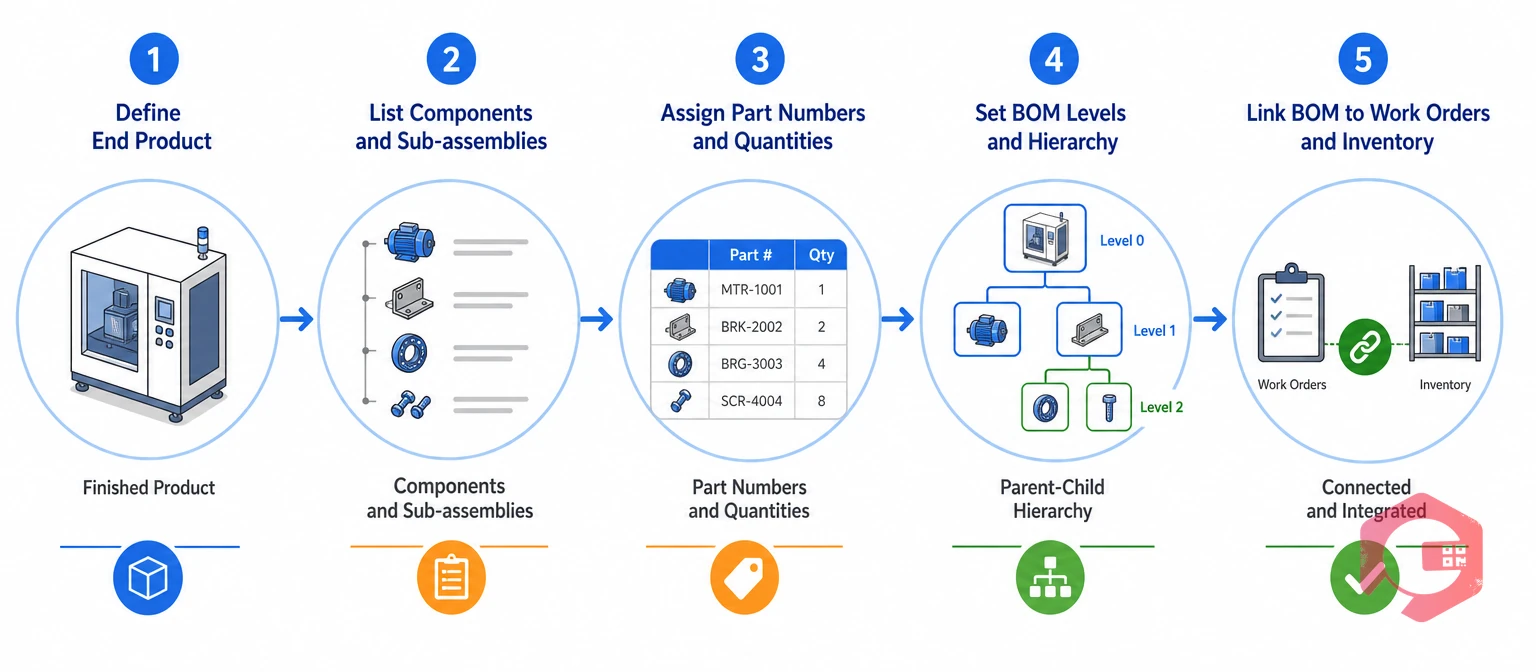
Creating a reliable BOM in manufacturing follows five steps. The discipline is in completeness, correct hierarchy, and version control from the very beginning.
BOM accuracy in manufacturing does not happen on its own. It requires process discipline applied across engineering, procurement, and production. Teams that maintain reliable BOMs follow a closed-cycle approach — not a one-time setup.
The BOM Accuracy Loop is the framework that keeps BOMs in manufacturing reliable over time:
The most common BOM failure is keeping the same BOM in multiple places. An engineering file, a production spreadsheet, and a purchasing database all drift apart over time. Set up one system where the BOM lives. When a part number changes, it updates everywhere — not through a manual campaign across disconnected files.
Every released BOM needs a revision level and an effective date. Production runs must reference a specific revision. If a quality issue comes up, you need to know exactly which BOM version was active and what it specified. Use the ECO process. Document the reason, get approvals, then release the updated BOM before it takes effect.
Before releasing a production order, run a BOM explosion to calculate net material needs. Compare them against available stock. Any shortfall found at this stage can be addressed through planned procurement. That is far less disruptive than a mid-production shortage. Connecting BOM management to spare parts inventory tracking gives maintenance the same validation for every job before dispatch.
A Computerized Maintenance Management System (CMMS) extends BOM management beyond production into equipment maintenance. ERP and PLM systems handle production BOMs. A CMMS handles Service BOMs — the parts and consumables that keep production machinery running at spec.
According to SMRP maintenance benchmarks, incorrect or incomplete parts data is a top cause of first-time fix failures. When a work order uses an outdated Service BOM, technicians pull the wrong parts. Repair windows stretch. Production stops longer than planned.
Cryotos CMMS connects Service BOM management to preventive maintenance scheduling. PM work orders carry the correct parts list for each asset's service interval. The system checks the BOM against current stock levels. It generates replenishment requests for items below minimum quantity. This shifts procurement from reactive emergency buying to planned purchasing. Maintenance teams using Cryotos report up to 30% reduction in unplanned downtime and 25% faster repair turnaround. Those results trace directly to accurate Service BOMs working as an integrated part of the maintenance system.
A BOM in manufacturing is the complete list of every component, raw material, sub-assembly, and consumable required to produce a specific product. It connects design, procurement, scheduling, and inventory into one source of truth. Without an accurate BOM, production teams cannot reliably order materials, schedule runs, or control costs. Every downstream step from procurement to quality inspection depends on BOM accuracy.
A single-level BOM lists a finished product and its direct components only. Sub-assemblies appear as single line items with no further breakdown. A multi-level BOM is hierarchical. It breaks every sub-assembly into its own child components across multiple levels. Simple assemblies can use a single-level BOM. Complex products with intermediate build stages need multi-level BOMs so ERP systems can calculate material requirements at every assembly level.
Manufacturing uses five BOM types. These are EBOM (design), MBOM (production floor), SBOM (sales), Service BOM (maintenance), and Configurable BOM (multi-variant products). Each type addresses a specific operational context. Using the wrong BOM type for a given function is one of the most common causes of EBOM-to-MBOM errors and production planning failures on the shop floor.
A CMMS manages Service BOMs by linking spare parts directly to asset records. It pulls the correct parts list when a work order is created. It checks part availability against live inventory before dispatching technicians. It triggers reorder alerts for below-minimum stock. When work orders close, actual parts consumed are recorded. This creates a feedback loop that keeps Service BOMs accurate over time — without manual spreadsheet maintenance.
Managing BOM in manufacturing across assets, work orders, and inventory is far easier with the right system. Schedule a free demo to see how Cryotos connects BOM management to preventive maintenance, work orders, and inventory in one platform.


Cryotos AI predicts failures, automates work orders, and simplifies maintenance—before problems slow you down.



