Child asset maintenance history is the record of every completed and open work order on the components that sit under a parent asset, and a parent asset scan should show it. When a technician scans a machine's QR code, the first question is what has gone wrong with this machine before. If the scan returns only the work logged against the parent, the answer is incomplete.
Most repairs happen on components such as a motor, a gearbox or a belt, so most of the useful history sits on child assets. A Computerized Maintenance Management System that rolls that history up to the parent puts the full story in front of the technician in one scan. This guide explains why that matters, what it helps with and how Cryotos shows it.
Key Takeaways

A parent asset is a machine or system that contains smaller maintainable parts. A conveyor line is a parent asset, for example. A child asset is a maintainable component that sits under a parent in the asset hierarchy. The drive motor, gearbox and belt on that conveyor are child assets.
Child asset maintenance history is every work order logged against those components. It covers inspections, repairs, part replacements and tasks still waiting. Each record carries a status, such as closed, work in progress or open, and a date.
The ISO 55000 family of asset management standards asks organizations to manage asset information across the whole asset lifecycle. A parent view that hides component records leaves a gap in that information. A parent record is complete only when its children's records are part of it.
Parent-only history hides the real problem because technicians log most work on components, so the parent record looks quieter than the machine is.
Here is an illustrative example. A packaging line stops twice in one month, and the parent record shows two short entries. The gearbox, a child asset, has an open oil-leak work order from three weeks ago. The drive motor was rewound last quarter. A technician who sees only the parent starts from zero, while one who sees child history starts at the gearbox.
A parent-only scan usually misses four kinds of records:
Hidden component history turns a quick diagnosis into a guess.
The table shows what changes for technicians, supervisors and auditors when a parent scan includes child assets.
| Area | Parent-Only History | Parent and Child History |
|---|---|---|
| What the scan shows | Work orders logged on the parent only. | Work orders on the parent and every child asset. |
| Open work | Open work on the parent only. | Open and in-progress work on components too. |
| Repeat faults | Hard to see, because records sit on separate components. | Visible in one list, sorted by date. |
| Shift handover | Needs a call or a note to pass on context. | Earlier repairs are already on screen. |
| Cost and downtime review | Understates the machine's maintenance load. | Shows the full maintenance load of the machine. |
| Audit trail | Gaps between machine and component records. | One trail from machine to component. |
Both views stay useful, so a well-designed screen lets the technician filter down to the parent's own records when needed.
To see how a scan opens an asset record, explore Cryotos asset QR code scanning.
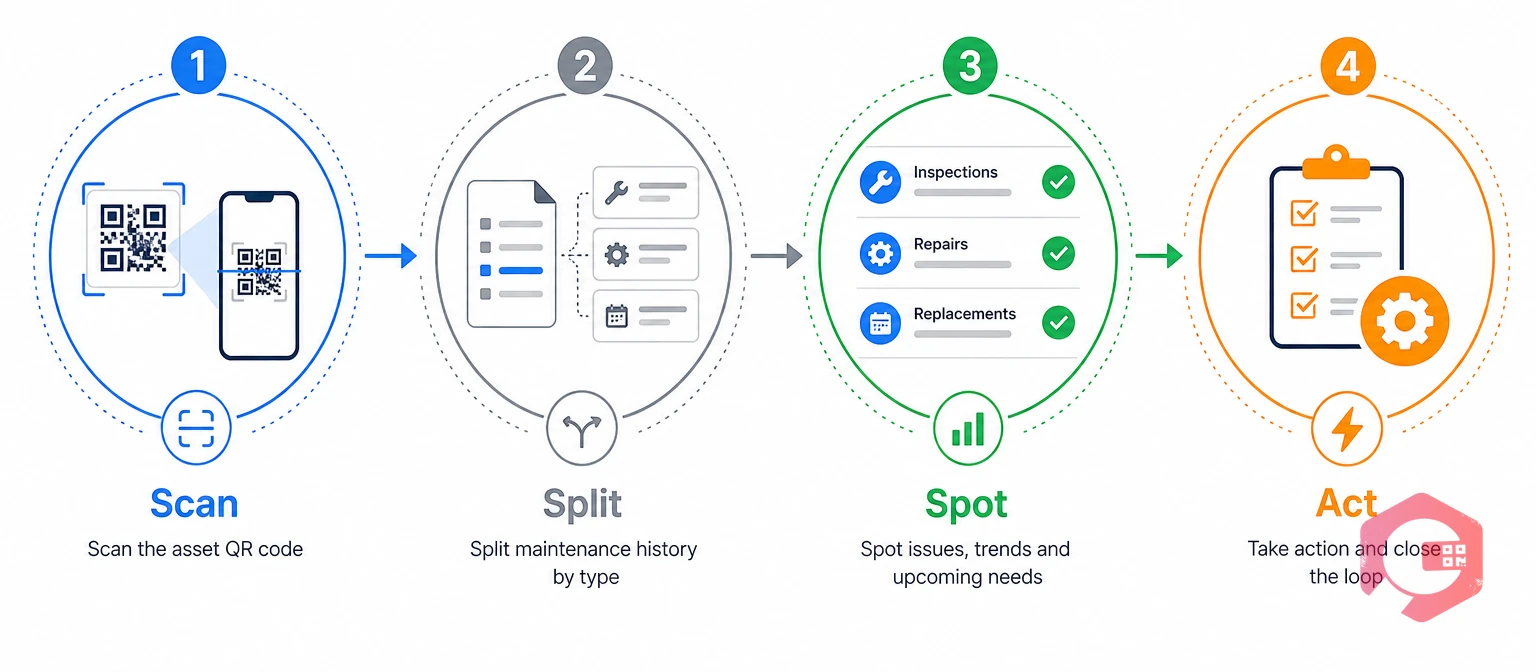
Use child asset maintenance history by following four moves each time you scan a parent asset: scan, split, spot and act.
The SCAN-SPLIT-SPOT-ACT Framework:
Maintenance teams that follow these four moves tend to start each diagnosis with context instead of guesses. The habit takes seconds, and it works on any parent asset with a clear hierarchy.
Completed work orders tell you what has been fixed, and not-completed work orders tell you what is still waiting.
Closed records show earlier repairs, the parts used and the notes left by the technician. They answer whether this component failed before and what fixed it last time.
Open and in-progress records show the backlog on components. An old open work order on a gearbox is a warning that a parent machine may be running on a known problem.
In Cryotos, a closed work order counts as completed. Open and work-in-progress orders count as not completed. Splitting them takes one tap, so a supervisor can see unfinished component work at a glance.
Technicians benefit first, but supervisors, planners and auditors gain from the same scan.
They see earlier repairs and open tasks before touching the machine, which shortens diagnosis and avoids repeating a fix that already failed.
They spot components with stale open work and can assign it before it causes a stop. Clear status labels also make shift handover faster.
They get one trail from the machine to every component, which supports reviews of maintenance load, repeat failures and compliance records.

Silent failures are the quiet gaps that appear when the parent record looks fine but component records sit out of sight. Many maintenance teams recognize at least two of these.
History rolls up to the parent only when the hierarchy is clean and teams log work on the right asset. Five steps get it there.
Clean hierarchy and careful logging make every later scan more useful.
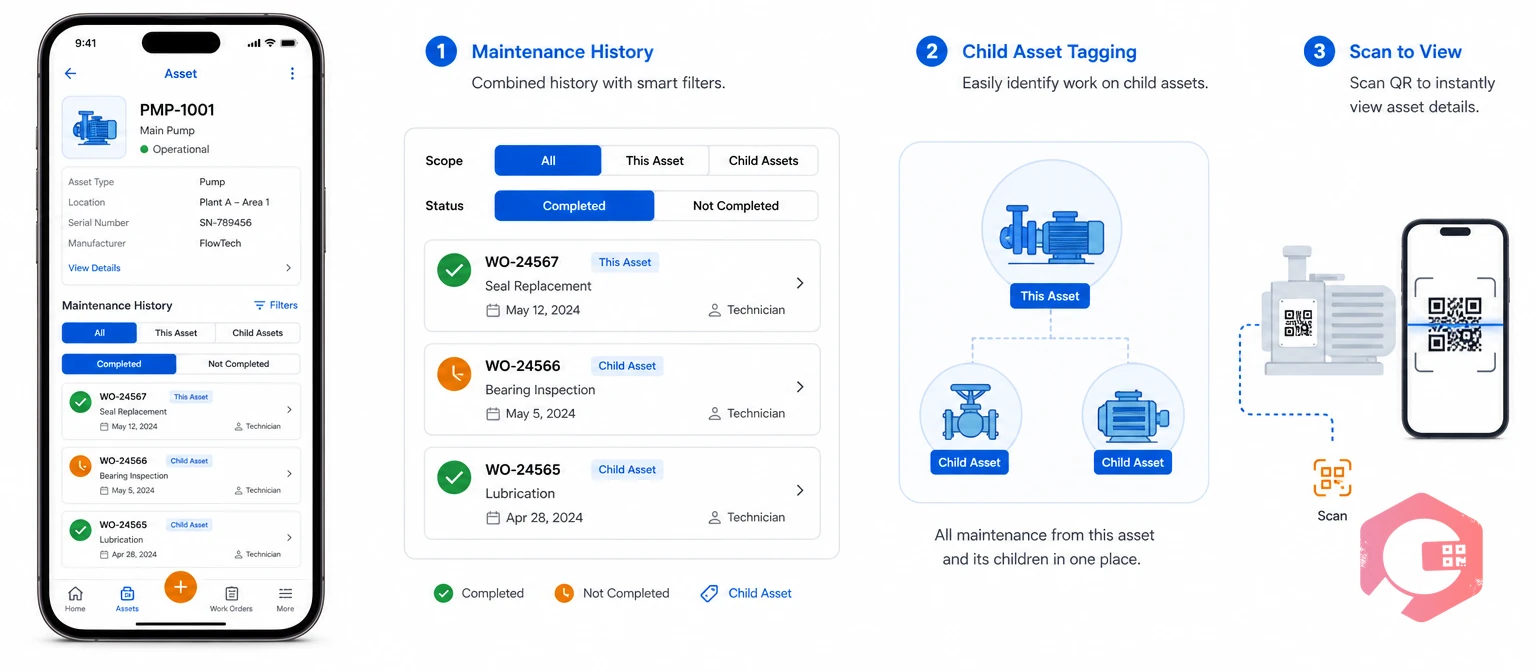
In the Cryotos mobile app, scanning a parent asset's QR code opens the Asset Detail screen. The Maintenance History row counts work on the parent and on its child assets, and a short line shows how that count splits. The hierarchy comes from asset maintenance management software that links every component to its parent.
This view builds on Cryotos asset tracking and the same work order management records that crews already use. Maintenance teams using Cryotos have reported up to 30% reduction in unplanned downtime and 25% faster repair turnaround.
Cryotos shows the records. It does not decide which component caused a fault, so technicians and engineers still make that call.
Child asset maintenance history is the record of completed and open work orders on the components under a parent asset. It includes repairs, inspections, replaced parts and unfinished tasks, each with a status and date.
Most work is logged on components, so a parent-only scan shows a partial story. Showing child work orders gives the technician the full history of the machine in one view, before any tool is picked up.
Yes. It should show closed, open and work-in-progress records, with a filter to split completed from not-completed work. Open work on a component is often the most useful warning on the screen.
Yes. History rolls up only from records logged against the child asset. If technicians log everything on the parent, component history never builds, so train teams to choose the component when they raise a work order.
Yes. A This asset filter limits the list to work logged on the parent itself, and a Child assets filter does the reverse. The All view shows both together.
It makes repeat faults on one component easy to see, and it shows earlier fixes and open tasks. Teams can then repair the real cause or plan the replacement instead of repeating a quick fix.
Scanning a parent asset should tell the whole story of the machine, not part of it. Schedule a free demo to see how Cryotos shows parent and child maintenance history on one scan.


Cryotos AI predicts failures, automates work orders, and simplifies maintenance—before problems slow you down.