

CMMS data quality is the accuracy, completeness, consistency, and timeliness of the asset, work order, and inventory records stored in your maintenance management system. When that data is wrong, missing, or stale, every decision built on top of it — from PM schedules to spare parts orders — inherits the same errors. A 2023 study on data-driven maintenance found that organizations relying on poor asset data experience up to 30% higher unplanned downtime than those with clean, verified records.
Key Takeaways
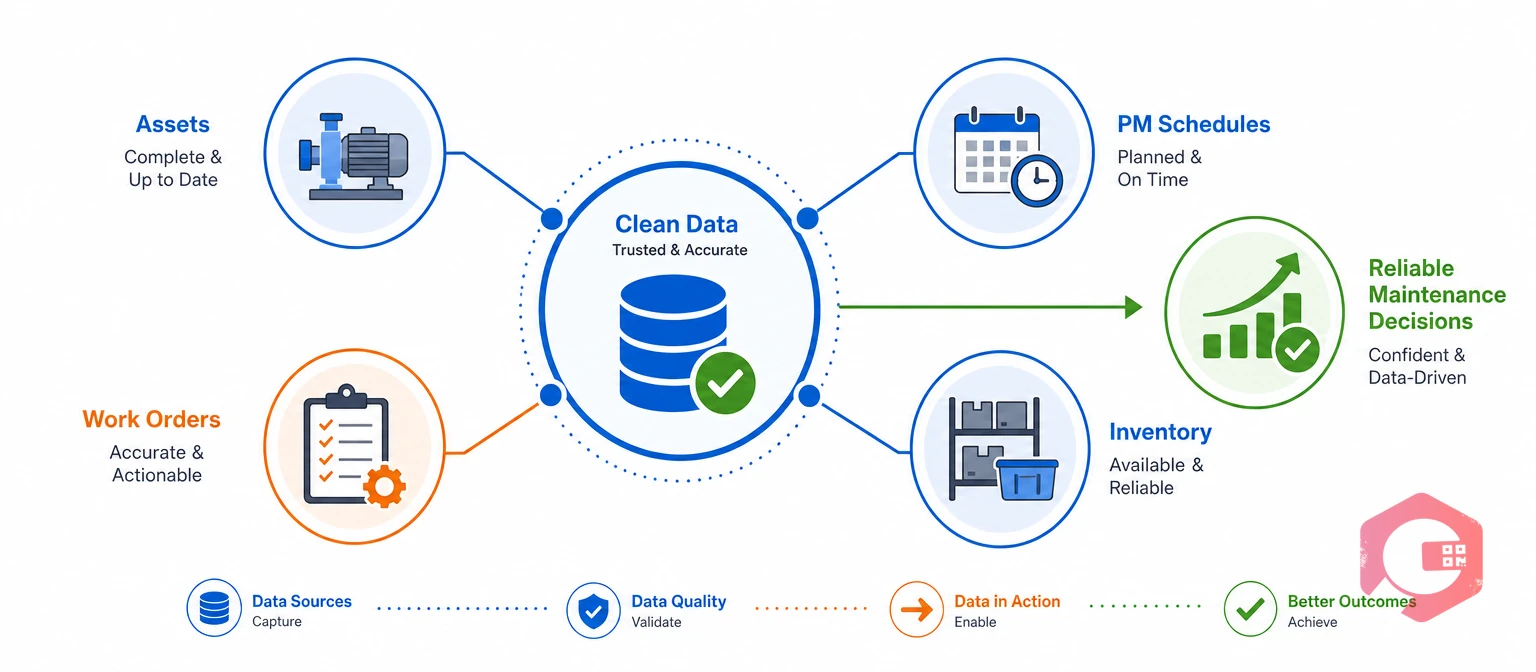
CMMS data quality measures how accurate, complete, consistent, and current the information inside your maintenance management system actually is. It covers everything a technician or planner touches: asset records, work order histories, PM schedules, inventory counts, and meter readings.
Good data quality doesn't mean a perfect database. It means the numbers your team relies on match reality closely enough to make sound decisions. A work order that says a pump was serviced last month, when it actually wasn't, is a data quality failure even if every field is technically filled in.
Most maintenance teams first notice data quality problems indirectly. A report doesn't add up. Two technicians log the same asset under different names. A PM triggers on the wrong interval because someone typed the meter reading incorrectly. Each of these traces back to a data quality gap rather than a software bug.
The broader discipline of data quality applies the same principles across any information system, but maintenance data carries a physical consequence that most business records don't. A bad customer record might cause a confusing email. A bad asset record can mean a technician services the wrong machine, or skips one that actually needed attention.
CMMS data quality also ties directly into asset lifecycle management. Every stage of an asset's life — installation, operation, maintenance, and eventual replacement — depends on the same underlying record staying accurate from the day it's created to the day the asset is retired.
CMMS data quality matters because every maintenance decision — scheduling, budgeting, staffing, and compliance reporting — depends on the records behind it. A Computerized Maintenance Management System is only as useful as the data technicians and planners put into it.
The ISO 55000 asset management standard treats reliable asset information as a core requirement, not an optional extra. It frames data governance as part of managing risk across an asset's entire lifecycle, not a back-office chore that can wait.
Maintenance teams that treat their CMMS as a system of record — not just a task list — tend to catch problems earlier. Most facilities that struggle with unreliable KPIs trace the root cause back to the same place: nobody owns the data quality of the system feeding those numbers.
Data quality also carries a compliance dimension. Audit trails, safety inspections, and regulatory reporting all pull from the same CMMS records. A missing or backdated entry doesn't just skew a KPI — it can leave a facility exposed during an audit.
The Society for Maintenance & Reliability Professionals (SMRP) has long noted that benchmarking only works when the underlying data across plants is captured consistently. A facility comparing its MTBF against an industry benchmark is really comparing its data quality against that benchmark's data quality — if the inputs aren't measured the same way, the comparison means little.
This ripple effect shows up inside a single plant too. A reliability engineer building a criticality ranking pulls from asset records, failure history, and downtime logs. If any of those three sources carries stale or duplicate entries, the ranking itself becomes unreliable, and every PM schedule built on top of it inherits that same weakness.
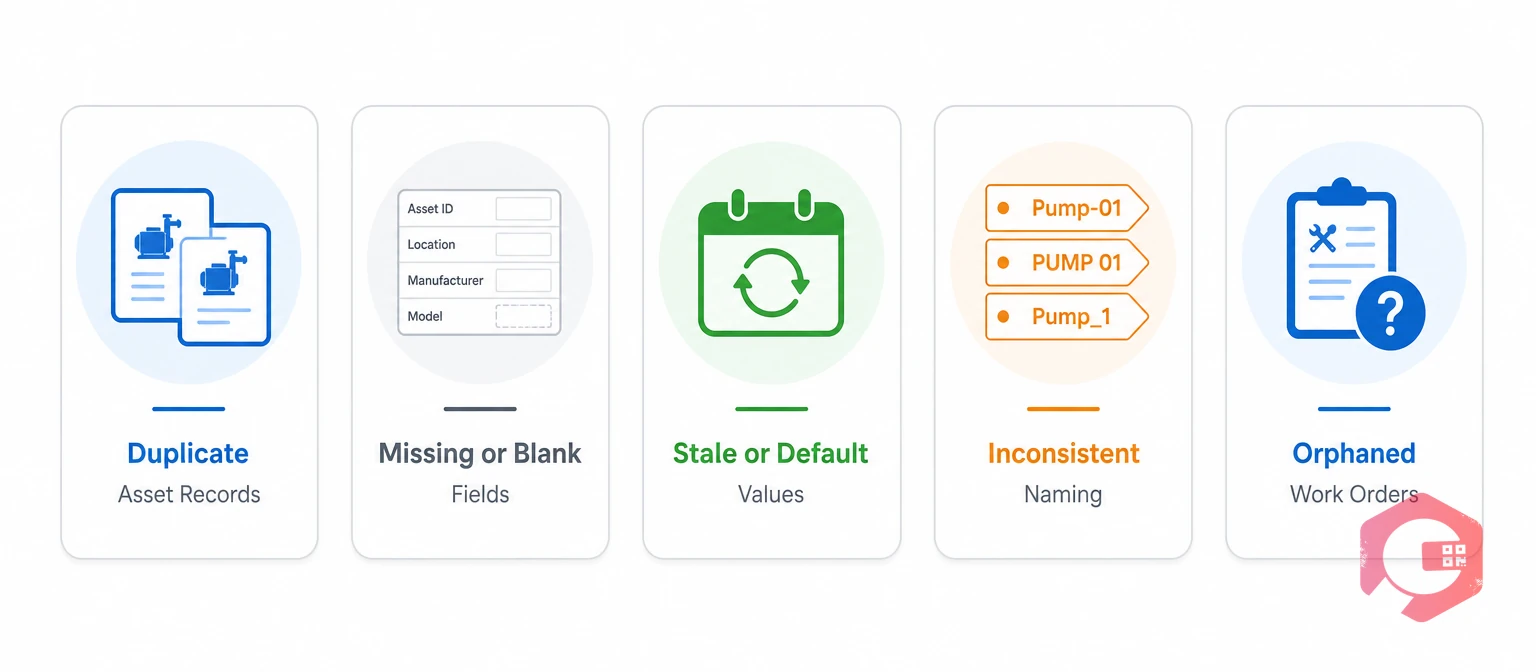
Bad CMMS data usually falls into a small set of recurring patterns. Recognizing which one you're dealing with is the first step toward fixing it.
The table below shows how each issue plays out in practice, and which data quality dimension it violates.
| Data Issue | Example | Operational Impact | Dimension Violated |
|---|---|---|---|
| Duplicate asset record | Same forklift logged as two separate assets | Maintenance history splits in two, hiding a repeat failure pattern | Consistency |
| Missing labor hours | Work order closed with no time logged | Labor cost and wrench time reports understate true cost | Completeness |
| Incorrect meter reading | Technician enters 1,200 instead of 12,000 hours | PM triggers late or not at all, risking a failure | Accuracy |
| Stale criticality rating | Asset marked "low priority" three years after a process change | Critical equipment gets the same PM frequency as non-critical gear | Timeliness |
Every one of these patterns is fixable without replacing your CMMS. The fix starts with knowing which dimension is failing, since accuracy problems and timeliness problems need different corrections.
None of these issues stays contained to the record where it started. A duplicate asset created in year one still splits failure history in year three, long after anyone remembers why two records exist for the same machine. A missing labor hour on one work order doesn't just understate that job's cost — it quietly drags down the average cost-per-repair figure that a budget planner uses to forecast next year's maintenance spend. The longer a data issue goes unnoticed, the more downstream reports and decisions it has already touched by the time someone catches it.
Bad CMMS data impacts maintenance operations by delaying work orders, skewing preventive maintenance schedules, distorting reliability metrics, and driving up both labor and inventory costs. These effects rarely stay isolated — a single bad meter reading can ripple through scheduling, reporting, and budgeting within weeks.
Picture a mid-size manufacturer running EAM software across three production lines. A conveyor motor gets logged as a new asset instead of being matched to its existing record after a rebuild. From that point forward, asset tracking shows two thinner failure histories instead of one complete one, so a repeat bearing failure pattern that would have flagged the motor for replacement never surfaces. The team keeps repairing the same underlying problem for another eight months before someone notices the two records describe the same machine.
A technician dispatched to "Compressor 1" when the asset record actually lists it as "COMP-01" wastes time just confirming which machine needs attention. Multiply that across a facility with hundreds of assets, and work order management starts absorbing delays that have nothing to do with the actual repair.
Preventive maintenance depends entirely on accurate meter readings, asset hours, and service history. A single mistyped reading can push a PM interval weeks past when it should have triggered, or trigger it too early and waste labor on unnecessary service. Facilities running preventive maintenance software on unreliable input data end up with a schedule that looks disciplined on paper but doesn't match what the equipment actually needs.
MTTR, MTBF, and OEE are only as good as the timestamps and failure codes behind them. Missing labor hours understate cost. Duplicate records split failure history in two, hiding a repeat problem that would otherwise stand out. A maintenance KPI dashboard built on inconsistent data gives leadership false confidence — the numbers look fine because the underlying records are incomplete, not because performance is actually strong.
Run your own numbers through Cryotos's OEE calculator to see how much a data gap could be distorting your current reporting.
Bad part numbers, duplicate SKUs, and stale stock counts push teams toward two costly habits: over-ordering spares "just in case," or running out of a part that the system claims is in stock. Clean inventory management data closes that gap by keeping counts and part identities consistent across every warehouse location.
The cost of this gap rarely shows up as a single obvious line item. It shows up as a slightly bloated MRO budget every quarter, a warehouse with pallets of parts nobody remembers ordering, and the occasional emergency freight charge for a part that was technically in stock — just under a different part number three shelves over.
Backdated entries, missing signatures, and incomplete inspection records create real exposure during a safety or regulatory audit. A facility can pass daily operations without issue and still fail an audit purely because the paperwork trail behind its work orders doesn't hold together.
This shows up most often in regulated industries where inspection records feed directly into compliance filings. A hospital's fire-suppression inspection log, a food plant's sanitation checklist, or a power plant's safety-critical PM history all rely on the same basic promise: that the date on the record matches the date the work actually happened. When technicians backfill records days later from memory, that promise quietly breaks, even when the underlying maintenance work itself was done correctly and on time.
You measure CMMS data quality by tracking the rate of duplicate records, the percentage of work orders closed with all required fields complete, and how often asset records get updated against their real-world status. Treating data quality as something you can score, rather than a vague impression, is what makes improvement possible.
None of these metrics needs a dedicated data quality tool. Most CMMS platforms with a report builder can surface all five with a saved query, which turns data quality from a one-time cleanup project into a number the team checks the same way it checks OEE or MTTR.
CMMS data goes bad primarily because of manual entry errors, weak field validation, inconsistent onboarding, and systems that don't talk to each other. None of these causes are dramatic on their own — they accumulate quietly until the reports stop making sense.
Most facilities that successfully fix their data quality problems start by tackling manual entry first, since it's the single largest source of new errors entering the system every day.
Bad data behaves like technical debt: it's cheap to ignore in the short term and expensive to unwind later. A facility that lets duplicate records and blank fields accumulate for two years faces a much larger cleanup project than one that catches the same issues quarterly. The Occupational Safety and Health Administration has flagged inconsistent recordkeeping as a recurring factor in maintenance-related incident investigations, which means data debt isn't purely an efficiency problem — it can become a safety one too.
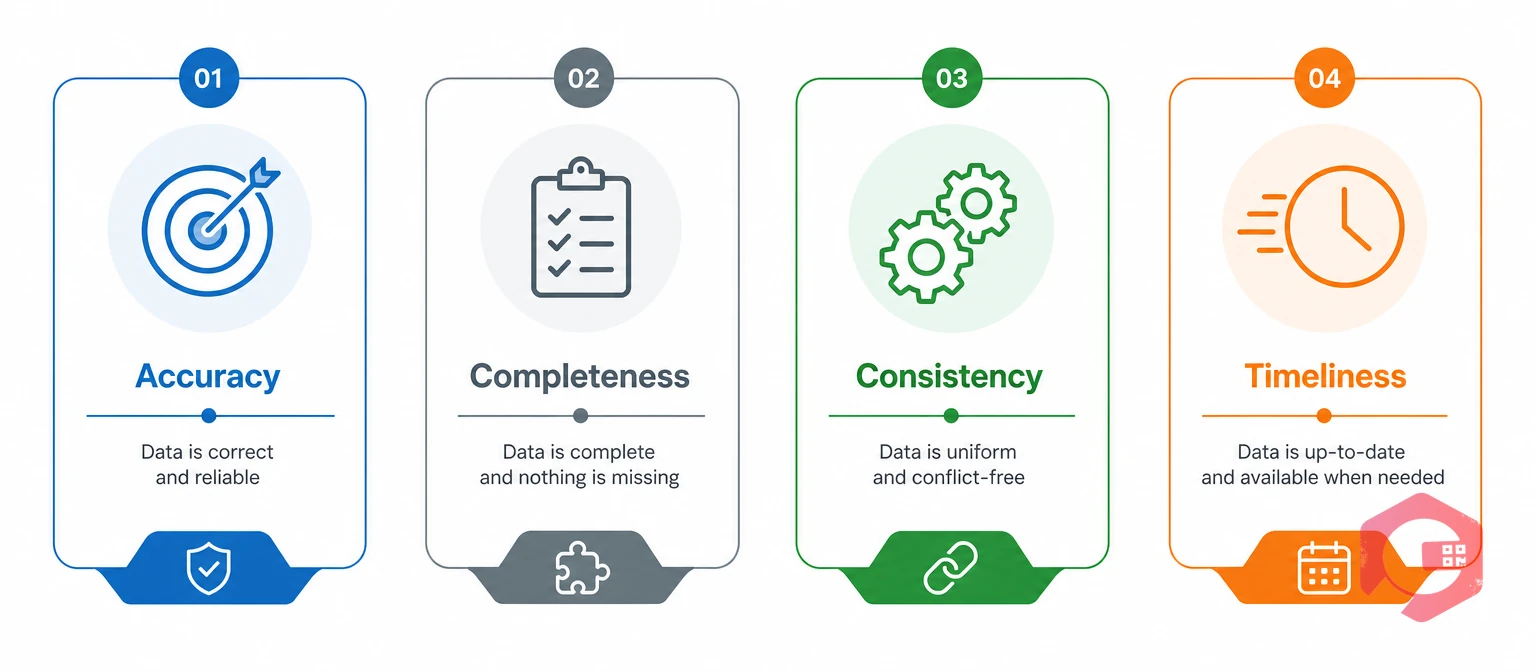
A useful way to diagnose and track CMMS data quality is to break it into four measurable pillars. Each one answers a different question about your records.
The 4-Pillar CMMS Data Quality Framework:
Most maintenance teams score reasonably well on one or two pillars and poorly on the others. A plant with strict entry rules might have excellent accuracy but weak timeliness if technicians batch-enter work orders at the end of the week instead of in real time. Scoring each pillar separately makes it obvious where to focus cleanup effort first, rather than treating "data quality" as one vague problem.
A simple way to apply the framework: pull twenty random work orders closed in the last month and grade each one against all four pillars. A plant that finds most failures clustering in "completeness" knows the fix is stricter required fields, not a system-wide data migration. A plant where "timeliness" is the weak pillar instead needs a process fix — entering data closer to when work happens, rather than at the end of a shift from memory.
Revisit the scorecard every quarter rather than treating it as a one-time diagnosis. A plant that fixes its completeness gap in month one often finds a consistency problem it hadn't noticed by month four, once the more obvious blank fields stop masking the duplicate records underneath them.
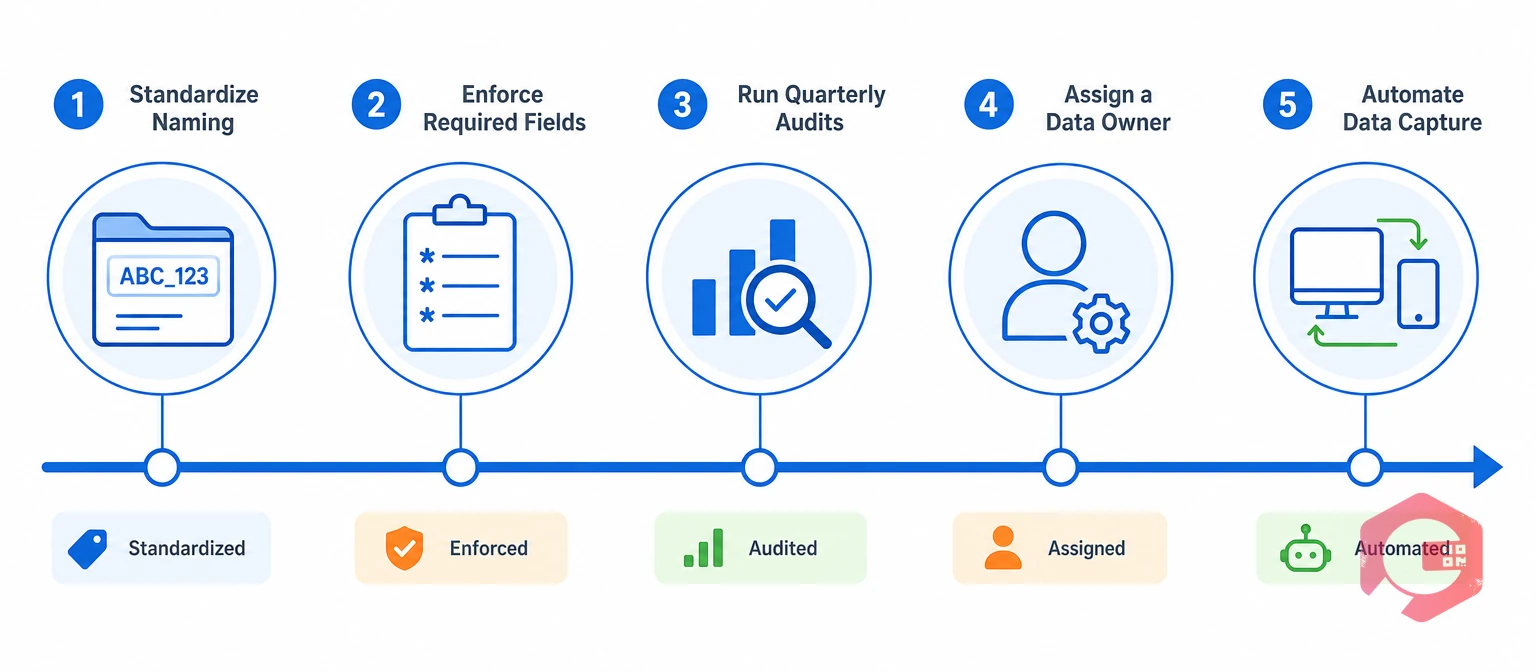
You improve CMMS data quality by standardizing naming conventions, enforcing required fields, auditing records on a schedule, and giving one person clear ownership of data governance. None of these steps require new software — most CMMS platforms already support the controls needed.
Facilities that follow this sequence typically see measurable improvement within one or two quarters, since most of the value comes from stopping new bad data at the point of entry rather than cleaning up the backlog all at once. The order matters: enforcing required fields before standardizing names just locks bad naming conventions into a more complete record. Fix the naming and structure first, then tighten the entry rules around it.
The ROI of clean CMMS data shows up as fewer PM misfires, more accurate KPI reporting, and lower emergency parts spend. These savings are harder to isolate than a single line-item cost, but they compound across every process the data touches.
Maintenance teams using Cryotos have reported up to 30% reduction in unplanned downtime and 25% faster repair turnaround, gains that depend heavily on the underlying asset and work order data being trustworthy in the first place. A downtime tracking feature can only report accurate numbers if the work orders feeding it are complete and correctly timestamped.
Operations that treat data cleanup as an ongoing discipline, rather than a one-time project, tend to see the ROI stack over time. Each quarter of consistent entry standards makes the next quarter's reporting more reliable, which in turn makes budgeting and staffing decisions easier to defend to leadership.
The clearest way to see the payoff is to compare two versions of the same decision. A parts manager working from a stock count that's routinely wrong either over-orders to stay safe or gets caught short and pays rush freight. A parts manager working from a count that's consistently accurate orders exactly what's needed, on a normal lead time, every time. That gap repeats across scheduling, staffing, and budgeting decisions throughout the year, and it's the reason clean data pays for the effort to maintain it many times over.
Watch for reports that don't add up, technicians confused about which asset a work order refers to, or PM schedules that trigger at the wrong time. These symptoms almost always trace back to duplicate records, missing fields, or stale values somewhere in the system.
No. Most data quality problems come from entry habits and missing validation rules, not the software itself. A structured cleanup effort inside your existing CMMS usually resolves the majority of issues within a couple of quarters.
A single named owner, often a planner or reliability engineer, works better than a shared responsibility. That person audits records, enforces naming standards, and catches drift before it spreads across the system.
A quarterly audit on a sample of records catches most drift before it becomes a bigger reporting problem. Facilities with high technician turnover or frequent manual entry may benefit from checking monthly instead.
Automation removes a large share of the risk, especially around meter readings and asset identification through barcode or IoT capture, but it doesn't eliminate every source of error. Manual entries like failure descriptions and root cause notes still need review and standardization.
Pick one pillar from the framework — completeness is usually the quickest win — and enforce a single required field, like labor hours, on every closed work order starting today. A small, consistently enforced rule beats an ambitious cleanup plan that stalls after the first week.
Yes, and sometimes more. A five-technician team often runs on tighter margins with less room to absorb a bad PM schedule or a missed compliance deadline. The good news is that a small team can usually fix naming conventions and enforce required fields in a single afternoon, since there's far less legacy data to untangle than in a multi-site operation.
Clean CMMS data isn't a one-time cleanup project — it's a habit that pays off every time a technician opens a work order or a manager pulls a report. Schedule a free demo to see how Cryotos helps maintenance teams enforce data standards and keep their records reliable from day one.




Cryotos AI predicts failures, automates work orders, and simplifies maintenance—before problems slow you down.



