

A CMMS enhances BOM accuracy by linking every spare part directly to the asset that uses it, capturing real parts consumption through closed work orders, and validating stock against each asset's bill of materials before a technician is dispatched. The result: your maintenance team arrives at every job with the right parts confirmed — and your stores team orders based on real asset demand, not estimates.
Research from the Reliability Web maintenance knowledge base and the Society for Maintenance and Reliability Professionals (SMRP) consistently identifies incorrect or incomplete parts data as one of the leading causes of first-time fix failures in maintenance operations. When a technician shows up to a job without the correct components, repair windows stretch, production stops longer than planned, and emergency procurement costs spike. A CMMS closes that gap by making BOM accuracy a system function — not a memory exercise or a spreadsheet discipline.
This guide explains what a bill of materials means in a maintenance context, why BOM inaccuracy is so expensive, and exactly how a CMMS turns BOM management into a measurable driver of maintenance efficiency.
Key Takeaways

A bill of materials (BOM) in maintenance is the structured list of every spare part, component, lubricant, and consumable required to service, repair, or overhaul a specific asset. Each BOM entry includes the part name, part number, required quantity, unit of measure, and the supplier or storeroom location.
Unlike a production BOM — which lists the components needed to manufacture something — a maintenance BOM defines what is needed to keep an asset running at specification. For a centrifugal pump, the maintenance BOM includes shaft seals, bearing sets, O-rings, gaskets, and coupling inserts. For an industrial air compressor, it covers filters, drive belts, valves, and lubricants tied to operating-hour change intervals. For a conveyor system, it lists rollers, tensioner springs, drive chains, and gearbox oil grades.
The terms are used interchangeably in many workshops, but there is an important operational distinction. A parts list is a flat inventory catalogue — it tells you what parts exist in your storeroom. A maintenance BOM is asset-specific — it tells you which parts belong to which machine, in what quantities, and for which task. A well-configured CMMS maintains both: a parts catalogue in inventory management and BOMs linked to each asset record, so when a work order is created, the system already knows what parts are needed before a planner has to look anything up.
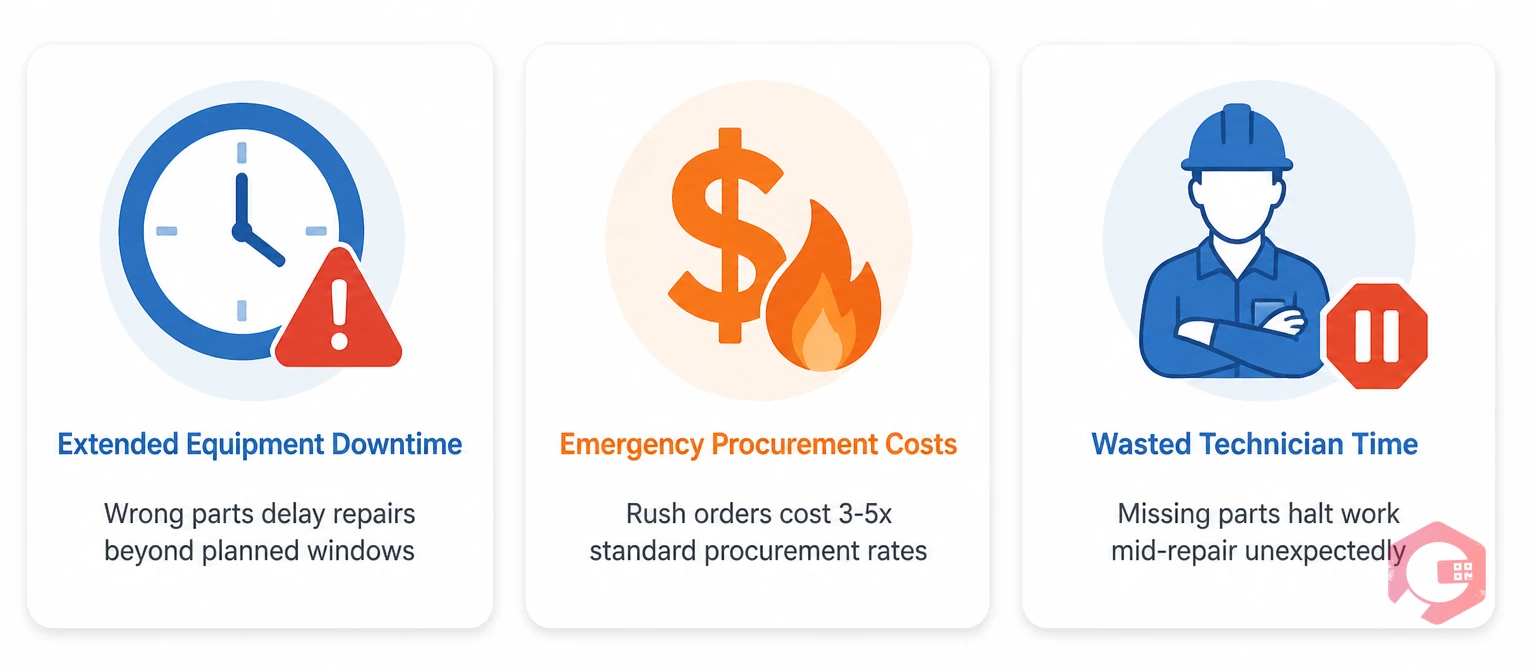
BOM errors in maintenance do not just cause inconvenience — they produce measurable financial losses across three areas: extended downtime, emergency procurement costs, and wasted technician time. When a work order references an outdated part number, the technician pulls the wrong item from the storeroom. When a BOM is missing a component, the technician discovers the gap mid-repair and has to stop work to raise an urgent purchase request.
Emergency parts procurement costs three to five times more than planned stock purchases, according to SMRP maintenance benchmarks — and every hour waiting for parts adds directly to mean time to repair (MTTR). In high-throughput environments like food production lines or automated warehouses, even a two-hour delay caused by a missing gasket can wipe out an entire shift's output.
BOM inaccuracy is almost never intentional — it builds up through disconnected systems and manual processes. Supplier part number changes go unrecorded in maintenance files, leaving technicians ordering obsolete items. Substitute parts used during a breakdown are logged informally or not at all, causing the BOM to drift from what the asset actually requires. Assets are upgraded or modified without a corresponding BOM revision. And in spreadsheet-based environments, there is no mechanism to propagate a single part number change across every asset that uses it — each BOM document drifts independently over time. The longer this continues, the wider the gap between what the BOM says and what the asset actually needs.

A CMMS improves BOM accuracy through three core mechanisms: a centralized parts master linked directly to asset records, automated BOM updates driven by work order completions, and real-time inventory validation that confirms part availability before a job is dispatched.
In a CMMS, every spare part in the spare parts inventory is catalogued with a unique identifier, description, unit of measure, supplier data, and storage location. Each asset record then links to the specific parts its BOM requires — so there is no ambiguity about which part belongs to which machine. When a new asset is added to the system, its BOM is built once and stored permanently in the asset profile. Every subsequent work order for that asset automatically references the same BOM.
When a part number changes — because a supplier updates their catalogue or a component is superseded — a single update to the CMMS parts master propagates the change across every BOM that references that part. This is fundamentally impossible with a spreadsheet-based system, where each document is an isolated file and part number changes have to be tracked down and corrected manually across dozens of separate BOMs.
The most powerful aspect of CMMS-driven BOM management is the feedback loop between completed work orders and the BOM itself. When a technician closes a work order, the parts consumed are automatically deducted from inventory and recorded against the asset's maintenance history. If the technician used a different part than the BOM specified — because a substitute was required or a new equivalent was available — that variance flags for the maintenance planner to review and update the BOM accordingly.
This creates a self-correcting BOM. Instead of relying on someone to manually update a spreadsheet after every repair, the CMMS captures the ground truth of what parts were actually used and feeds that data back into the asset record. Over time, the BOM converges toward accuracy driven by real maintenance activity — not theoretical planning documents that nobody updates after go-live.
When a work order is generated, the system checks the asset's BOM against live inventory levels before the job is dispatched to a technician. If a required part is below minimum stock, the CMMS triggers an automatic reorder alert — giving the procurement team time to source the part before the maintenance window opens. This prevents the most common cause of first-time fix failure: arriving at a job without the right parts.
According to Plant Engineering, first-time fix rates improve significantly when parts availability is confirmed before job dispatch. That single operational improvement — validate BOM against inventory before dispatch — has a direct, measurable impact on MTTR and overall maintenance efficiency across every job type.
BOM accuracy is not just a data quality concern — it is a direct operational efficiency driver. When the right parts are confirmed, available, and staged before a technician leaves the storeroom, three measurable gains follow immediately.
Without a linked BOM, a planner preparing a work order must manually locate the asset's spec sheet, cross-reference the parts catalogue, check stock levels for each item, and stage the parts — a process that takes 30 to 60 minutes per complex job. With a CMMS BOM, work order preparation takes minutes. The system pulls the BOM automatically, confirms availability, and surfaces any gaps that need to be addressed before dispatch.
Cryotos supports this through its work order management module, where parts are pre-linked from the asset BOM at work order creation — giving planners a complete, ready-to-execute job package without manual cross-referencing.
Emergency parts orders are among the most expensive line items in any maintenance budget. They combine premium pricing, expedited shipping charges, and the administrative burden of urgent approvals. BOM accuracy validated against live inventory eliminates the conditions that make emergency orders necessary. When a CMMS knows exactly what every asset needs and how much of each part is on the shelf, it calculates forward demand for upcoming preventive maintenance tasks and generates replenishment orders well in advance — shifting procurement from reactive fire-buying to planned purchasing at standard rates.
Preventive maintenance depends on the right parts being available at the scheduled time. If a PM work order triggers but the required filter, seal, or lubricant is not in stock, the PM gets deferred. Deferred PMs are where equipment failures originate. A CMMS with accurate BOMs and real-time inventory integration makes PM execution reliable, because the system validates parts availability at PM scheduling time — not on the morning the job is due.
Teams running Cryotos report up to a 30% reduction in unplanned downtime and 25% faster repair times — outcomes that trace directly to the combination of accurate BOMs, confirmed stock, and structured PM scheduling operating as an integrated system rather than three separate manual processes.
Building an accurate, maintainable BOM structure in Cryotos is a four-step process that most maintenance teams complete for their critical assets within the first two weeks of implementation.
Register every maintainable asset in Cryotos with its make, model, serial number, installation date, and criticality rating. The asset register is the foundation everything links to — BOMs, work orders, maintenance history, and inventory consumption data all reference the asset record. Cryotos supports bulk import from Excel, so existing asset lists do not need to be re-entered line by line.
For each asset, build its BOM by linking the required spare parts from the Cryotos parts master. Start with your highest-criticality assets and the most common maintenance tasks — PM service kits, seal replacements, and consumables. Each part is linked with a quantity required per maintenance interval, so the system knows exactly how much of each item a given task will consume. Use asset QR code scanning to tag physical equipment and connect field technicians to the correct asset profile — including its full BOM — from their mobile device.
Once BOMs are built, run a gap analysis: for each BOM item, check current stock levels against the minimum quantity required for the next scheduled PM. Any parts below the required level should trigger an immediate stock review. Cryotos's inventory management module provides real-time stock visibility down to bin level, making this validation a quick report rather than a manual storeroom walk.
Configure Cryotos to require technicians to record parts consumption when closing every work order. This single workflow step — logging which parts were used and in what quantity — creates the feedback loop that keeps BOMs accurate over time. When actual usage consistently differs from the BOM specification, the maintenance manager receives a flag to review and update the asset's parts list. Combine this with Cryotos's report builder to generate monthly BOM accuracy reports showing variance between specified and actual parts consumed across all work orders — surfacing systemic BOM errors before they cause a job delay.
A BOM (bill of materials) in a CMMS is the list of spare parts, components, and consumables linked to a specific asset's maintenance profile. When a work order is created for that asset, the CMMS references the BOM to identify required parts, checks their availability in inventory, and pre-stages them for the technician. This reduces job preparation time and eliminates the risk of arriving at a repair with wrong or missing components.
A CMMS keeps BOMs accurate through the work order feedback loop — every completed job captures which parts were actually used, and variances from the BOM trigger a review flag for the maintenance planner. Unlike spreadsheet-based BOMs that drift because there is no mechanism to enforce updates, a CMMS BOM is corrected by the maintenance workflow itself. Supplier part number changes also propagate automatically from the central parts master to every linked BOM.
Yes. A CMMS can maintain separate BOMs for different maintenance tasks on the same asset. For example, a 250-hour service BOM (filters, oil, belts) and a 2,000-hour overhaul BOM (seals, bearings, shaft components) can both be linked to the same asset record. When a work order is created for a specific task type, the system automatically references the correct BOM for that interval — no manual lookup required.
In a CMMS, when a part is updated in the central parts master — because a supplier has superseded it or the part number has changed — the update propagates automatically to every BOM that references that part. This eliminates the risk of technicians ordering obsolete items from outdated spreadsheets. The parts master functions as a single source of truth that keeps all asset BOMs current simultaneously, without requiring manual corrections across multiple documents.
Accurate BOMs reduce maintenance costs through three direct mechanisms: eliminating emergency parts procurement by confirming availability before jobs are dispatched; cutting technician idle time caused by missing parts mid-repair; and improving PM compliance by ensuring preventive maintenance always has the correct materials ready on schedule. The combined effect is lower reactive spend, higher first-time fix rates, and fewer extended downtime events — all traceable to parts data accuracy.
BOM accuracy is not a back-office data concern — it is a front-line maintenance performance driver. When your bill of materials is linked to real assets, validated against live inventory, and updated automatically through the work order lifecycle, your team stops losing time to missing parts and starts completing jobs right the first time.
Cryotos CMMS gives maintenance teams the structure to build accurate BOMs, validate them against real-time inventory, and keep them current without manual spreadsheet effort. Ready to eliminate parts-driven delays and lift your first-time fix rate? Schedule a free Cryotos demo today and see BOM management in action.



Cryotos AI predicts failures, automates work orders, and simplifies maintenance—before problems slow you down.



