
Training your team on a new Computerized Maintenance Management System is one of the highest-impact decisions you will make during an implementation. Done well, it accelerates adoption, protects productivity, and gets your maintenance operation to full capability within weeks. Done poorly, it leaves technicians working around the system, supervisors reverting to spreadsheets, and managers questioning whether the investment was worth it.
The evidence is clear on where most CMMS rollouts stall: it is not the software — it is the training. According to Prosci's change management research, projects with excellent change management are six times more likely to meet their objectives than those with poor change management. For CMMS implementations, that translates directly into how fast your team moves from logging in for the first time to closing work orders without assistance.
Key Takeaways
A temporary productivity dip during CMMS rollout is not a bug — it is expected. The mistake most facilities make is not preparing for it, which turns a manageable two-week adjustment into a two-month stall. Research from the Society for Maintenance and Reliability Professionals (SMRP) consistently shows that maintenance teams that follow a structured training approach reduce their adoption curve by 40% compared to those that rely on self-guided learning alone. Structured training does not eliminate the dip — it shrinks it and puts a clear end date on it.
Maintenance teams using Cryotos have reported up to 30% reduction in unplanned downtime and 25% faster repair turnaround — but those results show up after the team is trained, not on day one. The training phase is the bridge between go-live and those outcomes.
The fastest way to waste CMMS training time is to give everyone the same content. Before you build a CMMS training plan, run a quick audit of your team's current capabilities and daily workflows. You are looking for three things: what they already know, how they currently work, and where the new CMMS will change their day-to-day most significantly.
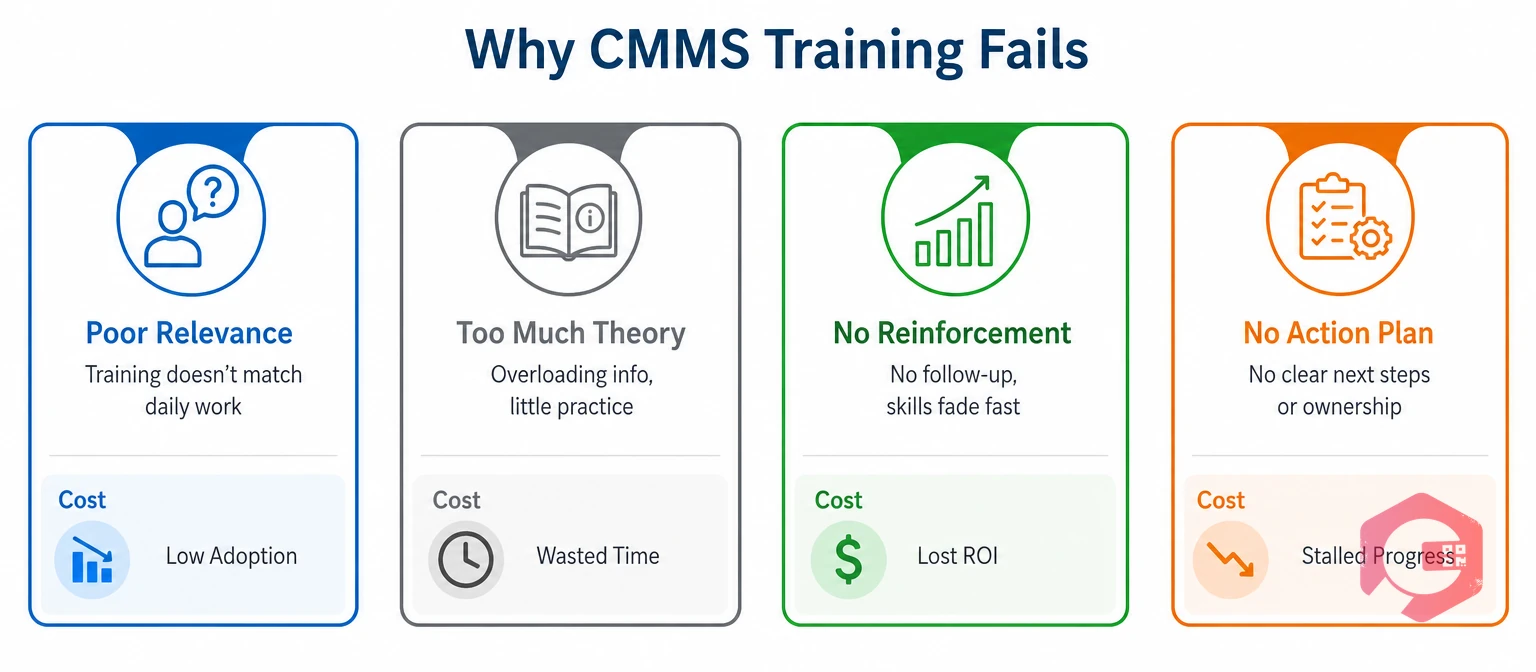
Map each role to the specific CMMS functions they will actually use. Effective CMMS training starts here — matching the right content to the right person. A field technician working from the mobile app needs a completely different onboarding path than a maintenance manager configuring preventive maintenance schedules. Skipping this mapping step is the most common reason CMMS training fails — people learn features they never use while struggling with the ones they need every day.
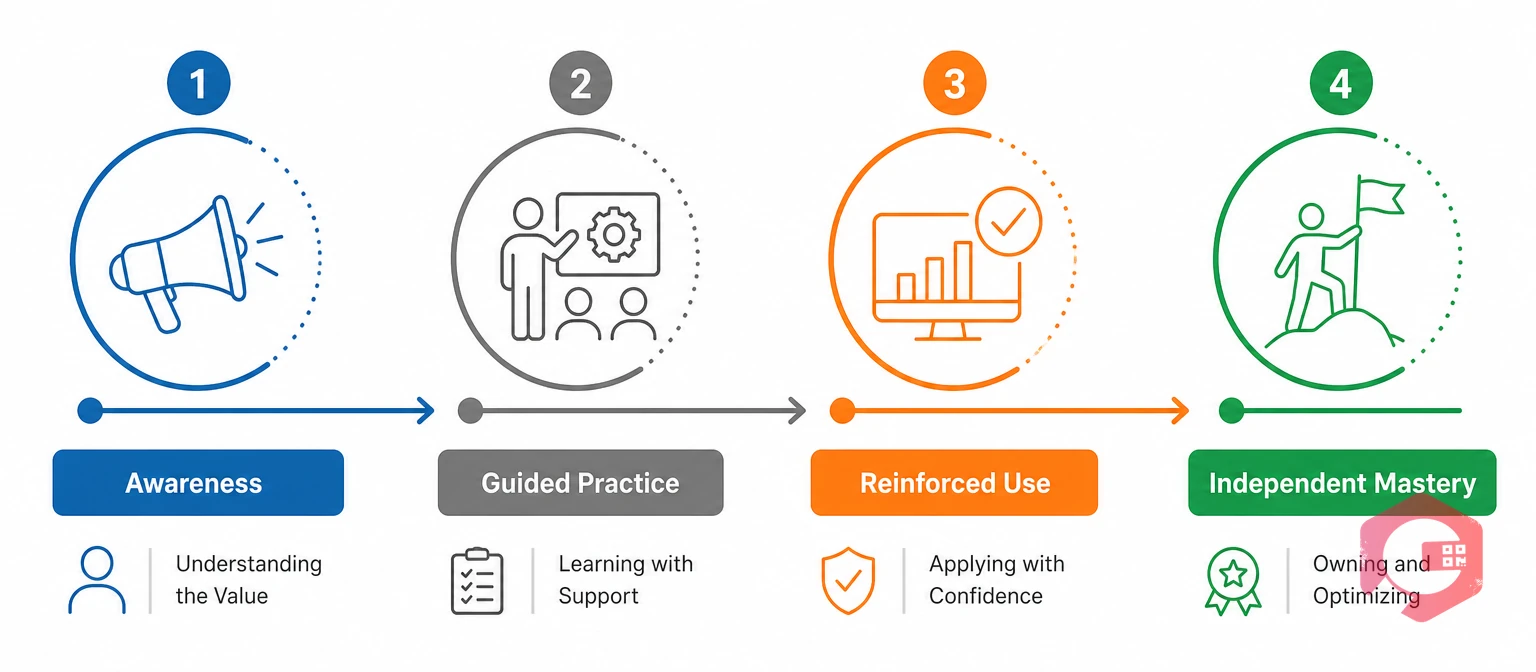
Most CMMS training is designed to answer the question "how does this feature work?" The better question is "how does this person move from first login to confident daily use?" The CMMS Adoption Ladder is a four-stage model that structures training around how people actually learn new systems, not how the software is organised.
The CMMS Adoption Ladder:
Plan four to six weeks across these stages for most teams. Rushing from Stage 2 to Stage 4 — skipping Stage 3's reinforcement period — is where most implementations falter.
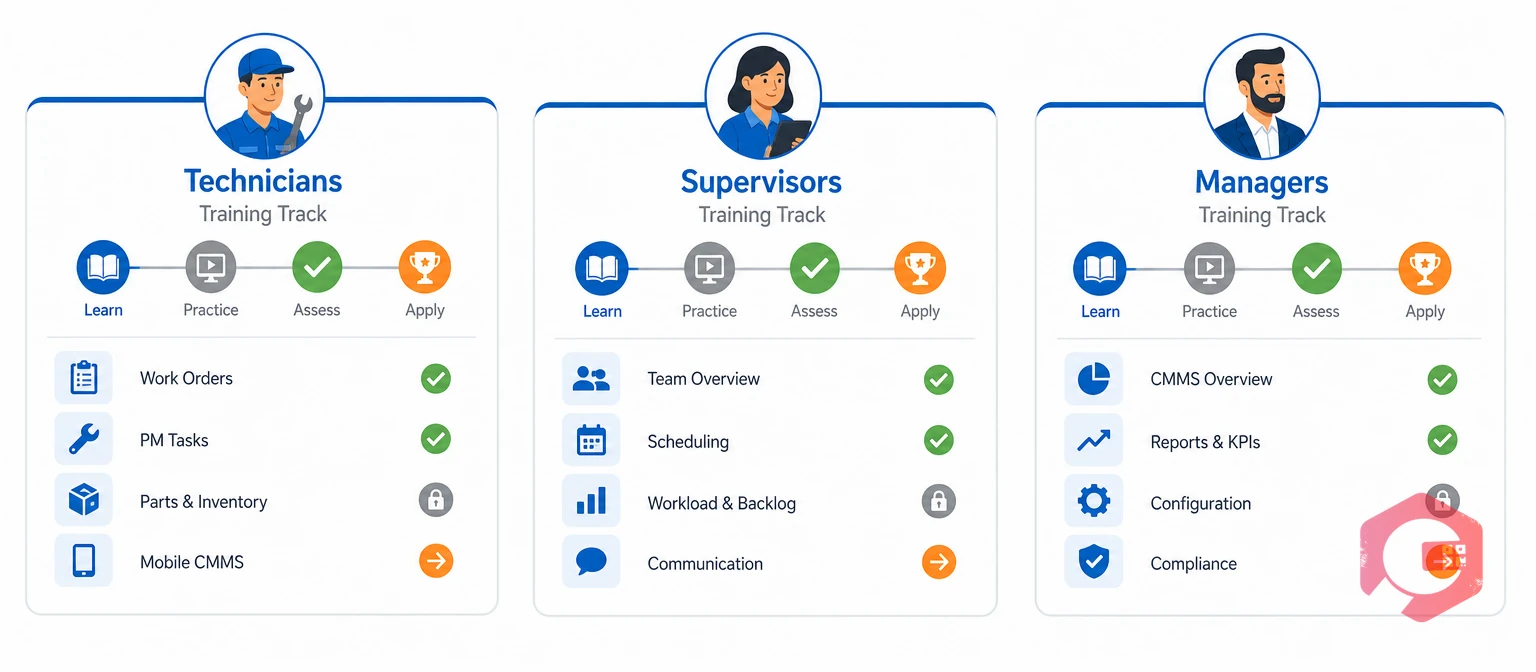
Role-based training means designing separate learning tracks for each user group, built around the actual tasks each group performs. The goal is not to teach the whole system to everyone — it is to get each person confident in their specific workflows as quickly as possible.
Technicians need to be confident in four things: logging in on mobile, receiving and closing work orders, recording fault notes, and requesting parts. That is the core of their daily interaction with the system. Start there. Train on mobile first — most field staff will use the CMMS almost exclusively from their phones, and training them on a desktop interface they will never use adds confusion. The work order management workflow should be the first competency technicians achieve before any other feature is introduced.
Supervisors need to see the broader picture: how to assign and reassign work orders, how to monitor team progress in real time, and how to check PM compliance rates. They also need to be the first line of support for their team's questions — which means they need to complete training at least a week before their direct reports go live. Train supervisors on maintenance checklists and work order workflows first, then layer in reporting and dashboard access once those core tasks are solid.
Managers and system administrators are responsible for configuration, reporting, and ongoing system health. Their training path is longer and more technical: asset setup, PM scheduling, user access configuration, and dashboard customization. This group typically benefits from vendor-led training rather than internal peer training, and should have completed their setup tasks before either technicians or supervisors go live.
Want to see how role-based access and training tracks work inside a live CMMS? Explore how Cryotos's mobile CMMS structures different user experiences by role — from field technicians to operations managers.
A pilot is a 2–3 week live deployment — the final stage of structured CMMS training before scaling to the entire organisation. It is the most effective risk management tool available during CMMS implementation, and most facilities that skip it regret it.
The pilot serves three purposes. First, it surfaces training gaps you could not have anticipated in a demo environment — real work orders create real edge cases. Second, it builds internal champions: the team members who go through the pilot become your most credible advocates when training scales out, because they can say "I was confused by this too, here is what helped." Third, it gives your training material a revision cycle before it reaches your largest user group.
Pilot results also give you a realistic adoption timeline to communicate to leadership — replacing the vague "a few weeks" with a data-backed "based on our pilot, the full team will be at independent use within 5 weeks of go-live."
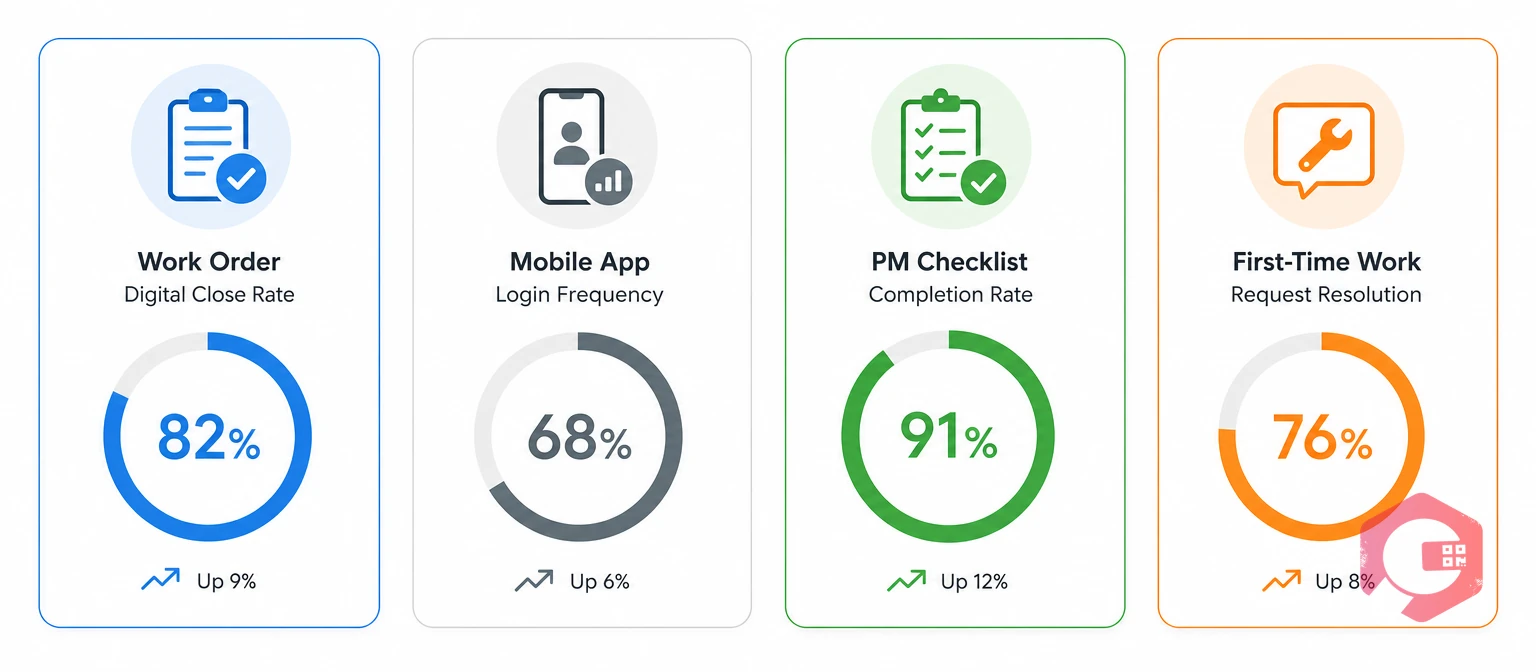
Completing a training session does not mean someone can use the system confidently. Most organisations measure CMMS training success by attendance — who sat in the CMMS training session, who clicked through the e-learning module. These metrics tell you training happened. They do not tell you training worked.
The metrics that predict adoption success are behavioural: they measure whether people are actually using the system to do real work. The workflow automation features of a well-configured CMMS make these metrics automatic — they are generated by normal system use, not by surveys or manual tracking.
Review these metrics weekly for the first 60 days. The goal is not to blame individuals for low numbers — it is to identify which training gaps are systemic and run targeted re-training before they become entrenched habits.
Resistance is a predictable part of CMMS training. Expecting it — and having a response ready — prevents it from derailing the rollout. Most resistance comes from one of three places: genuine confusion about how to use the system, concern that the new system makes the job harder, or frustration with perceived extra work during an already busy period.
Each of these needs a different response.
Internal champions are your most powerful tool here. A technician who struggled in week one and is now closing work orders confidently in week three is more persuasive than any training document or vendor testimonial. Identify those people early and give them the visibility to share their experience.
Most maintenance teams reach independent, confident use within four to six weeks of structured training. The timeline depends on team size, digital confidence levels, and how closely training is tied to real work tasks rather than generic feature walkthroughs. Teams that go through a pilot phase before full rollout tend to reach full adoption 30–40% faster than those that skip straight to organisation-wide go-live.
Training everyone the same way, regardless of role. A field technician and a maintenance manager have almost no overlap in their daily CMMS use — a single training track that covers both usually does neither well. The second most common mistake is ending training at go-live, rather than running a formal Stage 3 reinforcement period where adoption data is tracked and re-training happens fast when gaps appear.
Start by distinguishing resistance from confusion. Most "resistance" in CMMS rollouts is actually people who were under-trained on their specific workflows and are compensating by avoiding the system. Once the training gap is closed, most resistance resolves. True resistance — where someone understands the system and still refuses to use it — is a management conversation, not a training problem. Make sure supervisors are visible daily users before escalating to a performance discussion.
A combination works best for most teams. An initial in-person session where people complete real tasks in the live system (not demos) builds confidence faster than online modules alone. Online or recorded content is useful for reference after go-live — not as the primary training format. Field technicians in particular need hands-on, mobile-first practice, not a slide deck about the software.
Focus initial training exclusively on the three or four tasks each role performs every day. For technicians: receiving work orders, logging completion notes, and raising work requests. For supervisors: assigning work, checking team status, and closing PM tasks. Advanced features — reporting dashboards, IoT integrations, custom workflows — should come in a second wave of training at 30–60 days post go-live, once the core workflows are solid habits.
Effective CMMS training — structured, role-based, and tracked by adoption metrics rather than attendance — takes planning, but the payoff is real. Getting your team through CMMS training correctly — rather than rushing a go-live and hoping for the best — is the difference between a system that transforms your maintenance operation and one that gets quietly abandoned six months after launch. Schedule a free demo to see how Cryotos supports your team through every stage of adoption, from initial onboarding to full operational capability.


Cryotos AI predicts failures, automates work orders, and simplifies maintenance—before problems slow you down.



