

CMMS software should run your maintenance operation when the goal is asset uptime, work order control, and PM compliance — ERP should run it when maintenance needs to share data tightly with finance, procurement, and enterprise-wide planning. Most maintenance teams don't actually need to choose one and abandon the other; they need to know which system owns which job, and when it's time to connect the two.
A Computerized Maintenance Management System and an Enterprise Resource Planning system solve different problems, even though both can technically track a work order. This guide breaks down what each system actually does, where they overlap, and gives you a repeatable way to decide which one should be the system of record for your maintenance operation.
Key Takeaways
A CMMS is maintenance-management software built specifically around assets, work orders, and preventive maintenance schedules — an ERP is enterprise-wide software built around financials, procurement, HR, and cross-departmental resource planning. Both can technically create a work order, but only one is designed to make maintenance efficient rather than just accounted for.
Most maintenance organizations following SMRP maintenance best practices treat this as a fit-for-purpose decision rather than a feature checklist. The table below summarizes where each system is strongest.
| Attribute | CMMS | ERP |
|---|---|---|
| Primary purpose | Maintenance and asset upkeep | Enterprise-wide resource planning |
| Core data | Work orders, PM schedules, asset history | Financials, HR, procurement, inventory across the business |
| Typical daily user | Maintenance technicians, planners | Finance, operations, supply chain teams |
| Implementation time | Weeks | Months to over a year |
| Cost range | Lower, modular pricing | Higher, enterprise licensing |
| Best fit for | Maintenance-first organizations | Organizations needing full business-system integration |
Neither system is inherently better — they're built to answer different questions. A CMMS answers "is this asset running, and when does it need service?" An ERP answers "what does running this business cost, and where does the money and material move?"
The confusion usually starts because both systems can technically produce a work order. But a work order created in an ERP module is primarily a cost object — it exists to tie labor and parts spend to a general ledger line. A work order created in a CMMS is primarily an operational instruction — it exists to tell a technician what to do, track how they did it, and feed that history back into future PM planning.
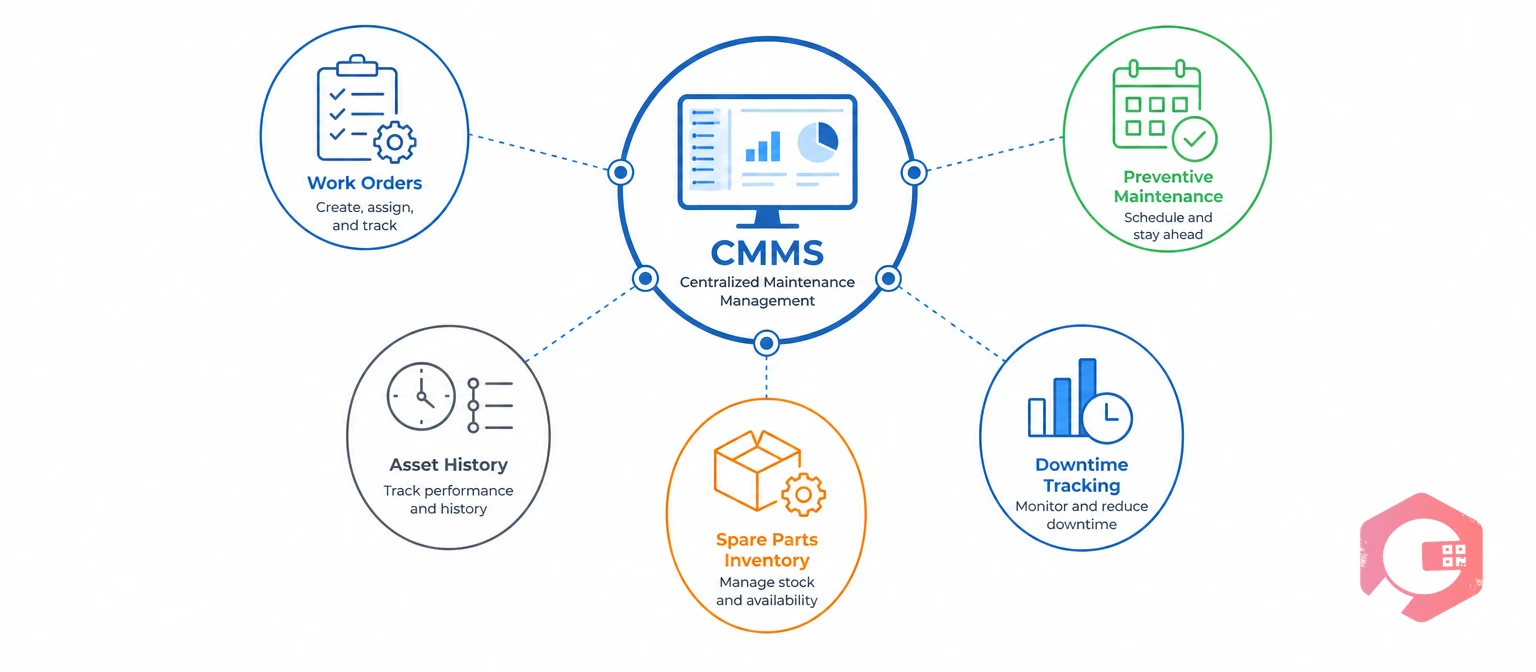
A CMMS (Computerized Maintenance Management System) is software purpose-built to schedule, track, and document maintenance work on physical assets. It centralizes work orders, preventive maintenance schedules, asset history, spare parts inventory, and downtime tracking in one system technicians actually use in the field.
A CMMS is designed around the maintenance workflow specifically: a technician gets a work order on a mobile device, closes it with parts used and time logged, and that data feeds directly into preventive maintenance scheduling and asset history — no translation layer required. That tight fit is why maintenance teams using Cryotos have reported up to 30% reduction in unplanned downtime and 25% faster repair turnaround.
An ERP (Enterprise Resource Planning) system is software that integrates financials, human resources, procurement, inventory, and operations into a single enterprise-wide database. Its job is to give the whole organization — not just maintenance — one shared source of truth for money, people, and materials.
Maintenance functionality inside an ERP is usually a module bolted onto the core financial and operational system, not the reason the ERP was purchased. That module can log a work order and tie its cost to a general ledger account, but it rarely matches a dedicated CMMS on asset-level detail, mobile usability, or preventive maintenance scheduling depth.
This gap exists by design, not by accident. ERP vendors build maintenance modules to satisfy a checkbox in an enterprise sales cycle — the buyer is finance or operations leadership, not the maintenance team who'll actually use it daily. That mismatch between who buys the software and who has to use it is one of the most common reasons ERP-based maintenance tracking quietly falls out of use within a year of go-live.
Schedule a free demo to see how a maintenance-first system compares to running your maintenance operation out of a general ERP module.
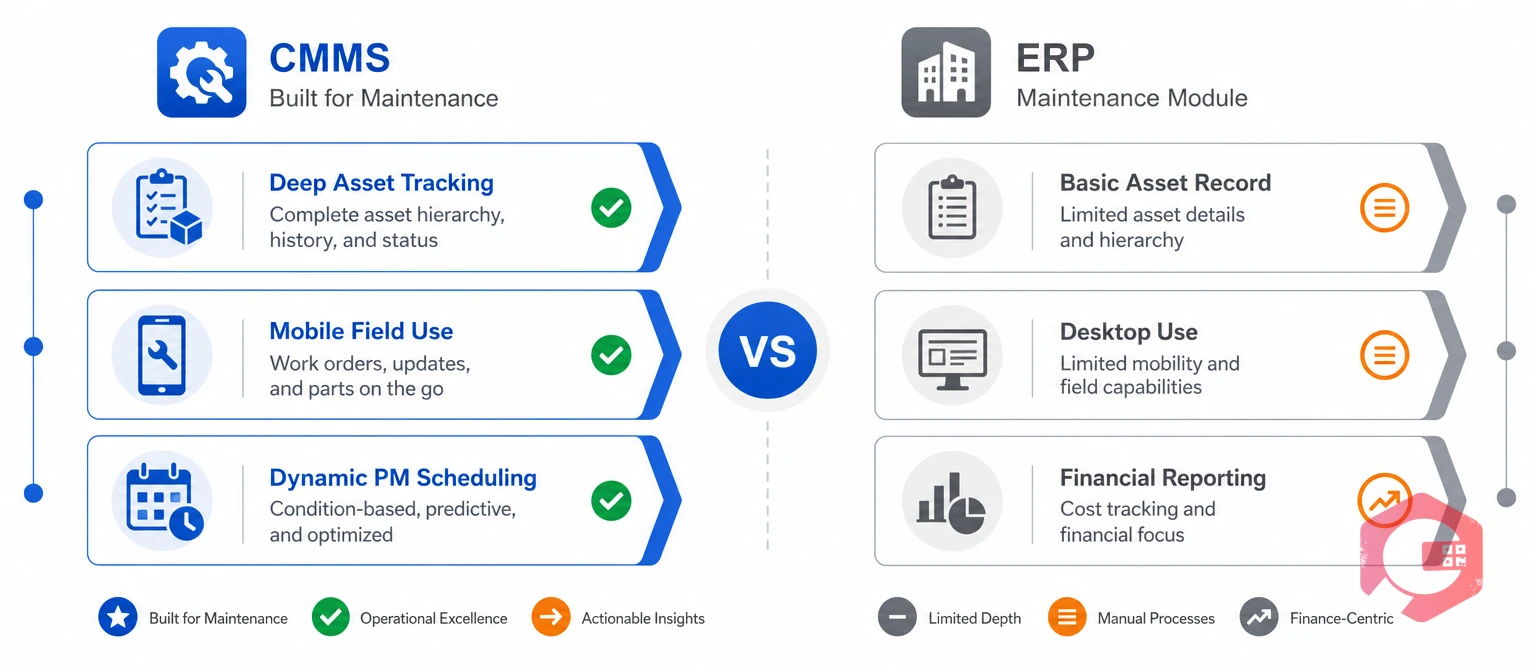
The high-level comparison above covers strategy. This section covers the feature-level differences that actually affect a maintenance team's day-to-day work.
| Capability | CMMS | ERP Maintenance Module |
|---|---|---|
| Asset tracking depth | Full asset hierarchy, meter readings, condition data | Basic asset record, usually financial (depreciation-focused) |
| Work order granularity | Checklists, parts, labor, downtime cause codes | Cost and status tracking, limited task-level detail |
| Mobile field use | Built for technicians on the floor, often offline-capable | Often desktop-first, mobile access limited or add-on |
| PM scheduling | Static and dynamic (meter-based) scheduling | Usually calendar-based only, less asset-condition awareness |
| Financial reporting | Maintenance cost by asset, limited enterprise financials | Full general ledger, budgeting, and procurement integration |
The pattern is consistent across every row: a CMMS goes deep where maintenance needs depth, and an ERP goes wide where the business needs breadth. Neither one covers the other's strength well without integration.
Mobile field use is often the row that decides the argument in practice. A technician standing at a pump at 2 a.m. needs to pull up asset history, log parts used, and close a work order from a phone — often without reliable signal. That's the exact scenario a CMMS is built for and an ERP interface, designed for a desk-bound finance user, typically handles poorly.
A dedicated CMMS is the right call when maintenance outcomes — uptime, PM compliance, and repair speed — are the primary business driver, not financial consolidation.
Operations that successfully run maintenance-first organizations pick the CMMS as the system of record for maintenance and connect it to the ERP for financial reporting — not the other way around.
The timeline difference alone often settles the decision. A CMMS rollout can reach full technician adoption in six to eight weeks because the scope is narrow and the mobile interface is built for people who aren't sitting at a desk. An ERP implementation touching finance, HR, and procurement routinely runs six months to two years, and maintenance functionality is rarely the first module configured — it's usually one of the last, after the higher-priority financial modules go live.
An ERP module makes more sense when the organization already runs its finances, procurement, and inventory through one ERP, and maintenance data volume is genuinely light.
Most facilities that outgrow this setup do so quickly — the moment PM compliance or downtime becomes a tracked priority, the ERP module's shallow maintenance data becomes the bottleneck.
A common pattern: leadership signs off on running maintenance through the corporate ERP because it's already paid for and "one less system to manage." Six to twelve months later, someone asks for a PM compliance report by asset, and the answer is that the data simply isn't granular enough to produce one. That gap is usually the trigger for evaluating a dedicated CMMS.
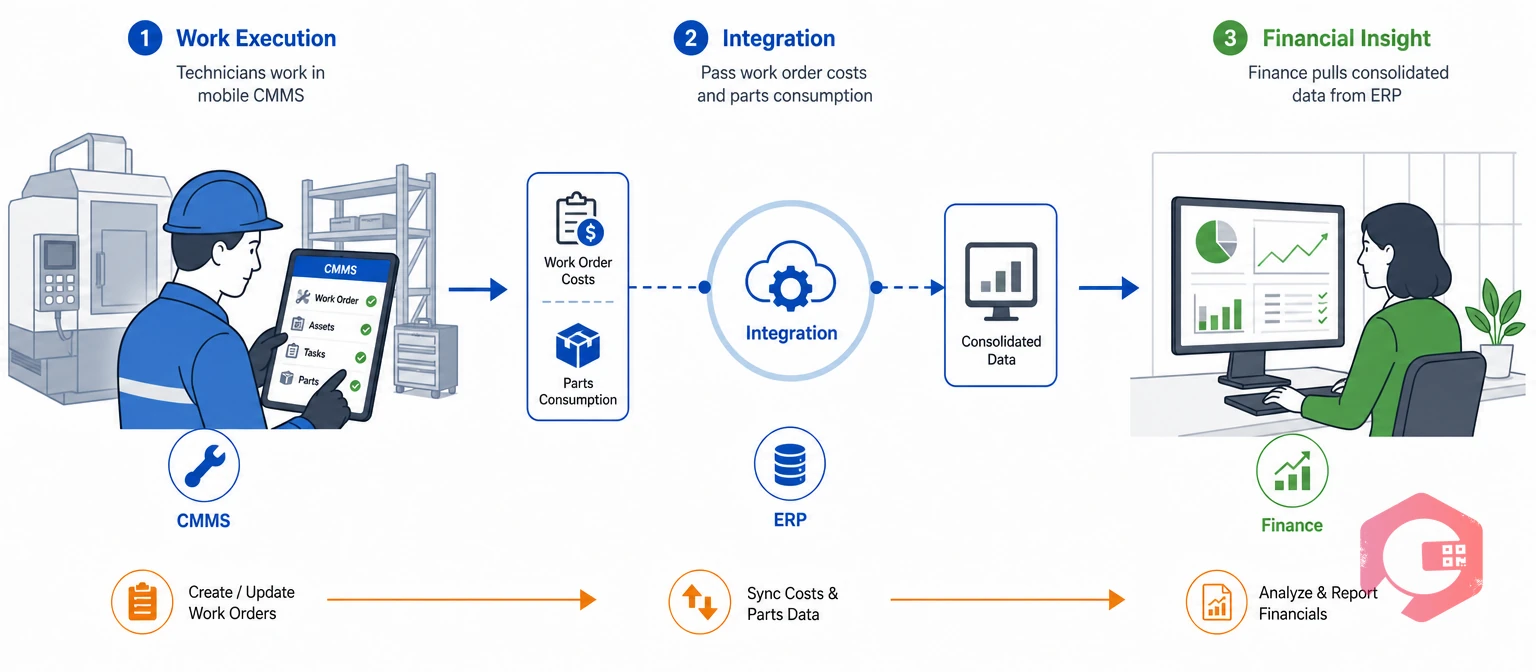
For most mid-size and larger operations, the real answer isn't CMMS or ERP — it's CMMS for maintenance execution, integrated with ERP for enterprise financials and procurement. Cryotos supports ERP integration with systems like SAP and Microsoft Dynamics 365, so parts consumption and labor costs flow into the general ledger without technicians ever touching the ERP directly.
That division of labor matters because it keeps each system doing what it does best. Technicians work in a mobile-first CMMS built for the shop floor, while finance pulls consolidated cost data from the ERP without needing maintenance staff to learn a second system.
The integration itself is usually simpler than teams expect. Rather than a two-way sync of every field, most successful setups pass a narrow, well-defined data set: completed work order costs, parts consumption against inventory, and asset capital expenditure. Everything else — checklists, technician assignments, PM scheduling logic — stays entirely inside the CMMS, where it belongs.
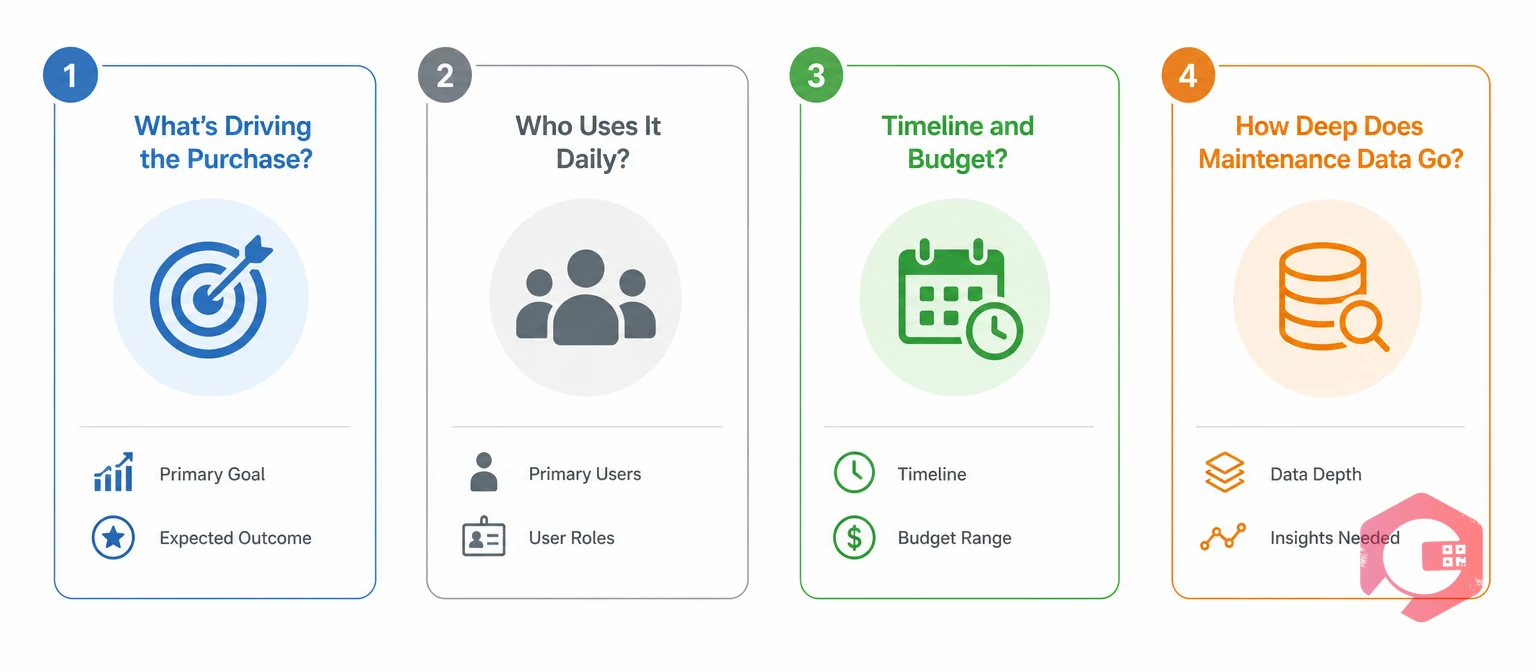
Rather than comparing feature lists indefinitely, four questions settle most CMMS-vs-ERP decisions quickly.
The 4-Question Fit Test:
Most maintenance teams answer all four questions the same direction — toward a dedicated CMMS for maintenance execution, connected to whatever ERP already runs the rest of the business.
Where teams get stuck is treating this as an all-or-nothing decision instead of a sequencing question. It's rarely "CMMS forever, ERP never" or the reverse — it's "which system leads for maintenance, and at what point does the other one need to be connected." Answering the four questions above usually makes that sequencing obvious within a single conversation, rather than a months-long evaluation process.
Yes, and for most mid-size organizations this is the standard setup. The CMMS handles maintenance execution and asset data, while an integration passes cost and inventory data to the ERP for enterprise financial reporting.
It can look cheaper upfront since there's no new software license, but the hidden cost is shallow maintenance data and limited mobile usability. Most organizations that rely on an ERP module alone end up purchasing a dedicated CMMS once maintenance KPIs become a real priority.
Not necessarily. A standalone CMMS is enough for organizations where maintenance costs don't need to flow into complex enterprise financial reporting. Larger organizations typically add ERP integration once maintenance spend needs visibility at the corporate finance level.
Most small to mid-size plants get more value starting with a CMMS, since it delivers faster uptime and PM compliance gains without the long implementation timeline an ERP requires. ERP integration can follow once maintenance data needs to reach corporate finance.
A focused integration — passing work order costs and parts consumption between systems — typically takes a few weeks once both systems' APIs and data mapping are confirmed. Full two-way synchronization of every field takes longer and is rarely necessary for most maintenance operations.
CMMS and ERP aren't competing for the same job — one runs maintenance, the other runs the business. Schedule a free demo to see how Cryotos handles maintenance execution on its own or fully integrated with your existing ERP.


Cryotos AI predicts failures, automates work orders, and simplifies maintenance—before problems slow you down.



