

Compliance audits for data IT assets using CMMS refer to the structured process of verifying that every server, laptop, storage device, and networked endpoint in your organization meets regulatory, security, and lifecycle standards — with a Computerized Maintenance Management System providing the audit trail, maintenance records, and asset register needed to pass any inspection. According to a Gartner report on IT asset management, organizations without a centralized asset tracking system carry up to 30% more unlicensed or untracked IT equipment than they realize — creating both compliance risk and unnecessary cost.
Whether you are preparing for a GDPR audit, an ISO 27001 assessment, a SOX technology review, or an internal IT governance cycle, the quality of your compliance outcome depends on one thing: how accurately your CMMS records the lifecycle, maintenance history, and disposal chain of every data IT asset in your environment.
Data IT assets are any physical or virtual components of your technology infrastructure that store, process, or transmit data. Understanding exactly what falls within scope is the first step to building a compliance program that holds up under scrutiny.
When organizations register data IT assets in a CMMS, the register should include the following categories:
Unlike physical maintenance assets such as HVAC systems or production equipment, data IT assets carry an additional compliance layer: the data they hold is itself regulated. A server nearing end-of-life is not just an asset management problem — it is a potential GDPR violation if it is disposed of without certified data destruction. A laptop with an expired software license is not just an inventory gap — it is an ISO 27001 non-conformance. Managing data IT assets through a CMMS brings maintenance discipline to a domain that has traditionally been handled through disconnected IT ticketing systems, spreadsheets, and shadow inventory lists.

Before exploring how a CMMS solves the problem, it helps to understand exactly where compliance programs typically fail for data IT assets. These five challenges appear consistently across industries — from healthcare organizations preparing for HIPAA audits to financial services firms facing SOX technology reviews.
Data IT assets change hands, locations, and configurations more frequently than most physical maintenance assets. A laptop deployed to a new hire may be reassigned three times in two years. A server rack may be expanded, migrated, and decommissioned within a single financial year. Without a CMMS that captures every lifecycle event — deployment, reassignment, upgrade, and retirement — auditors will find gaps in your asset history that create compliance risk, even if the physical asset was managed responsibly throughout.
Each major regulatory framework imposes specific asset management obligations. The GDPR compliance checklist requires organizations to maintain records of processing activities, including the systems that store personal data. HIPAA's Security Rule mandates a hardware inventory and movement tracking system for all ePHI-capable devices. SOX requires documented change management and configuration records for any technology that supports financial reporting. ISO 27001 expects a formal asset register with ownership, classification, and acceptable use rules for every information asset. A single CMMS that generates compliant records for all four frameworks is far more efficient than maintaining separate tracking tools for each regulation.
End-of-life disposal is the highest-risk moment in any data IT asset lifecycle. Organizations regularly face regulatory penalties not because they managed assets poorly during active use, but because they had no documented chain of custody for disposal. According to the NIST Guidelines for Media Sanitization (SP 800-88), organizations must maintain evidence that data-bearing media was sanitized or destroyed in accordance with a documented method. A CMMS that links disposal work orders to certified destruction records creates the evidence trail regulators expect.
Software license compliance is inseparable from hardware asset compliance in a well-designed IT governance program. Auditors from software vendors — Microsoft, Oracle, IBM — routinely conduct license audits that require organizations to produce a hardware-linked software inventory. When your CMMS holds both the physical asset record and the software/firmware version history for each device, producing this documentation is a matter of generating a report rather than manually cross-referencing multiple systems.
Organizations with remote workers, branch offices, and cloud-hybrid infrastructure face a visibility problem that paper-based or spreadsheet-based asset management cannot solve. A CMMS with QR code scanning, GPS tracking, and mobile access gives IT compliance teams real-time visibility into where every data IT asset is, what its current configuration status is, and when it was last inspected — regardless of whether the device is on-premises or distributed across multiple locations.
A CMMS (computerized maintenance management system) was originally designed for physical maintenance operations in manufacturing and facilities. Its application to data IT asset compliance leverages those same core capabilities — asset registers, work order management, preventive maintenance scheduling, and audit trails — in a technology infrastructure context. Here is how each capability maps directly to compliance audit requirements.
Every IT compliance audit begins with the same question: can you produce a complete, accurate inventory of your assets? A CMMS creates a permanent digital record for every data IT asset, capturing the asset name, unique ID, serial number, location, assigned owner, classification level, purchase date, warranty expiry, and maintenance history. When an auditor requests the asset register, the CMMS generates it in seconds — not after two days of spreadsheet consolidation across IT, finance, and facilities teams.
Regulatory frameworks such as ISO 27001 and HIPAA require that organizations demonstrate ongoing maintenance and review of their IT infrastructure, not just a point-in-time snapshot. A CMMS generates automated preventive maintenance work orders for IT assets — firmware update cycles, security patch verification, hardware health checks, and battery or capacity assessments. Each completed work order becomes a timestamped service record that proves the asset was actively managed throughout its operational life, not just inventoried when it was first deployed.
Every action taken on a data IT asset in a CMMS — from initial deployment to configuration changes to physical movement — generates an immutable audit log entry with a timestamp, the user who performed the action, and the specific change made. This is the kind of evidence that regulatory auditors look for when assessing whether an organization's controls are real and consistently applied, rather than documented on paper and ignored in practice. According to ISO 27001 Annex A, organizations must establish controls for asset management that include documented ownership and accountability — a CMMS audit trail provides exactly this.
A CMMS that links software and firmware records to physical asset profiles gives compliance teams a single source of truth for both hardware and software inventories. When a software vendor audit requests a list of all devices running a specific application version, or when a security team needs to verify which assets have received a critical firmware patch, the CMMS produces that report directly from the asset register without requiring a separate software asset management tool.
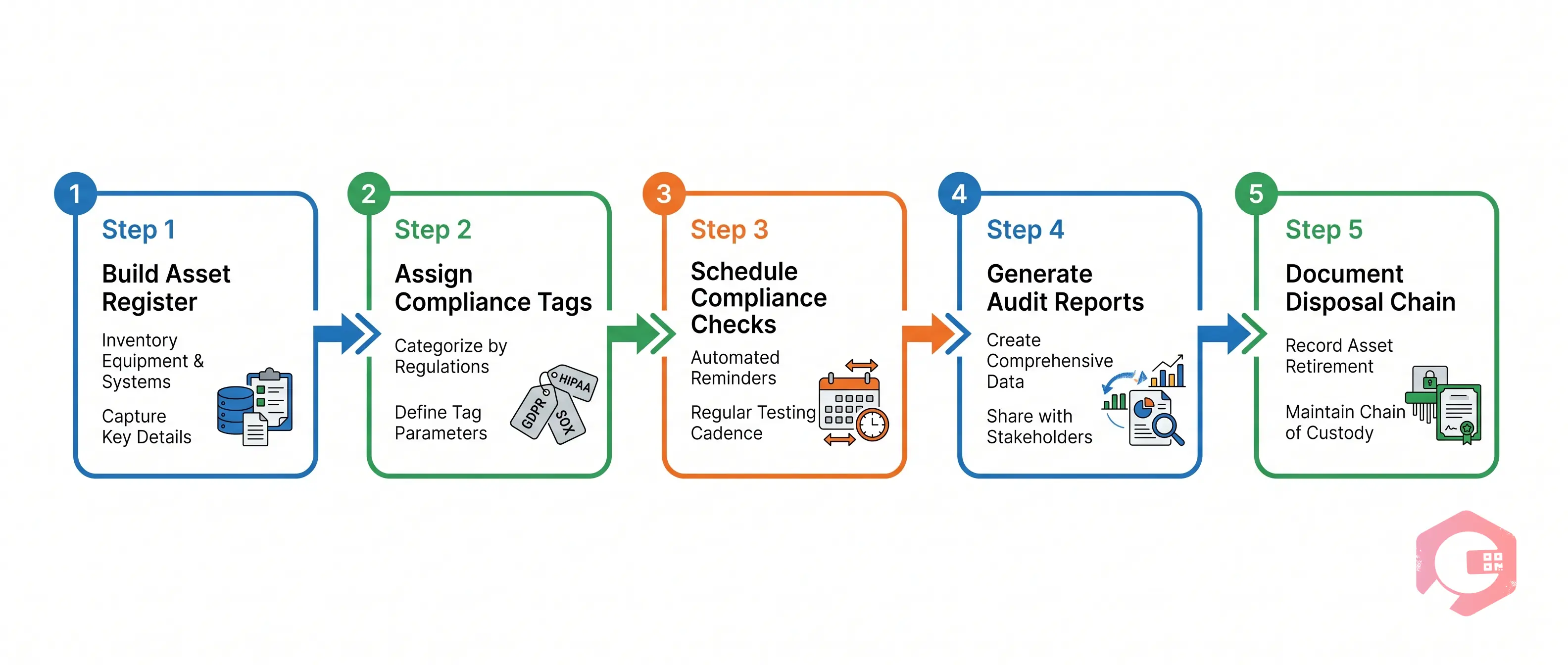
Organizations that use a CMMS effectively for IT asset compliance do not treat the audit as a single annual event. They build a continuous compliance workflow that makes every scheduled audit a validation exercise rather than a discovery exercise. Here is the five-step process that leading IT compliance teams follow.
Start by importing or manually entering every data IT asset into the CMMS with a standardized data schema. At minimum, each asset record should include the asset type, manufacturer, model, serial number, physical or cloud location, assigned department, data classification (public, confidential, restricted), and the regulatory framework that governs it. QR code labels printed from the CMMS and affixed to physical hardware allow technicians and auditors to scan any device and retrieve its full compliance record instantly from a mobile device.
Tag each asset with its current lifecycle stage — Active, End-of-Support, Pending Retirement, or Decommissioned — and link compliance obligations to each stage. An asset in the End-of-Support stage, for example, should automatically trigger a compliance alert requiring either a security exception approval or a decommission plan. Lifecycle stage management in a CMMS ensures that assets do not silently drift from compliant to non-compliant between audit cycles without any stakeholder awareness.
Use the CMMS preventive maintenance scheduler to create recurring compliance check work orders for every regulated IT asset. A quarterly hardware health check for servers, a monthly firmware version verification for network equipment, and an annual data classification review for storage devices are all examples of compliance-driven PM tasks that a CMMS can automate completely. Each completed check closes a work order, adds a timestamped record to the asset history, and contributes to the compliance evidence package.
When an audit is scheduled, the CMMS should be able to generate the following reports in under five minutes: a complete asset inventory filtered by regulatory framework, a maintenance history report for any asset or group of assets, a list of all assets that missed a scheduled compliance check in the review period, and a change log showing every configuration or location update during the audit window. Preparing for an audit in a CMMS-driven organization takes minutes rather than weeks — because the evidence was being continuously collected throughout the year.
When a data IT asset reaches end of life, the CMMS manages the decommission workflow from work order creation through to certified destruction. The decommission work order requires the technician to document the data sanitization method used, attach the certificate of destruction from the approved vendor, and record the final disposal date and destination. This creates an unbroken chain of custody for every decommissioned device — the exact evidence that GDPR, HIPAA, and data protection auditors require to confirm that regulated data was handled appropriately at end of life.

According to NIST Cybersecurity Framework, the Identify function — which encompasses asset management — is the foundation upon which all other cybersecurity controls are built. Organizations that implement a CMMS for IT asset compliance are not just solving an audit problem; they are building the foundational control layer that makes every downstream security control more effective.
Cryotos CMMS provides the asset management infrastructure that IT compliance teams need to move from reactive audit preparation to continuous compliance.
Organizations using Cryotos for asset management report 30% reductions in unplanned downtime and significantly faster audit preparation times. If your organization is ready to bring the same discipline to data IT asset compliance that leading manufacturers apply to their physical equipment, Cryotos CMMS gives you the tools to do it. Book a free demo today and see how your compliance audit workflow can transform.
A compliance audit for data IT assets is a formal review that verifies every server, laptop, storage device, and networked endpoint in an organization meets applicable regulatory, security, and governance standards — including that assets are inventoried, maintained, and disposed of according to documented procedures.
Yes. Modern CMMS platforms are designed to manage any physical or virtual asset that requires a maintenance schedule, an ownership record, and a documented service history. Data IT assets map directly onto CMMS capabilities such as asset registers, preventive maintenance schedules, work order management, and audit log generation.
GDPR requires a record of processing activities linked to the systems that store personal data. HIPAA mandates a hardware inventory and physical safeguard documentation for ePHI-capable devices. SOX requires change management records for systems supporting financial reporting. ISO 27001 Annex A.8 requires a complete asset inventory. PCI DSS Requirement 9 requires physical access control documentation for cardholder data environments.
A CMMS manages the entire decommission workflow, requiring technicians to document the data sanitization method, attach the certificate of destruction, and record the final disposal date — creating a complete chain of custody for every decommissioned device.
ITAM software focuses on software license management, discovery, and financial tracking. A CMMS focuses on maintenance scheduling, work order management, service history, and compliance audit trails — providing a more complete compliance evidence package for physical hardware maintenance, disposal chain of custody, and preventive compliance check scheduling.


Cryotos AI predicts failures, automates work orders, and simplifies maintenance—before problems slow you down.



