

Daily safety briefing scripts are short, structured talking points—usually 5 to 10 minutes—that supervisors use to open a shift around one specific safety behavior instead of a generic warning. Behavior-based safety (BBS) toolbox talks apply the same logic: instead of reciting a rule, you explain the exact behavior you want to see and why it matters, so workers buy into the message instead of tuning it out.
Most facilities run these talks daily or before high-risk tasks, documented with a sign-in sheet. Get the structure right and a five-minute talk can shift behavior on the floor. Get it wrong, and it becomes background noise. This guide gives you a repeatable framework, ready-to-use scripts, and a way to track whether the talks are actually changing behavior.
Key Takeaways
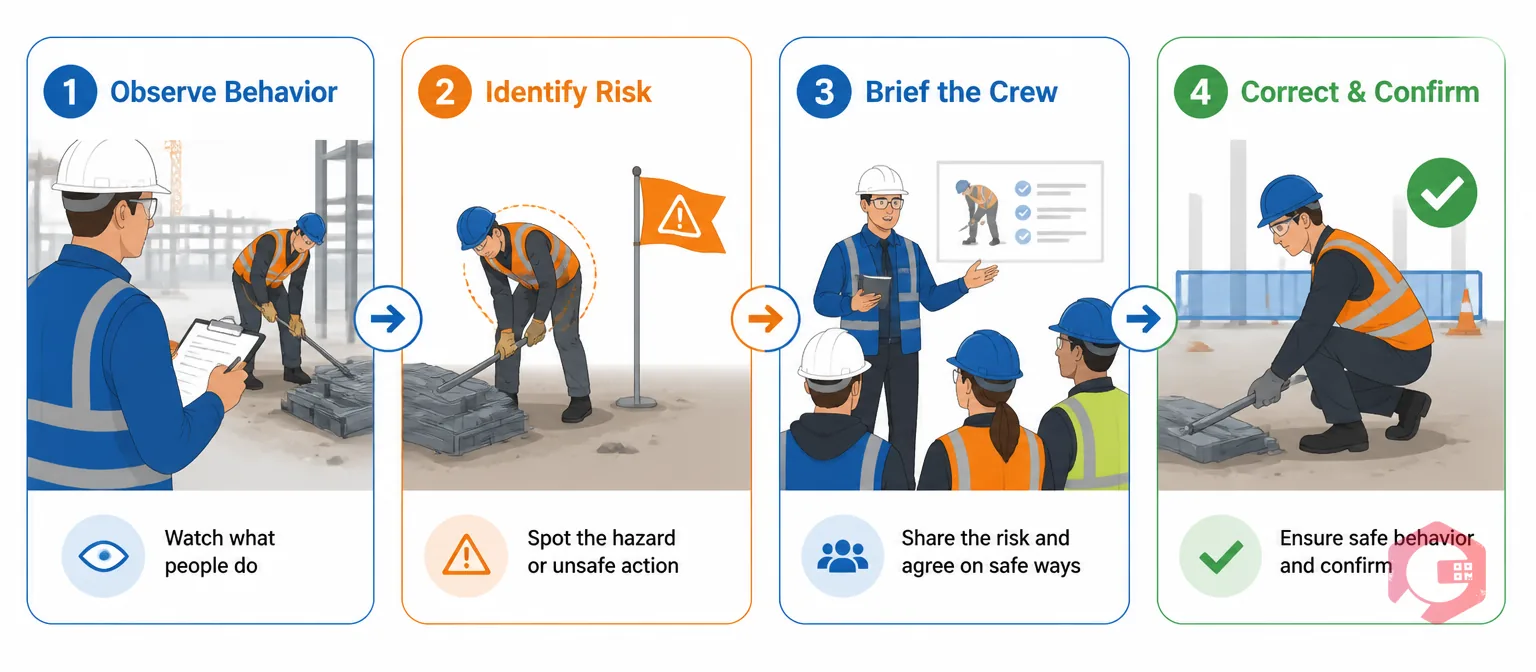
A behavior-based safety toolbox talk is a brief, front-line safety conversation that targets one specific, observable action—like how a worker climbs a ladder or signals before backing up equipment—rather than a broad compliance topic. Unlike a standard toolbox talk that might cover "ladder safety" in general terms, well-written daily safety briefing scripts zero in on the exact behavior crews get wrong most often and explain the consequence in plain language.
The approach comes from behavior-based safety theory, which holds that most incidents trace back to a handful of repeated at-risk behaviors rather than one-time equipment failures. OSHA's safety and health program guidance lists this kind of ongoing, worker-level engagement as a core element of a strong safety program, alongside hazard identification and management commitment.
Most facilities schedule BBS talks daily or before high-risk tasks and log them with a sign-in sheet in case of an audit. They stay short—5 to 10 minutes—because the goal is retention, not coverage.

Every strong daily safety briefing script follows the same three-part shape, no matter the topic. Skip a step and the talk turns into a lecture; hit all three and it turns into a conversation that actually changes behavior.
The H-C-C Briefing Framework:
Practitioners who write scripts this way find the hook does most of the work—it's the difference between a worker mentally checking out and a worker recognizing their own crew in the story. Operations that successfully run daily briefings tend to pull hooks straight from that week's near-miss reports instead of generic examples pulled from a template.

Good daily safety briefing scripts break down into five short blocks, timed so the talk never drifts into a full training session.
Most facilities that run daily briefings well protect this five-minute window closely. Supervisors who let talks run past ten minutes typically see attendance and attention drop within a few weeks, even when the content stays useful.
Want a digital record of every toolbox talk instead of a paper sign-in sheet that gets lost in a truck cab? Permit-to-work software can log attendance and pre-task safety checks in the same workflow your crew already uses for work permits.

Each topic below is framed around one observable behavior, not a broad subject, so you can drop it straight into the H-C-C structure.
Here's what one of these daily safety briefing scripts sounds like in practice, built on lockout/tagout compliance.
"Last week, a crew on the east line cleared a jam without locking out the conveyor first. Nobody got hurt, but the belt kicked on mid-clear. That's the kind of close call that doesn't make the incident log but easily could have."
"Starting today, nobody reaches into a jammed line without applying lockout/tagout (LOTO) first—even for a two-second fix. That means isolating the energy source, applying your lock, and verifying zero energy before your hands go near the belt."
"Who can walk me through the LOTO steps for this line right now? I want everyone to demonstrate it once before we start today's run."
Toolbox talk attendance tracking is the record of who attended a safety briefing, what topic was covered, and what actions—if any—came out of it. A paper sign-in sheet proves a talk happened; it doesn't prove anything changed. That gap is where most behavior-based safety programs lose credibility during an audit, and it's exactly why well-run daily safety briefing scripts get logged, not just delivered.
Logging talks inside a Computerized Maintenance Management System closes that gap. Instead of a sheet in a binder, attendance, topic, and any hazards raised during the talk become part of the same digital record used for work orders and inspections. If a worker flags a guard that's missing during a briefing, that observation can convert directly into a digital work order instead of getting mentioned once and forgotten.
Maintenance teams using Cryotos have reported up to 30% reduction in unplanned downtime and 25% faster repair turnaround, largely because hazards raised in daily briefings get routed and closed instead of sitting in a notebook. OSHA's injury and illness data consistently shows that near-miss reports outnumber recordable injuries by a wide margin, which is exactly the gap a documented briefing habit is meant to close. Keeping this history also makes it far easier to complete a regulatory compliance checklist when an inspector asks for proof of ongoing safety engagement.

Most weak daily safety briefing scripts fail for the same handful of reasons, not because the topic was wrong.
Most effective daily safety briefings run 5 to 10 minutes and cover exactly one behavior. Longer sessions tend to blur into general training and lose the crew's attention before the key point lands.
Front-line supervisors or crew leads usually deliver these talks because they see the day-to-day behaviors firsthand. Safety managers typically supply the topic library and review attendance records.
Most facilities run them daily before high-risk tasks or at the start of every shift, with a rotating topic list so the same behavior doesn't repeat for weeks at a time.
A toolbox talk is a short, informal briefing on one specific behavior, while full safety training is a longer, often certified session covering a complete topic like fall protection or confined-space entry.
Yes. A dated attendance record with the topic covered protects the organization during an audit and creates a history that shows safety engagement is ongoing, not occasional.
Behavior-based safety toolbox talks and daily safety briefing scripts only work if you can prove they happened and track what came out of them. Schedule a free demo to see how Cryotos turns daily briefings into a documented, auditable safety record tied directly to your work orders.



Cryotos AI predicts failures, automates work orders, and simplifies maintenance—before problems slow you down.



