

A digital asset management taxonomy is the shared structure that sorts, names, and describes every asset record. In maintenance, those records are the equipment entries in a Computerized Maintenance Management System, plus the manuals, photos, and certificates attached to each one.
This guide covers maintenance asset records, not marketing media libraries. You will build a taxonomy in four steps, document it in a register template, and see how Cryotos manages each layer.
Key Takeaways

A digital asset management taxonomy gives each asset a class, a place, a name, a set of facts, and a list of files. The idea of taxonomy comes from biology: a tree of categories that moves from broad groups to specific members.
Most maintenance teams feel the gap when search fails. A taxonomy fixes four common symptoms:
Industry standards formalize the same structure. ISO 14224 defines a nine-level equipment taxonomy, from industry down to individual parts. ISO 55000 asset management standards likewise stress accurate, controlled asset information.
A taxonomy turns a pile of records into a searchable, reportable system.

A digital asset management taxonomy works as six layers, and each layer answers one question about an asset. Build the layers in order, because each one depends on the layer before it.
The Six-Layer Asset Taxonomy Stack:
Layers one to three sort the asset. Layer four names it, layer five describes it, and layer six attaches proof and control.
See how Cryotos structures classes and parent-child hierarchies in its asset tracking module.
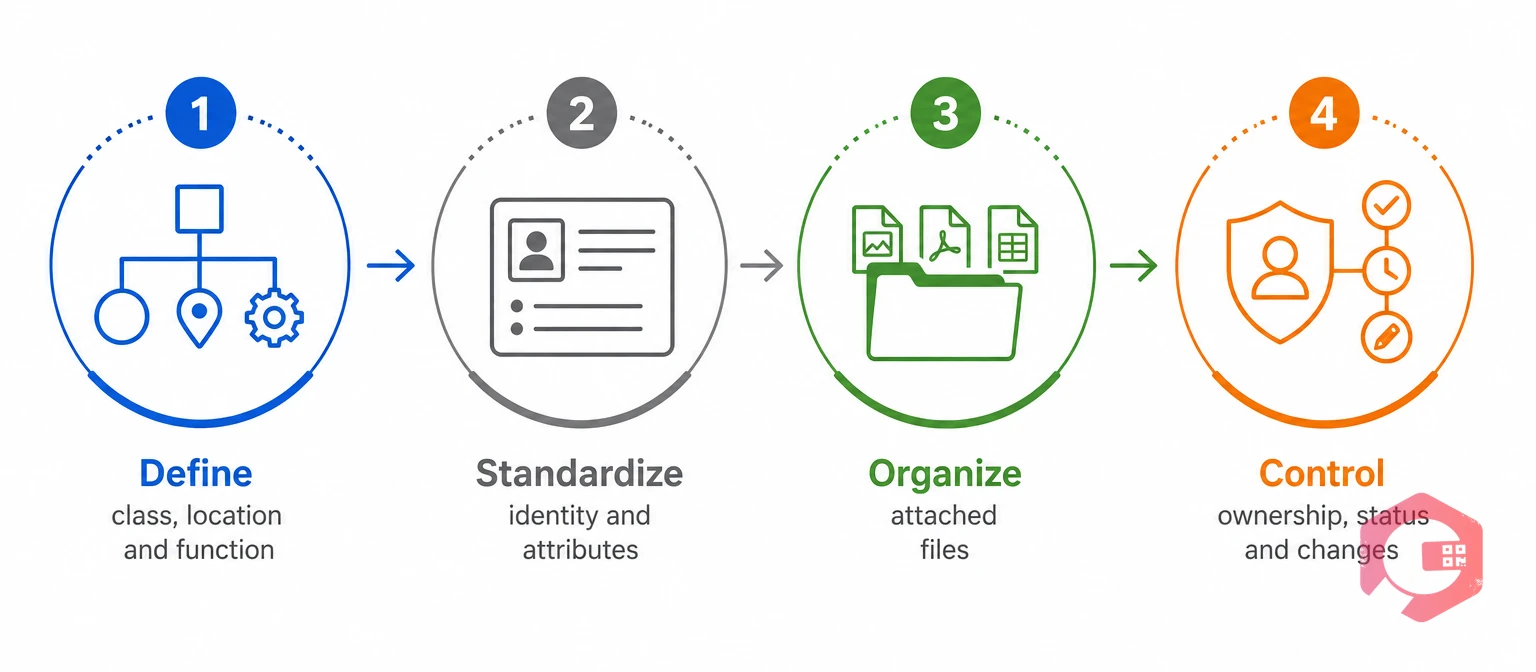
Define how assets are sorted before you load a single record. These three layers set the shape of the whole digital asset management taxonomy.
Group assets into a short list of classes, such as rotating equipment, electrical, HVAC, and instruments. Keep the hierarchy to five levels or fewer: site, area, line or system, asset, and component.
A parent-child hierarchy is a tree in which each asset sits under the system or place that contains it. Create a component record only when you plan to maintain, inspect, or replace that part on its own.
Most plants need both views, so use one location tree for dispatch and a system tag for reports. A hybrid setup works like a faceted classification, where one asset can be viewed by location, by function, or by class.
Cryotos supports location-based, function-based, and hybrid structures, so teams keep every view without duplicating records. Settle these three layers first, because every later step depends on them.
Give every asset one permanent ID, then record the same attributes for every asset in a class. Consistency matters more than detail.
Use a short, structured code made of site, area, class, and a padded number, such as P1-UTL-CMP-003. Never reuse the ID of a retired asset, because old work orders and reports still point to it.
Not every field belongs on every asset. Define a core set for all assets, then add fields for each class.
A controlled vocabulary is an approved list of terms that everyone must pick from. Library science uses the same idea, known as a controlled vocabulary, to keep one concept under one spelling.
| Aspect | Controlled vocabulary | Free-text tags |
|---|---|---|
| Data entry | Pick one approved term | Type any wording |
| Search | One spelling per concept | Many spellings for the same thing |
| Reporting | Groups cleanly by class or status | Needs manual cleanup first |
| Change | New terms need approval | New terms appear instantly |
| Used for | Class, status, criticality, and failure cause | Notes and one-off context |
Use lists for anything you filter or report on, such as class, status, and criticality. Keep free text for notes and one-off context.
Together, these fields form your asset metadata. Cryotos lets managers filter assets by any attribute and apply bulk scheduling or cost reporting to the filtered group.
Attach every file to the asset it describes, and give each file a type. A manual stored in a shared folder gets lost, while a manual attached to the pump record is there when the technician needs it.
A linked document is a file stored on an asset record instead of in a separate folder. Linking keeps the asset and its paperwork together for its whole life.
Tag each asset with a QR label so a technician who scans it lands on the record and its files. Cryotos supports QR code scanning from its mobile app for exactly this purpose.
Document types are the layer of a digital asset management taxonomy that technicians notice first, because they open these files on the job.
A taxonomy stays accurate only when someone owns it. Assign a named owner, define lifecycle statuses, and record every change.
Taxonomy governance is the set of rules for who may add, change, or retire a term. Without those rules, every team invents its own classes.
Four statuses cover most plants: commissioning, active, retiring, and retired. Each status should control what the asset can do, such as receiving preventive maintenance tasks. This mirrors asset lifecycle management practice, where every stage has an owner.
A named owner and a change log keep a digital asset management taxonomy from drifting.
Use this register to document each layer of your digital asset management taxonomy before you load data. The example rows describe a small manufacturing plant.
| Layer | Question it answers | Example values | Field type | Owner |
|---|---|---|---|---|
| Class | What kind of asset is it? | Centrifugal pump, air compressor, torque wrench | Pick list | Reliability engineer |
| Location | Where does it sit? | Plant 1 / Utilities / Compressor room | Parent-child tree | Maintenance manager |
| Function | Which system does it serve? | Compressed air system | Pick list | Production engineer |
| Identity | What is its unique ID? | P1-UTL-CMP-003 | Auto-numbered text | Maintenance planner |
| Attributes | Which facts do we record? | Make, model, serial number, criticality High | Lists, text, and dates | Asset owner |
| Files and status | What is attached, and is it in service? | Manual v3, calibration certificate, status Active | Document type list and status list | Asset owner and approver |
Fill in one row per layer, then test the register against three real assets. If a technician cannot describe an asset with it, simplify the taxonomy.
Cryotos keeps every layer of the taxonomy inside one asset record, so structure, files, and history stay together. The platform's asset maintenance management software covers the full stack.
Reliable records pay off in the field. Maintenance teams using Cryotos have reported up to 30% reduction in unplanned downtime and 25% faster repair turnaround. Results depend on how consistently teams record data.
The taxonomy sets the rules, and Cryotos applies them whenever a record is created, scanned, or changed.
Most maintenance teams that struggle with a digital asset management taxonomy make the same few mistakes.
A simple taxonomy that people follow beats a perfect one they ignore.
It is the shared structure that classifies, names, and describes asset records and their attached files. It covers classes, locations, IDs, attributes, documents, and status. The goal is to find and trust any record in seconds.
An asset hierarchy is one layer of the taxonomy: the parent-child tree of places and systems. The taxonomy also covers classes, IDs, attributes, files, and status.
Most plants work well with five hierarchy levels or fewer. ISO 14224 uses nine levels for complex process industries, which is a useful reference but more than most sites need. Add a level only when you track work at that level.
Every maintainable asset should have one. The label links the physical item to its record, files, and history. Use durable labels in hot, wet, or dusty areas, so scans keep working.
A maintenance or reliability lead usually owns it and approves new terms. Asset owners keep individual records correct. Finance or compliance can approve status changes for high-value or regulated assets.
Yes. A CMMS stores the hierarchy, attributes, IDs, files, statuses, and change history in one record. Cryotos adds QR scanning, bulk actions on filtered assets, and field-level audit history.
A clear digital asset management taxonomy makes every asset record faster to find and easier to trust. Schedule a free demo to see how Cryotos manages asset structure, files, and history in one system.


Cryotos AI predicts failures, automates work orders, and simplifies maintenance—before problems slow you down.



